How to Set the MLflow Tracking URI in Python

The tracking URI tells your code where MLflow records go. Get it wrong and nothing fails: MLflow quietly writes your runs somewhere else, and your UI stays empty. This guide shows the two ways to set it, which one wins, how to check it, and exactly what MLflow 3.18 does when you don't set it, with real output.
Syntax
import mlflow

mlflow.set_tracking_uri("<URI>")
print(mlflow.get_tracking_uri())
Or, for every MLflow program you start from a terminal, the environment variable:
MLFLOW_TRACKING_URI=<URI>
| Part | What it means |
|---|---|
mlflow.set_tracking_uri(uri) | Sends everything this program logs to uri |
mlflow.get_tracking_uri() | Returns the tracking URI MLflow is using right now |
MLFLOW_TRACKING_URI | The same setting, read from the environment. A set_tracking_uri() call in your code wins over it |
<URI> | Where the records go: a tracking server, such as http://127.0.0.1:8080, or a database file, such as sqlite:///mlflow.db |
Prerequisites
- MLflow in a uv project. See How to Install MLflow in a Python Project with uv.
- A tracking server, here at
http://127.0.0.1:8080: How to Start an MLflow Tracking Server on Your Computer.
Step 1: See the Default
Save this as show_tracking_uri.py:
import mlflow

print("Tracking URI:", mlflow.get_tracking_uri())
Run it with nothing set:
uv run python show_tracking_uri.py
Tracking URI: sqlite:////Users/you/source/mlflow-demo/mlflow.db
With no tracking URI set, MLflow 3.18 uses a SQLite file called mlflow.db in the folder you run from. Not your server.
Step 2: Set It with an Environment Variable
MLflow reads MLFLOW_TRACKING_URI by itself:
- macOS / Linux
- Windows (PowerShell)
MLFLOW_TRACKING_URI=http://127.0.0.1:8080 uv run python show_tracking_uri.py
$env:MLFLOW_TRACKING_URI = "http://127.0.0.1:8080"
uv run python show_tracking_uri.py
Tracking URI: http://127.0.0.1:8080
The variable works for every MLflow program in that terminal, including the mlflow command line.
Step 3: Set It in Code
import mlflow

mlflow.set_tracking_uri("http://127.0.0.1:8080")
print("Tracking URI:", mlflow.get_tracking_uri())
uv run python set_tracking_uri.py
Tracking URI: http://127.0.0.1:8080
Step 4: Know Which One Wins
Set both, with different ports: the variable says 9999, the code says 8080.
MLFLOW_TRACKING_URI=http://127.0.0.1:9999 uv run python set_tracking_uri.py
Tracking URI: http://127.0.0.1:8080
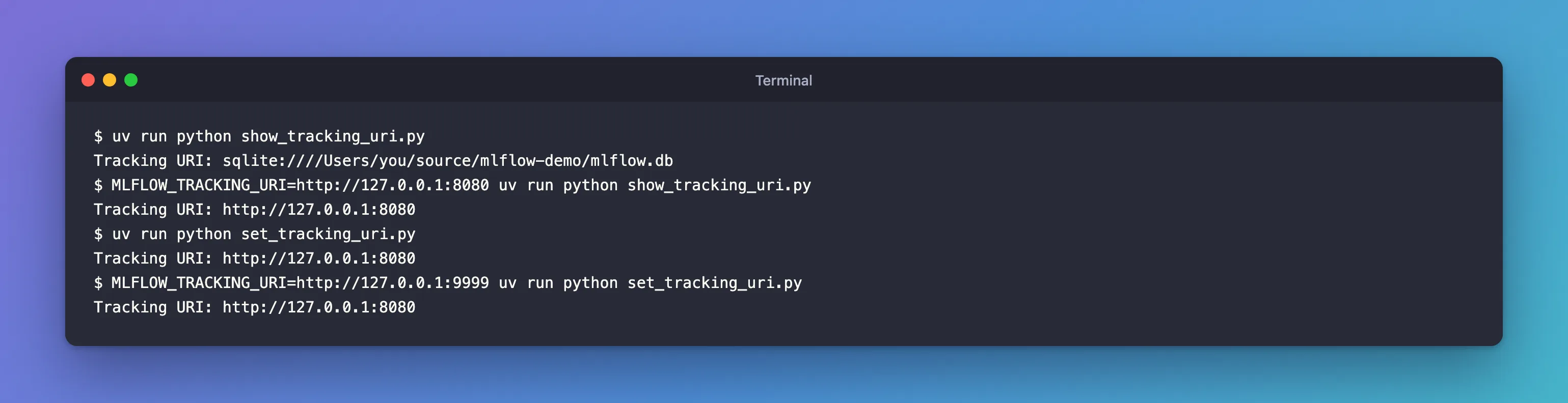
The order, from strongest to weakest:
mlflow.set_tracking_uri()in your code;- the
MLFLOW_TRACKING_URIenvironment variable; - the default,
sqlite:///mlflow.dbin the current folder.
A good pattern for real projects is to read the address from settings, so each computer can set its own, and pass it to set_tracking_uri(). MLflow Tutorial for Machine Learning in Python — Part 1 does exactly that with pydantic-settings.
The Trap: Runs That Never Reach Your Server
This script logs a run without setting a tracking URI:
import mlflow

with mlflow.start_run() as run:
    mlflow.log_param("color", "blue")

print("Logged run", run.info.run_id)
print("It went to:", mlflow.get_tracking_uri())
uv run python log_without_uri.py
2026/11/13 17:06:34 INFO mlflow.store.db.utils: Creating initial MLflow database tables...
2026/11/13 17:06:34 INFO mlflow.store.db.utils: Updating database tables
Logged run b3072508b3af4707a001b40d46cf6f12
It went to: sqlite:////Users/you/source/mlflow-demo/mlflow.db
No error, no warning. MLflow created a brand-new mlflow.db in the project folder and put the run there, so it never appears in your server's UI. The two Creating initial MLflow database tables lines are the only clue. If your runs seem to vanish, check mlflow.get_tracking_uri() first, and keep those files out of Git: How to Keep MLflow Files Out of Git with .gitignore.
Common Mistakes
| Mistake | What happens | Do this instead |
|---|---|---|
| Setting no tracking URI | Runs go to a new mlflow.db in the current folder | Set it in code or with MLFLOW_TRACKING_URI |
Calling set_tracking_uri() inside a run that's already started | The run was created at the old address, so the next call fails at the new one: RestException: RESOURCE_DOES_NOT_EXIST: Run with id=… not found | Set the URI first, before anything else MLflow does |
| A wrong port in the URI | MLflow retries for about four minutes, then fails | Match the address the server prints: Fixed: "MlflowException: API request to … failed with exception … Max retries exceeded" Connection Refused in MLflow |
| Expecting the variable in one terminal to apply in another | Each terminal has its own variables | Set it in the terminal that runs the code, or in a settings file |
Troubleshooting
| Symptom | Likely cause | Fix |
|---|---|---|
Creating initial MLflow database tables when your code runs | No tracking URI, so MLflow made a local database | Set the URI |
| The UI shows only Default after a run | The run went to another URI | Print mlflow.get_tracking_uri() in your code |
FAQ
What does a tracking URI look like?
For a server, http://host:port, such as http://127.0.0.1:8080. For a local database without a server, sqlite:///mlflow.db. Other schemes include postgresql://… and databricks.
Why four slashes in sqlite:////Users/…?
sqlite:/// is the scheme, and the path itself starts with /. Three plus one.
Should I use localhost or 127.0.0.1?
127.0.0.1, the address the server prints. On a Mac, localhost can resolve to the IPv6 address first, which caused trouble on port 5000: Fixed: "Access to localhost was denied" HTTP ERROR 403 When You Open the MLflow UI on a Mac.
Conclusion
With nothing set, MLflow 3.18 used sqlite:///mlflow.db in the current folder and silently logged a run there. MLFLOW_TRACKING_URI pointed every MLflow program in the terminal at the server, mlflow.set_tracking_uri() did it in code and won over the variable, and mlflow.get_tracking_uri() always tells you which address is in use.
Additional Resources
- Logging to a Tracking Server — MLflow's documentation of both ways to connect.
- mlflow.set_tracking_uri — the API reference.
- Backend Stores — where the default
mlflow.dbcomes from.
