How to Set Table Names in EF Core with ToTable (Lowercase for MySQL)

EF Core names each table after your DbSet property: Products, Categories. On SQL Server or Windows that's harmless, but MySQL on Linux and in Docker compares table names case-sensitively, so products and Products are different tables and hand-written SQL breaks. This guide sets lowercase names with ToTable, shows the rename migration EF Core generates for an existing database, and the SQL MySQL actually runs.
Where Table Names Come From
EF Core's entity types page gives the rule: "By convention, each entity type will be set up to map to a database table with the same name as the DbSet property that exposes the entity. If no DbSet exists for the given entity, the class name is used."
With this DbContext:
public DbSet<Category> Categories => Set<Category>();

public DbSet<Product> Products => Set<Product>();
the first migration created tables called Categories and Products.
Why Lowercase Matters on MySQL
MySQL's identifier case sensitivity page says table names "are not case-sensitive in Windows, but are case-sensitive in most varieties of Unix". The setting behind it, lower_case_table_names, was 0 on this MySQL 9.7 in Docker, which runs Linux:
SELECT @@lower_case_table_names;
+--------------------------+
| @@lower_case_table_names |
+--------------------------+
|                        0 |
+--------------------------+
1 row in set (0.000 sec)
With 0, "Name comparisons are case-sensitive". Lowercase names avoid the whole question: every platform and every person writing SQL by hand gets products right.
Prerequisites
- A .NET C# project using EF Core with MySQL. The examples use EF Core 10 with Oracle's
MySql.EntityFrameworkCoreand MySQL 9.7, from How to Connect a .NET C# Web API to a MySQL Database — Part 1. - The EF Core tools: How to Install dotnet-ef as a Local Tool in a .NET C# Project.
Step 1: Set the Names with ToTable
In each entity's configuration, or in OnModelCreating:
builder.ToTable("categories");
builder.ToTable("products");
The same can be written as an attribute on the class, [Table("products")]; the docs show both. ToTable keeps database names out of your entity classes, next to the rest of the mapping.
Step 2: Read the Rename Migration
The tables already exist, so EF Core generates a rename:
dotnet ef migrations add LowercaseTableNames --project src/Dewiride.Inventory.Data --startup-project src/Dewiride.Inventory.Api
migrationBuilder.DropForeignKey(
    name: "FK_Products_Categories_CategoryId",
    table: "Products");

migrationBuilder.DropPrimaryKey(
    name: "PK_Products",
    table: "Products");

migrationBuilder.DropPrimaryKey(
    name: "PK_Categories",
    table: "Categories");

migrationBuilder.RenameTable(
    name: "Products",
    newName: "products");

migrationBuilder.RenameTable(
    name: "Categories",
    newName: "categories");

migrationBuilder.RenameIndex(
    name: "IX_Products_CategoryId",
    table: "products",
    newName: "IX_products_CategoryId");

migrationBuilder.AddPrimaryKey(
    name: "PK_products",
    table: "products",
    column: "Id");

migrationBuilder.AddPrimaryKey(
    name: "PK_categories",
    table: "categories",
    column: "Id");

migrationBuilder.AddForeignKey(
    name: "FK_products_categories_CategoryId",
    table: "products",
    column: "CategoryId",
    principalTable: "categories",
    principalColumn: "Id",
    onDelete: ReferentialAction.Cascade);
More than a rename: the names of the primary keys, the index and the foreign key all contain the table name, so EF Core renames them too. Dropping and re-adding a primary key on a table with an AUTO_INCREMENT column looks risky on MySQL, so read the SQL before applying anything:
dotnet ef migrations script CreateCatalogTables LowercaseTableNames --project src/Dewiride.Inventory.Data --startup-project src/Dewiride.Inventory.Api
START TRANSACTION;
ALTER TABLE `Products` DROP CONSTRAINT `FK_Products_Categories_CategoryId`;

ALTER TABLE Products RENAME products;

ALTER TABLE Categories RENAME categories;

ALTER TABLE `products` RENAME INDEX `IX_Products_CategoryId` TO `IX_products_CategoryId`;

ALTER TABLE `products` ADD CONSTRAINT `FK_products_categories_CategoryId` FOREIGN KEY (`CategoryId`) REFERENCES `categories` (`Id`) ON DELETE CASCADE;

INSERT INTO `__EFMigrationsHistory` (`MigrationId`, `ProductVersion`)
VALUES ('20261103043533_LowercaseTableNames', '10.0.14');

COMMIT;
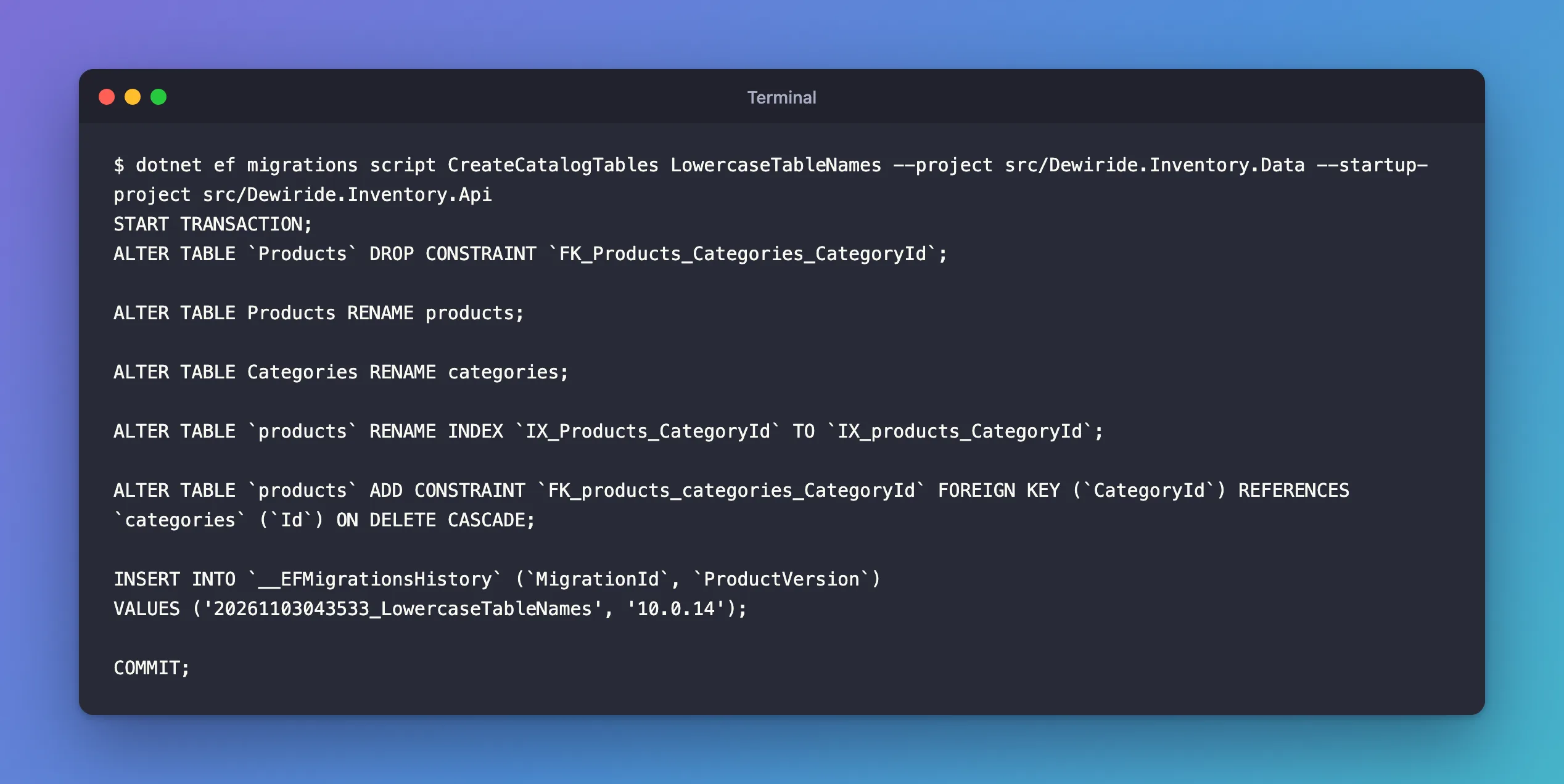
The primary-key steps are gone. MySQL calls every primary key PRIMARY, whatever a tool names it, so Oracle's provider leaves the drop and re-add out of the SQL. The data is never touched: RENAME changes only the name.
Step 3: Apply It
dotnet ef database update --project src/Dewiride.Inventory.Data --startup-project src/Dewiride.Inventory.Api
Applying migration '20261103043533_LowercaseTableNames'.
      ALTER TABLE `Products` DROP CONSTRAINT `FK_Products_Categories_CategoryId`;
      ALTER TABLE Products RENAME products;
      ALTER TABLE Categories RENAME categories;
      ALTER TABLE `products` RENAME INDEX `IX_Products_CategoryId` TO `IX_products_CategoryId`;
      ALTER TABLE `products` ADD CONSTRAINT `FK_products_categories_CategoryId` FOREIGN KEY (`CategoryId`) REFERENCES `categories` (`Id`) ON DELETE CASCADE;
Done.
SHOW TABLES;
+-----------------------+
| Tables_in_inventory   |
+-----------------------+
| __EFMigrationsHistory |
| categories            |
| products              |
+-----------------------+
3 rows in set (0.001 sec)
Step 4: Know What Breaks
Code using EF Core keeps working, because EF Core always uses the names from the model. SQL written by hand, reports, and other tools that still say Products don't:
SELECT COUNT(*) FROM Products;
SELECT COUNT(*) FROM products;
ERROR 1146 (42S02): Table 'inventory.Products' doesn't exist
+----------+
| COUNT(*) |
+----------+
|        1 |
+----------+
1 row in set (0.000 sec)
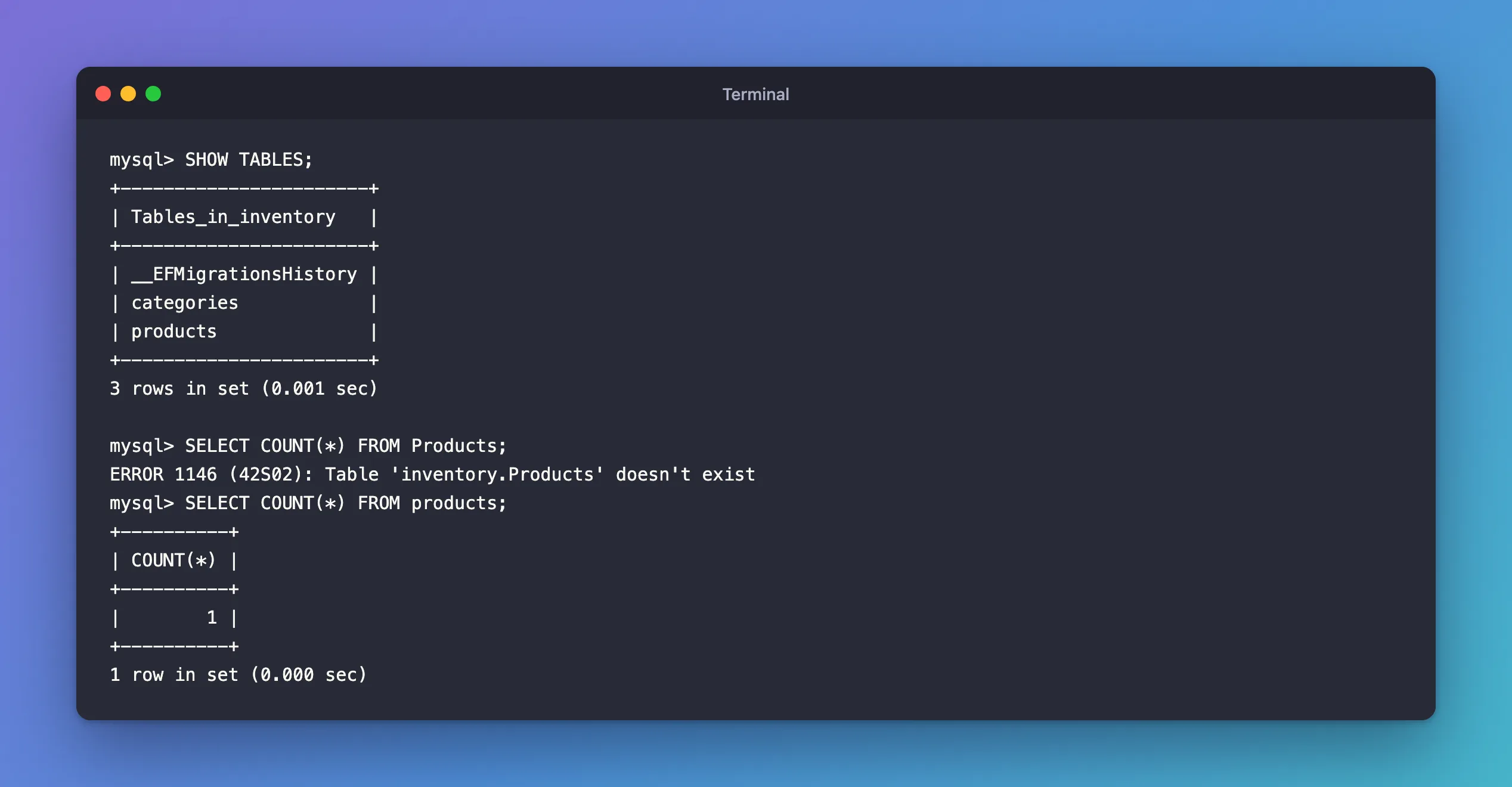
Rename tables early, before anything else depends on the old names. Fixed: ERROR 1146 Table doesn't exist explains the error in detail.
Common Mistakes
| Mistake | What happens | Do this instead |
|---|---|---|
| Keeping EF Core's default names on MySQL | Case-sensitive names that hand-written SQL gets wrong | Set lowercase names with ToTable from the first migration |
| Renaming a table in MySQL by hand | The model and the database disagree; the next migration tries again | Rename through the model and a migration |
| Renaming after reports and scripts exist | They break with error 1146 | Rename early, and update every consumer |
| Mixing naming styles across tables | Nobody can guess a table's name | Pick one style and use it everywhere |
FAQ
Do column names need to be lowercase too?
No. MySQL compares column names case-insensitively on every platform; the manual says column names "are not case-sensitive on any platform". These tables keep EF Core's PascalCase column names.
Can I lowercase every table automatically?
Yes, by looping over the model in OnModelCreating and calling SetTableName for each entity. Naming each table explicitly with ToTable is clearer, and it keeps the names visible next to each entity's mapping.
Conclusion
EF Core names tables after the DbSet properties, and MySQL on Linux treats Products and products as different tables. builder.ToTable("products") sets a lowercase name; on an existing database, EF Core generates a rename that MySQL runs as ALTER TABLE … RENAME, without touching data. Rename early: EF Core follows the model, but hand-written SQL that uses the old name fails with error 1146.
Additional Resources
- Entity Types: Table name — the convention and
ToTable. - Identifier Case Sensitivity —
lower_case_table_names.
