How to Set Connection Lifetime in MySql.Data

Pooled connections can live for as long as the app runs, which is a problem if the server behind them changes. Connection Lifetime retires them once they're old enough, so new ones find the new server. I timed exactly when it happens.
What It Does
Oracle's documentation says: "When a connection is returned to the pool, its creation time is compared with the current time and the connection is destroyed if that time span (in seconds) exceeds the value specified by Connection Lifetime." It adds, "This option is useful in clustered configurations to force load balancing between a running server and a server just brought online."
The default of 0 means no limit.
See It Work
This opens and closes a connection every 2 seconds, and prints MySQL's id for it. Save it as lifetime-demo.cs, in the folder with the tester from How to Write a MySQL Connection String for .NET C#:
#:package MySql.Data@26.10.0

using MySql.Data.MySqlClient;

var connectionString = Environment.GetEnvironmentVariable("MYSQL_CONNECTION_STRING")
    ?? throw new InvalidOperationException("Set the MYSQL_CONNECTION_STRING environment variable first.");

// Opens and closes a connection every 2 seconds, and prints MySQL's id for it.
for (var i = 1; i <= 5; i++)
{
    await using (var connection = new MySqlConnection(connectionString))
    {
        await connection.OpenAsync();
        Console.WriteLine($"Open {i}: connection id {connection.ServerThread}");
    }

    await Task.Delay(TimeSpan.FromSeconds(2));
}
With the default, it's one connection throughout:
Open 1: connection id 21
Open 2: connection id 21
Open 3: connection id 21
Open 4: connection id 21
Open 5: connection id 21
With a lifetime of 3 seconds:
- macOS / Linux
- Windows (PowerShell)
export MYSQL_CONNECTION_STRING="Server=127.0.0.1;Port=3306;Database=inventory;User ID=inventory_app;Password=$(grep '^MYSQL_PASSWORD=' ../dewiride-inventory-api/.env | cut -d= -f2-);SslMode=Required;Connection Lifetime=3"
dotnet run lifetime-demo.cs
$password = (Get-Content ../dewiride-inventory-api/.env | Where-Object { $_ -like 'MYSQL_PASSWORD=*' }).Substring('MYSQL_PASSWORD='.Length)
$env:MYSQL_CONNECTION_STRING = "Server=127.0.0.1;Port=3306;Database=inventory;User ID=inventory_app;Password=$password;SslMode=Required;Connection Lifetime=3"
dotnet run lifetime-demo.cs
Open 1: connection id 23
Open 2: connection id 23
Open 3: connection id 23
Open 4: connection id 25
Open 5: connection id 25
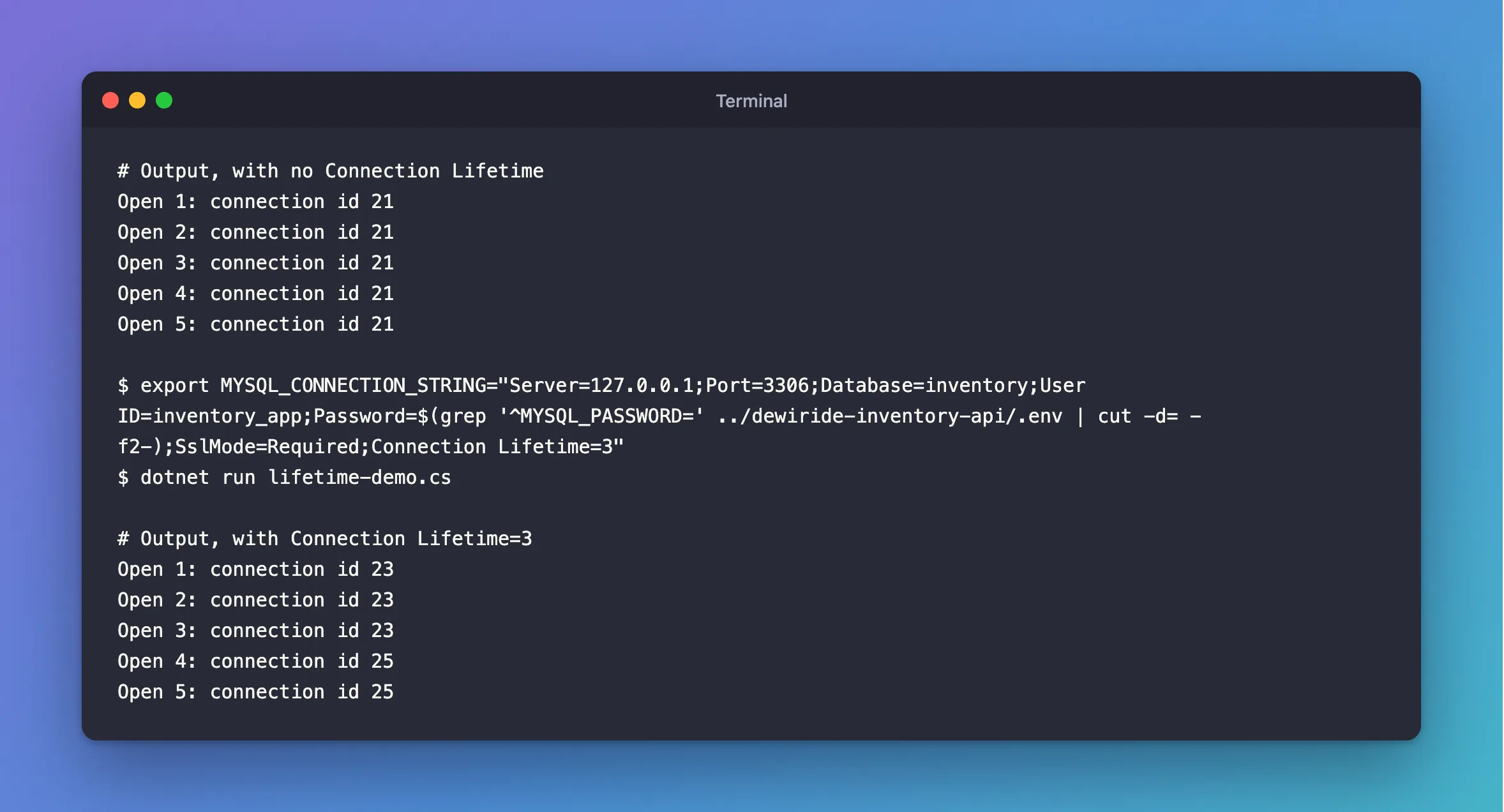
Connection 23 was used at 0, 2 and 4 seconds. When it was returned after the third use, it was over 3 seconds old, so the pool closed it, and the fourth open got a new one.
It's Only Checked on Return
That's the part to remember. A connection past its lifetime that sits idle isn't touched until someone uses it, and it's closed when they hand it back. So one request can still use a connection on the old server. The idle ones go after about 3 minutes anyway.
Should You Set It?
For a single server that stays put, no: leave it at 0.
Set it when connections need to move:
- A failover or a read replica behind one address. Without it, a busy pool stays on the old server.
- A load balancer in front of MySQL, so that new servers get a share.
- A password rotation or a certificate change, if you want connections to pick up the change on their own.
Pick a time that's long compared with how often a connection is reused, such as 5 to 15 minutes. Very short values lose much of what a pool saves.
…;Connection Lifetime=600
Common Mistakes
| Mistake | What happens | Do this instead |
|---|---|---|
| A value of a few seconds | Connections open constantly, and you've lost the pool's benefit | Use minutes |
| Expecting connections to close at that time exactly | It's checked when one is returned | Allow for that |
| Treating it as an idle timeout | That's separate, and not configurable | See how that works |
Troubleshooting
| Symptom | Likely cause | Fix |
|---|---|---|
| Connections live longer than the setting | They're idle, or in use | Expected: it's checked on return |
| More new connections than expected | The value is too low | Raise it |
Option not supported | A typo in the option's name | Use Connection Lifetime or ConnectionLifeTime |
Conclusion
Connection Lifetime closes a connection when it's returned and older than that many seconds. Use it when the server behind an address can change, in minutes, and leave it at 0 otherwise.
Additional Resources
- Connector/NET Connection Options —
Connection Lifetime, quoted above. - Managing a Connection Pool in Connector/NET — the pool.
