How to Set a Cache-Control Header for One Page in Next.js

Next.js chooses each page's Cache-Control header from the way the page renders, and a static page gets s-maxage=31536000: a year in any shared cache. When one page needs a different header, such as no-store for a page whose address carries a one-time code, a headers() rule in next.config.ts sets it for that page alone. This guide adds one and checks it on a production build, the only place the default shows.
What Next.js Sends Without a Rule
Cache-Control is the response header that tells browsers and shared caches — the proxies and CDNs between your server and your visitors — whether they may keep a copy of a response, and for how long. Next.js sets it for you, from the way each route renders. Its CDN caching guide lists the values. These are the ones a page or its files get:
| The response | Cache-Control from Next.js | What it allows |
|---|---|---|
| A static page, built once and never revalidated | s-maxage=31536000 | Shared caches may keep it for 31,536,000 seconds: a year |
| A dynamic page, rendered for every request | private, no-cache, no-store, max-age=0, must-revalidate | No shared cache may keep it |
Files under /_next/static/, with a hash in their names | public, max-age=31536000, immutable | Anyone may keep them for a year. The headers reference says this one cannot be overridden |
A page is static when nothing on it depends on the request, so Next.js renders it once, at build time. Simple pages usually are, and a year in a CDN is fine for most of them. It isn't for a page whose address carries something secret.
Step 1: Check the Header the Page Gets Now
The example is a page that a sign-in service sends people back to, with a one-time code in its address, such as /callback?code=…. Nothing on the page itself depends on the request:
// A sign-in service sends people back here with a one-time code in the
// page's address, such as /callback?code=…
export default function Callback() {
  return <p>Finishing sign-in…</p>;
}
The header that matters is the one a production build sends, so build the app and start it:
npm run build
npx next start -p 3011
npx next start is the command that npm start runs. -p 3011 serves the app on port 3011, because another app on my computer uses the default port, 3000. The end of the build output already says how Next.js serves the page:
Route (app)
┌ ○ /
├ ○ /_not-found
└ ○ /callback


○  (Static)  prerendered as static content
○ marks a static page: Next.js rendered /callback once, during the build. When the server prints ✓ Ready, open a second terminal and ask for the page's headers with curl, which comes with macOS, Windows 10 and later, and most Linux distributions:
- macOS / Linux
- Windows (PowerShell)
curl -sI http://localhost:3011/callback
curl.exe -sI http://localhost:3011/callback
-sI sends a HEAD request and prints only the response headers. In PowerShell, type curl.exe: in Windows PowerShell, curl on its own runs a different command.
HTTP/1.1 200 OK
Vary: rsc, next-router-state-tree, next-router-prefetch, next-router-segment-prefetch, Accept-Encoding
x-nextjs-cache: HIT
x-nextjs-prerender: 1
x-nextjs-prerender: 1
link: </_next/static/media/07a39a8a4660cc7c-s.p.0r6juujl39pe6.woff2>; rel=preload; as="font"; crossorigin=""; type="font/woff2", </_next/static/media/605ce01b664af129-s.p.0wgildi0cnwt9.woff2>; rel=preload; as="font"; crossorigin=""; type="font/woff2"
x-nextjs-stale-time: 300
X-Powered-By: Next.js
Cache-Control: s-maxage=31536000
ETag: "128msotvdya56j"
Content-Type: text/html; charset=utf-8
Content-Length: 6719
Date: Thu, 19 Nov 2026 13:04:52 GMT
Connection: keep-alive
Keep-Alive: timeout=5
Cache-Control: s-maxage=31536000. MDN puts the directive in one sentence: The s-maxage response directive indicates how long the response remains fresh in a shared cache. Here that is a year. x-nextjs-prerender: 1 and x-nextjs-cache: HIT say what the build output said: the server answered with the page it built in advance. A CDN in front of this app may keep the page for a year.
Step 2: Add a headers() Rule for the Page
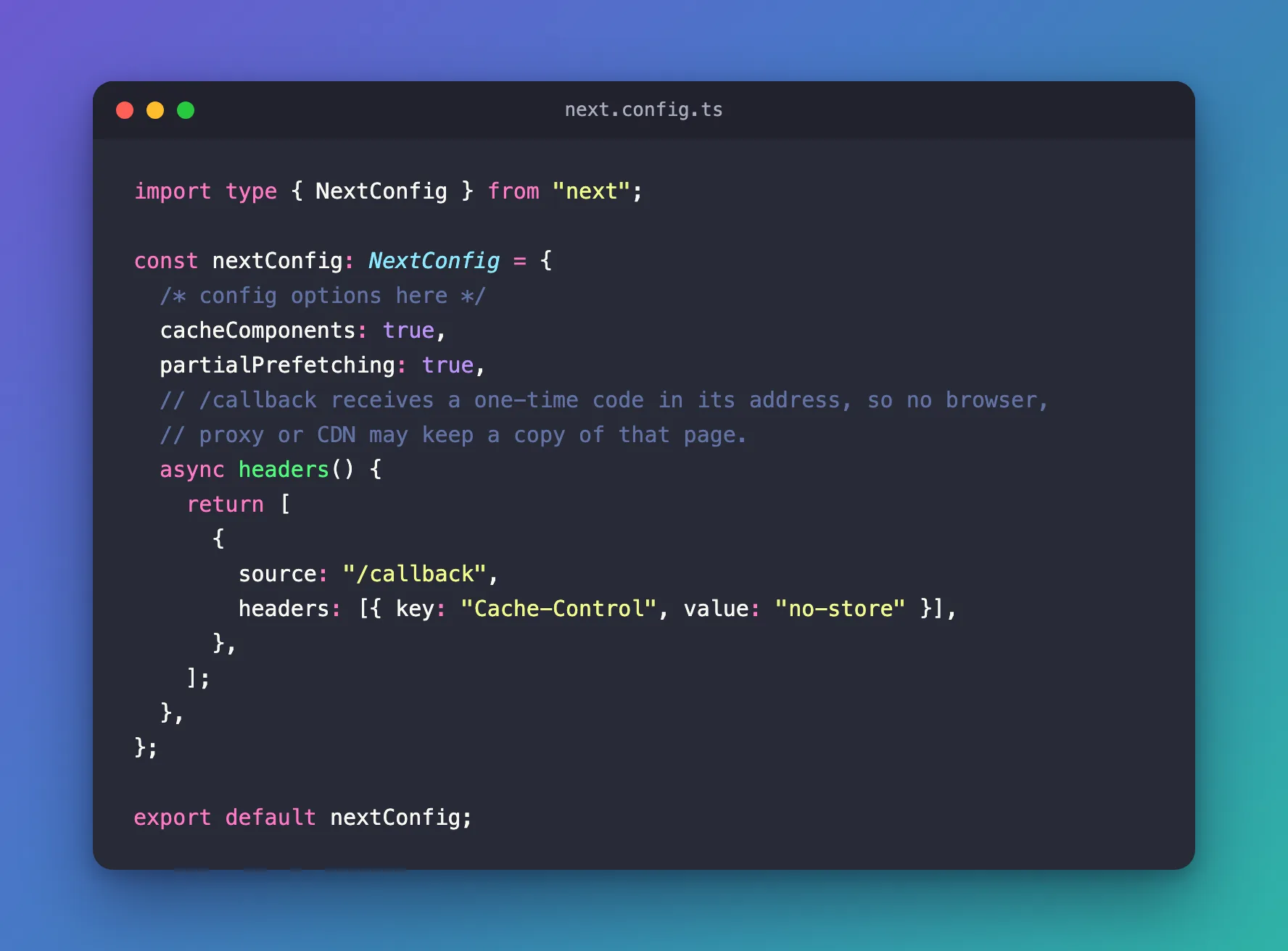
Open next.config.ts and add an async headers() function. It returns a list of rules, and each rule names a path and the headers that path's responses get:
import type { NextConfig } from "next";

const nextConfig: NextConfig = {
  /* config options here */
  cacheComponents: true,
  partialPrefetching: true,
  // /callback receives a one-time code in its address, so no browser,
  // proxy or CDN may keep a copy of that page.
  async headers() {
    return [
      {
        source: "/callback",
        headers: [{ key: "Cache-Control", value: "no-store" }],
      },
    ];
  },
};

export default nextConfig;
| Part | What it does |
|---|---|
async headers() | Next.js calls it and applies the rules it returns. A plain, synchronous function works too |
source: "/callback" | The path the rule applies to. A path without patterns matches that one page |
key: "Cache-Control" | The header to set |
value: "no-store" | In MDN's words, any caches of any kind (private or shared) should not store this response |
cacheComponents and partialPrefetching are settings create-next-app wrote into this app. Keep whatever your file already has, and add only headers().
Step 3: Build Again and Check
Stop the server with Ctrl+C, then build and start the app again. next start takes its rules from the last build, so a changed next.config.ts does nothing until you build:
npm run build
npx next start -p 3011
Ask for the page's headers again:
- macOS / Linux
- Windows (PowerShell)
curl -sI http://localhost:3011/callback
curl.exe -sI http://localhost:3011/callback
HTTP/1.1 200 OK
Cache-Control: no-store
Vary: rsc, next-router-state-tree, next-router-prefetch, next-router-segment-prefetch, Accept-Encoding
x-nextjs-cache: HIT
x-nextjs-prerender: 1
x-nextjs-prerender: 1
link: </_next/static/media/07a39a8a4660cc7c-s.p.0r6juujl39pe6.woff2>; rel=preload; as="font"; crossorigin=""; type="font/woff2", </_next/static/media/605ce01b664af129-s.p.0wgildi0cnwt9.woff2>; rel=preload; as="font"; crossorigin=""; type="font/woff2"
x-nextjs-stale-time: 300
X-Powered-By: Next.js
ETag: "gj96nt66xz56j"
Content-Type: text/html; charset=utf-8
Content-Length: 6719
Date: Thu, 19 Nov 2026 13:05:08 GMT
Connection: keep-alive
Keep-Alive: timeout=5
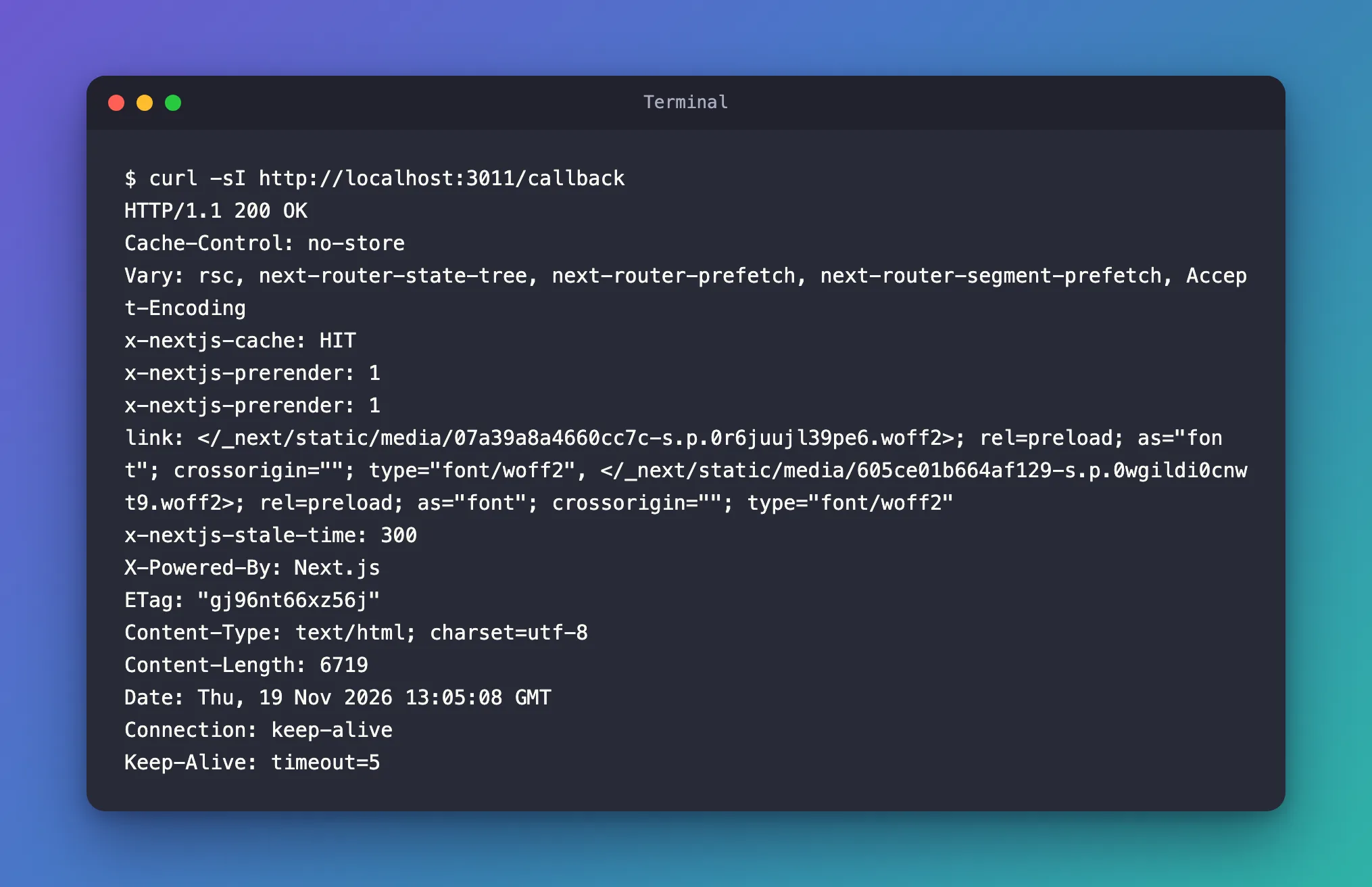
Cache-Control: no-store, and the s-maxage is gone. Everything else stayed as it was: the page is still static, and the server still answers from its build (x-nextjs-cache: HIT). Only browsers, proxies and CDNs stop keeping copies.
The rule matches the path, whatever follows the ?. The address a sign-in service would really open gets the same header:
- macOS / Linux
- Windows (PowerShell)
curl -sI 'http://localhost:3011/callback?code=abc123'
curl.exe -sI "http://localhost:3011/callback?code=abc123"
Cache-Control: no-store
Keep the quotes around the address. Without them, zsh, the default shell on macOS, reads ? as part of a file name pattern and stops with no matches found.
Every other page keeps the header Next.js gives it. The home page, which has no rule:
- macOS / Linux
- Windows (PowerShell)
curl -sI http://localhost:3011/
curl.exe -sI http://localhost:3011/
Cache-Control: s-maxage=31536000
One page changed, and the rest of the app kept the caching Next.js gave it.
Step 4: Know Why the Development Server Hides It
None of this shows while you work with npm run dev. Stop the production server, start the development server — here on port 3012 — and ask for the home page, which the production build serves with s-maxage=31536000:
npx next dev -p 3012
- macOS / Linux
- Windows (PowerShell)
curl -sI http://localhost:3012/
curl.exe -sI http://localhost:3012/
HTTP/1.1 200 OK
Vary: rsc, next-router-state-tree, next-router-prefetch, next-router-segment-prefetch, Accept-Encoding
Link: </_next/static/media/07a39a8a4660cc7c-s.p.0r6juujl39pe6.woff2>; rel=preload; as="font"; crossorigin=""; type="font/woff2", </_next/static/media/605ce01b664af129-s.p.0wgildi0cnwt9.woff2>; rel=preload; as="font"; crossorigin=""; type="font/woff2", </next.svg>; rel=preload; as="image"
Cache-Control: no-store
X-Powered-By: Next.js
Content-Type: text/html; charset=utf-8
Date: Thu, 19 Nov 2026 13:09:23 GMT
Connection: keep-alive
Keep-Alive: timeout=5
no-store, for a page without a rule. The development server sent no-store for every page I asked it for, with the rule and without it. A page that production keeps in shared caches for a year looks exactly as safe there as a page with no-store. Check caching headers on a production build.
Where It Matters
- Pages whose address carries a secret: sign-in callbacks with a one-time code, password-reset links with a token. MSAL's redirect bridge guide gives the reason for its own sign-in page:
no-storeprevents CDNs, reverse proxies, and browser disk caches from retaining the page — and the authorization codes or tokens in its URL. - MSAL's redirect page. MSAL Browser asks for its redirect bridge page to be served with
no-store. Fixed: Next.js Caches the MSAL Redirect Page with "Cache-Control: s-maxage=31536000" shows a real app sending a year instead, and this rule fixing it. The chat app in the Microsoft Agent Framework series uses the same rule for its sign-in.
Common Mistakes
| Mistake | What happens | Do this instead |
|---|---|---|
Checking the header with npm run dev only | The development server sends no-store for every page, so nothing looks wrong | Check with npm run build and next start |
Editing the rule and only restarting next start | The old header stays: next start uses the rules from the last build | Run npm run build again, then start |
source: "/:path*" with no-store | Every page and response loses its caching | Match only the page that needs it |
A public or s-maxage value on a page that shows personal data | A rule replaces Next.js's header on dynamic pages too, so shared caches may keep one person's page and show it to others | Use those values only for pages that are the same for everyone |
A rule for files under /_next/static/ | The headers reference says their public, max-age=31536000, immutable cannot be overridden | Leave them alone: each name carries a hash of the file's content, so a changed file gets a new name |
Troubleshooting
| Symptom | Likely cause | Fix |
|---|---|---|
The page still shows s-maxage=31536000 | The app wasn't built again after the change | npm run build, then start the app |
Still s-maxage=31536000 after a new build | source doesn't match the page's path | Use the path exactly as the page is requested, starting with / |
Every page shows no-store | You are asking the development server | Ask a production build started with next start |
zsh: no matches found | The address has a ? and no quotes | Put the address in quotes |
FAQ
Does the page stop being static?
No. After the change, /callback still came back with x-nextjs-prerender: 1 and x-nextjs-cache: HIT: the server answers with the page it built. The rule changes the header, not the way Next.js renders the page.
Can one rule cover several pages?
Yes. source takes patterns: in the headers reference, /blog/:slug* matches /blog, /blog/a, and /blog/a/b/c. Use the narrowest pattern that covers the pages you mean.
What about a dynamic page?
Next.js already sends a dynamic page with private, no-cache, no-store, max-age=0, must-revalidate, so it stays out of shared caches without a rule. A rule replaces that header as well. When I gave a dynamic page a rule with public, s-maxage=60, its response carried exactly that, and Next.js's own private was gone. That is why a public value belongs only on pages that are the same for everyone.
Why no-store and not private?
MDN: The private response directive indicates that the response can be stored only in a private cache (e.g., local caches in browsers). private still lets the browser's own cache keep a copy. For a page whose address carries a code or token, no-store keeps it out of every cache, the browser's included.
Conclusion
A Next.js page that doesn't depend on the request is built once and served with Cache-Control: s-maxage=31536000. To give one page a different header, add a headers() rule in next.config.ts with that page's path in source, build the app again, and check it with curl -sI on a production build: the development server sends no-store for every page and hides the difference.
Additional Resources
- Next.js: headers — the rule format, path patterns, and the one header that can't be overridden.
- Next.js: Using a CDN with Next.js — the
Cache-Controlvalues Next.js sets for static and dynamic pages. - Next.js: How to self-host your Next.js application — caching when you run
next startyourself. - MDN: Cache-Control — every directive, including
no-store,privateands-maxage.
