How to Serve a Registered Model by Alias with mlflow models serve

mlflow models serve can serve whichever version of a registered model an alias points to, such as production. The address is read once, when the server starts: move the alias, and the running server keeps the version it loaded until you restart it. This guide shows both, with real output from MLflow 3.18.0.
Syntax
mlflow models serve -m "models:/NAME@ALIAS" -p PORT --env-manager uv
| Part | What it means |
|---|---|
models:/NAME@ALIAS | The version of the registered model NAME that the alias ALIAS points to |
models:/NAME/VERSION | A fixed version instead, such as models:/diabetes-progression/2 |
-p PORT | The port to listen on |
--env-manager uv | Build the model's environment with uv |
MLflow's Model Registry guide describes the alias address as models:/<registered model name>@<alias>.
Prerequisites
- An MLflow tracking server with a database backend at
http://127.0.0.1:8080, such asmlflow server --port 8080with its default SQLite database. The registry needs one. mlflowandscikit-learnin your project, for example withuv add mlflow scikit-learn pandas.
Step 1: Register Two Versions and Set the Alias
The example trains two Ridge regressions on scikit-learn's diabetes data, which predicts how far the disease progresses in a year, with a different alpha each. It registers both as diabetes-progression, points production at version 1, and saves one patient in a file, in the layout the server reads:
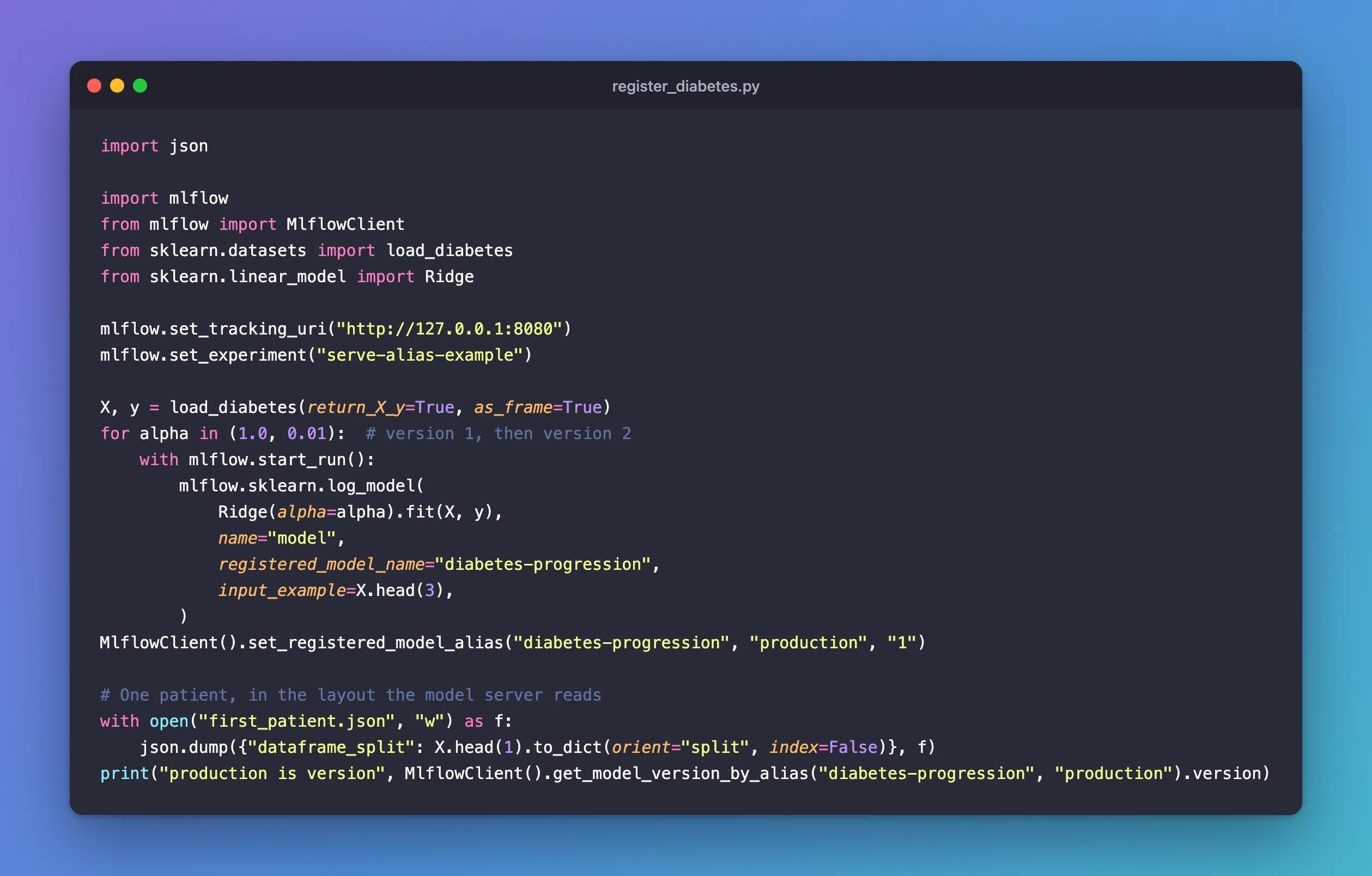
import json

import mlflow
from mlflow import MlflowClient
from sklearn.datasets import load_diabetes
from sklearn.linear_model import Ridge

mlflow.set_tracking_uri("http://127.0.0.1:8080")
mlflow.set_experiment("serve-alias-example")

X, y = load_diabetes(return_X_y=True, as_frame=True)
for alpha in (1.0, 0.01):  # version 1, then version 2
    with mlflow.start_run():
        mlflow.sklearn.log_model(
            Ridge(alpha=alpha).fit(X, y),
            name="model",
            registered_model_name="diabetes-progression",
            input_example=X.head(3),
        )
MlflowClient().set_registered_model_alias("diabetes-progression", "production", "1")

# One patient, in the layout the model server reads
with open("first_patient.json", "w") as f:
    json.dump({"dataframe_split": X.head(1).to_dict(orient="split", index=False)}, f)
print("production is version", MlflowClient().get_model_version_by_alias("diabetes-progression", "production").version)
uv run python register_diabetes.py
Successfully registered model 'diabetes-progression'.
Created version '1' of model 'diabetes-progression'.
...
Registered model 'diabetes-progression' already exists. Creating a new version of this model...
Created version '2' of model 'diabetes-progression'.
...
production is version 1
Step 2: Serve the Alias
- macOS / Linux
- Windows (PowerShell)
export MLFLOW_TRACKING_URI=http://127.0.0.1:8080
uv run mlflow models serve -m "models:/diabetes-progression@production" -p 5001 --env-manager uv
$env:MLFLOW_TRACKING_URI = "http://127.0.0.1:8080"
uv run mlflow models serve -m "models:/diabetes-progression@production" -p 5001 --env-manager uv
2026/11/26 04:39:30 INFO mlflow.utils.virtualenv: Environment /Users/you/.mlflow/envs/mlflow-1a8495c475783fb241f6a7a3da8ec77fb2802018 already exists
...
INFO:     Uvicorn running on http://127.0.0.1:5001 (Press CTRL+C to quit)
MLflow looked up the alias, found version 1, and loaded it. The environment already existed from an earlier model with the same packages, so the server was up in seconds.
Step 3: Ask for a Prediction
In another terminal, send the patient:
- macOS / Linux
- Windows (PowerShell)
curl http://127.0.0.1:5001/invocations -H "Content-Type: application/json" --data @first_patient.json
{"predictions": [182.67335420683418]}
Invoke-RestMethod http://127.0.0.1:5001/invocations -Method Post -ContentType "application/json" -InFile first_patient.json
predictions
-----------
{182.673354206834}
182.67 is version 1's prediction for this patient.
Step 4: Move the Alias
Point production at version 2, as a release would:
import mlflow
from mlflow import MlflowClient

mlflow.set_tracking_uri("http://127.0.0.1:8080")
client = MlflowClient()
client.set_registered_model_alias("diabetes-progression", "production", "2")
print("production is version", client.get_model_version_by_alias("diabetes-progression", "production").version)
uv run python move_alias.py
production is version 2
Send the same patient again:
{"predictions": [182.67335420683418]}
The same 182.67: the server still has version 1, because it read the alias when it started.
Step 5: Restart the Server
Press Ctrl+C in Terminal 2 and start the same command again. Then send the patient once more:
{"predictions": [204.30296696531178]}
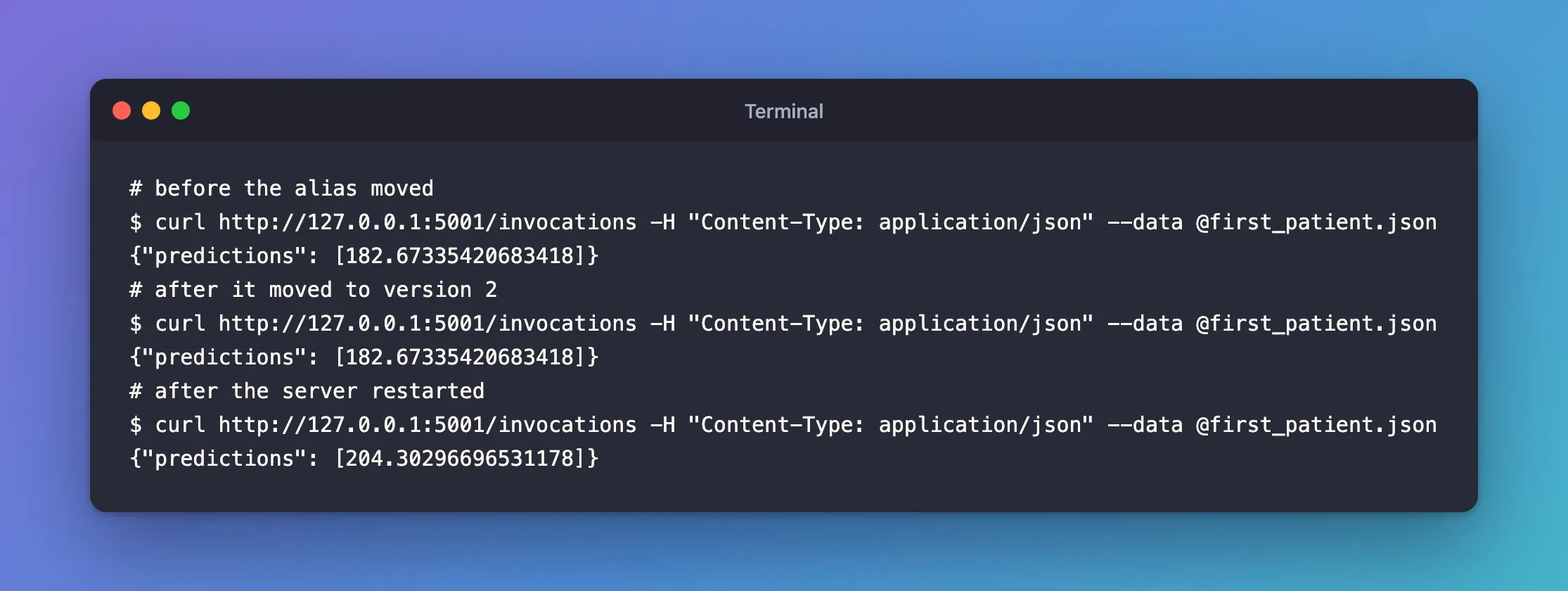
204.30 is version 2's prediction: the restarted server looked up production again and loaded version 2. In PowerShell, the three answers were {182.673354206834}, {182.673354206834} and {204.302966965312}.
Common Mistakes
| Mistake | What happens | Do this instead |
|---|---|---|
| Moving the alias and expecting the running server to follow | It keeps serving the version it loaded | Restart the server after a release |
--data @first_patient.json in PowerShell | ParserError: The splatting operator '@' cannot be used to reference variables in an expression | Invoke-RestMethod ... -InFile first_patient.json |
Troubleshooting
| Symptom | Likely cause | Fix |
|---|---|---|
RestException: INVALID_PARAMETER_VALUE: Registered model alias prod not found. when the server starts | The alias isn't set, or is spelled differently | Set it: How to Set an Alias on a Model Version in MLflow with Python |
| The prediction didn't change after a restart | The alias still points at the old version | Check it with How to Find Which Version an Alias Points To in MLflow |
FAQ
How do I know which version a server loaded?
The server doesn't print it, so look the alias up when you start the server, or serve a fixed version, such as models:/diabetes-progression/2, when you need to know exactly.
Is an alias better than a version number here?
The alias lets a release happen in the registry, with no change to the command that starts the server, only a restart.
Conclusion
mlflow models serve -m "models:/diabetes-progression@production" served version 1 while the alias pointed at it. Moving production to version 2 left the running server's answer at 182.67; after a restart it answered 204.30, version 2's prediction.
Additional Resources
- MLflow Model Registry — registered models, versions and aliases.
- mlflow models serve — the command's options.
