How to Send a Proactive Message from a Background Task in the Microsoft 365 Agents SDK in C#

Some work takes longer than a reply should: a timer, a report, a slow service. An agent built with the Microsoft 365 Agents SDK can answer straight away and send the result when it's ready, as a proactive message. Capture the conversation during the turn, hand the work to the SDK's IBackgroundTaskQueue, and send the result with Proactive.SendActivityAsync.
How It Works
A turn ends when your handler returns, and so does everything that belongs to it. Microsoft's guide to proactive messaging is explicit: The ITurnContext is disposed after the turn completes and isn't safe to use in a background thread. So the handler keeps two things that outlive the turn:
| What | Why |
|---|---|
new Conversation(turnContext) | The chat's address and the agent's identity in it, everything needed to write to the chat later |
turnContext.Adapter | The object that sends activities to the channel |
Then it queues the work. IBackgroundTaskQueue comes with the SDK's ASP.NET Core hosting package: AddAgentDefaults registers it, along with a hosted service that runs each queued work item in the background. The work item gets a CancellationToken that's cancelled when the app stops.
When the work is done, Proactive.SendActivityAsync(adapter, conversation, activity, cancellationToken) sends a message into the captured chat, with no turn and no state involved.
The Example
A tea timer. Send tea, and the agent answers that your tea is steeping. Twenty seconds later, it tells you it's ready. In between, it keeps answering other messages. The agent is one class in an ASP.NET Core project with the Agents SDK 1.9.205, hosted with AddAgentDefaults().AddAgent<TeaTimerAgent>() and MemoryStorage, listening on port 3978.
Prerequisites
- The Microsoft 365 Agents Playground.
agentsplayground --versionshould print0.2.30. If the command isn't found, install it withnpm install -g @microsoft/m365agentsplayground. - A Microsoft Entra app registration for the agent, with a client secret. A proactive message has to be sent as the agent, so it doesn't work in the Playground's default anonymous mode.
Step 1: Ask for the Queue
The agent asks for IBackgroundTaskQueue in its constructor, next to a logger for whatever goes wrong in the background:
    private static readonly TimeSpan SteepTime = TimeSpan.FromSeconds(20);

    private readonly IBackgroundTaskQueue _backgroundTaskQueue;
    private readonly ILogger<TeaTimerAgent> _logger;

    public TeaTimerAgent(AgentApplicationOptions options, IBackgroundTaskQueue backgroundTaskQueue, ILogger<TeaTimerAgent> logger)
        : base(options)
    {
        _backgroundTaskQueue = backgroundTaskQueue;
        _logger = logger;

        OnMessage("tea", StartTimerAsync);
        OnActivity(ActivityTypes.Message, HelpAsync, rank: RouteRank.Last);
    }
IBackgroundTaskQueue is in the Microsoft.Agents.Hosting.AspNetCore.BackgroundQueue namespace. The SDK creates a new agent for every message and fills in the constructor's parameters from the app's services.
Step 2: Capture the Conversation and Queue the Work
    private async Task StartTimerAsync(ITurnContext turnContext, ITurnState turnState, CancellationToken cancellationToken)
    {
        Conversation conversation = new(turnContext);
        IChannelAdapter adapter = turnContext.Adapter;

        _backgroundTaskQueue.QueueBackgroundWorkItem(async stoppingToken =>
        {
            try
            {
                await Task.Delay(SteepTime, stoppingToken);
                await Proactive.SendActivityAsync(adapter, conversation, MessageFactory.Text("🍵 Your tea is ready."), stoppingToken);
            }
            catch (OperationCanceledException)
            {
                _logger.LogWarning("The agent stopped before the tea was ready");
            }
            catch (Exception ex)
            {
                _logger.LogError(ex, "Couldn't send the tea message");
            }
        });

        await turnContext.SendActivityAsync($"Your tea is steeping. I'll tell you when it's ready, in {SteepTime.TotalSeconds} seconds.", cancellationToken: cancellationToken);
    }
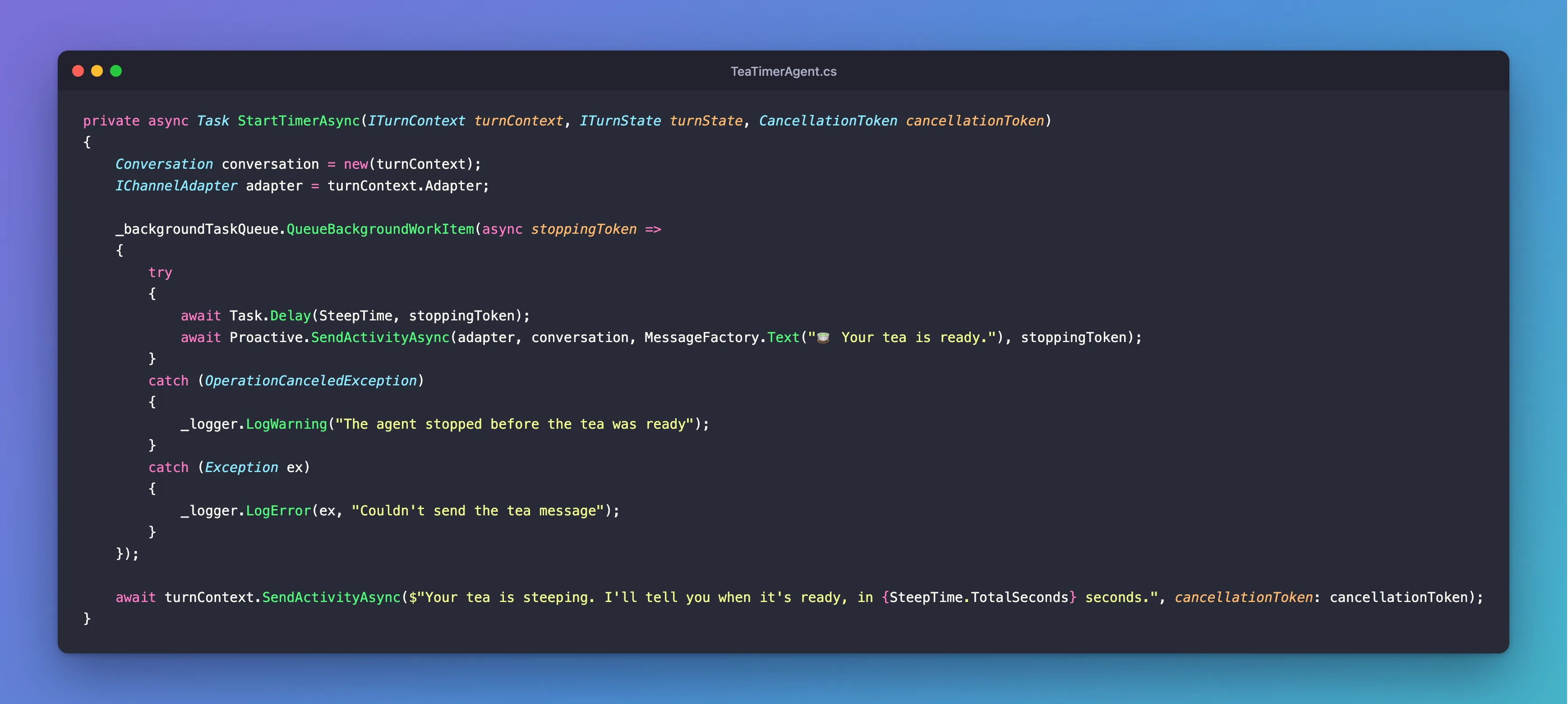
conversationandadapterare captured before the lambda, and the lambda uses only them, neverturnContext.QueueBackgroundWorkItemreturns at once. The handler answers and the turn ends while the work item waits.Task.Delay(SteepTime, stoppingToken)stands in for real work.stoppingTokenis cancelled if the agent stops, which ends the wait with anOperationCanceledException.- The two
catchblocks matter. A failure in a background work item has no turn whose error handling could report it, so without them it would simply vanish. Proactive.SendActivityAsyncis static: it needs only the adapter, the conversation and the activity.
The rest of the class is a help message for anything else:
    private Task HelpAsync(ITurnContext turnContext, ITurnState turnState, CancellationToken cancellationToken)
        => turnContext.SendActivityAsync("Send **tea** to start a tea timer.", cancellationToken: cancellationToken);
Step 3: Try It
Run the agent with dotnet run, and start the Agents Playground in its authenticated mode, as How to Test an Agent with Authentication in the Microsoft 365 Agents Playground shows. Send tea, then hello while you wait:
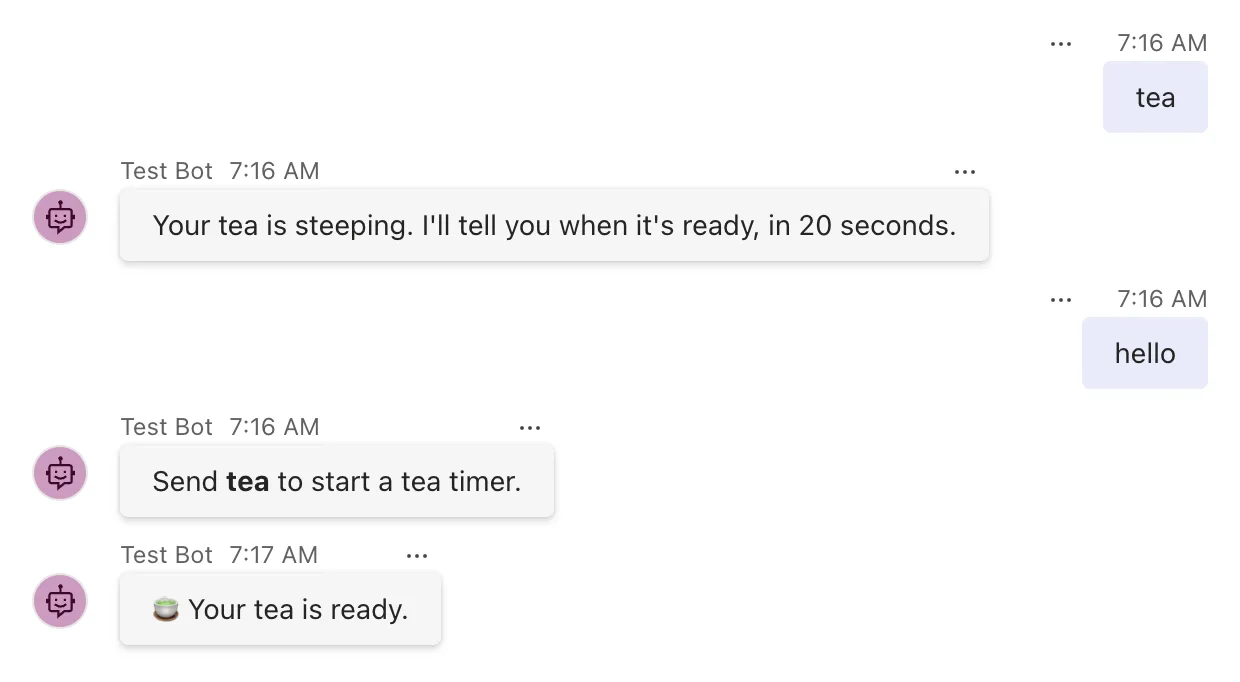
The agent answered tea at once, answered hello while the timer ran, and sent 🍵 Your tea is ready. on its own, twenty seconds after the first answer.
Common Mistakes
| Mistake | What happens | Do this instead |
|---|---|---|
Using turnContext inside the work item | It belongs to a turn that has ended; Microsoft's guide says it isn't safe to use | Capture new Conversation(turnContext) and turnContext.Adapter first |
No try/catch in the work item | Errors disappear, and the message just never comes | Catch and log every exception |
| Testing in the Playground's anonymous mode | aud claim is required in Claims, and no message | Use authenticated mode |
| Queuing work that must survive a restart | The queue lives in memory, so a restart loses it | Store long-lived work, such as a reminder for tomorrow, somewhere durable |
Troubleshooting
| Symptom | Likely cause | Fix |
|---|---|---|
| The answer comes, the later message never does | An exception in the work item | Look for the logged error in the agent's terminal |
| An instance of type 'Conversation' contains invalid values: aud claim is required in Claims | The conversation was captured from an anonymous message | Give the agent an identity and use authenticated mode |
| The agent stopped before the tea was ready | The agent stopped during the wait | Expected: the work item was cancelled |
FAQ
Why not just Task.Run?
Task.Run would start the work, but nothing in the app would know about it. The SDK's queue runs work items in a hosted service that's part of the app's lifetime: it hands each one the app's stopping token, and keeps track of running items when the app shuts down.
Can the background work read or change state?
Not with SendActivityAsync, which sends a message and nothing else. To load and save the conversation's state in the background, use Proactive.ContinueConversationAsync with a handler, as Part 6 of the Microsoft 365 Agents SDK Fundamentals shows.
Conclusion
To send a result later, finish the turn quickly and do the work in the background. Capture the Conversation and the adapter while the turn is still running, queue the work with IBackgroundTaskQueue, catch every exception inside it, and send the result with Proactive.SendActivityAsync.
Additional Resources
- Proactive messaging in the Agents SDK — the background task scenario and the other proactive operations.
- Proactive.SendActivityAsync method — its overloads.
