How to Send a dataframe_records Request to an MLflow Model Server

dataframe_records sends each row as a JSON object, with the column names as its keys, which is the easiest layout to write by hand. This guide sends two rows to a served model in that layout with curl and PowerShell, with real output from MLflow 3.18.0, and explains why MLflow's own guide prefers dataframe_split.
Syntax
{"dataframe_records": [{COLUMN: VALUE, ...}, ...]}
| Part | What it means |
|---|---|
dataframe_records | The layout: a list with one object per row |
COLUMN: VALUE | A column of the model's signature and its value in that row |
MLflow's guide to the inference server: "Pandas DataFrame in the records orientation. We do not recommend using this format because it is not guaranteed to preserve column ordering." In pandas, it's pandas_df.to_dict(orient="records").
Prerequisites
- An MLflow tracking server at
http://127.0.0.1:8080, such asmlflow server --port 8080. mlflowandscikit-learnin your project, for example withuv add mlflow scikit-learn pandas.
Step 1: Log a Model
The Linnerud dataset in scikit-learn has 20 men's results in three exercises, chin-ups, sit-ups and jumps, and their weights in pounds. The example fits a linear regression that predicts the weight from the three results:
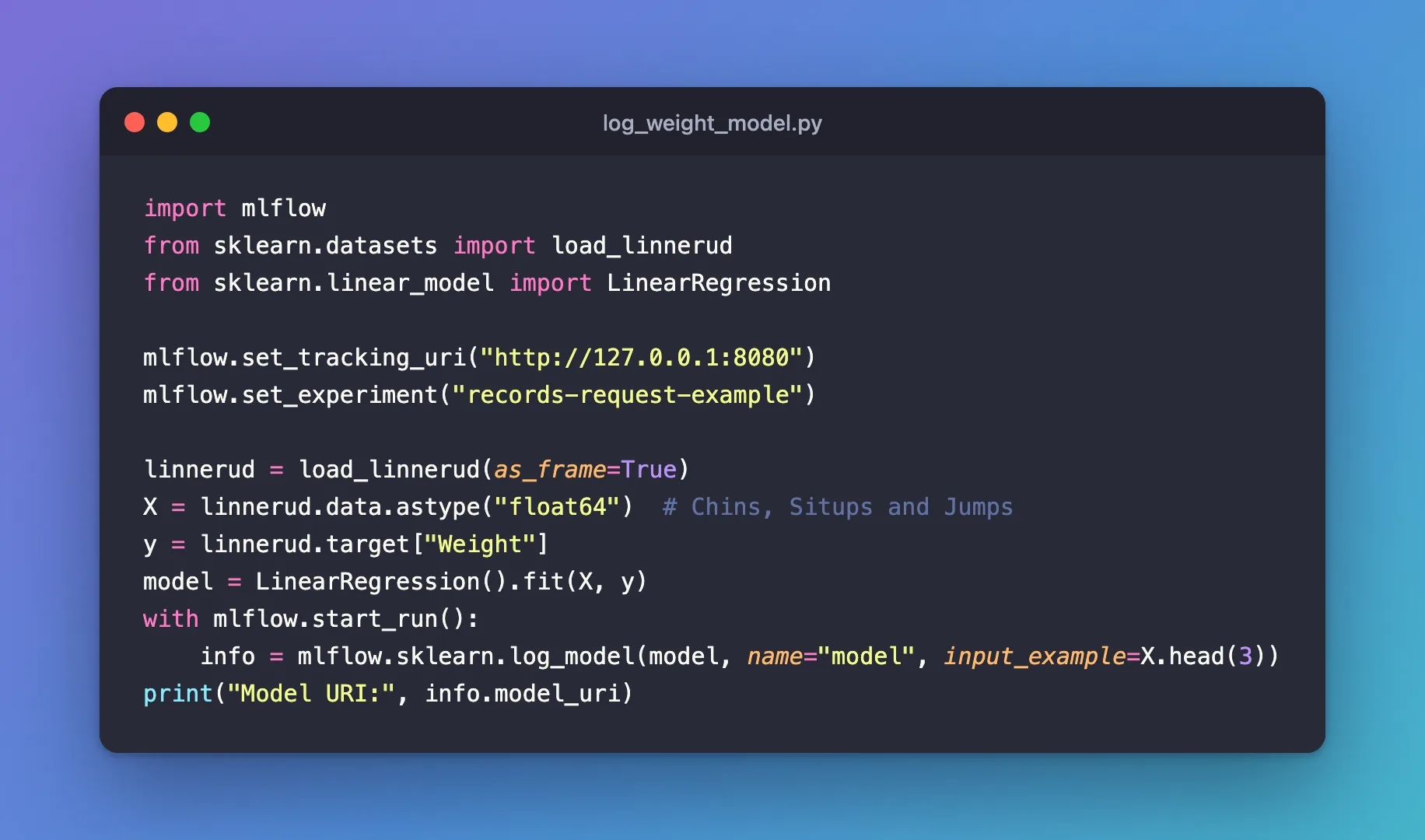
import mlflow
from sklearn.datasets import load_linnerud
from sklearn.linear_model import LinearRegression

mlflow.set_tracking_uri("http://127.0.0.1:8080")
mlflow.set_experiment("records-request-example")

linnerud = load_linnerud(as_frame=True)
X = linnerud.data.astype("float64")  # Chins, Situps and Jumps
y = linnerud.target["Weight"]
model = LinearRegression().fit(X, y)
with mlflow.start_run():
    info = mlflow.sklearn.log_model(model, name="model", input_example=X.head(3))
print("Model URI:", info.model_uri)
uv run python log_weight_model.py
Model URI: models:/m-02d0ca8192ba47978980c71f93a0adcc
Step 2: Serve the Model
- macOS / Linux
- Windows (PowerShell)
export MLFLOW_TRACKING_URI=http://127.0.0.1:8080
uv run mlflow models serve -m "models:/m-02d0ca8192ba47978980c71f93a0adcc" -p 5001 --env-manager uv
$env:MLFLOW_TRACKING_URI = "http://127.0.0.1:8080"
uv run mlflow models serve -m "models:/m-02d0ca8192ba47978980c71f93a0adcc" -p 5001 --env-manager uv
Step 3: Send Two Rows as Records
The first two men in the dataset: 5 chin-ups, 162 sit-ups and 60 jumps, and 2, 110 and 60:
- macOS / Linux
- Windows (PowerShell)
curl http://127.0.0.1:5001/invocations -H "Content-Type: application/json" --data '{"dataframe_records": [{"Chins": 5, "Situps": 162, "Jumps": 60}, {"Chins": 2, "Situps": 110, "Jumps": 60}]}'
{"predictions": [176.17362115123967, 188.91995665429945]}
Invoke-RestMethod http://127.0.0.1:5001/invocations -Method Post -ContentType "application/json" -Body '{"dataframe_records": [{"Chins": 5, "Situps": 162, "Jumps": 60}, {"Chins": 2, "Situps": 110, "Jumps": 60}]}'
predictions
-----------
{176.17362115124, 188.919956654299}
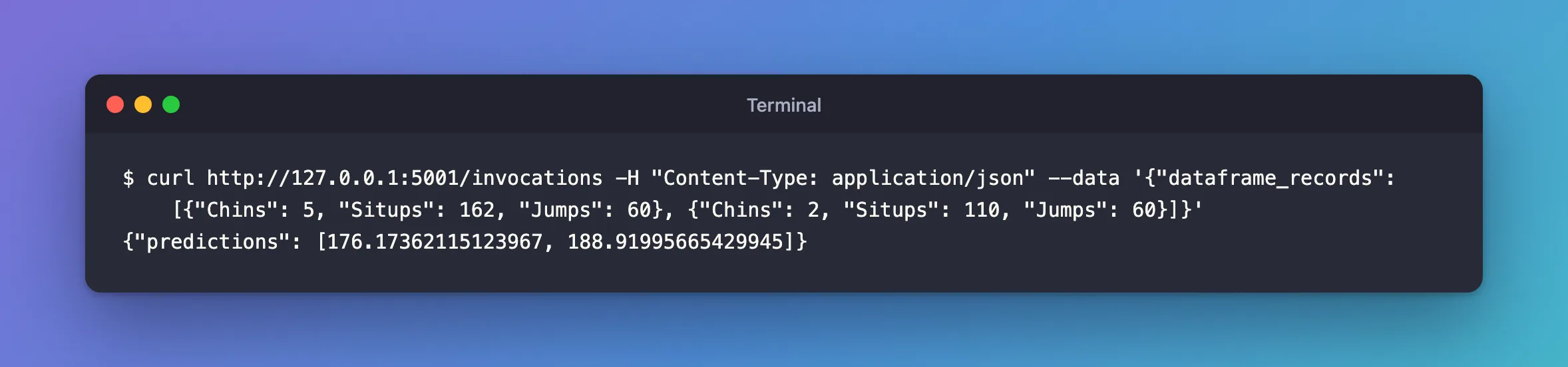
Two predicted weights, about 176 and 189 pounds, in the order of the rows. The whole numbers were fine: the signature asks for decimals, and the server converts them.
Common Mistakes
| Mistake | What happens | Do this instead |
|---|---|---|
| A row without one of the columns | 400 with Model is missing inputs ['Situps'] | Give every row every column |
A list of rows without the dataframe_records key | 400: Invalid input. The input must be a JSON dictionary with exactly one of the input fields ... Received a list. | Wrap the list in {"dataframe_records": ...} |
Troubleshooting
| Symptom | Likely cause | Fix |
|---|---|---|
could not convert string to float: 'five' | A value was written as text | Send numbers as numbers: 5, not "five" |
Model is missing inputs ['Chins']. Note that there were extra inputs: ['Chin']. | A column name has a typo | Copy the names from the model's signature |
FAQ
Should I use dataframe_records or dataframe_split?
MLflow's guide recommends against dataframe_records because "it is not guaranteed to preserve column ordering". dataframe_split writes the names once and keeps the order: How to Send a dataframe_split Request to an MLflow Model Server. Records are handy for a quick request typed by hand.
Can I build the records from a DataFrame?
Yes, with df.to_dict(orient="records"), as the guide shows.
Conclusion
Two rows written as objects, {"Chins": 5, "Situps": 162, "Jumps": 60} and {"Chins": 2, "Situps": 110, "Jumps": 60}, inside {"dataframe_records": [...]}, came back from the model server as two predicted weights, 176.17 and 188.92 pounds.
Additional Resources
- Deploy MLflow Model as a Local Inference Server — the JSON layouts and the advice on records.
- The Linnerud dataset — the example's data.
