How to See Who Has Access to a SharePoint List with the REST API in Power Automate

A list's permissions page shows who has access, but a flow can read the same thing in one REST request and use it: every group or person with access to the list, and the permission level each one has. It's a quick way to check that a flow set up a list's permissions the way you meant.
Syntax
The request goes through Send an HTTP request to SharePoint (How to Use Send an HTTP Request to SharePoint):
| Field | Value |
|---|---|
| Method | GET |
| Uri | _api/web/lists/getbytitle('<list name>')/roleassignments?$expand=Member,RoleDefinitionBindings&$select=Member/Title,RoleDefinitionBindings/Name |
| Headers | Accept: application/json;odata=nometadata |
<list name>: the list's title, as in Site contents.roleassignments: the list's role assignments, one for each group or person with access. Microsoft's Users, groups, and roles REST API reference gives a role assignment aMember, the user or group that corresponds to the Role Assignment, andRoleDefinitionBindings, the collection of role definition bindings: its permission levels.$expand=Member,RoleDefinitionBindings: without it, the answer holds only links toMemberandRoleDefinitionBindings, which the same reference shows as__deferred. Expanding them puts their values in the answer.$select=Member/Title,RoleDefinitionBindings/Name: only the group's or person's name and each level's name.
The Example
The flow, List Who Has Access, reads who has access to the Suggestions list on the root site contoso.sharepoint.com. It has two parts:
- Manually trigger a flow (How to Create an Instant Cloud Flow Inside a Solution in Power Automate).
- Get the role assignments, the GET.
Prerequisites
- Full Control of the site for the account the flow's SharePoint connection uses. Listing who has access is what the Enumerate Permissions permission allows, and only Full Control includes it by default.
Step 1: Add the Request
Add Send an HTTP request to SharePoint and rename it Get the role assignments:
| Field | Value |
|---|---|
| Site Address | Your site |
| Method | GET |
| Uri | _api/web/lists/getbytitle('Suggestions')/roleassignments?$expand=Member,RoleDefinitionBindings&$select=Member/Title,RoleDefinitionBindings/Name |
| Headers | Accept: application/json;odata=nometadata |
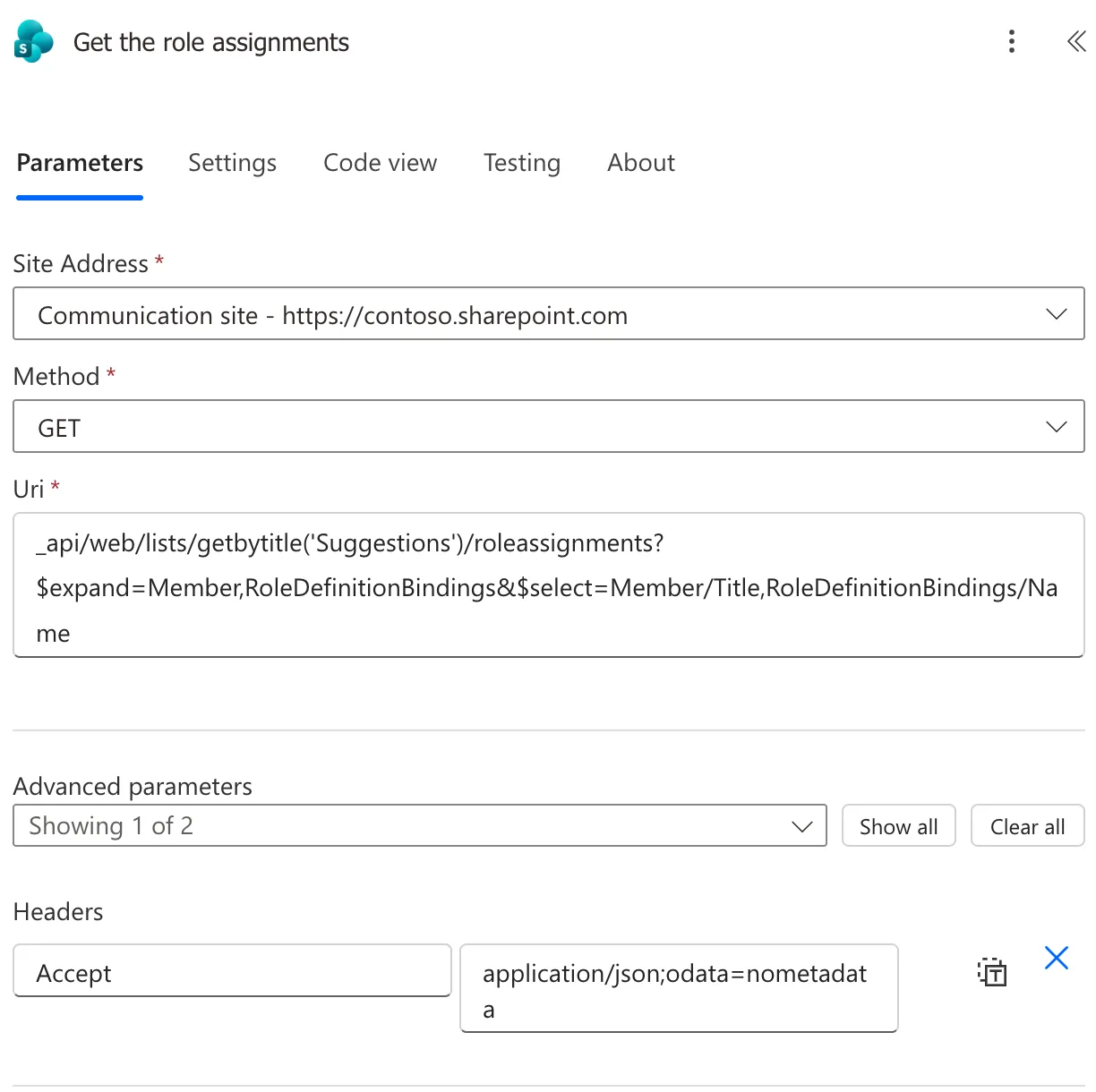
Step 2: Run the Flow and Read the Answer
Save the flow and test it manually (How to Test a Cloud Flow Manually in Power Automate). In the run, open Get the role assignments and look at body. Each entry is one row per field, numbered from 0:
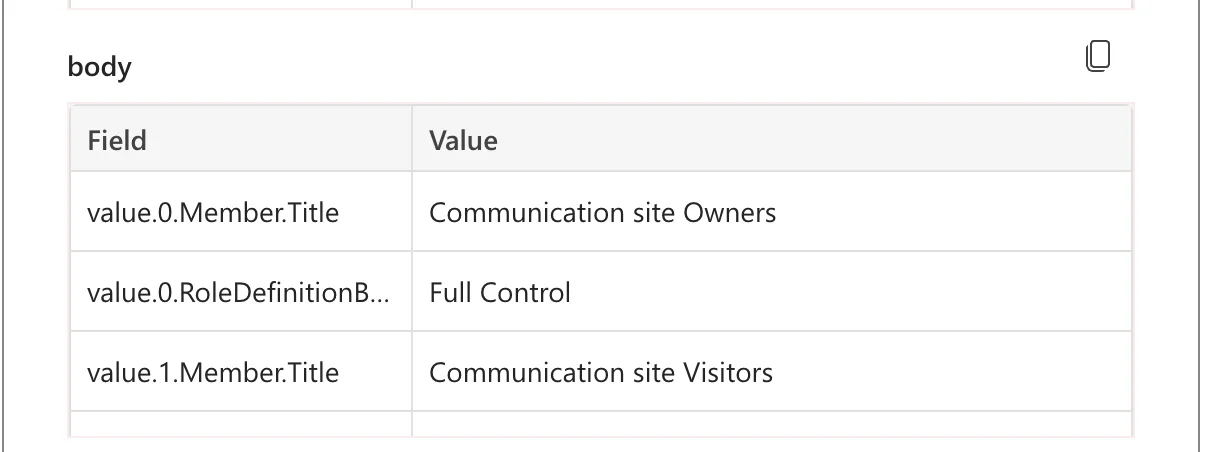
This is the whole answer to the same request:
{
  "value": [
    {
      "Member": { "Title": "Communication site Owners" },
      "RoleDefinitionBindings": [{ "Name": "Full Control" }]
    },
    {
      "Member": { "Title": "Communication site Visitors" },
      "RoleDefinitionBindings": [{ "Name": "Read" }]
    },
    {
      "Member": { "Title": "Suggestions Team" },
      "RoleDefinitionBindings": [{ "Name": "Read and Add" }]
    }
  ]
}
Three groups have access: the site's Owners with Full Control, its Visitors with Read, and the security group Suggestions Team with the custom level Read and Add. RoleDefinitionBindings is a list, because one group can hold more than one level on the same list.
Common Mistakes
| Mistake | What happens | Do this instead |
|---|---|---|
Leaving out $expand | Member and RoleDefinitionBindings stay links instead of values | Expand them |
$select=Title instead of Member/Title | The role assignment has no Title of its own | Name the expanded property first |
| Reading only the first level | A group with two levels shows only one | Read every entry in RoleDefinitionBindings |
Troubleshooting
| Symptom | Likely cause | Fix |
|---|---|---|
| An access-denied error | The connection's account can't see permissions | Use an account with Full Control |
| An error that the list doesn't exist | The title in getbytitle('…') is wrong | Copy the title from Site contents |
FAQ
Does a group's entry tell me who is in it?
No. It names the group. A SharePoint group's members are on its page under People and groups, and a security group's members are in Microsoft Entra.
Can I check a site instead of a list?
Yes. Leave out lists/getbytitle('<list name>')/: _api/web/roleassignments?… lists who has access to the site.
Can I do this without a flow?
Yes. The list's permissions page shows the same, and Check Permissions shows one person's access: How to Check a User's Permissions in SharePoint.
Conclusion
GET _api/web/lists/getbytitle('<list name>')/roleassignments?$expand=Member,RoleDefinitionBindings&$select=Member/Title,RoleDefinitionBindings/Name. Each entry in value names a group or person and the permission levels they hold on the list.
Additional Resources
- Users, groups, and roles REST API reference:
RoleAssignmentand its properties. - Use OData query operations in SharePoint REST requests:
$selectand$expand.
