How to See Which Datasets an MLflow Run Used

When a run logs its data with mlflow.log_input(), MLflow keeps each dataset's name, digest, source, schema and row count with the run. You can find them in the MLflow UI, from the command line and from Python. This guide looks at one run that used a training set and a test set, in all four places, with real screens and output from MLflow 3.18.0.
The Run Used Here
The run, train-and-test in an experiment called inputs-demo, logged two small tables of houses: four rows as houses-train with the training context, and one row as houses-test with the testing context. This is the script that logged it:
import mlflow
import pandas as pd

mlflow.set_tracking_uri("http://127.0.0.1:8080")
mlflow.set_experiment("inputs-demo")

train = pd.DataFrame({"size_m2": [72.0, 48.0, 95.0, 80.0], "price_k": [310.0, 205.0, 420.0, 335.0]})
test = pd.DataFrame({"size_m2": [130.0], "price_k": [560.0]})

with mlflow.start_run(run_name="train-and-test"):
    mlflow.log_input(mlflow.data.from_pandas(train, name="houses-train"), context="training")
    mlflow.log_input(mlflow.data.from_pandas(test, name="houses-test"), context="testing")
No source was given, so MLflow recorded the script as each dataset's source. How to Log a Dataset in MLflow covers the logging side.
Step 1: Look at the Runs Table
Open the experiment in the MLflow UI. The Dataset column shows the datasets of each run, by name with their digest in brackets and their context as a label. With two or more, they're cut short to fit; turn on Expand rows above the table to list each on its own line:

The digests, a3eaf7d8 and 18cbb63f, are fingerprints of each table's contents: two runs that show the same digest used the same data. The Datasets button in the toolbar filters the table to runs that used a dataset you pick.
Step 2: Look at the Run Page
Click the run's name. Under About this run, Datasets shows the first dataset with its context, and +1 for the other:

Click +1 to see the rest in a list.
Step 3: Open the Data Details Panel
Click a dataset's name, in the runs table or on the run page:
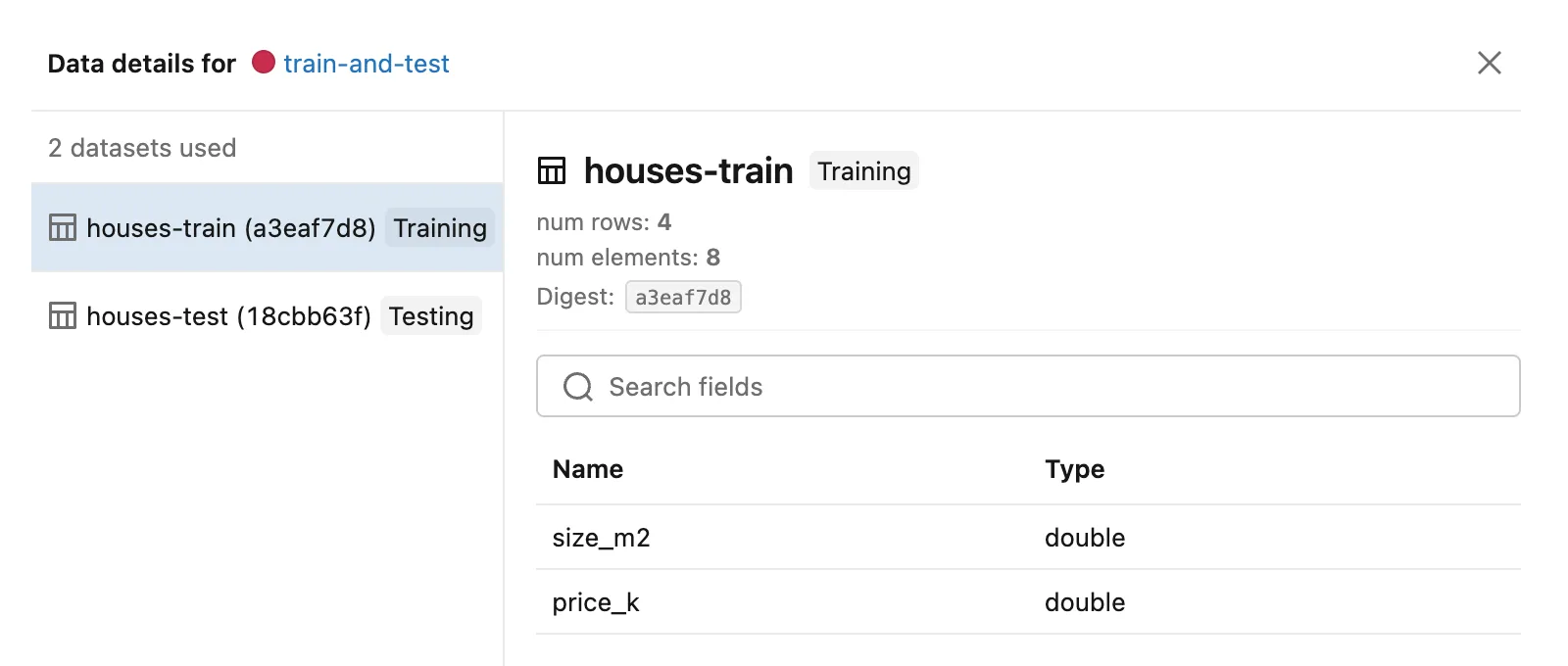
- The left side lists every dataset of the run with its context. Click one to see its details.
- The details show the row count (
num rows), the number of values (num elements), the digest and the schema: each column with its type. - The source appears here for file and web sources, such as Source type: Local with the file's path. For these two datasets the source is the script, and the panel shows no source line; the command line and Python below do.
- Open dataset, a button that appears for
https://sources, opens the source address in a new browser tab.
Step 4: See Them from the Command Line
mlflow runs describe prints the whole run as JSON, datasets included. Point it at the server first:
- macOS / Linux
- Windows (PowerShell)
export MLFLOW_TRACKING_URI=http://127.0.0.1:8080
uv run mlflow runs describe --run-id 2b438386fde04b16a1cbe731574e382d
$env:MLFLOW_TRACKING_URI = "http://127.0.0.1:8080"
uv run mlflow runs describe --run-id 2b438386fde04b16a1cbe731574e382d
{
    "info": {
        "artifact_uri": "mlflow-artifacts:/10/2b438386fde04b16a1cbe731574e382d/artifacts",
        "end_time": 1795086252054,
        "experiment_id": "10",
        "lifecycle_stage": "active",
        "run_id": "2b438386fde04b16a1cbe731574e382d",
        "run_name": "train-and-test",
        "start_time": 1795086252015,
        "status": "FINISHED",
        "user_id": "you"
    },
    "data": {
        "metrics": {},
        "params": {},
        "tags": {
            "mlflow.user": "you",
            "mlflow.source.name": "two_datasets.py",
            "mlflow.source.type": "LOCAL",
            "mlflow.runName": "train-and-test"
        }
    },
    "inputs": {
        "model_inputs": [],
        "dataset_inputs": [
            {
                "dataset": {
                    "name": "houses-train",
                    "digest": "a3eaf7d8",
                    "source_type": "code",
                    "source": "{\"tags\": {\"mlflow.user\": \"you\", \"mlflow.source.name\": \"two_datasets.py\", \"mlflow.source.type\": \"LOCAL\"}}",
                    "schema": "{\"mlflow_colspec\": [{\"type\": \"double\", \"name\": \"size_m2\", \"required\": true}, {\"type\": \"double\", \"name\": \"price_k\", \"required\": true}]}",
                    "profile": "{\"num_rows\": 4, \"num_elements\": 8}"
                },
                "tags": {
                    "mlflow.data.context": "training"
                }
            },
            {
                "dataset": {
                    "name": "houses-test",
                    "digest": "18cbb63f",
                    "source_type": "code",
                    "source": "{\"tags\": {\"mlflow.user\": \"you\", \"mlflow.source.name\": \"two_datasets.py\", \"mlflow.source.type\": \"LOCAL\"}}",
                    "schema": "{\"mlflow_colspec\": [{\"type\": \"double\", \"name\": \"size_m2\", \"required\": true}, {\"type\": \"double\", \"name\": \"price_k\", \"required\": true}]}",
                    "profile": "{\"num_rows\": 1, \"num_elements\": 2}"
                },
                "tags": {
                    "mlflow.data.context": "testing"
                }
            }
        ]
    },
    "outputs": {
        "model_outputs": []
    }
}
The datasets are under inputs → dataset_inputs, one entry each, with the context in tags. Take the run ID from the run page, or from the View run link your script printed.
Step 5: Read Them in Python
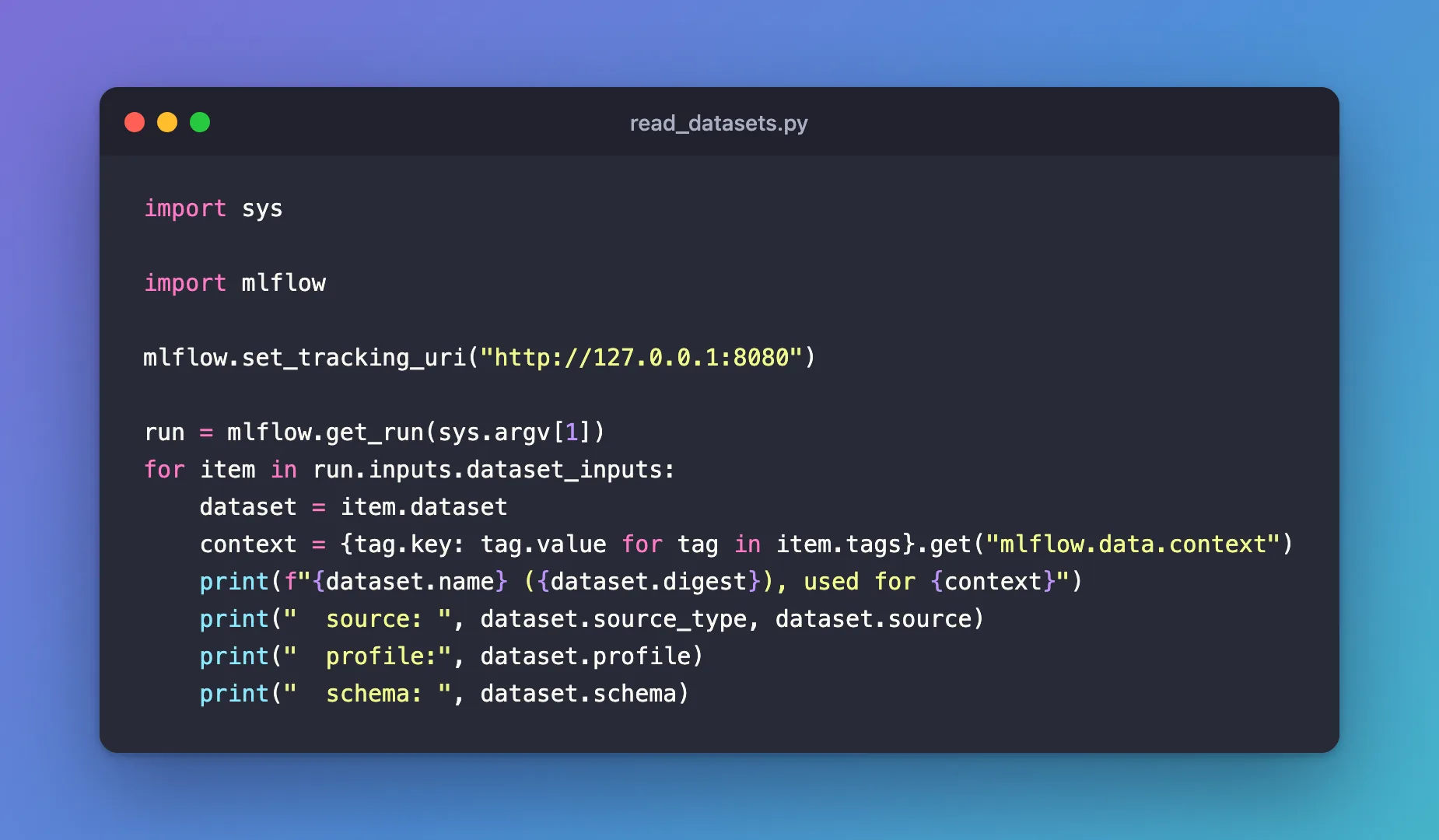
The same information is on the run object that mlflow.get_run() returns. Create read_datasets.py, which takes the run ID on the command line:
import sys

import mlflow

mlflow.set_tracking_uri("http://127.0.0.1:8080")

run = mlflow.get_run(sys.argv[1])
for item in run.inputs.dataset_inputs:
    dataset = item.dataset
    context = {tag.key: tag.value for tag in item.tags}.get("mlflow.data.context")
    print(f"{dataset.name} ({dataset.digest}), used for {context}")
    print("  source: ", dataset.source_type, dataset.source)
    print("  profile:", dataset.profile)
    print("  schema: ", dataset.schema)
| Line | What it does |
|---|---|
mlflow.get_run(sys.argv[1]) | Fetches the run whose ID you pass |
run.inputs.dataset_inputs | The run's datasets, one item each |
item.dataset | The dataset's record: name, digest, source_type, source, profile and schema |
item.tags | Its tags; the context is the one named mlflow.data.context |
uv run python read_datasets.py 2b438386fde04b16a1cbe731574e382d
houses-train (a3eaf7d8), used for training
  source:  code {"tags": {"mlflow.user": "you", "mlflow.source.name": "two_datasets.py", "mlflow.source.type": "LOCAL"}}
  profile: {"num_rows": 4, "num_elements": 8}
  schema:  {"mlflow_colspec": [{"type": "double", "name": "size_m2", "required": true}, {"type": "double", "name": "price_k", "required": true}]}
houses-test (18cbb63f), used for testing
  source:  code {"tags": {"mlflow.user": "you", "mlflow.source.name": "two_datasets.py", "mlflow.source.type": "LOCAL"}}
  profile: {"num_rows": 1, "num_elements": 2}
  schema:  {"mlflow_colspec": [{"type": "double", "name": "size_m2", "required": true}, {"type": "double", "name": "price_k", "required": true}]}
source, profile and schema come back as JSON text; json.loads() turns each into a dictionary when you need a single value from it.
Common Mistakes
| Mistake | What happens | Do this instead |
|---|---|---|
| Looking for the datasets on the Artifacts tab | It's empty: a logged dataset is a description, not a file | Look under Datasets, or log the file too with log_artifact |
Passing the run's name to get_run | RestException: RESOURCE_DOES_NOT_EXIST: Run with id=train-and-test not found | Use the run ID from the run page |
Expecting mlflow datasets list to show these | That command lists GenAI evaluation datasets, a different feature | Use mlflow runs describe |
Troubleshooting
| Symptom | Likely cause | Fix |
|---|---|---|
The Dataset column shows - | The run logged no datasets | Log them with mlflow.log_input() inside the run |
| The details panel shows no source | The source is the code that logged the dataset | Pass source= when you create the dataset, or read it with the CLI or Python |
runs describe can't find the run | MLFLOW_TRACKING_URI isn't set in this terminal | Set it as above, in the same terminal |
FAQ
Can I see the data itself?
Not from MLflow, unless you also logged the file as an artifact. The dataset record says where the data came from (source) and fingerprints it (digest), so you can find and check the original.
Why does the Datasets filter list the same name twice?
It lists every dataset it finds in the experiment's runs by name and digest, with its context. Different data under the same name, such as last month's and this month's file, shows up as two entries with different digests.
Can I search runs by dataset in Python?
Yes: mlflow.search_runs accepts datasets.name, datasets.digest and datasets.context in its filter, such as "datasets.digest = 'a3eaf7d8'".
Conclusion
The datasets a run logged show up in the runs table's Dataset column, on the run page under Datasets, and in the Data details panel with their row count, digest, schema and, for files and web addresses, their source. mlflow runs describe and mlflow.get_run(...).inputs.dataset_inputs give the same records from the command line and Python.
Additional Resources
- MLflow Dataset Tracking — MLflow's guide, including what the UI shows.
- mlflow runs describe — the command's reference.
- mlflow.get_run — the function's reference.
