How to Search for NuGet Packages from the Command Line (dotnet package search)

Before adding a package, you usually want two answers: which package, and which version. dotnet package search gets both from nuget.org without leaving the terminal. This guide searches by keyword, lists every version of one package, includes previews, and switches to JSON, using a real question as the example: which EF Core providers for MySQL support EF Core 10?
Prerequisites
- The .NET SDK 8.0.2xx or later. The command reference "applies to: ✔️ .NET 8.0.2xx SDK and later versions". This guide uses .NET 10.
- Internet access to nuget.org.
Step 1: Search by Keyword
dotnet package search EntityFrameworkCore.MySql --take 5
EntityFrameworkCore.MySqlis the search term. It isn't limited to exact names:Microsoft.EntityFrameworkCoreandZ.EntityFramework.Extensions.EFCorematched too.--take 5limits the results. The reference: "The number of results to return. The default value is 20."
****************************************
Source: nuget.org (https://api.nuget.org/v3/index.json)
| Package ID              | Latest Version | Owners                  | Total Downloads |
| ----------------------- | -------------- | ----------------------- | --------------- |
| Microsoft.EntityFramewo | 10.0.14        | aspnet, dotnetframework | 2,68,53,30,159  |
| rkCore                  |                | , EntityFramework, Micr |                 |
|                         |                | osoft                   |                 |
| ----------------------- | -------------- | ----------------------- | --------------- |
| Pomelo.EntityFrameworkC | 9.0.0          | AmamiyaYuuko, bgrainger | 14,34,30,246    |
| ore.MySql               |                | , LauXjpn, PomeloFounda |                 |
|                         |                | tion                    |                 |
| ----------------------- | -------------- | ----------------------- | --------------- |
| MySql.EntityFrameworkCo | 10.0.12        | MySQL                   | 1,62,40,637     |
| re                      |                |                         |                 |
| ----------------------- | -------------- | ----------------------- | --------------- |
| Z.EntityFramework.Exten | 10.105.9       | zzzprojects             | 7,34,90,968     |
| sions.EFCore            |                |                         |                 |
| ----------------------- | -------------- | ----------------------- | --------------- |
| MySql.Data.EntityFramew | 8.0.22         | MySQL                   | 81,83,005       |
| orkCore                 |                |                         |                 |
| ----------------------- | -------------- | ----------------------- | --------------- |
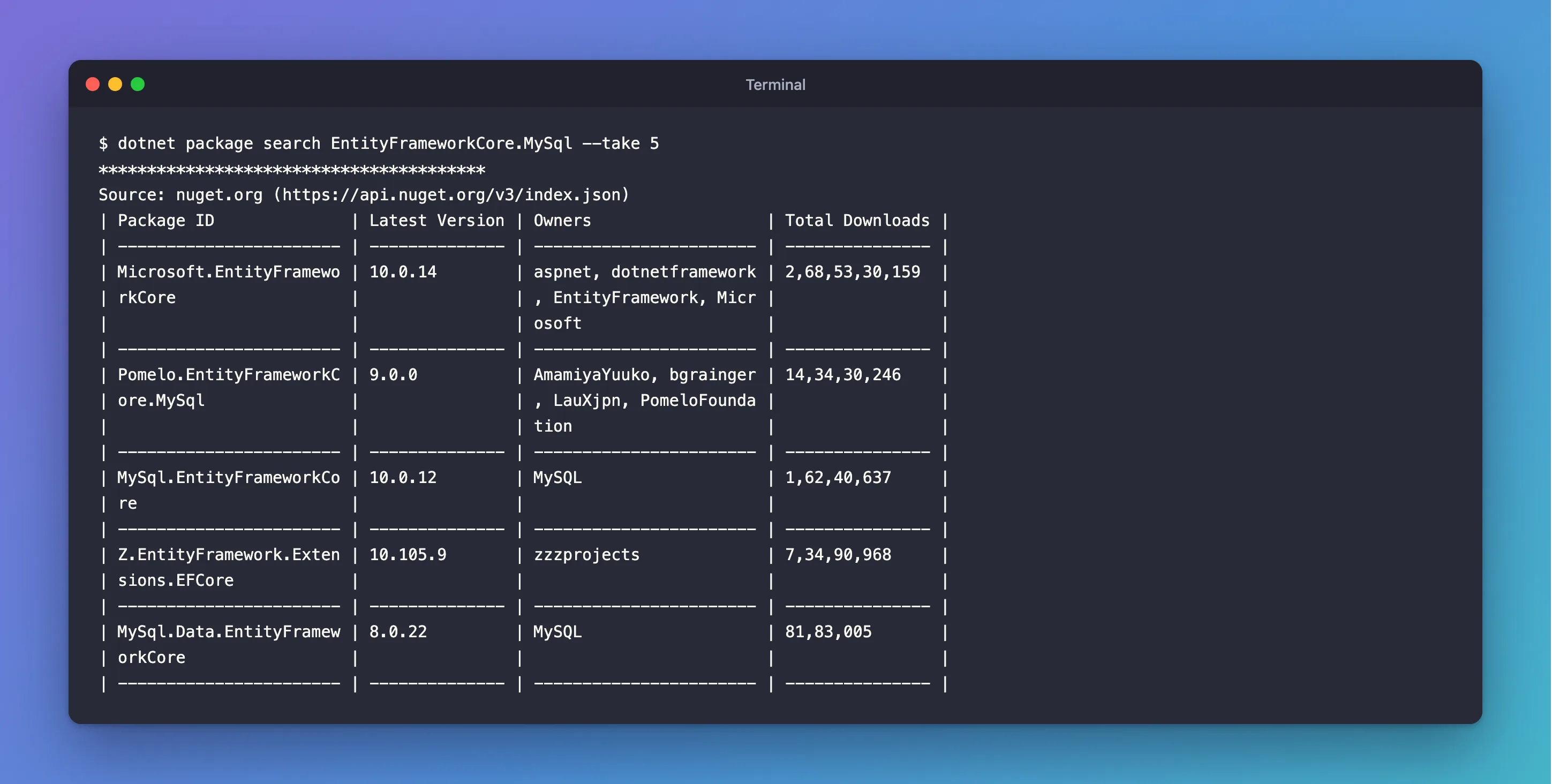
How to read it:
- Long IDs wrap inside the narrow first column:
Pomelo.EntityFrameworkC/ore.MySqlisPomelo.EntityFrameworkCore.MySql. Ownersshows who publishes the package:MySQLfor Oracle's provider, the Pomelo Foundation's team for Pomelo's.Total Downloadsis formatted for the machine's region; this Mac groups digits the Indian way, so1,62,40,637is 16,240,637.
Already one answer: Pomelo's newest stable version is 9.0.0, Oracle's is 10.0.12.
Step 2: List Every Version of One Package
--exact-match "narrows the search to only include packages whose IDs exactly match the specified search term", and "provides a concise list of all available versions for the identified package":
dotnet package search MySql.EntityFrameworkCore --exact-match
| MySql.EntityFrameworkCo | 10.0.1   |        | N/A             |
| re                      |          |        |                 |
| ----------------------- | -------- | ------ | --------------- |
| MySql.EntityFrameworkCo | 10.0.7   |        | N/A             |
| re                      |          |        |                 |
| ----------------------- | -------- | ------ | --------------- |
| MySql.EntityFrameworkCo | 10.0.9   |        | N/A             |
| re                      |          |        |                 |
| ----------------------- | -------- | ------ | --------------- |
| MySql.EntityFrameworkCo | 10.0.12  |        | N/A             |
| re                      |          |        |                 |
| ----------------------- | -------- | ------ | --------------- |
The list is oldest first, so the newest stable version is at the bottom. The docs add that it "Causes --take and --skip options to be ignored": you always get every version.
Step 3: Include Previews
--prerelease lets "prerelease packages to be shown". For Pomelo, to check whether an EF Core 10 version exists even as a preview:
dotnet package search Pomelo.EntityFrameworkCore.MySql --exact-match --prerelease
| Pomelo.EntityFrameworkC | 9.0.0-preview.1         |        | N/A             |
| ore.MySql               |                         |        |                 |
| ----------------------- | ----------------------- | ------ | --------------- |
| Pomelo.EntityFrameworkC | 9.0.0-preview.2.efcore. |        | N/A             |
| ore.MySql               | 9.0.0                   |        |                 |
| ----------------------- | ----------------------- | ------ | --------------- |
| Pomelo.EntityFrameworkC | 9.0.0-preview.3.efcore. |        | N/A             |
| ore.MySql               | 9.0.0                   |        |                 |
| ----------------------- | ----------------------- | ------ | --------------- |
| Pomelo.EntityFrameworkC | 9.0.0-rc.1.efcore.9.0.0 |        | N/A             |
| ore.MySql               |                         |        |                 |
| ----------------------- | ----------------------- | ------ | --------------- |
| Pomelo.EntityFrameworkC | 9.0.0                   |        | N/A             |
| ore.MySql               |                         |        |                 |
| ----------------------- | ----------------------- | ------ | --------------- |
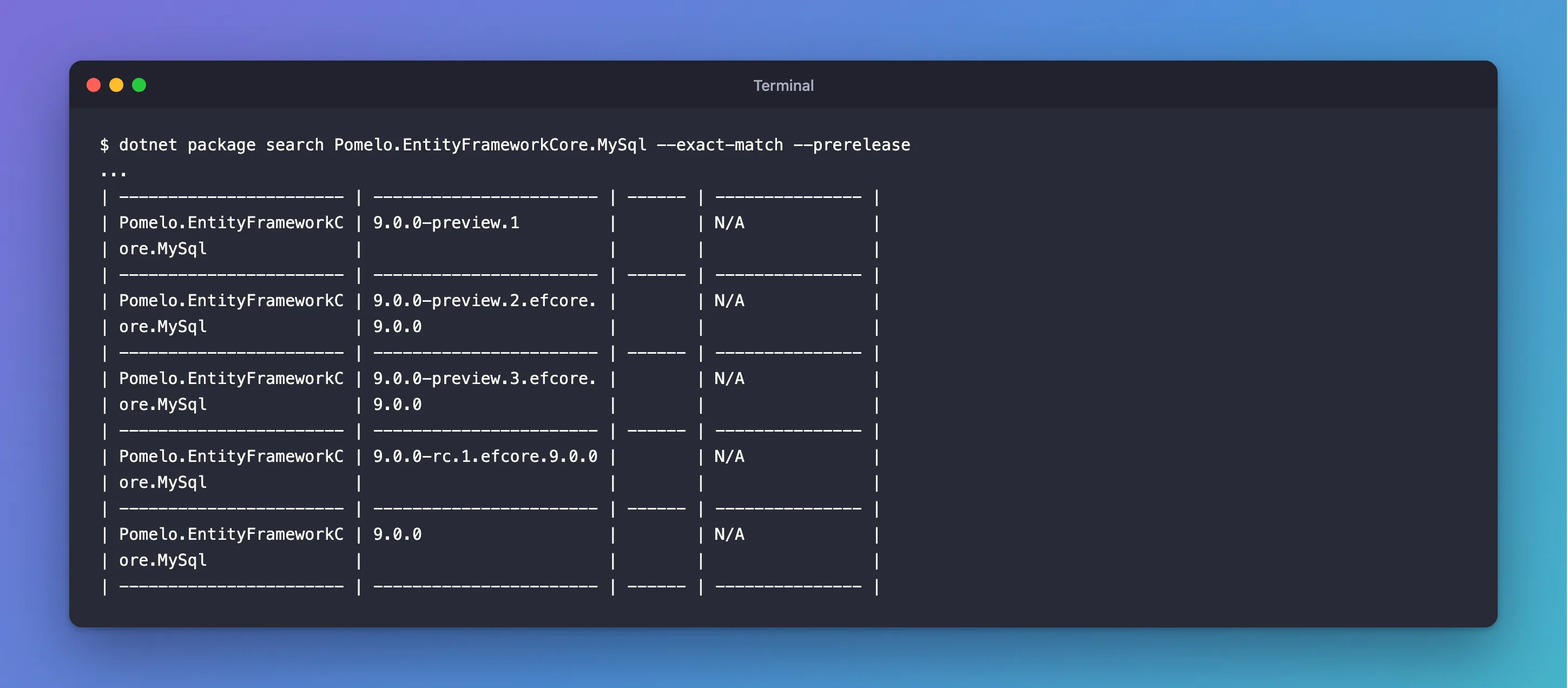
Nothing after 9.0.0, not even a preview: at the time of writing, Pomelo has no version for EF Core 10.
Step 4: Get JSON for Scripts
--format json (the default is table) is easier to read in a script, and doesn't wrap:
dotnet package search MySql.EntityFrameworkCore --exact-match --prerelease --format json
{
  "version": 2,
  "problems": [],
  "searchResult": [
    {
      "sourceName": "nuget.org",
      "packages": [
        {
          "id": "MySql.EntityFrameworkCore",
          "version": "3.1.10"
        },
        {
          "id": "MySql.EntityFrameworkCore",
          "version": "3.1.12"
        },
The last versions in that list were 9.0.20, 10.0.0-preview, 10.0.0-rc, 10.0.1, 10.0.7, 10.0.9, 10.0.12 and 11.0.0-preview: Oracle already publishes a preview for EF Core 11.
Common Mistakes
| Mistake | What happens | Do this instead |
|---|---|---|
Reading the first row as the newest version in --exact-match | Versions are listed oldest first | Read the last row |
Searching a partial name with --exact-match | No results | Search the keyword first, then the exact ID |
| Picking the package with the most downloads | Old packages have big totals, such as MySql.Data.EntityFrameworkCore 8.0.22 here | Check the latest version and the owner |
| Parsing the table in scripts | Wrapped IDs break the parsing | Use --format json |
FAQ
Does it search private feeds too?
It searches the package sources NuGet is configured with; here only nuget.org, shown in the Source: line. The command's help lists --source, "The package source to search", which can be repeated to search several feeds.
Is this the same as dotnet package add with no version?
No: search only reads. dotnet package add installs the newest stable version, which is the last non-preview row of --exact-match.
Conclusion
dotnet package search <term> searches nuget.org from the terminal; --exact-match lists every version of one package, oldest first; --prerelease adds previews; --format json makes the results easy to script. Here it showed in a minute that Oracle's MySQL provider supports EF Core 10 and Pomelo's doesn't yet.
