How to Schedule a Refresh of a Power BI Semantic Model

A semantic model keeps a copy of its data, so a report shows what the data looked like at the last refresh. A scheduled refresh updates that copy for you, every day at the times you choose. Here's how to set one up in the Power BI service.
Microsoft's Configure scheduled refresh lists the limits: Power BI Pro: Up to 8 scheduled refreshes per day, and up to 48 with Premium Per User or a capacity. The example refreshes Expenses, a model of a SharePoint list, every morning (How to Create a Semantic Model Without a Report in Power BI).
Step 1: Open the Model's Settings
In the workspace, hover over the semantic model, select More options (...), and select Settings. A panel opens with the model's name and sections such as About, Refresh and Data source credentials. Select Refresh:
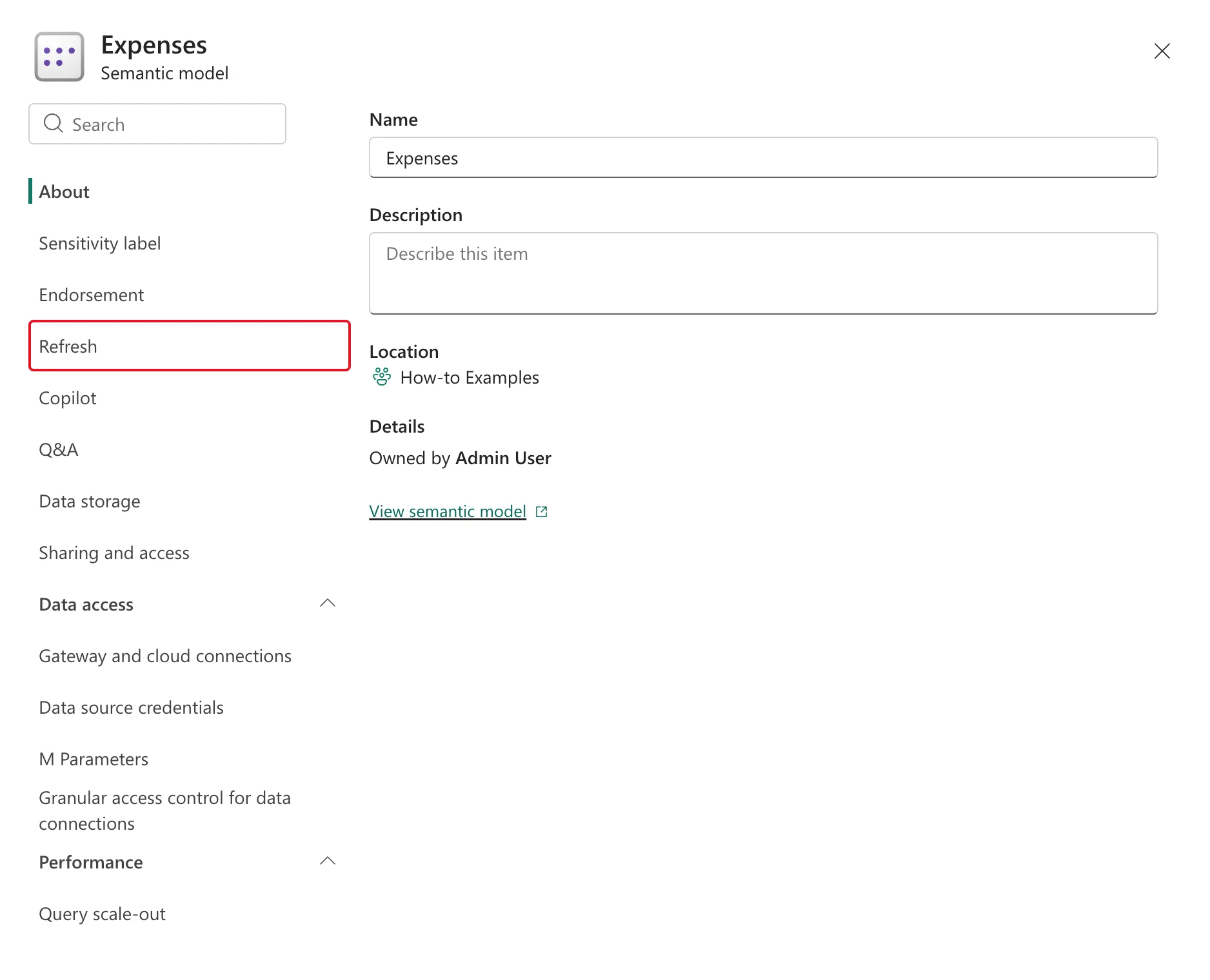
Step 2: Set the Schedule
Under Refresh, set:
| Setting | Example | Why |
|---|---|---|
| Time zone | (UTC) Dublin, Edinburgh, Lisbon, London | The times below are in this zone |
| Configure a refresh schedule | On | Turns the schedule on |
| Refresh frequency | Daily | Every day; Weekly picks days |
| Time | 9 : 00 AM | Add another time adds more, up to the license's limit |
| Send refresh failure and critical warning notifications to | Semantic model owner | Someone hears when a refresh fails |
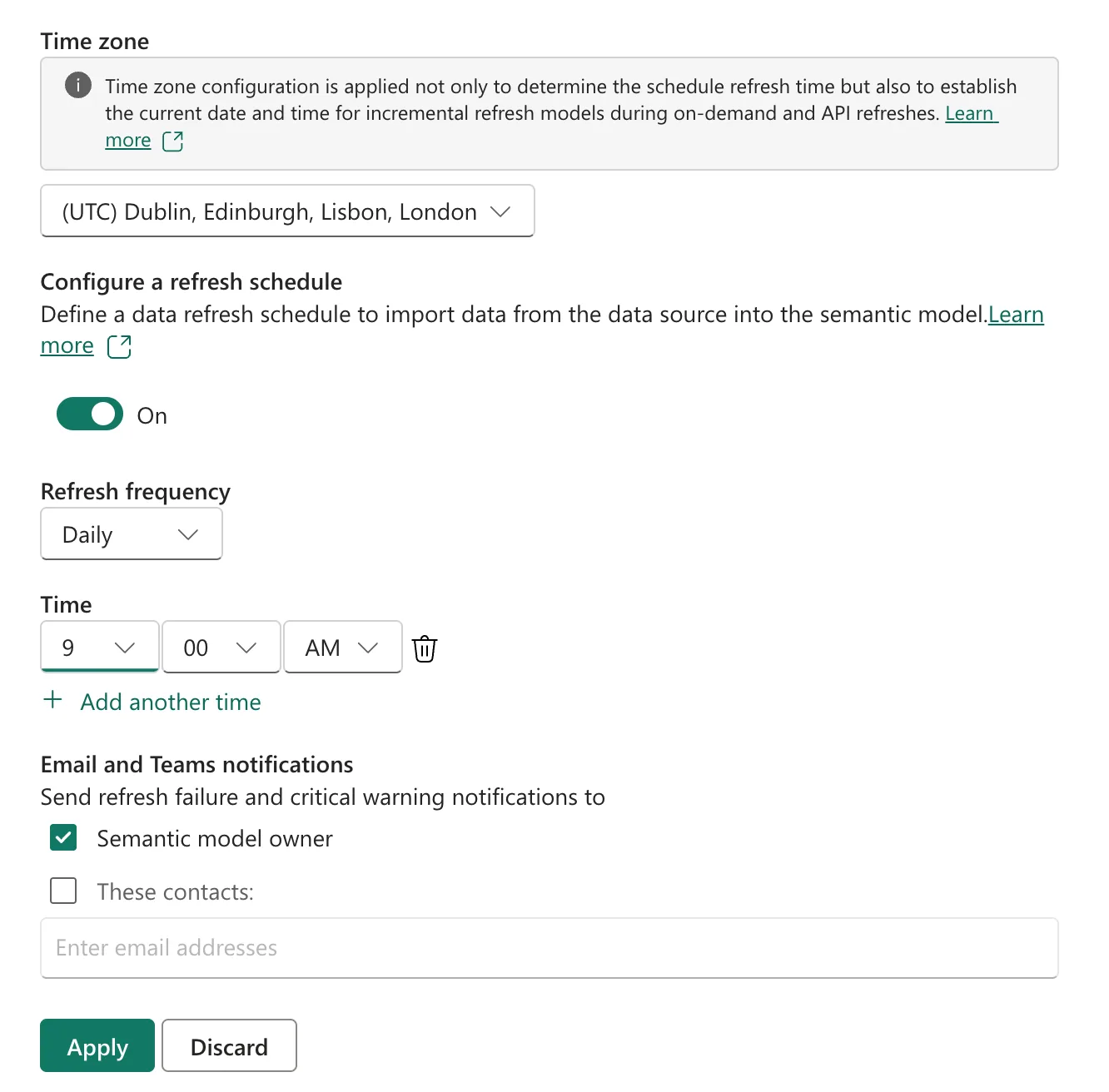
Select Apply.
Step 3: Check the Next Refresh
Back in the workspace's list, the model's Next refresh column shows the next scheduled time, here 09:00 the same day, next to Refreshed, the last refresh:

The refresh signs in to SharePoint with the model's saved connection. If a refresh fails, check Data source credentials in the same settings panel.
Common Mistakes
| Mistake | What happens | Do this instead |
|---|---|---|
| Leaving the time zone as UTC when you meant local time | Refreshes run an hour or more off | Pick your own time zone |
| Planning more refreshes than the license allows | The article's limit for Pro is 8 a day | Up to 8 times a day with Pro |
| Nobody gets failure emails | A stopped refresh goes unnoticed | Keep the owner ticked, or add contacts |
Troubleshooting
| Symptom | Likely cause | Fix |
|---|---|---|
| Next refresh is empty | The schedule is Off, or wasn't applied | Turn it On and Apply |
| The refresh fails | The saved credentials no longer work | Update Data source credentials |
| The report still shows old data | It ran before the change | Refresh now, from the model's refresh icon |
FAQ
Can I refresh right away?
Yes: select the refresh icon next to the model in the workspace list. Microsoft's Data refresh in Power BI explains on-demand and scheduled refreshes.
Why choose a time zone at all?
The times in the schedule are read in that time zone, and the settings' own note says it's also used to establish the current date and time for incremental refresh models.
Conclusion
Model More options (...) > Settings > Refresh: set the time zone, turn the schedule On, choose Daily and a time, keep the owner notified, and Apply. The example's Expenses model now refreshes every day at 09:00.
