How to Save User State in the Microsoft 365 Agents SDK in C#

Some things an agent should remember about a person, not a conversation: their name, their settings, their usual order. In the Microsoft 365 Agents SDK that's user state, and it follows the person into every conversation they have with your agent.
Syntax
turnState.User.SetValue(name, value);

T value = turnState.User.GetValue<T>(name, defaultValueFactory);
turnStateis theITurnStateevery handler receives.Useris the user scope: one set of values for each person, kept for whoever sent the activity.nameis the value's name in the scope, a string you choose.valueis what you store: a string, a number, a list or a class of your own, saved as JSON.Tis the type you read the value back as.defaultValueFactoryis optional: a function that returns the value to use when the person has none yet. Without it, a missing value comes back asnull, or as0for a number.
The SDK loads the sender's user state before your handlers run and saves it when the turn ends.
The Example
The agent for this post greets people, and remembers what they want to be called. call me Sam saves the name; any other message gets a greeting:
using System.Text.RegularExpressions;
using Microsoft.Agents.Builder;
using Microsoft.Agents.Builder.App;
using Microsoft.Agents.Builder.State;
using Microsoft.Agents.Core.Models;

namespace UserStateDemo;

public class GreeterAgent : AgentApplication
{
    private static readonly Regex NamePattern = new(@"^call me\s+(.{1,30})$", RegexOptions.IgnoreCase);

    public GreeterAgent(AgentApplicationOptions options) : base(options)
    {
        OnMessage(NamePattern, SaveNameAsync);
        OnActivity(ActivityTypes.Message, GreetAsync, rank: RouteRank.Last);
    }

    private async Task SaveNameAsync(ITurnContext turnContext, ITurnState turnState, CancellationToken cancellationToken)
    {
        string name = NamePattern.Match(turnContext.Activity.Text).Groups[1].Value.Trim();

        turnState.User.SetValue("name", name);

        await turnContext.SendActivityAsync($"Nice to meet you, {name}. I'll remember that.", cancellationToken: cancellationToken);
    }

    private async Task GreetAsync(ITurnContext turnContext, ITurnState turnState, CancellationToken cancellationToken)
    {
        string? name = turnState.User.GetValue<string>("name");

        string reply = name is null
            ? "Hello! What should I call you? Send **call me** and your name."
            : $"Hello again, {name}!";

        await turnContext.SendActivityAsync(reply, cancellationToken: cancellationToken);
    }
}
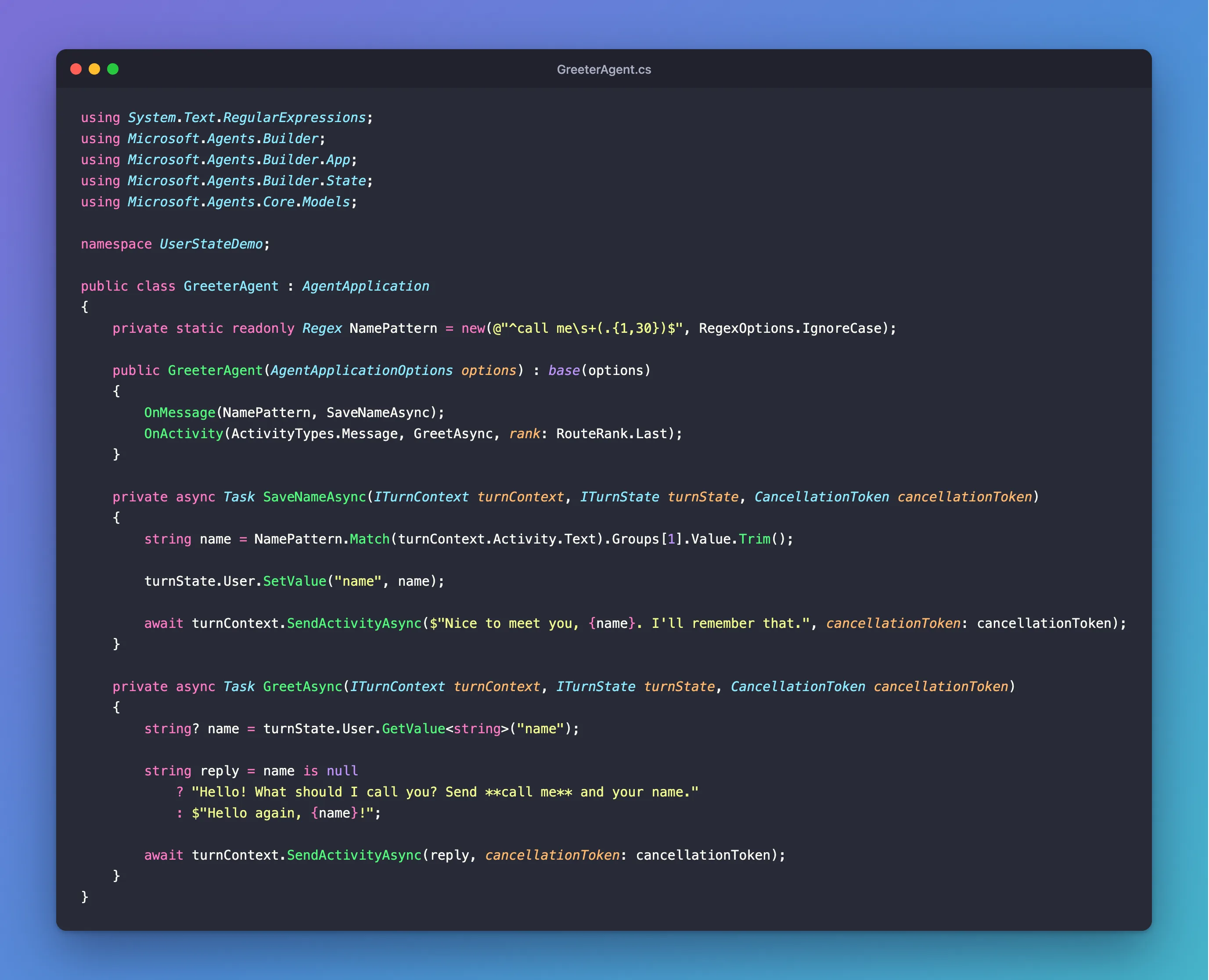
It's one class in an ASP.NET Core project with the Agents SDK, hosted with AddAgent<GreeterAgent>(), with MemoryStorage registered as its IStorage, and listening on port 3978.
Prerequisites
- The Microsoft 365 Agents Playground, to chat with the agent on your own machine.
agentsplayground --versionshould print0.2.30; if the command isn't found, install it withnpm install -g @microsoft/m365agentsplayground.
Step 1: Save the Value for the Person
turnState.User.SetValue("name", name);
turnState.User is the state of whoever sent this message. The SDK finds it with the channel and the sender's ID, so you never pass the person yourself.
Step 2: Read It Back
string? name = turnState.User.GetValue<string>("name");
There's no default here on purpose: for someone who hasn't said what to call them, GetValue<string> returns null, and the agent asks.
Step 3: Try It
Run the agent with dotnet run, then start the Agents Playground in a second terminal:
agentsplayground -e http://localhost:3978/api/messages -c emulator
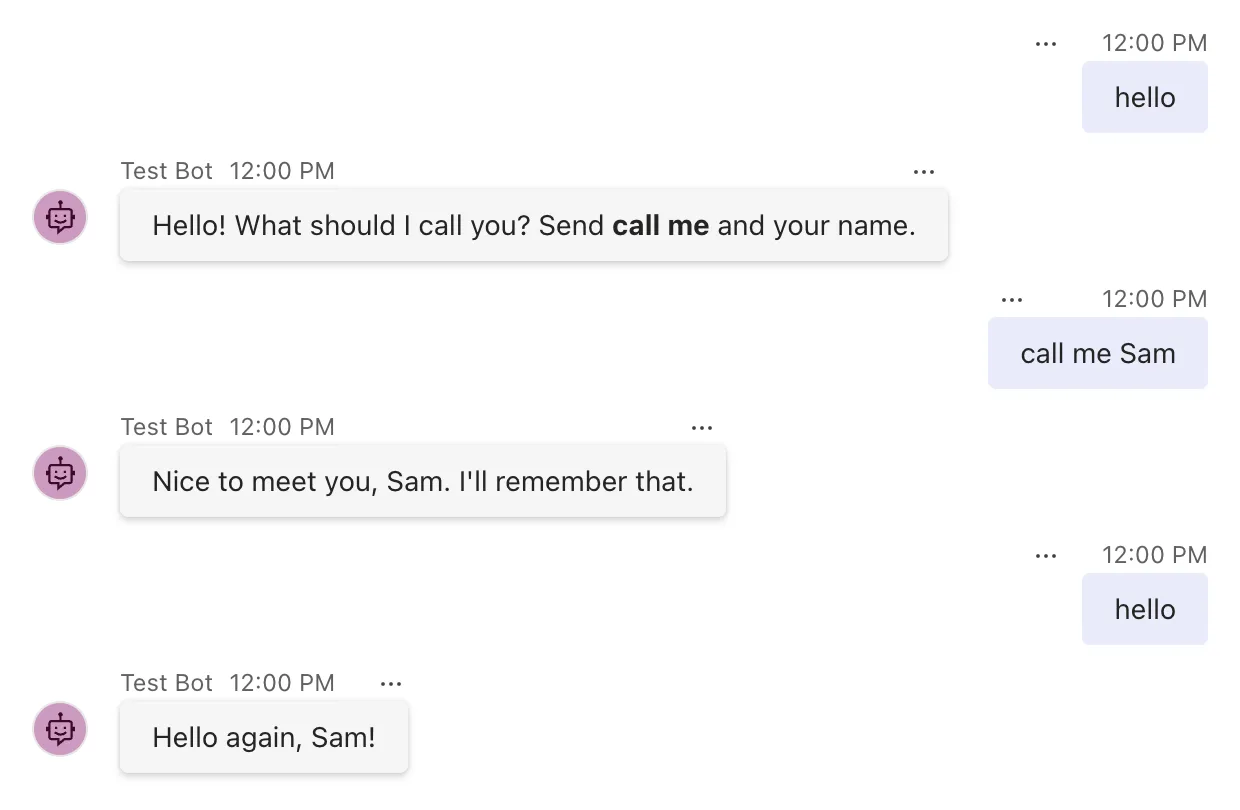
Send hello, call me Sam, then hello again:
Step 4: Try Another Conversation and Another Person
Select Group Chat in the Playground's list on the left. There, the agent only receives messages that mention it: type @, choose Test Bot, and send hello.
Then send hello as a second person. The Playground sends what you type as its made-up user, Alex Wilber, but its custom activity can send a message as someone else, such as its built-in user Megan Bowen, whose ID is user-id-1. Select Mock an Activity, then Custom activity, and change the from lines and the last line of the activity:
  "from": {
    "id": "user-id-1",
    "name": "Megan Bowen"
  },
  "type": "message",
  "text": "hello"
Select Send activity. How to Send a Custom Activity from the Microsoft 365 Agents Playground walks through that dialog in full. The group chat shows:
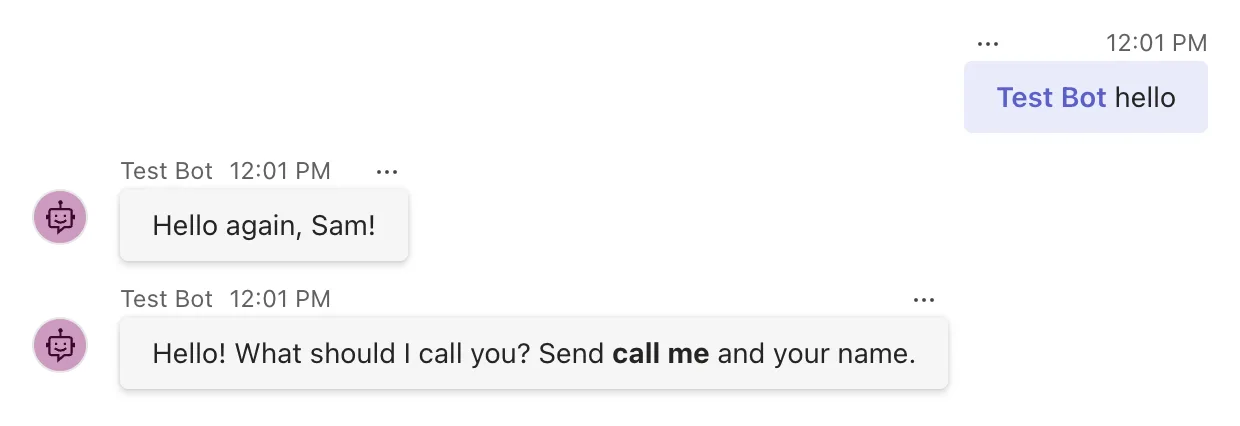
A custom activity doesn't appear in the chat as a message; only the agent's answer does. The two answers show both sides of user state:
- Alex is still Sam in the group chat. User state follows a person into every conversation with the agent.
- Megan gets asked for a name. User state belongs to one person, and Megan hasn't given one yet.
Common Mistakes
| Mistake | What happens | Do this instead |
|---|---|---|
| Keeping a person's setting in conversation state | Everyone in a group chat shares it, and it's missing in the person's other chats | Use turnState.User |
| Expecting user state to follow a person to another channel | The same person on another channel is a different user | Treat each channel's user state as separate |
Reading a number without a default and testing for null | A missing number comes back as 0, not null | Check turnState.User.HasValue(name) first, or pass a default |
| Storing more than the agent needs about people | Personal data you have to protect and delete on request | Keep only what the agent uses |
Troubleshooting
| Symptom | Likely cause | Fix |
|---|---|---|
| The agent asks for the name again in another chat | The value was saved in conversation state | Use turnState.User |
| The name is gone after the agent restarts | MemoryStorage keeps state only in the agent's memory | Expected; use durable storage in production |
| Someone else's name appears | The value was saved in conversation state, or in a static field | User state is kept per sender; save the value there |
FAQ
How does the SDK know who the user is?
From the activity: the channel's ID and the sender's ID, turnContext.Activity.From.Id. The user state is saved under a key made of both, such as emulator/users/user-id-0 in the Playground.
Does user state follow a person from Teams to a website?
No. Microsoft's state documentation says it plainly: user state and conversation state are scoped by channel. The same person on two channels has two separate user states.
How do I delete a person's user state?
Call await turnState.User.DeleteStateAsync(turnContext, cancellationToken) in a turn from that person. It removes their user state from storage. Anything about them in conversation state, such as their name in a shared list, stays where it is.
Conclusion
User state is the person's own corner of an agent's memory: turnState.User.SetValue(name, value) to keep something about whoever sent the message, and turnState.User.GetValue<T>(name) to read it in any conversation they have with the agent, on the same channel. Everyone else gets their own.
Additional Resources
- Manage state — user state, conversation state and how their keys are built.
- AgentApplication in Microsoft 365 Agents SDK: Use turn state — the state scopes in code.
- UserState class — the API reference for the user scope.
