How to Save Conversation State in the Microsoft 365 Agents SDK in C#

An agent built with the Microsoft 365 Agents SDK forgets everything between messages, unless you keep it somewhere. For anything that belongs to a conversation, such as a running total, a list, or how far a conversation has got, that place is conversation state.
Syntax
T value = turnState.Conversation.GetValue<T>(name, defaultValueFactory);

turnState.Conversation.SetValue(name, value);
turnStateis theITurnStateevery handler receives. It holds the turn's state, grouped into scopes.Conversationis the conversation scope: one set of values per conversation, shared by everyone in it.Tis the type of the value: a number, a string, a list or a class of your own. Values are saved as JSON, andGetValue<T>turns them back intoT.nameis the value's name in the scope, a string you choose.defaultValueFactoryis optional: a function that returns the value to use when there isn't one yet.GetValuekeeps what it returns as the value. Without it, a missing value comes back asnull, or as0for a number.SetValue(name, value)stores the value. Nothing is written to storage yet: the SDK saves the conversation's state when the turn ends.
The Example
The agent for this post keeps a tab. Send it add 4.50, and it adds 4.50 to the conversation's total; send tab, and it tells you the total:
using System.Globalization;
using System.Text.RegularExpressions;
using Microsoft.Agents.Builder;
using Microsoft.Agents.Builder.App;
using Microsoft.Agents.Builder.State;

namespace ConversationStateDemo;

public class TabAgent : AgentApplication
{
    private static readonly Regex AddPattern = new(@"^add\s+(\d{1,5}(?:\.\d{1,2})?)$", RegexOptions.IgnoreCase);

    public TabAgent(AgentApplicationOptions options) : base(options)
    {
        OnMessage(AddPattern, AddAsync);
        OnMessage("tab", ShowTabAsync);
    }

    private async Task AddAsync(ITurnContext turnContext, ITurnState turnState, CancellationToken cancellationToken)
    {
        decimal amount = decimal.Parse(AddPattern.Match(turnContext.Activity.Text).Groups[1].Value, CultureInfo.InvariantCulture);

        decimal tab = turnState.Conversation.GetValue<decimal>("tab", () => 0m);
        tab += amount;
        turnState.Conversation.SetValue("tab", tab);

        await turnContext.SendActivityAsync($"Added {amount:0.00}. The tab is now **{tab:0.00}**.", cancellationToken: cancellationToken);
    }

    private async Task ShowTabAsync(ITurnContext turnContext, ITurnState turnState, CancellationToken cancellationToken)
    {
        decimal tab = turnState.Conversation.GetValue<decimal>("tab", () => 0m);

        await turnContext.SendActivityAsync($"The tab is **{tab:0.00}**.", cancellationToken: cancellationToken);
    }
}
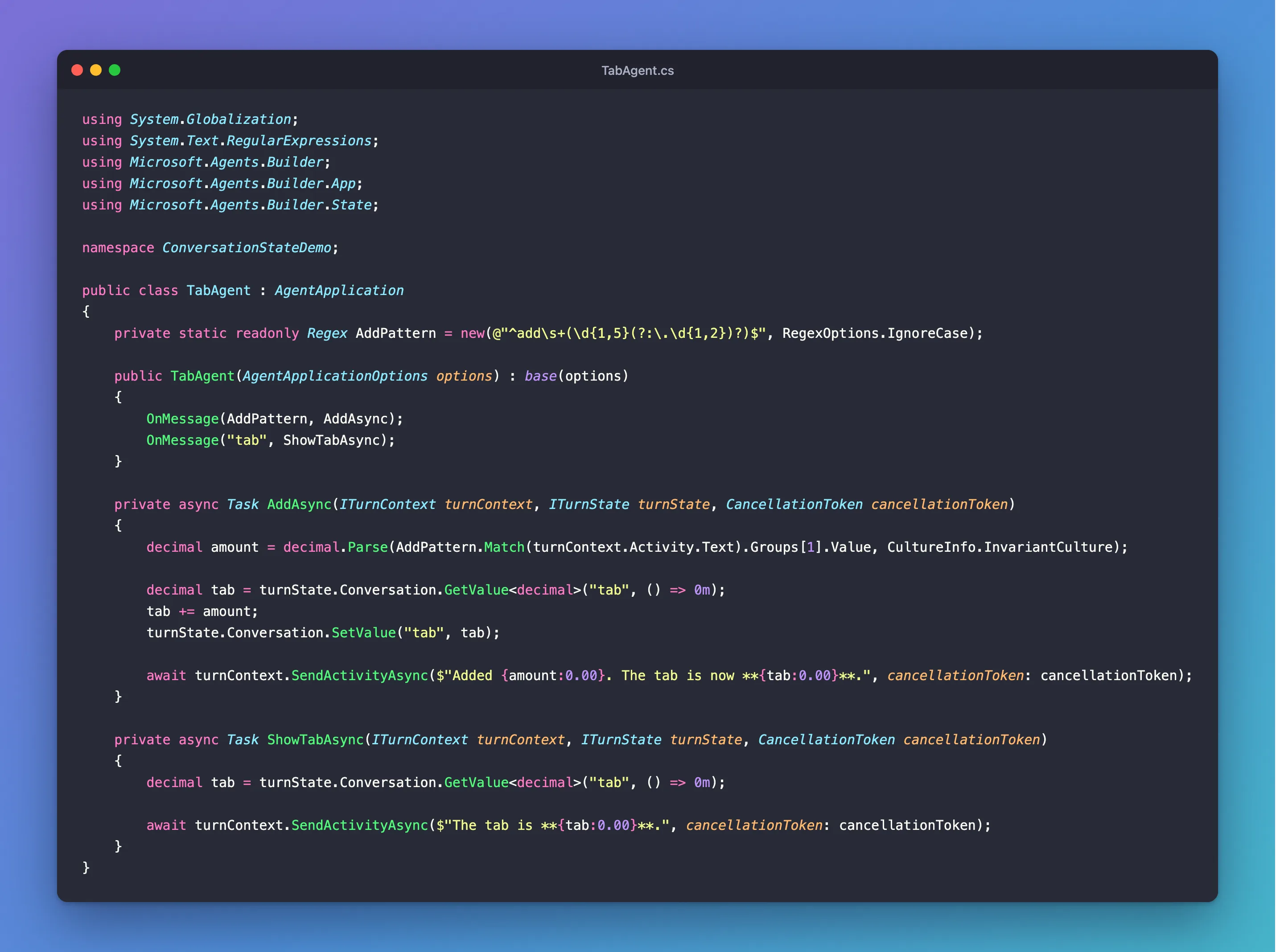
It's one class in an ASP.NET Core project with the Agents SDK, hosted with AddAgent<TabAgent>(), with MemoryStorage registered as its IStorage, and listening on port 3978.
Prerequisites
- The Microsoft 365 Agents Playground, to chat with the agent on your own machine.
agentsplayground --versionshould print0.2.30; if the command isn't found, install it withnpm install -g @microsoft/m365agentsplayground.
Step 1: Read, Change and Write the Value
The whole pattern is in AddAsync:
        decimal tab = turnState.Conversation.GetValue<decimal>("tab", () => 0m);
        tab += amount;
        turnState.Conversation.SetValue("tab", tab);
GetValue<decimal>("tab", () => 0m)reads the conversation'stab. In a new conversation there isn't one yet, so it calls() => 0mand starts the tab at zero.tab += amountchanges the copy in your code.SetValue("tab", tab)puts the new total back in the conversation's state, which the SDK saves when the turn ends.
ShowTabAsync only reads the value, with the same default, so a new conversation's tab shows 0.00.
Step 2: Try It
Run the agent with dotnet run, then start the Agents Playground in a second terminal:
agentsplayground -e http://localhost:3978/api/messages -c emulator
Send add 4.50, add 3, then tab:
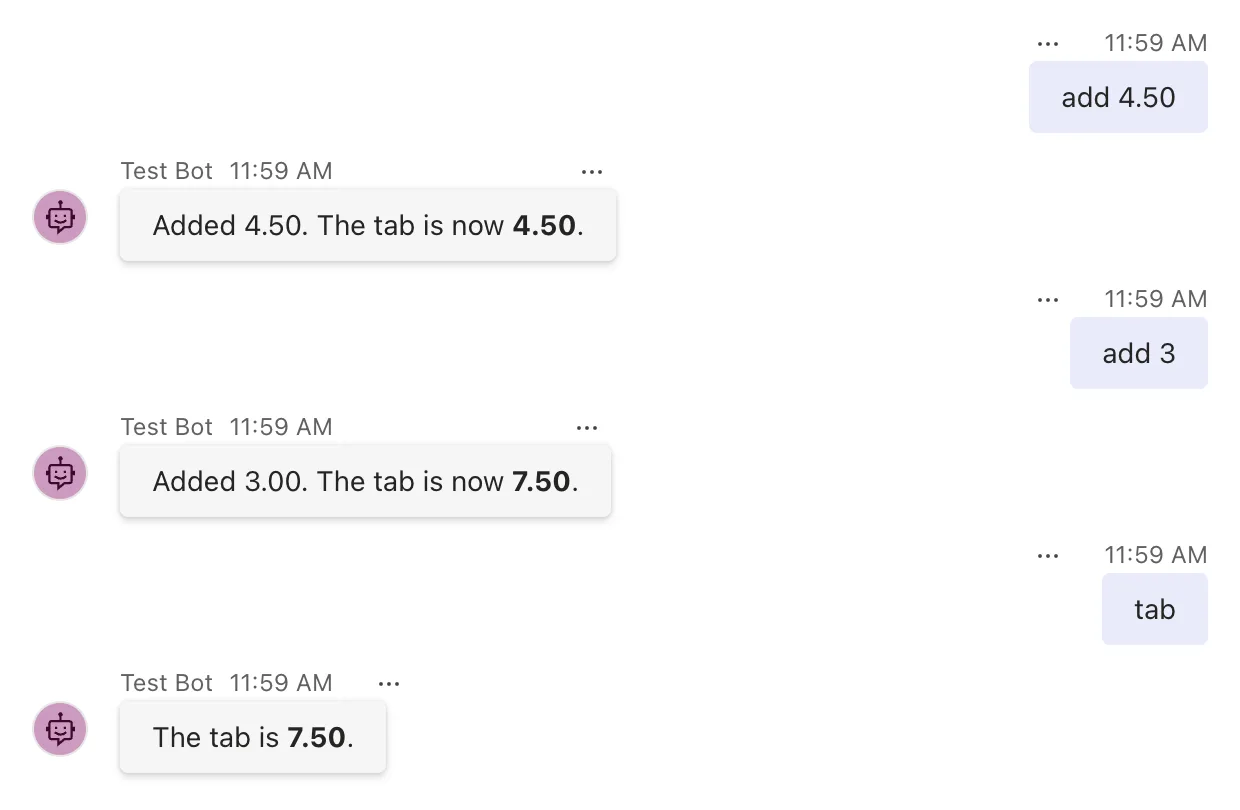
Each message is a separate turn, handled by a brand-new instance of TabAgent, and the total still adds up: it came from the conversation's state each time.
Step 3: Check Another Conversation
Select Group Chat in the Playground's list on the left. In a group chat the agent only receives messages that mention it, so type @, choose Test Bot, and send tab:
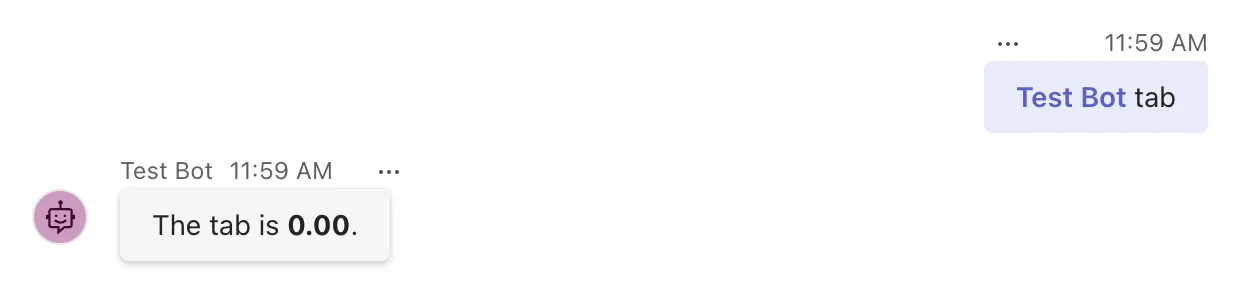
The group chat is another conversation, so it has a tab of its own, still at zero. Everyone in the group chat shares that one tab, and the personal chat's 7.50 is untouched.
Common Mistakes
| Mistake | What happens | Do this instead |
|---|---|---|
| Keeping the total in a field of the agent class | It's back to zero on the next message | Keep it in turnState.Conversation |
Changing the value and forgetting SetValue | A number or a string you changed isn't saved | Write it back with SetValue |
turnState.SetValue("tab", tab) without a scope | A name without a scope goes to temp state, which is never saved | Use turnState.Conversation.SetValue, or the path "conversation.tab" |
| Using conversation state for something about one person | Everyone in a group chat sees and changes it | Use user state for a person's own values |
Troubleshooting
| Symptom | Likely cause | Fix |
|---|---|---|
| The value is back to its default on every message | It's set in a field, or without a scope | Use turnState.Conversation |
| The value is gone after the agent restarts | MemoryStorage keeps state only in the agent's memory | Expected; use durable storage, such as Azure Blob Storage or Azure Cosmos DB, in production |
| Another chat shows a different value | Each conversation has its own conversation state | That's how the scope works; use user state to follow a person |
FAQ
Where is the value stored?
In the agent's IStorage, under a key made of the channel and the conversation's ID, such as emulator/conversations/ followed by the ID. With MemoryStorage, that's the agent's own memory.
Can I keep a list or my own class?
Yes. The value is saved as JSON, so lists, dictionaries, records and plain classes with public properties all work. Read it back with the same type: GetValue<List<string>>, for example.
What happens when two messages arrive at the same time?
Both turns load the same state, and the save that comes second can fail with an EtagException. Fixed: EtagException: AgentState 'conversation' could not save key because another turn updated the state first shows it and how to handle it.
Conclusion
Conversation state is two calls: turnState.Conversation.GetValue<T>(name, defaultValueFactory) to read a value, with a default for a new conversation, and turnState.Conversation.SetValue(name, value) to write it back. The SDK loads the conversation's values before your handler runs and saves them when the turn ends, separately for every conversation.
Additional Resources
- Manage state — state scopes and storage in the Agents SDK.
- AgentApplication in Microsoft 365 Agents SDK: Use turn state — the conversation, user and temp scopes in code.
- ConversationState class — the API reference for the conversation scope.
