How to Run the Aspire Dashboard in Docker

Microsoft publishes the Aspire Dashboard as a container image, so one docker run command starts it with nothing else to install. Version 17.0.0 of mcr.microsoft.com/aspire/dashboard serves the dashboard on port 18888 of your computer and takes OpenTelemetry on ports 4317 and 4318.
The Aspire Dashboard is a web page for OpenTelemetry logs, traces and metrics, and it runs without an Aspire app. Microsoft's documentation gives two ways to start it on its own, the Aspire CLI and a container: The dashboard also ships as a standalone container image. Use this option when a container workflow fits your environment or you want to manage dashboard hosting with your existing container tooling.
The image has moved from mcr.microsoft.com/dotnet/aspire-dashboard to mcr.microsoft.com/aspire/dashboard, and the old repository stays on Aspire 13: Aspire 13 images continue to be published to the legacy repositories for servicing and security updates, and Legacy latest stays on the Aspire 13 line. The documentation also advises a version tag over latest: The latest tag follows the latest image in its repository; choose a published version tag to stay on a version line. This post pins 17.0.0.
Syntax
docker run --rm -it -p <ui-port>:18888 -p <grpc-port>:18889 -p <http-port>:18890 -d --name <name> mcr.microsoft.com/aspire/dashboard:<version>
| Part | What it does |
|---|---|
docker run | Create and run a new container from an image, pulling the image first if your computer doesn't have it |
--rm | Automatically remove the container and its associated anonymous volumes when it exits |
-it | Two options together: -i to Keep STDIN open even if not attached, and -t to Allocate a pseudo-TTY. Microsoft's command uses both |
-p <ui-port>:18888 | Publishes the container's port 18888, the dashboard's page, on port <ui-port> of your computer |
-p <grpc-port>:18889 | Publishes the container's OTLP/gRPC port, 18889, on <grpc-port> |
-p <http-port>:18890 | Publishes the container's OTLP/HTTP port, 18890, on <http-port> |
-d | Run container in background and print container ID |
--name <name> | Assign a name to the container, so later commands can use the name instead of the ID |
mcr.microsoft.com/aspire/dashboard:<version> | The image, and the version tag to run |
In -p, the number before the colon is on your computer and the one after it is in the container. Docker's reference reads its own example, -p 127.0.0.1:80:8080/tcp, the same way: it binds port 8080 of the container to TCP port 80 on 127.0.0.1 of the host. Without an address in front, as in this post, Docker publishes the port on all interfaces (address 0.0.0.0) by default. These ports are externally accessible.
The Example
The example uses the ports from Microsoft's documentation: the page on 18888, and OTLP on 4317 and 4318, the default addresses of OpenTelemetry's exporters (http://localhost:4317 for gRPC and http://localhost:4318 for HTTP). It starts version 17.0.0 with Docker 29.9.3 on a Mac, signs in, receives a trace from a small ASP.NET Core app, and stops the container.
Prerequisites
- Docker, running.
docker --versionprints the version you have. - Ports 18888, 4317 and 4318 free on your computer. A dashboard started with the Aspire CLI uses the same three, so stop it first.
Step 1: Start the Container
- macOS / Linux
- Windows (PowerShell)
docker run --rm -it \
    -p 18888:18888 \
    -p 4317:18889 \
    -p 4318:18890 \
    -d \
    --name aspire-dashboard \
    mcr.microsoft.com/aspire/dashboard:17.0.0
The \ at the end of a line continues the command on the next one.
docker run --rm -it `
    -p 18888:18888 `
    -p 4317:18889 `
    -p 4318:18890 `
    -d `
    --name aspire-dashboard `
    mcr.microsoft.com/aspire/dashboard:17.0.0
The backtick at the end of a line continues the command on the next one.
The three mappings put the dashboard's page on http://localhost:18888, and its OTLP ports, 18889 and 18890 inside the container, on 4317 and 4318 of your computer. The first time, Docker downloads the image:
Unable to find image 'mcr.microsoft.com/aspire/dashboard:17.0.0' locally
17.0.0: Pulling from aspire/dashboard
e983cd7922bd: Pull complete
baa8d93892a6: Pull complete
b8145ebb45b5: Pull complete
0726a6682c3c: Pull complete
1c4044ecdc2c: Pull complete
Digest: sha256:69b9b095610997cc2b5a3c265acd5c9f8d6b6b5040ef8cfdccc8a66efff0252d
Status: Downloaded newer image for mcr.microsoft.com/aspire/dashboard:17.0.0
11b8d88cf228280444563990e5eabf9a091dd9e75e8fd5cd763b8dcabbafaadb
Docker didn't have the image, so it pulled it from Microsoft Container Registry in five layers. The Digest identifies this exact image, and Aspire's documentation suggests pinning by digest when you need an immutable image reference. The last line is the ID of the new container, which -d prints before Docker hands the terminal back. Yours is different.
Step 2: Get the Sign-In Link from the Logs
The dashboard asks for a token when you open it, and in a container the token is in the log. The documentation: When the dashboard is run from a standalone container, the login token is printed to the container logs. docker logs prints what the container has logged so far:
docker logs aspire-dashboard
info: Aspire.Dashboard.DashboardWebApplication[0]
      Aspire dashboard version: 17.0.0+2d325b13709752ba6d9a943635c5e2940a2530c0
warn: Microsoft.AspNetCore.DataProtection.Repositories.FileSystemXmlRepository[60]
      Storing keys in a directory '/home/app/.aspnet/DataProtection-Keys' that may not be persisted outside of the container. Protected data will be unavailable when container is destroyed. For more information go to https://aka.ms/aspnet/dataprotectionwarning
warn: Microsoft.AspNetCore.DataProtection.KeyManagement.XmlKeyManager[35]
      No XML encryptor configured. Key {00000000-0000-0000-0000-000000000000} may be persisted to storage in unencrypted form.
info: Aspire.Dashboard.DashboardWebApplication[0]
      Now listening on: http://[::]:18888
info: Aspire.Dashboard.DashboardWebApplication[0]
      OTLP/gRPC listening on: http://[::]:18889
info: Aspire.Dashboard.DashboardWebApplication[0]
      OTLP/HTTP listening on: http://[::]:18890
warn: Aspire.Dashboard.DashboardWebApplication[0]
      OTLP server is unsecured. Untrusted apps can send telemetry to the dashboard. For more information, visit https://go.microsoft.com/fwlink/?linkid=2267030
info: Aspire.Dashboard.DashboardWebApplication[0]
      Login to the dashboard at http://localhost:18888/login?t=<token>
info: Aspire.Dashboard.DashboardWebApplication[0]
      Aspire Dashboard

            - Dashboard:  http://localhost:18888
            - Login URL:  http://localhost:18888/login?t=<token>
            - OTLP/gRPC:  http://localhost:18889
            - OTLP/HTTP:  http://localhost:18890

info: Aspire.Dashboard.DashboardWebApplication[0]
      Dashboard is running in a container. Access the dashboard from the host using port forwarding.
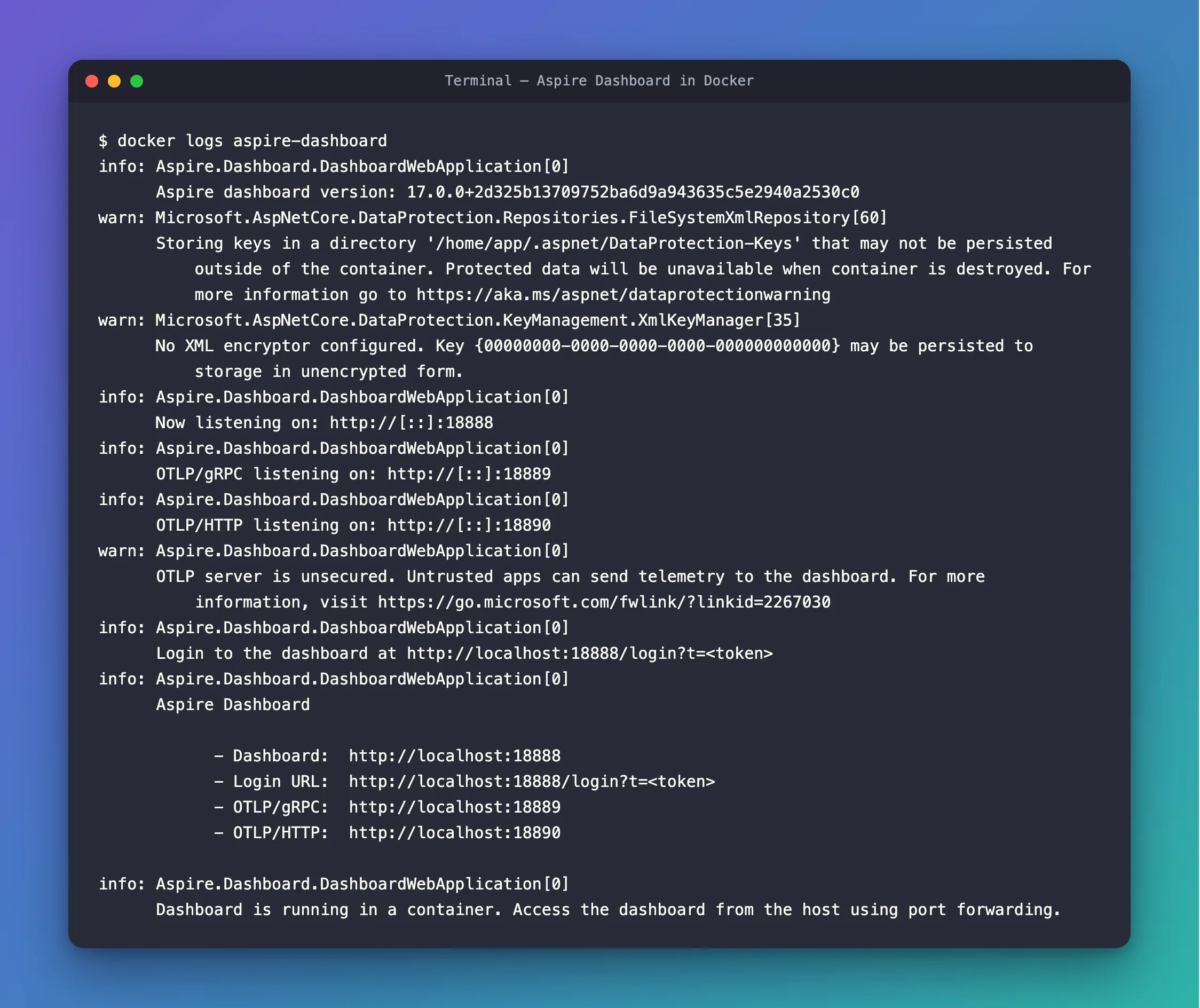
The Login URL is the sign-in link, and I replaced my token with <token>. The addresses in the log are the ones inside the container, OTLP/gRPC on 18889 and OTLP/HTTP on 18890, and the last line says so: Access the dashboard from the host using port forwarding. From your computer, use the published ports: 18888 for the page, and 4317 and 4318 for telemetry.
The warn line OTLP server is unsecured means that any app that can reach ports 4317 and 4318 can send this dashboard telemetry.
What the Two Data Protection Warnings Mean
The other two warn lines come from ASP.NET Core Data Protection. The dashboard, an ASP.NET Core app, keeps your sign-in in a cookie (When the token is successfully authenticated an auth cookie is persisted to the browser), and ASP.NET Core protects such cookies with Data Protection keys. Its documentation: The ASP.NET Core Data Protection stack is used by several ASP.NET Core middlewares, including authentication middleware (for example, cookie middleware).
- Storing keys in a directory '/home/app/.aspnet/DataProtection-Keys' that may not be persisted outside of the container. The keys live inside the container, in the home folder of the user it runs as, and
--rmdeletes the container when it stops. ASP.NET Core's guidance for keys that must outlive a container is a folder that's a Docker volume that persists beyond the container's lifetime or an external provider. For this dashboard, losing them only means signing in again. - No XML encryptor configured. Key … may be persisted to storage in unencrypted form. The key is stored as a plain file in that folder. ASP.NET Core's documentation: If no
IXmlEncryptoris configured, the unencrypted document is persisted in theIXmlRepository. The file is inside the container and goes with it.
Both are warnings, and the dashboard works with them. A new container makes new keys, and the old sign-in cookie can't be read with them: when my browser brought a cookie from an earlier dashboard on the same address, this container logged FrontendComposite was not authenticated. Failure message: Unprotect ticket failed, and the Login URL signed me in as usual.
Step 3: Sign In
Open the Login URL in your browser, token included. The dashboard opens on Structured logs, empty, under a red Endpoint is unsecured banner, the same warning as in the log, and a welcome note:
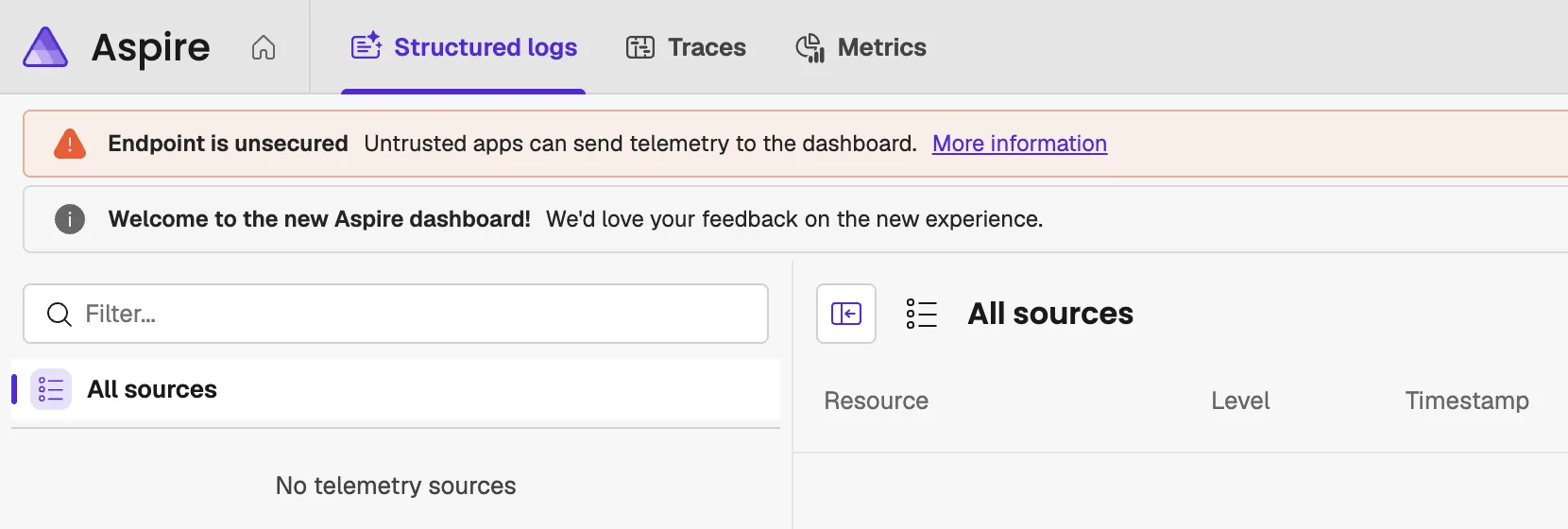
The token is new each time a container starts, so take the link from the logs of the container that's running.
Step 4: Send It Telemetry
Any app that sends OpenTelemetry to http://localhost:4317 (gRPC) or http://localhost:4318 (HTTP) now shows up: Docker forwards those ports to 18889 and 18890 in the container. I ran HelloTelemetry, the small ASP.NET Core app from How to Send ASP.NET Core Logs, Traces and Metrics to the Aspire Dashboard with OpenTelemetry, with OTEL_EXPORTER_OTLP_ENDPOINT set to http://localhost:4317, and called its /hello endpoint once. The app answers it by calling api.nuget.org, and it traces both incoming requests and outgoing HTTP calls.
The request arrived on the Traces page: HelloTelemetry: GET /hello, with 2 spans, in 0.82 seconds:

The app sent its telemetry to port 4317 on the computer, and Docker passed it to the dashboard on port 18889 inside the container.
Step 5: Stop the Container
docker stop aspire-dashboard
aspire-dashboard
docker stop prints the name back once the container has stopped. Docker's reference describes how it stops: The main process inside the container will receive SIGTERM, and after a grace period, SIGKILL. Because of --rm, the container is also gone. Listing all containers with that name shows only the header:
docker ps -a --filter name=aspire-dashboard
CONTAINER ID IMAGE COMMAND CREATED STATUS PORTS NAMES
-a means Show all containers (default shows just running), so a stopped container would be listed too, and --filter name=aspire-dashboard keeps the ones with that name: there are none. The telemetry went with the container, because The standalone dashboard defaults to no persistence and telemetry is lost when the dashboard shuts down.
Step 6: Remove the Image
The image stays on your computer after the container is gone, so the next docker run uses it without downloading it again: by default, Docker pulls an image only if it was not found in the image cache. When you no longer need the dashboard, remove the image to free its disk space:
docker image rm mcr.microsoft.com/aspire/dashboard:17.0.0
Untagged: mcr.microsoft.com/aspire/dashboard:17.0.0
Untagged: mcr.microsoft.com/aspire/dashboard@sha256:69b9b095610997cc2b5a3c265acd5c9f8d6b6b5040ef8cfdccc8a66efff0252d
Deleted: sha256:3a8c2960d0e35f7a08d64ae903b53614e9ec048547a06a75471623c3f67f9571
Deleted: sha256:187b9dad46e0c178327d67281b7941bfad3f9b33aafc975bff83faac6ca07524
Deleted: sha256:7c423d61245380dbf3e7ca076d38ac36637cb59d27a7456d805bd84b85fad4d8
Deleted: sha256:bdf4af90dbcf6919d66fb8b0817d2465119f67da7331be9da26c72ac392247d3
Deleted: sha256:f53e6663dd4799ce402830e169d60eb9bd2704db50649175828af7e930298861
Deleted: sha256:78c456c2adbdb29a4f61bbf308d10af59eacdf23f4ca4a82fb8e25e797124759
The two Untagged lines remove the image's names: its tag, 17.0.0, and its digest, the one Step 1 printed. The Deleted lines remove the image and the layers it was made of. On my Mac, docker image ls had listed the image at 167 MB.
docker image rm removes an image from your computer, and Docker's reference adds: If the tag is the only one for the image, both the image and the tag are removed. It doesn't touch the registry (This does not remove images from a registry), so a later docker run downloads the image again.
Common Mistakes
| Mistake | What happens | Do this instead |
|---|---|---|
Pulling mcr.microsoft.com/dotnet/aspire-dashboard | You get the Aspire 13 line: the old repository's latest stays there | Use mcr.microsoft.com/aspire/dashboard |
Using the latest tag | Your dashboard changes version when a new image comes out | Pin a version tag, such as 17.0.0 |
| Sending telemetry to the ports in the log, 18889 or 18890 | Those are the container's ports, not your computer's | Send to 4317 (gRPC) or 4318 (HTTP) |
Expecting telemetry to survive docker stop | --rm removes the container, and the dashboard keeps no telemetry by default | Use the persistence options in Aspire's documentation if you need history |
| Using a sign-in link from an earlier container | Each container has its own token and its own keys | Take the Login URL from the running container's logs |
FAQ
Why does the dashboard ask me to sign in again after a restart?
A new container has a new token and new Data Protection keys, and the cookie from the old one can't be read with them. Open the Login URL from the new container's logs.
Can I run it without the sign-in?
Aspire's documentation names an environment variable for the container: set the ASPIRE_DASHBOARD_UNSECURED_ALLOW_ANONYMOUS environment variable to true. It switches authentication off, with the same risks as the CLI's --allow-anonymous: Only allow anonymous access in trusted local development environments, and don't expose an anonymously accessible dashboard or its endpoints to an untrusted network. With ports published on all interfaces, as here, that matters. I kept the sign-in.
Can I keep the telemetry between runs?
Yes, with a Docker volume and the dashboard's persistence settings. The documentation: For a dashboard container more configuration is required because the local filesystem is ephemeral. You must mount persistent storage. Its Persist data between container runs section has the full command.
Is it the same dashboard as the one the Aspire CLI starts?
It's the same version, 17.0.0, and the same pages. The CLI needs Node.js instead of Docker, and it listens on 4317 and 4318 directly, with no mapping.
Conclusion
docker run --rm -it -p 18888:18888 -p 4317:18889 -p 4318:18890 -d --name aspire-dashboard mcr.microsoft.com/aspire/dashboard:17.0.0 starts the Aspire Dashboard in Docker, with its page on 18888 and OpenTelemetry on 4317 and 4318 of your computer. docker logs aspire-dashboard gives you the sign-in link, the two Data Protection warnings only mean you sign in again after a restart, and docker stop ends it, removing the container with it. docker image rm frees the space when you're done.
Additional Resources
- Standalone Aspire dashboard — the container command, the image repositories, signing in, and persistence.
- Aspire dashboard configuration — the settings a container takes as environment variables.
- docker container run — every option of
docker run, including-p. - Configure ASP.NET Core Data Protection — persisting keys when an app runs in Docker.
- Key management extensibility in ASP.NET Core — what happens to keys without an XML encryptor.
