How to Return an Error from Action.Execute in the Microsoft 365 Agents SDK in C#

When an Action.Execute button sends something your agent can't accept, answer with an error and a reason. The chat app shows the reason under the card, in red, and the person can fix their input and try again. In the Microsoft 365 Agents SDK, AdaptiveCardInvokeResponseFactory.BadRequest builds that answer.
Syntax
return AdaptiveCardInvokeResponseFactory.BadRequest(message);
BadRequest(message)builds an answer withstatusCode400,typeapplication/vnd.microsoft.error, and a value with the codeBadRequestand yourmessage.- Return it from an
Action.Executehandler, one you registered withAdaptiveCards.OnActionExecute.
The factory has other errors too: NotSupported(message), also 400; InternalError(message), a 500; and Error(statusCode, code, message) for your own. Microsoft's Universal Action model defines the 400: The incoming request was invalid.
The Example
The agent for this post answers order with a sandwich order card: one number input, How many sandwiches?, and an Order button. The agent accepts 1 to 10. Anything else gets the error Order between 1 and 10 sandwiches., and an accepted order gets a short message. The agent is one class in an ASP.NET Core project with the Agents SDK, hosted with AddAgent<OrderAgent>() and listening on port 3978.
Prerequisites
- The Microsoft 365 Agents Playground, to chat with the agent on your own machine.
agentsplayground --versionshould print0.2.30; if the command isn't found, install it withnpm install -g @microsoft/m365agentsplayground.
Step 1: Check What the Card Sent
using System.Text.Json.Nodes;
using Microsoft.Agents.Builder;
using Microsoft.Agents.Builder.App;
using Microsoft.Agents.Builder.App.AdaptiveCards;
using Microsoft.Agents.Builder.State;
using Microsoft.Agents.Core.Models;
using Microsoft.Agents.Core.Serialization;

namespace SandwichOrder;

public class OrderAgent : AgentApplication
{
    private const string OrderCardJson = """
        {
          "type": "AdaptiveCard",
          "version": "1.5",
          "body": [
            { "type": "TextBlock", "text": "Sandwich order", "size": "Large", "weight": "Bolder" },
            { "type": "Input.Number", "id": "count", "label": "How many sandwiches?" }
          ],
          "actions": [
            { "type": "Action.Execute", "title": "Order", "verb": "order" }
          ]
        }
        """;

    public OrderAgent(AgentApplicationOptions options) : base(options)
    {
        OnMessage("order", SendOrderCardAsync);
        AdaptiveCards.OnActionExecute("order", OrderAsync);
    }

    private Task SendOrderCardAsync(ITurnContext turnContext, ITurnState turnState, CancellationToken cancellationToken)
    {
        Attachment card = new() { ContentType = ContentTypes.AdaptiveCard, Content = JsonNode.Parse(OrderCardJson) };
        return turnContext.SendActivityAsync(MessageFactory.Attachment(card), cancellationToken);
    }

    private Task<AdaptiveCardInvokeResponse> OrderAsync(ITurnContext turnContext, ITurnState turnState, object data, CancellationToken cancellationToken)
    {
        OrderData order = ProtocolJsonSerializer.ToObject<OrderData>(data);

        // Card values arrive as text, so read the number yourself and say what's wrong.
        if (!int.TryParse(order.Count, out int count) || count < 1 || count > 10)
        {
            return Task.FromResult(AdaptiveCardInvokeResponseFactory.BadRequest("Order between 1 and 10 sandwiches."));
        }

        return Task.FromResult(AdaptiveCardInvokeResponseFactory.Message($"Ordered {count} sandwiches."));
    }
}

public record OrderData(string? Count);
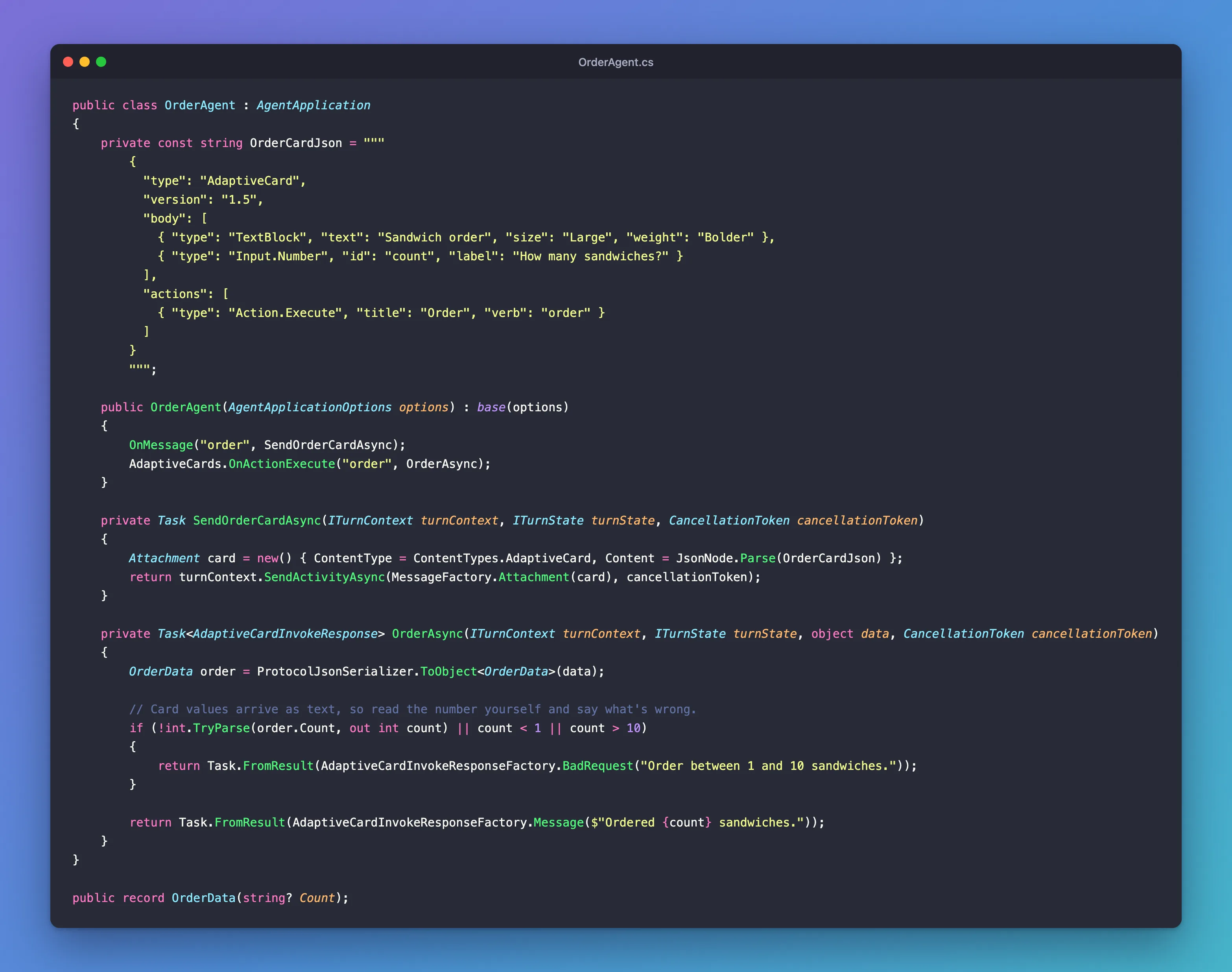
OrderDatareads the inputcountfromdata. It's astring?, because the card sends every value as text, the number included, and leaves out an empty input.int.TryParseturns the text into a number only if it is one. Together with the range check, that catches an empty input, a word, and a number out of range in one condition.BadRequestanswers with the reason. A message answers an order that went through.
The message OnMessage("order", ...) and the button's verb order don't clash: a typed message and an Action.Execute invoke are different activities, with different routes.
Step 2: Try It
Run the agent with dotnet run, then start the Agents Playground in a second terminal, on its Teams channel:
agentsplayground -e http://localhost:3978/api/messages -c msteams
In Personal Chat, send order, and type 12:
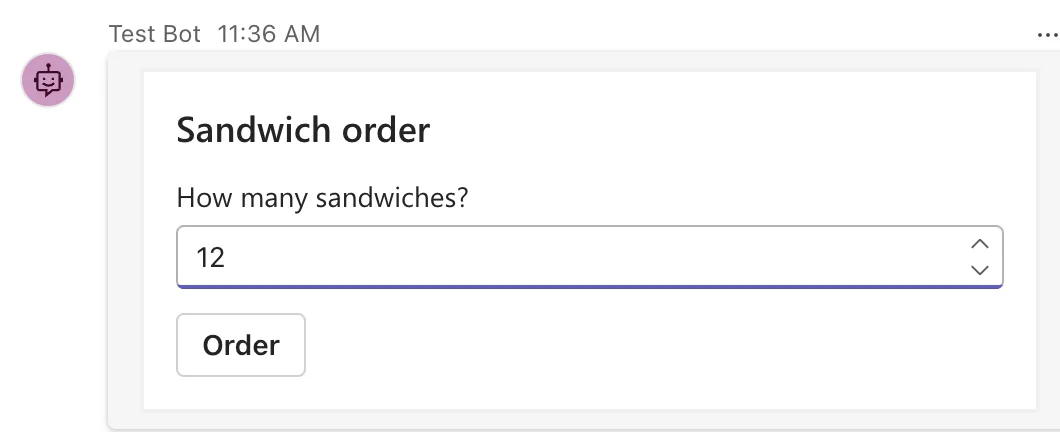
Select Order:
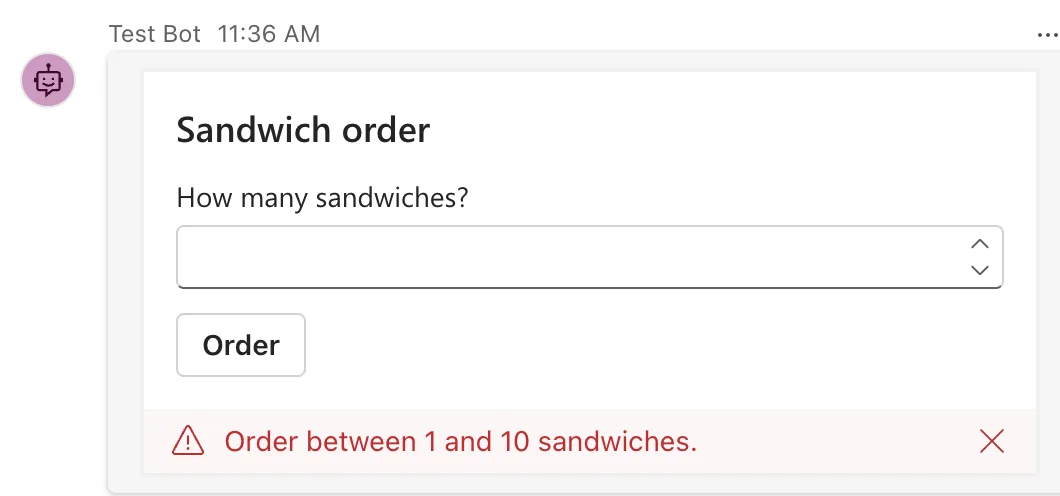
The reason appears in a red bar with a warning icon. The Playground also emptied the number box. In the Log Panel, the invoke 200 entry shows what was sent and what came back:
"value": {
    "action": {
      "type": "Action.Execute",
      "title": "Order",
      "verb": "order",
      "data": {
        "count": "12"
      }
    }
  },
{
  "statusCode": 400,
  "type": "application/vnd.microsoft.error",
  "value": {
    "code": "BadRequest",
    "message": "Order between 1 and 10 sandwiches."
  }
}
"count": "12": the number arrived as text, in quotes.- The log entry says
invoke 200, but the answer'sstatusCodeis 400. The HTTP response to the invoke is always 200 when the agent handled it; the error is inside the answer. Microsoft's Universal Action model: A client application MUST always look at thestatucCodeproperty in the response's body to know how the Bot processed the request.
Now type 3 and select Order again:
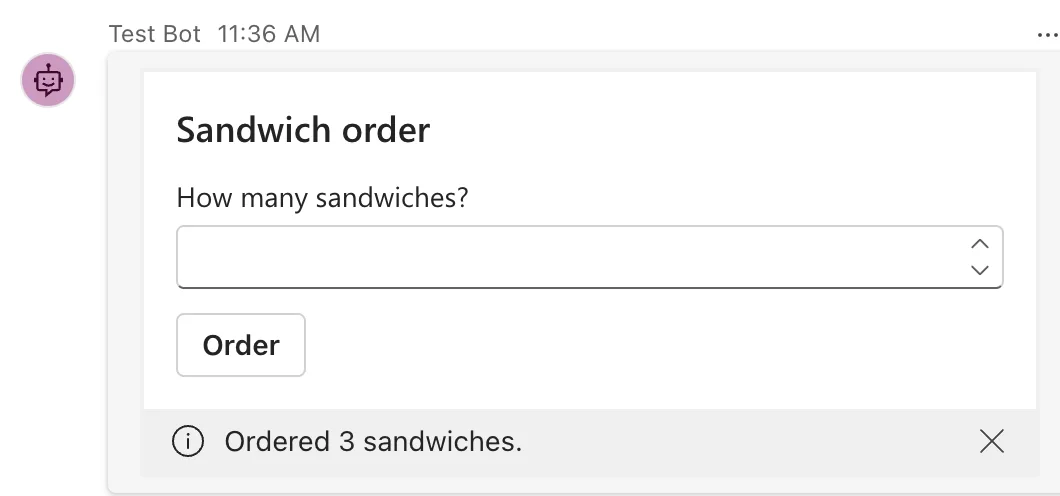
A valid order gets the message, in the grey bar of a normal answer.
Common Mistakes
| Mistake | What happens | Do this instead |
|---|---|---|
Reading the number input into an int property | The value arrives as text, so it doesn't fit an int | Read it into a string?, and parse it yourself |
| Relying on the card alone to check the input | Another app, an old card or a hand-made request can still send anything | Check every value in the handler too |
| Throwing an exception for bad input | The person doesn't learn what to fix | Return BadRequest with the reason |
| A vague message such as Invalid input | The person doesn't know what to change | Say what's accepted: Order between 1 and 10 sandwiches. |
Troubleshooting
| Symptom | Likely cause | Fix |
|---|---|---|
| The red bar shows for every order | The input's id and the record's property don't match, so Count is always null | Name the property after the input's id |
| The bar is grey for a bad order | The handler returned Message | Return BadRequest for errors |
| No bar at all | No route for the button's verb | Compare the button's verb with the route's |
FAQ
Which status should I use?
400, with BadRequest, when the request itself is wrong, such as bad input. 500, with InternalError, when your agent failed, such as a service it depends on being down. NotSupported is a 400 with its own code, for actions the agent doesn't support.
Does the error change the card?
No. In this series' tests, in the Playground and in Microsoft Teams, the card's content stayed the same, with the error in a red bar under it. The Playground emptied the number box, as it empties a card's inputs after every action it sends.
Can I check inputs on the card itself?
Yes: Adaptive Card inputs have isRequired, min, max and other properties that the chat app checks before sending. Keep the check in your handler too, because nothing forces a request to come from your card.
Conclusion
To reject what an Action.Execute button sent, check the values in your handler and return AdaptiveCardInvokeResponseFactory.BadRequest with a reason the person can act on. Chat apps show it in red under the card, which stays as it was.
Additional Resources
- Universal Action Model, on Microsoft Learn: the error answers and
statusCode. - AdaptiveCardInvokeResponseFactory class, on Microsoft Learn.
- Input.Number, on Microsoft Learn.
