How to Return a Message from Action.Execute in the Microsoft 365 Agents SDK in C#

Not every button press needs a new card. When an Action.Execute button only needs a short answer, return a message: the chat app shows it with the card, and the card stays as it was. In the Microsoft 365 Agents SDK, that's one factory method.
Syntax
AdaptiveCards.OnActionExecute(verb, handler);

private Task<AdaptiveCardInvokeResponse> handler(ITurnContext turnContext, ITurnState turnState, object data, CancellationToken cancellationToken)
{
    return Task.FromResult(AdaptiveCardInvokeResponseFactory.Message(text));
}
AdaptiveCards.OnActionExecuteroutes the button'sverbto your handler.AdaptiveCardInvokeResponseFactory.Message(text)builds an answer withstatusCode200,typeapplication/vnd.microsoft.activity.message, and yourtextas its value.
Microsoft's Universal Action model describes that answer: The request was successfully processed, and the response includes a message that the client should display.
The Example
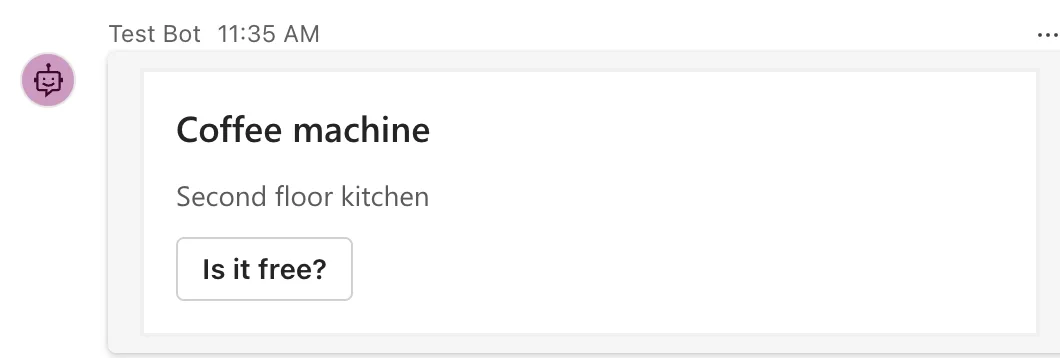
The agent for this post answers coffee with a card for the second-floor coffee machine and one button, Is it free?. Selecting it gets the answer Yes, the coffee machine is free., and the card doesn't change. The agent is one class in an ASP.NET Core project with the Agents SDK, hosted with AddAgent<CoffeeAgent>() and listening on port 3978.
Prerequisites
- The Microsoft 365 Agents Playground, to chat with the agent on your own machine.
agentsplayground --versionshould print0.2.30; if the command isn't found, install it withnpm install -g @microsoft/m365agentsplayground.
Step 1: Route the Button and Return a Message
using System.Text.Json.Nodes;
using Microsoft.Agents.Builder;
using Microsoft.Agents.Builder.App;
using Microsoft.Agents.Builder.App.AdaptiveCards;
using Microsoft.Agents.Builder.State;
using Microsoft.Agents.Core.Models;

namespace CoffeeCheck;

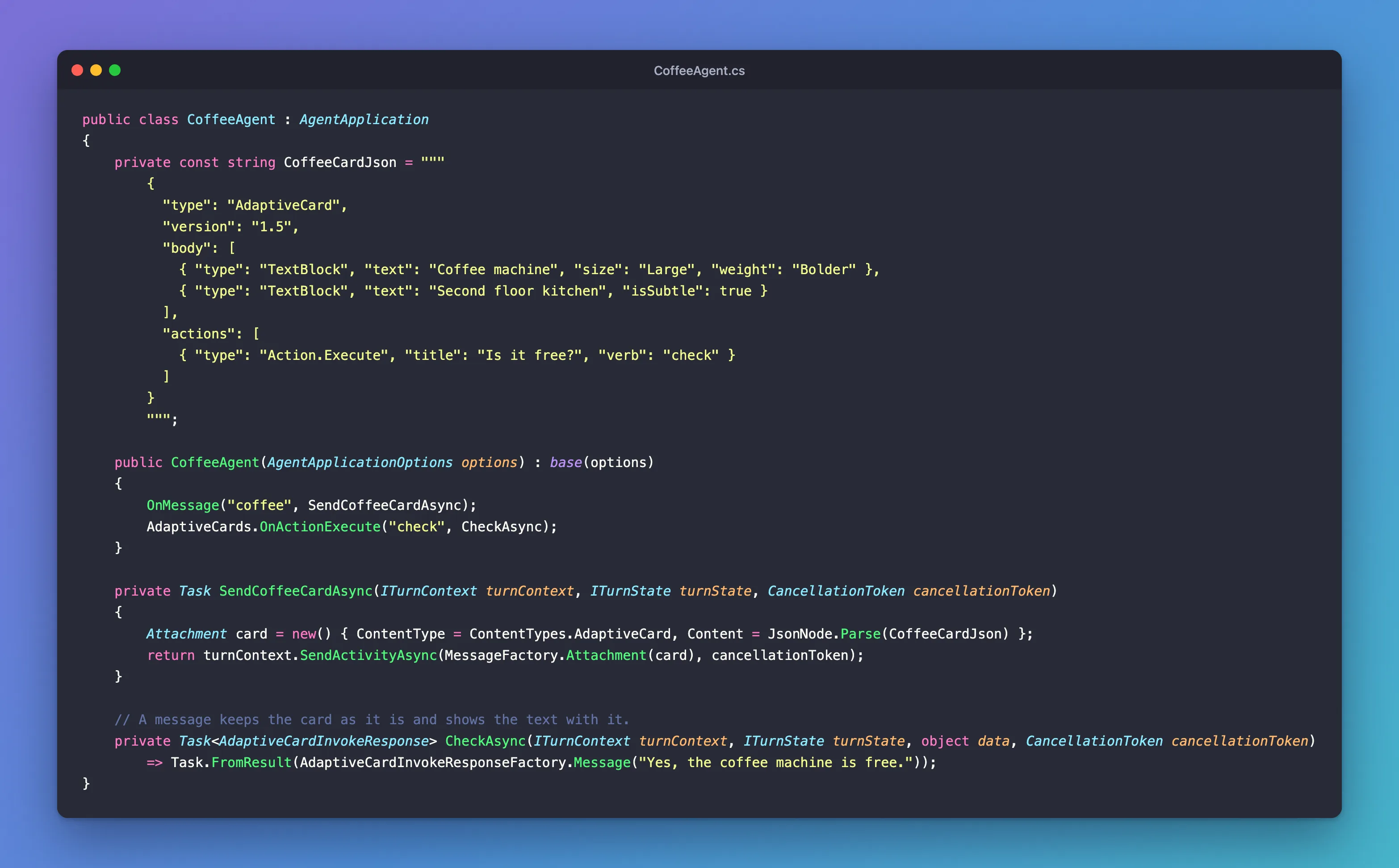
public class CoffeeAgent : AgentApplication
{
    private const string CoffeeCardJson = """
        {
          "type": "AdaptiveCard",
          "version": "1.5",
          "body": [
            { "type": "TextBlock", "text": "Coffee machine", "size": "Large", "weight": "Bolder" },
            { "type": "TextBlock", "text": "Second floor kitchen", "isSubtle": true }
          ],
          "actions": [
            { "type": "Action.Execute", "title": "Is it free?", "verb": "check" }
          ]
        }
        """;

    public CoffeeAgent(AgentApplicationOptions options) : base(options)
    {
        OnMessage("coffee", SendCoffeeCardAsync);
        AdaptiveCards.OnActionExecute("check", CheckAsync);
    }

    private Task SendCoffeeCardAsync(ITurnContext turnContext, ITurnState turnState, CancellationToken cancellationToken)
    {
        Attachment card = new() { ContentType = ContentTypes.AdaptiveCard, Content = JsonNode.Parse(CoffeeCardJson) };
        return turnContext.SendActivityAsync(MessageFactory.Attachment(card), cancellationToken);
    }

    // A message keeps the card as it is and shows the text with it.
    private Task<AdaptiveCardInvokeResponse> CheckAsync(ITurnContext turnContext, ITurnState turnState, object data, CancellationToken cancellationToken)
        => Task.FromResult(AdaptiveCardInvokeResponseFactory.Message("Yes, the coffee machine is free."));
}
- The button is an
Action.Executewith the verbcheck, routed toCheckAsync. CheckAsyncreturns the message. It sends nothing itself: the message is the answer to the click.
Step 2: Try It
Run the agent with dotnet run, then start the Agents Playground in a second terminal, on its Teams channel:
agentsplayground -e http://localhost:3978/api/messages -c msteams
In Personal Chat, send coffee:
Select Is it free?:
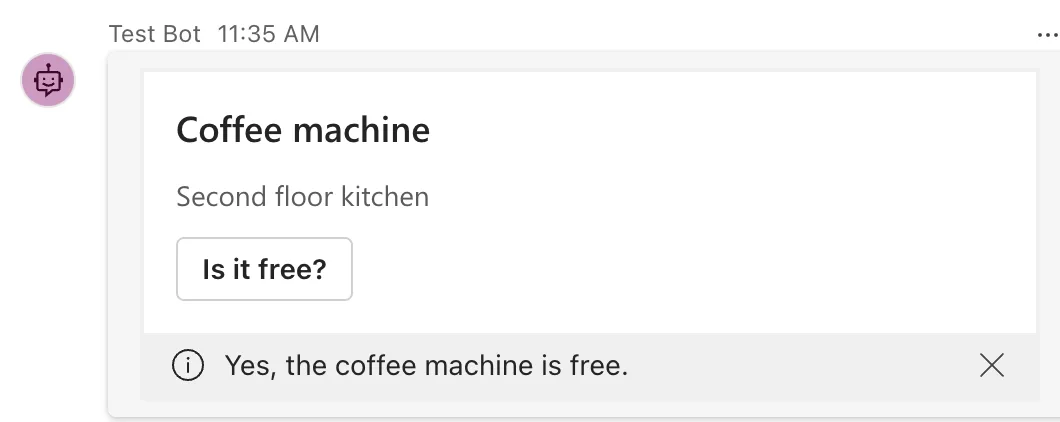
The message appears as a grey bar along the bottom of the card, with a button to close it. The card is unchanged, and nothing new was added to the chat. Microsoft Teams shows a message answer the same way: in this series' tests in Teams, You already picked Cake. appeared as the same kind of bar under a poll card.
In the Log Panel, the invoke 200 entry's Response tab shows the answer:
{
  "statusCode": 200,
  "type": "application/vnd.microsoft.activity.message",
  "value": "Yes, the coffee machine is free."
}
Common Mistakes
| Mistake | What happens | Do this instead |
|---|---|---|
| Using a message to say something everyone should see | Only the person who selected the button sees it | Send a chat message, or update the card for everyone |
| Returning a message when the card's content should change | The card keeps showing the old content | Return a new card with AdaptiveCardInvokeResponseFactory.AdaptiveCard |
Troubleshooting
| Symptom | Likely cause | Fix |
|---|---|---|
| Nothing appears after the click | No route for the verb | Compare the button's verb with the route's |
| The bar is red instead of grey | The handler returned an error, such as BadRequest | Return Message for normal answers |
FAQ
Who sees the message?
The person who selected the button. The answer goes back to the client that sent the click.
Is the message a chat message?
No. It's a bar on the card itself, with a button to close it, and nothing is added to the conversation.
When should I return an error instead?
When the request can't be done, return an error with AdaptiveCardInvokeResponseFactory.BadRequest: chat apps show it as an error. Message is for answers that went well.
Conclusion
Return AdaptiveCardInvokeResponseFactory.Message(text) from an Action.Execute handler to answer a button with a short message. The person who selected the button sees it under the card, and the card stays as it was.
Additional Resources
- Universal Action Model, on Microsoft Learn: every answer an
Action.Executecan get. - Use adaptive cards in agents, on Microsoft Learn.
