How to Require Human Approval Before a Microsoft Agent Framework Agent Calls a Tool in C#

Some tools shouldn't run just because a model decided to call them. Microsoft Agent Framework can make an agent stop and ask a person first: wrap the tool in ApprovalRequiredAIFunction, and the agent hands you the call to approve or reject instead of running it.
Syntax
AITool <tool> = new ApprovalRequiredAIFunction(AIFunctionFactory.Create(<method>, name: "<tool name>"));

List<ToolApprovalRequestContent> <requests> = <response>.Messages
    .SelectMany(message => message.Contents)
    .OfType<ToolApprovalRequestContent>()
    .ToList();

ChatMessage <answer> = new(ChatRole.User, [<request>.CreateResponse(<approved>)]);
<response> = await <agent>.RunAsync(<answer>, <session>);
| Part | What it is |
|---|---|
ApprovalRequiredAIFunction | Wraps a tool so that it needs approval: the model can call it, but it doesn't run until someone approves the call |
<method>, "<tool name>" | The method that does the work, and the name the model sees |
ToolApprovalRequestContent | What a run returns instead of an answer when the model called a wrapped tool. Its ToolCall holds the call: the tool's name and arguments |
<request>.CreateResponse(<approved>) | The person's answer: true to approve the call, false to reject it |
<agent>.RunAsync(<answer>, <session>) | Sends the answer back in the same session, so the agent can finish the run |
Microsoft's guide adds one rule: remember to check for ToolApprovalRequestContent instances in the response, after each agent run, until all function calls have been approved or rejected.
The Example
A smart-home agent has one tool, unlock_front_door, and that tool needs approval. Someone asks Please unlock the front door. The plumber is here. The console shows the call the agent wants to make, waits for y or n, and then prints the agent's answer.
Prerequisites
- A model deployment in a Microsoft Foundry project, and the Foundry User role on the Foundry resource for your account. The app calls the model as you.
- The .NET 10 SDK (
dotnet --versionprints a version that starts with10.0) and the Azure CLI, signed in withaz login.
Step 1: Create a Console App
In a terminal, in the folder where you keep your projects, run:
dotnet new console -n FrontDoor
cd FrontDoor
dotnet add package Microsoft.Agents.AI.Foundry --version 1.28.0-preview.261106.1
dotnet add package Azure.Identity --version 1.21.0
| Package | What it gives the app |
|---|---|
Microsoft.Agents.AI.Foundry | AsAIAgent, which turns a model in a Foundry project into an agent, and Agent Framework itself |
Azure.Identity | AzureCliCredential, which signs the app in to Foundry with your Azure CLI sign-in |
ApprovalRequiredAIFunction and the approval types come with Agent Framework, in the Microsoft.Extensions.AI namespace, so there's nothing else to add. Open the FrontDoor folder in VS Code, or FrontDoor.csproj in Visual Studio.
Step 2: Wrap the Tool
Replace everything in Program.cs with the first part of the program: the tool, and an agent that has it.
using System.ComponentModel;
using Azure.AI.Projects;
using Azure.Identity;
using Microsoft.Agents.AI;
using Microsoft.Extensions.AI;

// 1. The tool: a pretend smart lock. Wrapped in ApprovalRequiredAIFunction, it never runs
//    until a person approves the call.
AITool unlockTool = new ApprovalRequiredAIFunction(
    AIFunctionFactory.Create(UnlockFrontDoor, name: "unlock_front_door"));

AIAgent agent = new AIProjectClient(
        new Uri("https://foundry-devblogs-exp.services.ai.azure.com/api/projects/proj-devblogs-exp"),
        new AzureCliCredential())
    .AsAIAgent(
        model: "gpt-5.6-luna",
        instructions: "You control the front door of a smart home. Use your tools when someone asks.",
        tools: [unlockTool]);
AIFunctionFactory.Createturns the method into a tool the model can call, namedunlock_front_door.new ApprovalRequiredAIFunction(...)wraps that tool. The model sees exactly the same tool. The difference is what happens when it calls it.- The endpoint and
gpt-5.6-lunaare my Foundry project and model deployment. Use your own.
The method goes at the very end of the file, after all the other code, because C# wants top-level code first:
[Description("Unlocks the front door of the house.")]
static string UnlockFrontDoor() => "The front door is unlocked.";
The Description is what the model reads to decide when to call the tool.
Step 3: Ask, Then Answer Each Approval
After the agent, add the conversation:
// 2. One session for the whole conversation: the approval must come back to the same one.
AgentSession session = await agent.CreateSessionAsync();
AgentResponse response = await agent.RunAsync("Please unlock the front door. The plumber is here.", session);

// 3. While the agent asks for approvals instead of answering, ask a person and send their answers back.
List<ToolApprovalRequestContent> requests = ApprovalRequests(response);
while (requests.Count > 0)
{
    List<ChatMessage> answers = [];
    foreach (ToolApprovalRequestContent request in requests)
    {
        FunctionCallContent call = (FunctionCallContent)request.ToolCall;
        Console.Write($"The agent wants to call {call.Name}. Approve? (y/n): ");
        bool approved = Console.ReadLine()?.Trim().Equals("y", StringComparison.OrdinalIgnoreCase) == true;
        answers.Add(new ChatMessage(ChatRole.User, [request.CreateResponse(approved)]));
    }

    response = await agent.RunAsync(answers, session);
    requests = ApprovalRequests(response);
}

// 4. No approvals left: this is the agent's answer.
Console.WriteLine(response.Text);

static List<ToolApprovalRequestContent> ApprovalRequests(AgentResponse response) =>
    response.Messages
        .SelectMany(message => message.Contents)
        .OfType<ToolApprovalRequestContent>()
        .ToList();
- One
AgentSessionholds the conversation. The answers must go back to the same session, because that's where the waiting call is. ApprovalRequestslooks through every message of the response forToolApprovalRequestContent. When the model called the wrapped tool, that's what comes back instead of an answer.request.ToolCallis the call the model made. Cast toFunctionCallContent, it has the tool'sNameandArguments, so you can show the person exactly what they're approving.request.CreateResponse(approved)turns the person's y or n into an answer, andRunAsync(answers, session)sends it back.- The
whileloop follows Microsoft's rule from the Syntax section: the next response can ask for another approval, so keep answering until none are left.
Anything other than y counts as no: a sensitive action should need a clear yes.
Step 4: Run It
- VS Code
- Visual Studio
In the terminal, in the FrontDoor folder, run:
dotnet run
Press Ctrl+F5 (Debug > Start Without Debugging). The console window asks the question.
Answer y:
The agent wants to call unlock_front_door. Approve? (y/n): y
The front door is unlocked.
Run it again and answer n:
The agent wants to call unlock_front_door. Approve? (y/n): n
I couldn’t unlock the front door—the request was rejected.
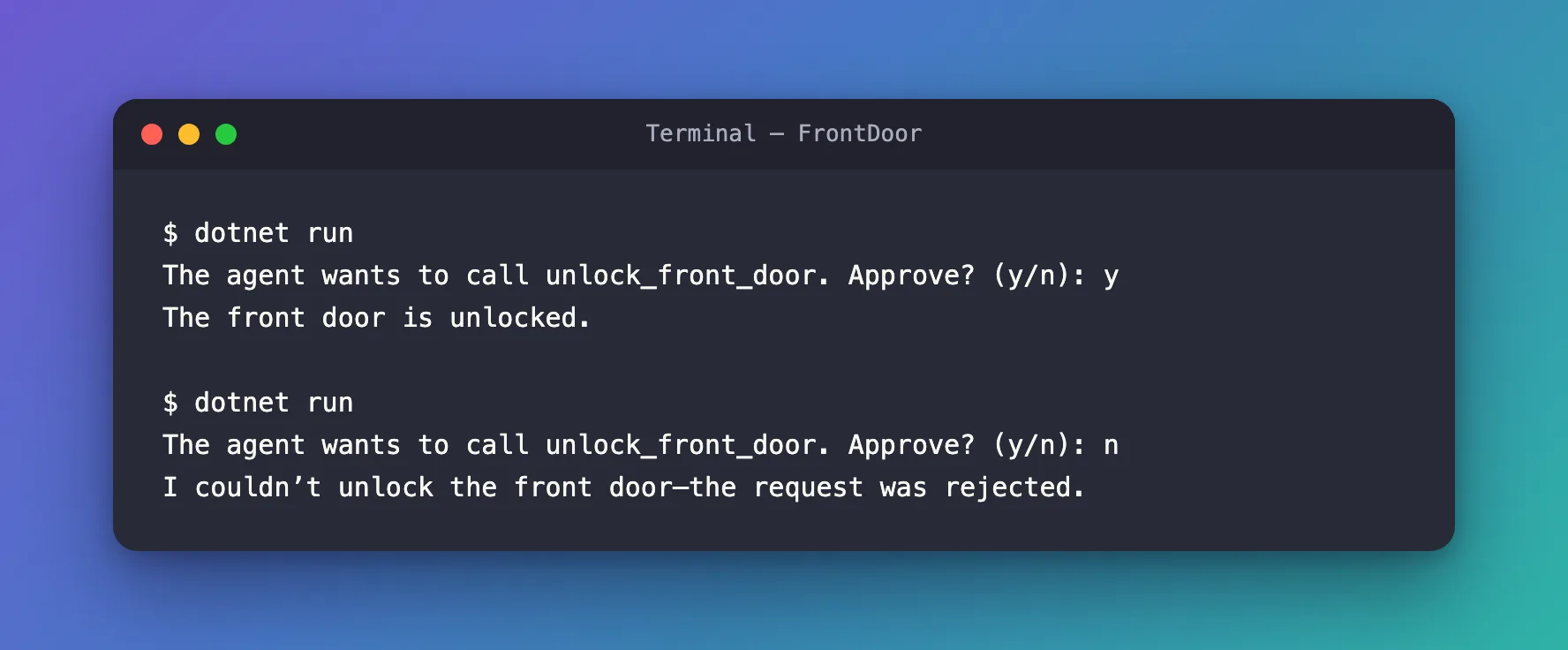
In both runs the question came first: the model called unlock_front_door, and the agent stopped instead of running it. With y, the tool ran and the model answered from its result. With n, the tool never ran: Agent Framework gave the model a result that says the call was rejected, and the model told the person.
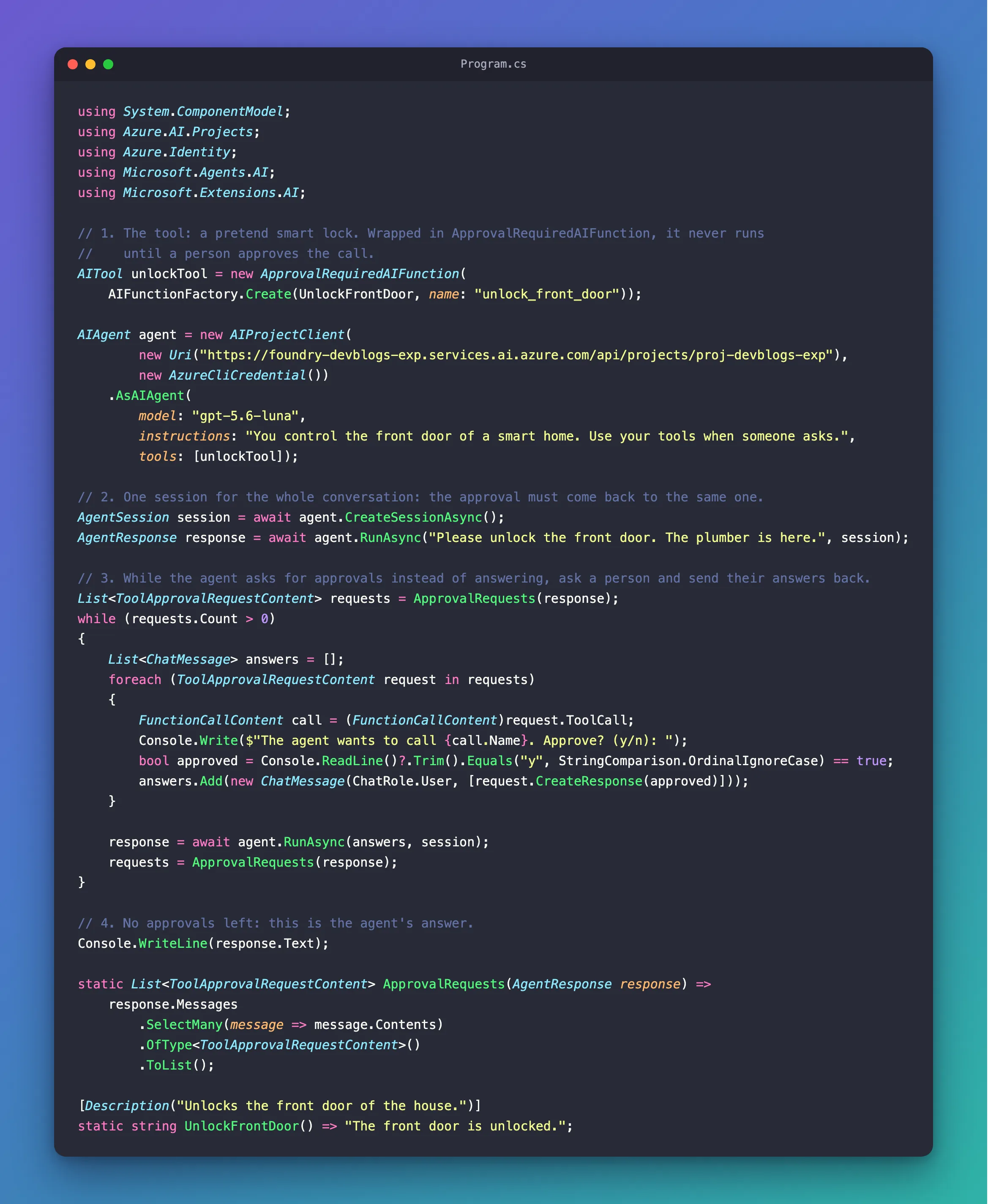
The Complete File
using System.ComponentModel;
using Azure.AI.Projects;
using Azure.Identity;
using Microsoft.Agents.AI;
using Microsoft.Extensions.AI;

// 1. The tool: a pretend smart lock. Wrapped in ApprovalRequiredAIFunction, it never runs
//    until a person approves the call.
AITool unlockTool = new ApprovalRequiredAIFunction(
    AIFunctionFactory.Create(UnlockFrontDoor, name: "unlock_front_door"));

AIAgent agent = new AIProjectClient(
        new Uri("https://foundry-devblogs-exp.services.ai.azure.com/api/projects/proj-devblogs-exp"),
        new AzureCliCredential())
    .AsAIAgent(
        model: "gpt-5.6-luna",
        instructions: "You control the front door of a smart home. Use your tools when someone asks.",
        tools: [unlockTool]);

// 2. One session for the whole conversation: the approval must come back to the same one.
AgentSession session = await agent.CreateSessionAsync();
AgentResponse response = await agent.RunAsync("Please unlock the front door. The plumber is here.", session);

// 3. While the agent asks for approvals instead of answering, ask a person and send their answers back.
List<ToolApprovalRequestContent> requests = ApprovalRequests(response);
while (requests.Count > 0)
{
    List<ChatMessage> answers = [];
    foreach (ToolApprovalRequestContent request in requests)
    {
        FunctionCallContent call = (FunctionCallContent)request.ToolCall;
        Console.Write($"The agent wants to call {call.Name}. Approve? (y/n): ");
        bool approved = Console.ReadLine()?.Trim().Equals("y", StringComparison.OrdinalIgnoreCase) == true;
        answers.Add(new ChatMessage(ChatRole.User, [request.CreateResponse(approved)]));
    }

    response = await agent.RunAsync(answers, session);
    requests = ApprovalRequests(response);
}

// 4. No approvals left: this is the agent's answer.
Console.WriteLine(response.Text);

static List<ToolApprovalRequestContent> ApprovalRequests(AgentResponse response) =>
    response.Messages
        .SelectMany(message => message.Contents)
        .OfType<ToolApprovalRequestContent>()
        .ToList();

[Description("Unlocks the front door of the house.")]
static string UnlockFrontDoor() => "The front door is unlocked.";
Common Mistakes
| Mistake | What happens | Do this instead |
|---|---|---|
| Asking for approval in the instructions instead of wrapping the tool | The model is asked to wait, but nothing stops it from calling the tool | Wrap the tool in ApprovalRequiredAIFunction |
| Sending the answer without the session, or with a new one | The answer doesn't reach the waiting call | Pass the same AgentSession to every RunAsync |
Reading only response.Text | The text is empty when the agent is waiting, and the approval request goes unnoticed | Check the messages for ToolApprovalRequestContent after every run |
| Answering only the first approval | One response can hold more than one request | Answer every request, in a loop, until none are left |
FAQ
Does the model know the tool needs approval?
Not from the wrapper: ApprovalRequiredAIFunction keeps the tool's name, description and parameters, so the model sees an ordinary tool. The approval happens where the tool would run, inside the agent, which is why the model can't skip it.
What does the model get when the person says no?
A result in place of the tool's: Tool call invocation was rejected by the approver and must not be retried. The model then answers from that. In this example it said it couldn't unlock the door, which sounds like a failure even though the person decided it. Fixed: Microsoft Agent Framework Agent Calls a Rejected Tool Approval a Failure shows one line of instructions that changes how the agent puts it.
Can I use this in a web API?
Yes. Over AG-UI, the run ends with an interrupt instead of a ToolApprovalRequestContent, and the answer comes back in the next request: How to Approve or Reject an AG-UI Tool Call Interrupt in ASP.NET Core.
Conclusion
To make a Microsoft Agent Framework agent ask before it runs a tool, wrap the tool in ApprovalRequiredAIFunction. When the model calls it, the run returns a ToolApprovalRequestContent instead of an answer. Show its ToolCall to a person, turn their decision into request.CreateResponse(true) or false, and send it back with RunAsync in the same session, until no requests are left. The tool runs only after a yes.
Additional Resources
- Using function tools with human in the loop approvals —
ApprovalRequiredAIFunction,ToolApprovalRequestContentandCreateResponse. - Running Agents —
RunAsync, responses and sessions.
