How to Replace Regex Matches with a Function in C#

A replacement string in Regex.Replace is the same for every match. When each match needs a replacement worked out from the match itself, pass a function instead: .NET calls it once for every match and puts what it returns in the match's place.
A regular expression finds text by its pattern, and Regex.Replace swaps what it finds for something else. Its simplest form takes a fixed replacement text. Another form takes a function, a MatchEvaluator, that gets each match and returns its replacement. The new text can then depend on the old: a number can be doubled, a word put in capitals, a date written another way.
Syntax
using System.Text.RegularExpressions;

string <result> = Regex.Replace(<input>, <pattern>, match => <replacement>);
| Part | What it is |
|---|---|
<input> | The text to search |
<pattern> | The regular expression that finds the parts to replace |
match => <replacement> | The function, a MatchEvaluator. It runs once for every match and returns the text that takes the match's place |
match.Value | Inside the function: the text this match found |
<result> | A new string with every match replaced. <input> itself doesn't change |
Microsoft's reference describes this form of the method: In a specified input string, replaces all strings that match a specified regular expression with a string returned by a MatchEvaluator delegate. And a MatchEvaluator represents the method that is called each time a regular expression match is found during a Replace method operation.
The Example
A console app called RegexReplace doubles a recipe. The pattern \d+ finds every number in Use 2 eggs, 150 g of flour and 1 cup of milk., and the function returns each number times two.
Prerequisites
- The .NET 10 SDK.
dotnet --versionprints a version that starts with10.0.
Step 1: Create a Console App
dotnet new console -n RegexReplace
cd RegexReplace
The template "Console App" was created successfully.

Processing post-creation actions...
Restoring /Users/you/source/RegexReplace/RegexReplace.csproj:
  Determining projects to restore...
  Restored /Users/you/source/RegexReplace/RegexReplace.csproj (in 58 ms).
Restore succeeded.
dotnet new console -n RegexReplace creates a folder named RegexReplace with a project file and a Program.cs, and cd moves into it. Regular expressions are part of .NET, so there's no package to add. Open the folder in VS Code, or RegexReplace.csproj in Visual Studio.
Step 2: Write the Code
Replace everything in Program.cs. First the text to change:
using System.Text.RegularExpressions;

string recipe = "Use 2 eggs, 150 g of flour and 1 cup of milk.";
using System.Text.RegularExpressions; brings in the Regex class, and recipe holds the sentence with three numbers in it.
Then the replacement, with the function:
// Replace every number with a value worked out from the number itself.
string doubled = Regex.Replace(recipe, @"\d+", match => (int.Parse(match.Value) * 2).ToString());
@"\d+"is the pattern.\dis a digit and+means one or more, so it finds2,150and1, each as a whole number. The@in front of the string keeps the backslash as it is, so it reaches the regular expression unchanged.match => (int.Parse(match.Value) * 2).ToString()is the function.match.Valueis the number's text,int.Parseturns it into a number,* 2doubles it andToString()turns it back into text.Regex.Replacereturns the new text, which goes intodoubled.
Last, print the text before and after:
Console.WriteLine(recipe);
Console.WriteLine(doubled);
Step 3: Run It
Run it in VS Code's terminal, or press Ctrl+F5 in Visual Studio:
dotnet run
Use 2 eggs, 150 g of flour and 1 cup of milk.
Use 4 eggs, 300 g of flour and 2 cup of milk.
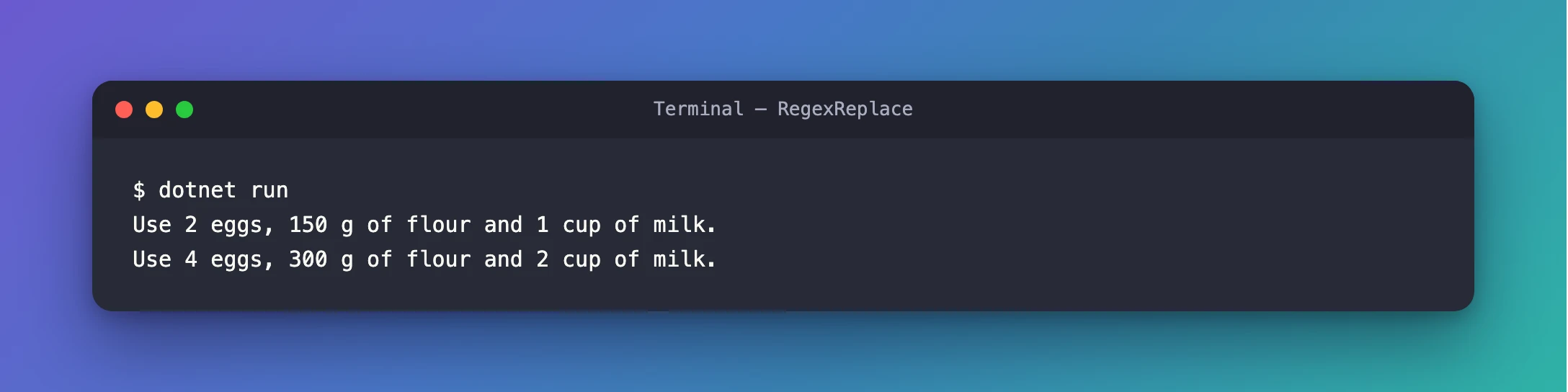
Every number doubled: 2 became 4, 150 became 300 and 1 became 2. Everything else stayed as it was, even cup, which a person would now write as cups: the function only ever sees the numbers the pattern found. And recipe still holds the original, because a string in C# never changes; Regex.Replace made a new one.
The Complete File
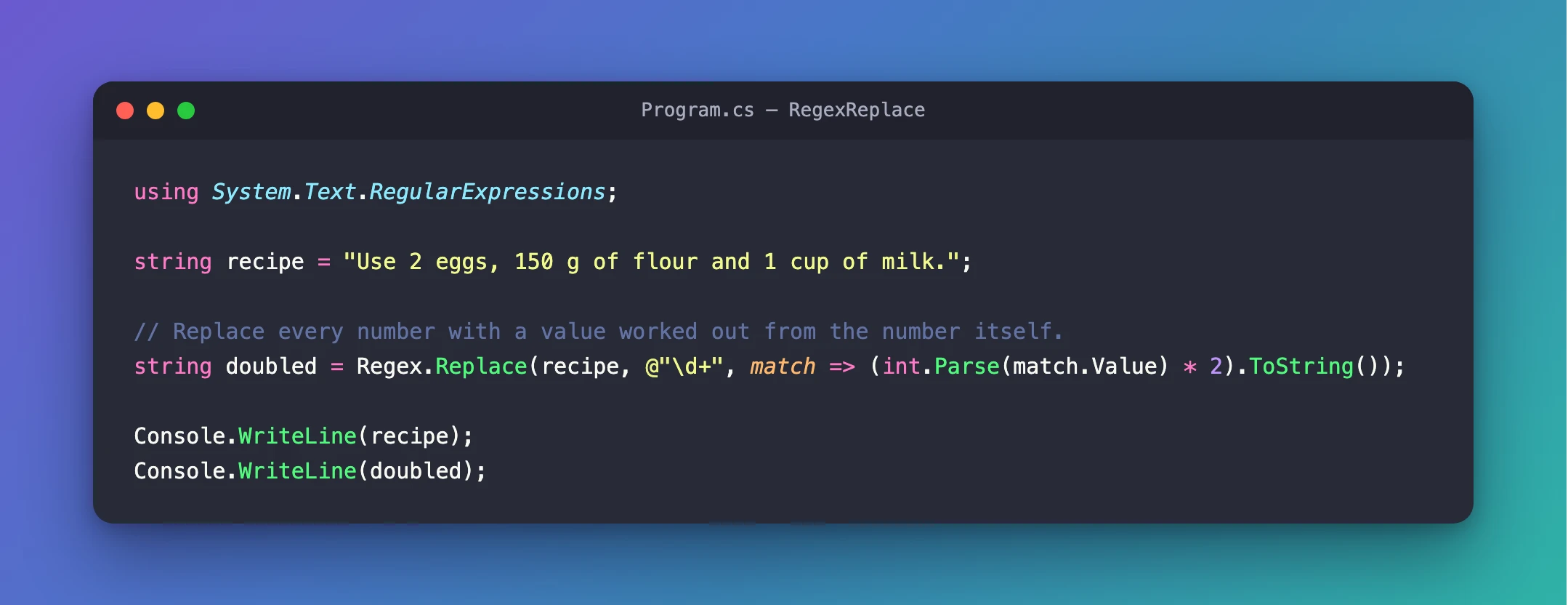
using System.Text.RegularExpressions;

string recipe = "Use 2 eggs, 150 g of flour and 1 cup of milk.";

// Replace every number with a value worked out from the number itself.
string doubled = Regex.Replace(recipe, @"\d+", match => (int.Parse(match.Value) * 2).ToString());

Console.WriteLine(recipe);
Console.WriteLine(doubled);
Common Mistakes
| Mistake | What happens | Do this instead |
|---|---|---|
Expecting \d+ to match a decimal number such as 1.5 | It matches 1 and 5 separately, so Add 1.5 cups. became Add 2.10 cups. | Match the whole number with \d+(\.\d+)? and read it with decimal.Parse(match.Value, CultureInfo.InvariantCulture). The same text then became Add 3.0 cups. |
Reading a long number with int.Parse | 99999999999 threw OverflowException: Value was either too large or too small for an Int32. | Use long.Parse or decimal.Parse for numbers that can be that long |
Calling Regex.Replace without keeping what it returns | Nothing changes: after Regex.Replace(recipe, ...) on its own, recipe still read Use 2 eggs. | Keep the result: string doubled = Regex.Replace(...) |
FAQ
What if nothing matches?
You get your text back as it was. Microsoft's reference: If pattern is not matched in the current instance, the method returns the current instance unchanged. With No numbers here. as the input, the result was the very same string object.
Can the function leave some matches as they are?
Yes: return match.Value for those. The reference describes the function as a custom method that examines each match and returns either the original matched string or a replacement string.
When is a plain replacement string enough?
When every match gets the same text, or a text built only from what the pattern found, such as $1 for its first group. The function is for replacements you have to work out.
Conclusion
Regex.Replace(input, pattern, match => ...) runs your function for every match and puts what it returns in the match's place. Here it doubled every number in a recipe. The same shape works for any replacement you can work out from the text the pattern found.
Additional Resources
- Regex.Replace — every form of the method, including the ones that take a
MatchEvaluator. - MatchEvaluator delegate — the function type the method takes.
- Regular expression language quick reference — what
\d,+and the other pattern elements mean.
