How to Render Markdown Safely in React with react-markdown

AI models and users write Markdown: numbered steps, bold words, tables, links. Shown as plain text, it's a mess of stars and pipes; turned into HTML and inserted with dangerouslySetInnerHTML, it can run whatever script someone slipped in. react-markdown turns Markdown into React elements instead. This guide renders a tricky piece of Markdown and shows what happens to the HTML and the script link inside it.
Why Not dangerouslySetInnerHTML
The quick way to show Markdown is a library that converts it to an HTML string, and React's dangerouslySetInnerHTML to insert that string. React's own name for that prop is the warning: whatever is in the string becomes part of the page, including <img onerror=…> tricks and javascript: links. When the text comes from a model or a user, that is a cross-site scripting risk.
react-markdown never builds an HTML string. It reads the Markdown and creates React elements, the same as JSX. Its documentation lists safe by default (no dangerouslySetInnerHTML or XSS attacks) among its features: HTML written inside the Markdown is shown as text, and dangerous link addresses are removed.
Prerequisites
- A React app. The examples use a Next.js 16.4.6 app with React 19.3.1; any React app works.
- A terminal in the app's folder.
Step 1: Install the Packages
npm install react-markdown@10.1.0 remark-gfm@4.0.1
added 100 packages, and audited 132 packages in 10s

92 packages are looking for funding
  run `npm fund` for details

found 0 vulnerabilities
| Package | What it adds |
|---|---|
react-markdown | The Markdown component |
remark-gfm | GitHub's Markdown extras: tables, strikethrough, task lists and links written as plain addresses |
Step 2: Render Some Markdown
This page renders Markdown the way a model might answer — with a heading, a list, a table, and two things that should never run: an HTML image with an onerror script, and a javascript: link:
"use client";

import Markdown from "react-markdown";
import remarkGfm from "remark-gfm";

// Text as a model or a user might write it, including HTML and a script link.
const answer = `## Reset your password

1. Open **Settings**.
2. Select *Account*, then **Reset password**.

| Step | Time |
| --- | --- |
| Reset | 1 minute |
| Sign in again | 1 minute |

<img src="x" onerror="alert('hello')"> <b>bold through HTML</b>

[Password help](https://example.com/help) or [click me](javascript:alert('hello'))`;

export default function MarkdownSafePage() {
  return (
    <main style={{ padding: 48, maxWidth: 720, lineHeight: 1.6 }}>
      <Markdown remarkPlugins={[remarkGfm]}>{answer}</Markdown>
    </main>
  );
}
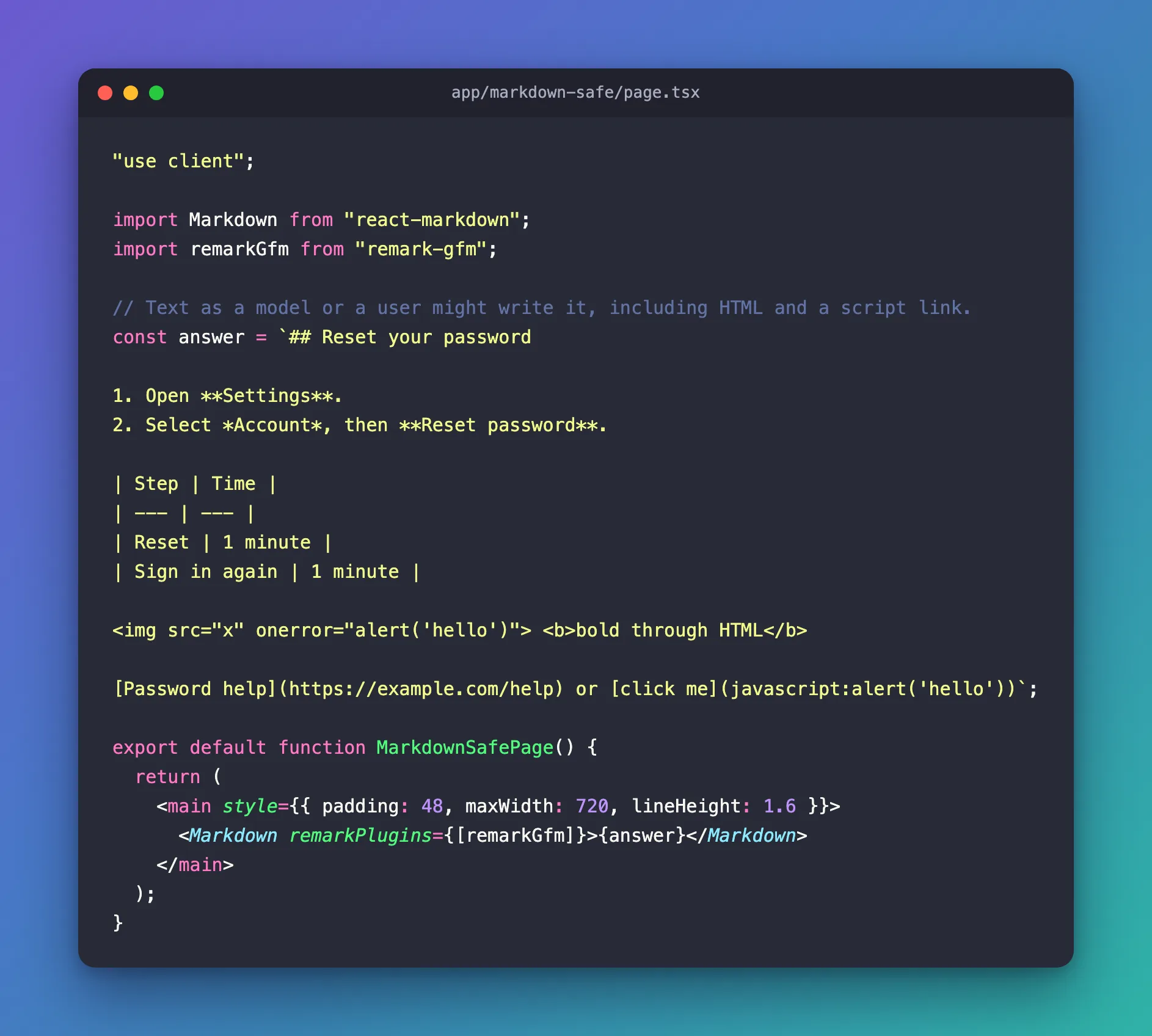
remarkPlugins={[remarkGfm]} adds the table support; without it, the table would stay as lines of pipes.
Step 3: See What Was Rendered
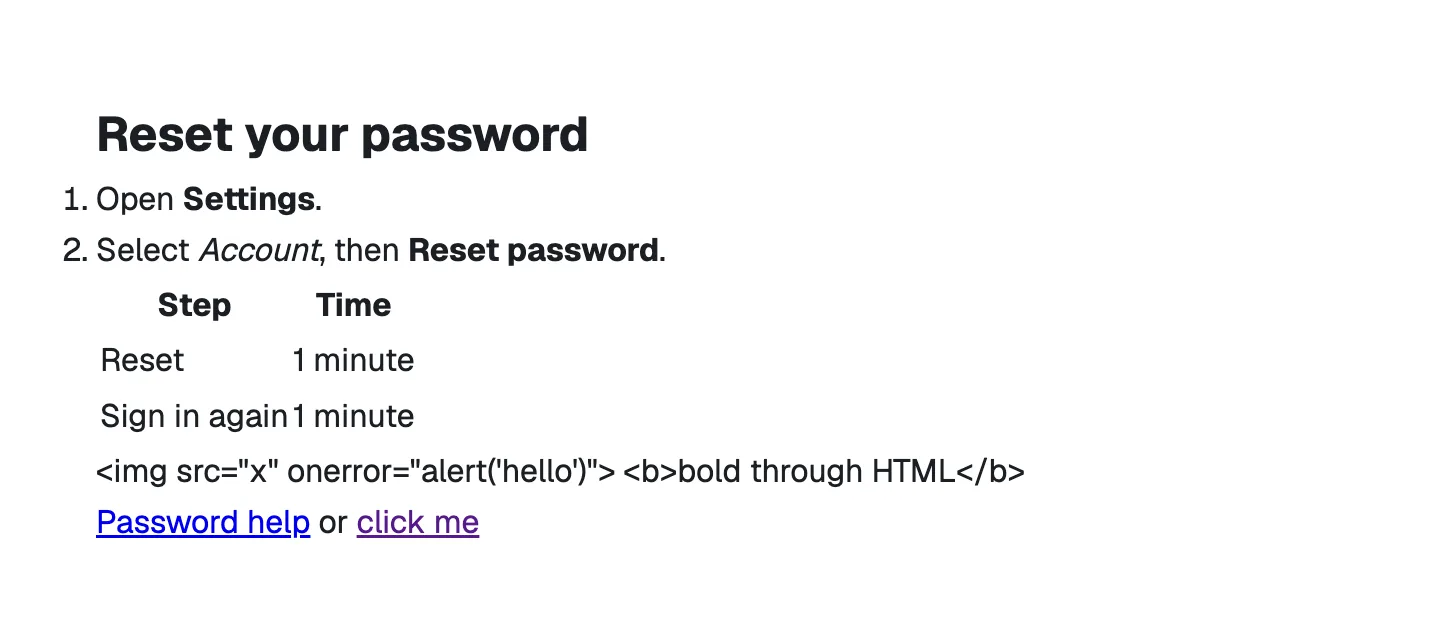
The heading, list, emphasis and table became real HTML elements. The two dangerous parts didn't:
| Markdown | What the page got |
|---|---|
<img src="x" onerror="alert('hello')"> | Plain text on the page. The page contained no <img> element, and no alert appeared |
<b>bold through HTML</b> | Plain text too — no <b> element |
[Password help](https://example.com/help) | A normal link to https://example.com/help |
[click me](javascript:alert('hello')) | A link with an empty address: <a href="">click me</a> |
I checked these in the browser: the page had zero img and b elements, its text contained the HTML as written, and the javascript: link's href was empty. react-markdown shows HTML as text by default; its skipHtml option leaves it out instead. The link was emptied by its default urlTransform, which removes addresses with dangerous protocols.
Keep It Safe When You Customize
react-markdown's documentation names the ways to make it unsafe again: Overwriting urlTransform to something insecure will open you up to XSS vectors. Furthermore, the remarkPlugins, rehypePlugins, and components you use may be insecure. In particular, the rehype-raw plugin turns HTML inside the Markdown back on — use it only for text you trust. If you need plugins and still want a guarantee, add rehype-sanitize, which the same documentation recommends.
Common Mistakes
| Mistake | What happens | Do this instead |
|---|---|---|
Converting Markdown to an HTML string and using dangerouslySetInnerHTML | Scripts in the text can run in your page | Use react-markdown |
Adding rehype-raw for model or user text | HTML in the text becomes real elements again | Leave it out, or add rehype-sanitize |
Forgetting remark-gfm | Tables and strikethrough show as raw characters | Pass remarkPlugins={[remarkGfm]} |
Troubleshooting
| Symptom | Likely cause | Fix |
|---|---|---|
A table shows as lines of | characters | remark-gfm isn't passed to Markdown | Add remarkPlugins={[remarkGfm]} |
| HTML in the Markdown shows as text | That is the safe default | Keep it, or use skipHtml to hide it |
| A link does nothing when clicked | Its address used a protocol urlTransform removes | Use https: or mailto: links |
FAQ
Is the plain text in the page escaped too?
Yes. Everything react-markdown renders goes through React, which escapes text, so characters such as < show as characters.
Can I style the rendered elements?
Yes. Style them with CSS around the component, or replace an element with your own through the components option — for example to open links in a new tab (How to Open Markdown Links in a New Tab with react-markdown).
Conclusion
react-markdown turns Markdown into React elements without dangerouslySetInnerHTML: lists, tables (with remark-gfm) and links become real elements, HTML in the text stays text, and javascript: links lose their address. Keep it that way by leaving urlTransform alone and keeping rehype-raw away from text you don't control.
Additional Resources
- react-markdown on GitHub — options, security notes and examples.
- remark-gfm on GitHub — tables, strikethrough and task lists.
- OWASP: Cross Site Scripting — what the safety is protecting against.
