How to Rename a Worksheet in Excel for the Web

New sheets are called Sheet1, Sheet2 and so on. A descriptive name makes the workbook easier to find your way around and makes formulas that mention the sheet readable. Right-click the tab, select Rename, type, and press Enter.
The example is the first sheet of the old overtime timesheet from Part 1 of the Overtime Timesheet series, renamed from Sheet1 to Overtime log.
Prerequisites
- A workbook open for editing in Excel for the web.
Step 1: Open the Tab's Menu
Right-click the sheet tab at the bottom of the page. Its menu has Insert, Duplicate, Copy Sheet, Rename and more. Select Rename:
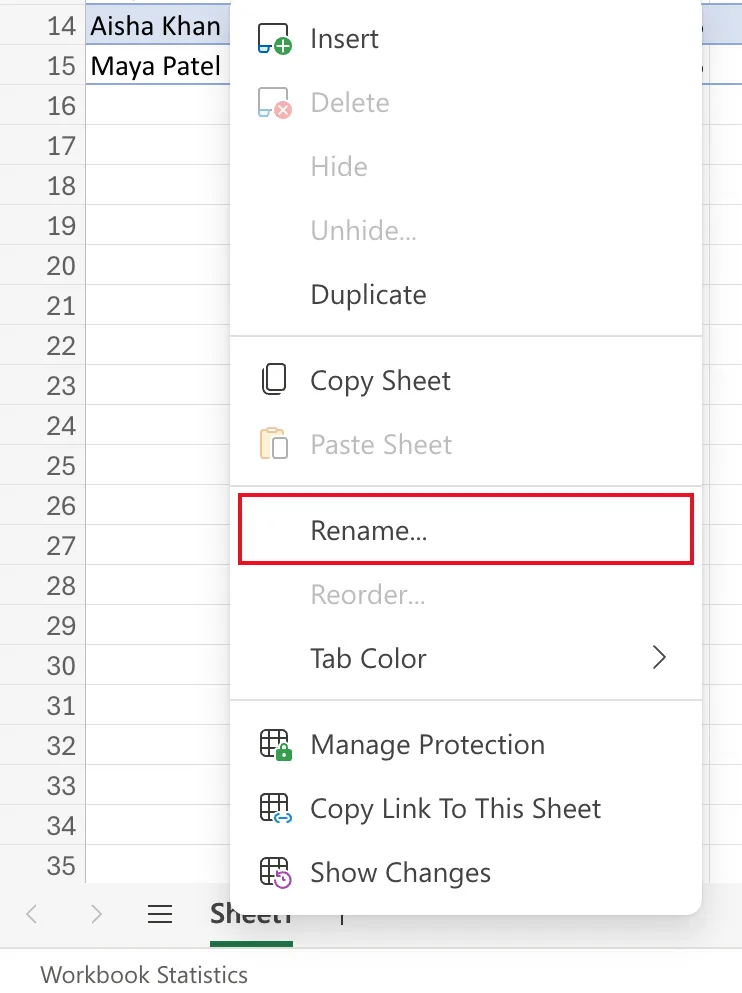
Microsoft's Rename a worksheet also gives a shortcut: double-click the tab.
Step 2: Type the New Name
The tab becomes a box you can type in. Replace the name with Overtime log:

Step 3: Press Enter
Press Enter. The tab shows its new name:

Naming Rules
From Rename a worksheet, a sheet name can't:
- be blank,
- be longer than 31 characters,
- contain any of
/ \ ? * : [ ], - begin or end with an apostrophe (
'), - be named History, which Excel uses itself.
Spaces are fine, as in Overtime log and Monthly totals.
Common Mistakes
| Mistake | What happens | Do this instead |
|---|---|---|
| A name over 31 characters | Excel won't accept it | Shorten it |
Using / in a date, like Oct/2026 | / isn't allowed | Use Oct 2026 |
| Clicking away before Enter | Check whether the name was kept | Press Enter |
Troubleshooting
| Symptom | Likely cause | Fix |
|---|---|---|
| The name is refused | It breaks a rule or another sheet has it | Pick another name |
| You can't find Rename | You right-clicked the grid, not the tab | Right-click the tab itself |
FAQ
Should I rename sheets before writing formulas?
It's tidiest. Formulas that use a table name, like OvertimeLog[Hours], don't mention the sheet at all, so they're not affected either way.
Can I change the tab's colour?
Yes, Tab Color is in the same menu.
Conclusion
Right-click the tab, Rename, type, Enter. Keep it short, without / \ ? * : [ ].
