How to Rename a Query in Power Query

A query's name becomes the name of its table in the semantic model, and every report shows it. A copied query called Expense Categories (2) says nothing about what it holds. Here's how to rename a query in Power Query.
The example renames Expense Categories (2), a copy of the Expense Categories query (How to Duplicate a Query in Power Query), to Category managers, because it will hold one row per category manager.
Step 1: Select Rename
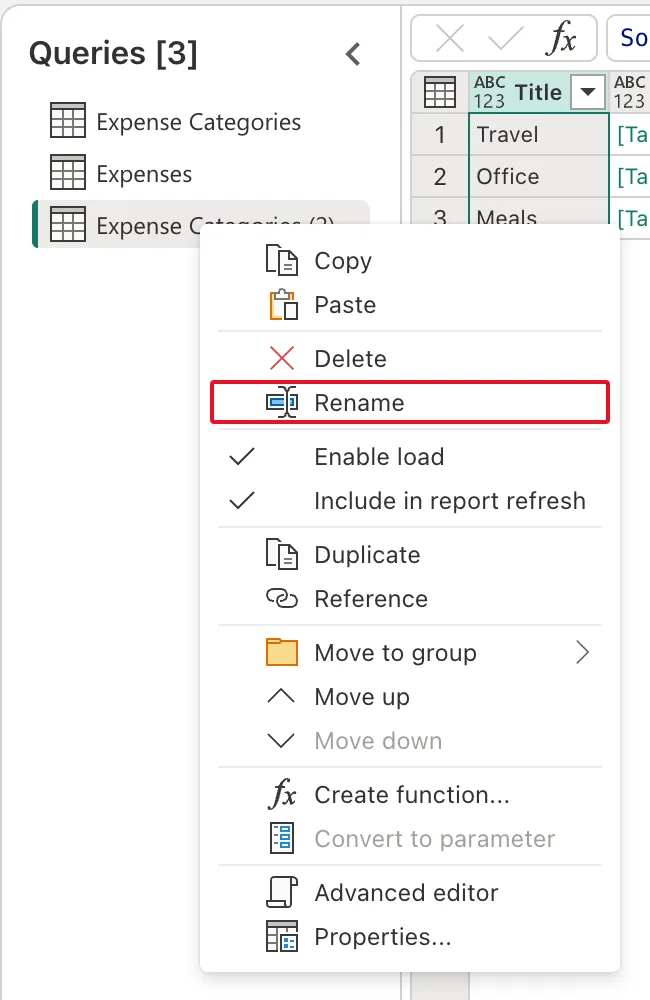
Under Queries, right-click the query and select Rename:
Step 2: Type the New Name
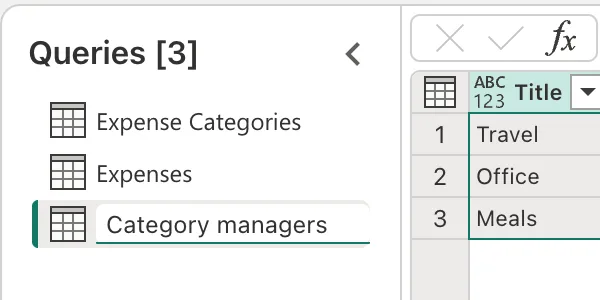
The name becomes a text box. Type the new name, here Category managers, and press Enter:
Step 3: Check the Result
The query is now Category managers under Queries and in Name under Properties in Query settings. Renaming a query doesn't add a step: Applied steps still shows Source and Navigation 1.

The Name box in Query settings does the same job: select it, type the name and press Enter.
Common Mistakes
| Mistake | What happens | Do this instead |
|---|---|---|
| Leaving (2) in a copy's name | The model gets a table no one can identify | Rename the copy at once |
| Naming a query after its source rather than its content | Two tables from one list look alike | Name it after what each row is |
| Renaming tables after building reports | Measures and visuals that use the table need checking | Name queries before building on them |
Troubleshooting
| Symptom | Likely cause | Fix |
|---|---|---|
| The name doesn't change | Enter wasn't pressed | Type the name again and press Enter |
| The new name is rejected | Another query already has it | Choose a name no other query uses |
FAQ
Is the query name the table name in Power BI?
Yes: each query that loads becomes a table of the same name in the semantic model.
Can I rename a column the same way?
Columns are renamed from their header (How to Rename a Column in Power Query).
Conclusion
Right-click the query, Rename, type the name, Enter, or use Name in Query settings. The example's copy became Category managers, the name its table will have in the model.
Additional Resources
- The Power Query user interface: the Queries pane and Query settings.
