How to Rename a Field in One Power BI Visual

Power BI names a summed column Sum of Amount in a visual. Rename for this visual changes the name one visual shows, without touching the model or any other visual. Here's how.
The example renames Sum of Amount to Amount in a table of expense claims (How to Add a Table to a Power BI Report).
Step 1: Open the Field's Menu
In Editing mode, select the visual. In the Visualizations pane, find the field in its well, here Sum of Amount in Columns, and select the arrow next to it. Select Rename for this visual:
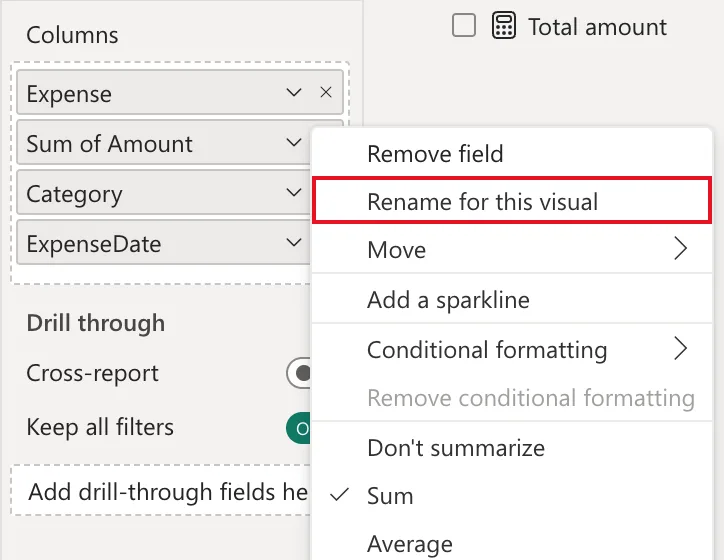
Step 2: Type the Name
The field becomes a text box. Type the new name, Amount, and press Enter:
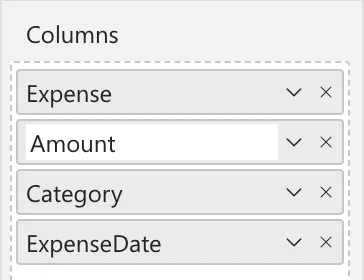
Step 3: Check the Visual
The table's header reads Amount:
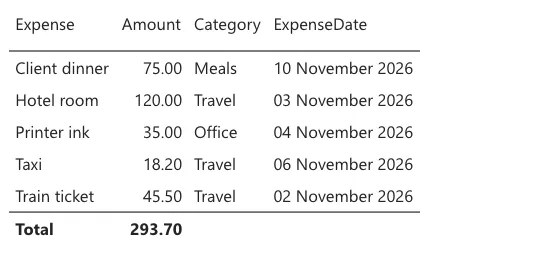
In the Data pane and in every other visual, the column is still Amount of Expenses, summed as before; only this visual's label changed.
Common Mistakes
| Mistake | What happens | Do this instead |
|---|---|---|
| Renaming in each visual what should change everywhere | Every new visual shows the old name | Rename the column in Power Query or the model |
| Selecting Don't summarize to lose Sum of | The table lists every amount without a total | Keep Sum, rename the label |
| Renaming with no visual selected | The well isn't shown | Select the visual first |
Troubleshooting
| Symptom | Likely cause | Fix |
|---|---|---|
| No Rename for this visual | The menu is the Data pane's, not the well's | Use the arrow on the field in the well |
| The old name is back | The field was removed and added again | Rename it again |
FAQ
Does this rename the column in the model?
No. To rename it everywhere, rename it in Power Query (How to Rename a Column in Power Query).
Does it work for chart axes and card labels?
Yes: any visual's field well has the same menu.
Conclusion
Select the visual, open the field's menu in its well, choose Rename for this visual, type the name and press Enter. The example's Sum of Amount became Amount in one table.
Additional Resources
- Tour the report editor in Power BI: the Visualizations pane and its field wells.
