How to Remove Characters from the End of a String in Python with rstrip

rstrip returns a copy of a string with characters removed from its end: whitespace when you call it with no argument, or any of the characters you list. It works on bytes too, which makes it handy for dropping = padding from base64.
Syntax
<result> = <text>.rstrip()
<result> = <text>.rstrip("<characters>")
<result> = <data>.rstrip(b"<characters>")
| Part | What it does |
|---|---|
.rstrip() | Removes spaces, tabs and line breaks from the end. |
"<characters>" | A set of characters: rstrip keeps removing from the end while the last character is any one of them. |
b"<characters>" | The same for a bytes value, which needs a bytes argument. |
The Python documentation for str.rstrip: "Return a copy of the string with trailing characters removed. The chars argument is a string specifying the set of characters to be removed."
The Example
The example strips spaces and a line break from the end of a word, the exclamation marks from Wow!!!, the = padding from a base64url value held as bytes, and .txt from test.txt, which goes wrong in an instructive way.
Prerequisites
- uv and Python. This guide uses uv 0.13.10 with Python 3.15.2.
Step 1: Write the Code
Create a file named main.py:
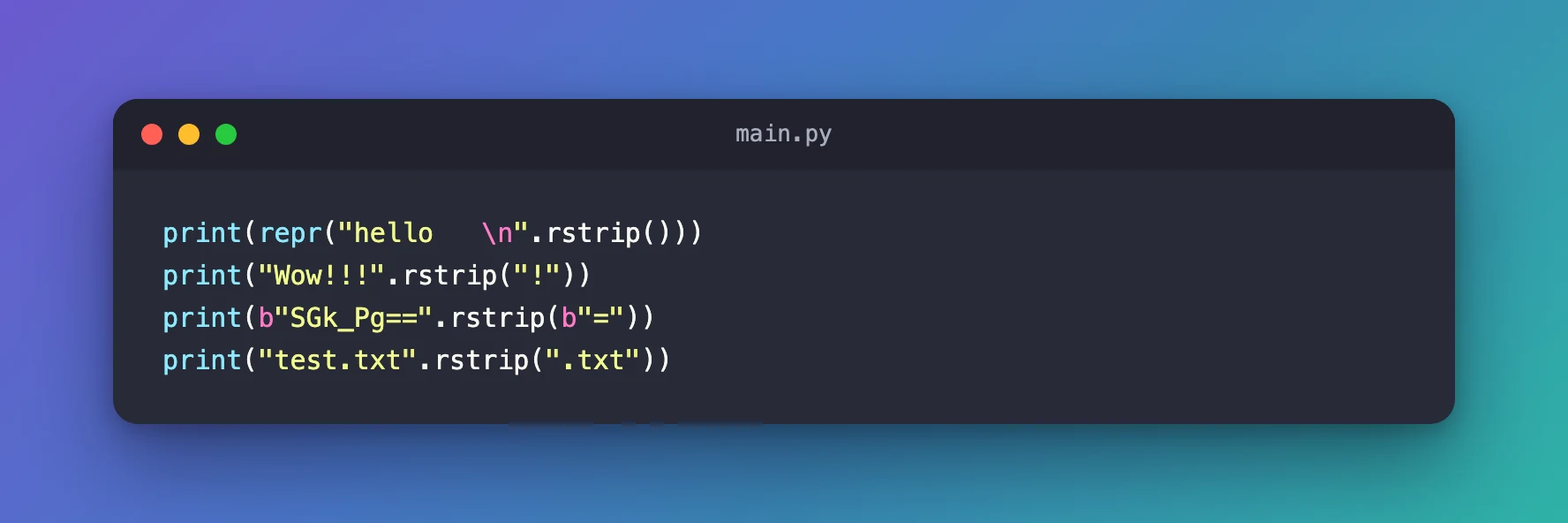
print(repr("hello   \n".rstrip()))
print("Wow!!!".rstrip("!"))
print(b"SGk_Pg==".rstrip(b"="))
print("test.txt".rstrip(".txt"))
Step 2: Run It
uv run python main.py
'hello'
Wow
b'SGk_Pg'
tes
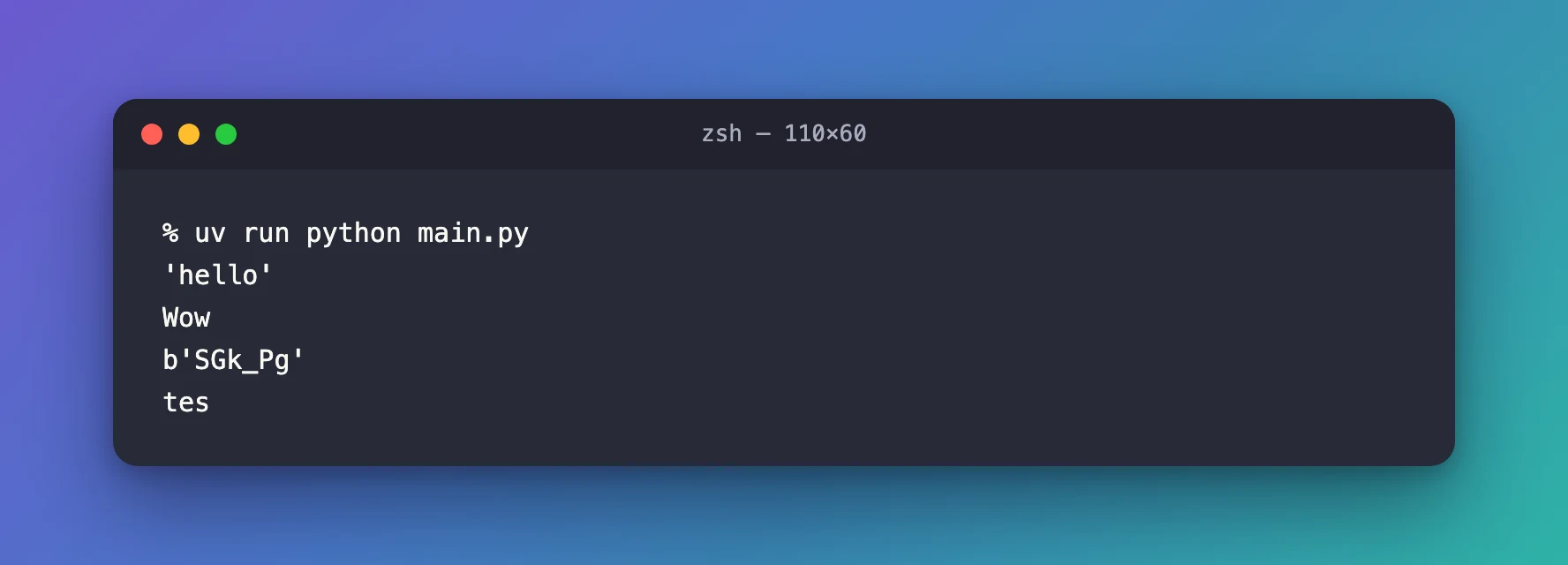
The command is the same in zsh, bash and PowerShell.
What Happened
rstrip()removed the three spaces and the line break;reprshows the quotes so you can see nothing is left.rstrip("!")removed all three exclamation marks, not just one.rstrip(b"=")removed both=from the bytes.rstrip(".txt")didn't remove the text.txt. It removed everyt,xand.from the end until it reached thes, leavingtes.
Common Mistakes
| Mistake | What happens | Do this instead |
|---|---|---|
Using rstrip to remove a word or file extension | It treats the argument as a set of characters: "test.txt".rstrip(".txt") gave tes | Use removesuffix(".txt"), which gave test |
Passing a bytes argument to a str, or the other way round | TypeError: rstrip arg must be None or str | Match the types: str with str, bytes with bytes |
| Expecting the original string to change | Strings never change; rstrip returns a new one | Assign the result: text = text.rstrip() |
Troubleshooting
| Symptom | Likely cause | Fix |
|---|---|---|
| More characters disappeared than expected | Characters in the argument also end the real text | Use removesuffix |
| Nothing changed | The characters weren't at the very end, or you didn't keep the result | Check with repr(), and assign the result |
FAQ
How do I strip both ends?
strip() removes from both ends and lstrip() from the start only. They take the same optional set of characters.
Why does rstrip("na") turn banana into b?
Because it keeps removing while the last character is n or a: "banana".rstrip("na") gave b.
Conclusion
text.rstrip() trims whitespace from the end, and text.rstrip(chars) trims any of the given characters, as many as it finds. To remove one exact ending, use removesuffix instead.
Additional Resources
- str.rstrip and str.removesuffix, in the Python documentation.
