How to Register a Single-Page Application in Microsoft Entra ID

A browser app that signs people in with Microsoft Entra ID, such as a React or Next.js front end using MSAL, needs an app registration of its own. What makes it a single-page application registration is one setting: the type of its redirect URI. This guide registers one in the Microsoft Entra admin center, then with the Azure CLI.
What Makes a Single-Page App Different
A single-page app runs in the visitor's browser, where anyone can read its code. It can't keep a secret, so its registration has none. Instead, it signs people in with the authorization code flow with PKCE: each sign-in uses a one-time value the app makes up on the spot, so a sign-in code intercepted on its way back is useless without it. MSAL, Microsoft's sign-in library, does all of this for you.
Two things in the registration make that work:
| Setting | Why |
|---|---|
| Redirect URI | The address Microsoft sends the sign-in response to. Microsoft sends responses only to addresses listed in the registration, and the address must match exactly — including path, protocol and port, as MSAL's documentation puts it |
| Platform: Single-page application | Lets the browser exchange the sign-in code for tokens. Microsoft's documentation says a SPA redirect URI is what supports the auth code flow with PKCE and cross-origin requests from the browser |
The examples on this page register a chat app called Dewiride Service Desk Chat that runs on http://localhost:3000 and receives sign-in responses at /redirect, the redirect bridge page MSAL Browser 5 needs (How to Add the MSAL Redirect Bridge Page to a Next.js App). Use your own app's name and address.
Prerequisites
- Permission to register applications in your Microsoft Entra tenant. By default every member of a tenant has it. If your organization has set Users can register applications to No, you need the Application Developer role (Restrict who can create applications).
- For the Azure CLI route: the Azure CLI signed in to that tenant (
az login).
Step 1: Start a New Registration
- Open the Microsoft Entra admin center and sign in with your work account.
- If you can reach more than one tenant, select the Settings icon in the top menu and switch to the right one under Directories + subscriptions.
- Browse to Entra ID > App registrations and select New registration.
Step 2: Fill In the Form
| Field | Value | Why |
|---|---|---|
| Name | Dewiride Service Desk Chat | The name people see, on Microsoft's consent screen for example |
| Supported account types | Single tenant only | Only people from your organization can sign in |
| Redirect URI — platform | Single-page application (SPA) | Makes it a single-page app registration |
| Redirect URI — address | http://localhost:3000/redirect | Where your app receives sign-in responses while you develop it |
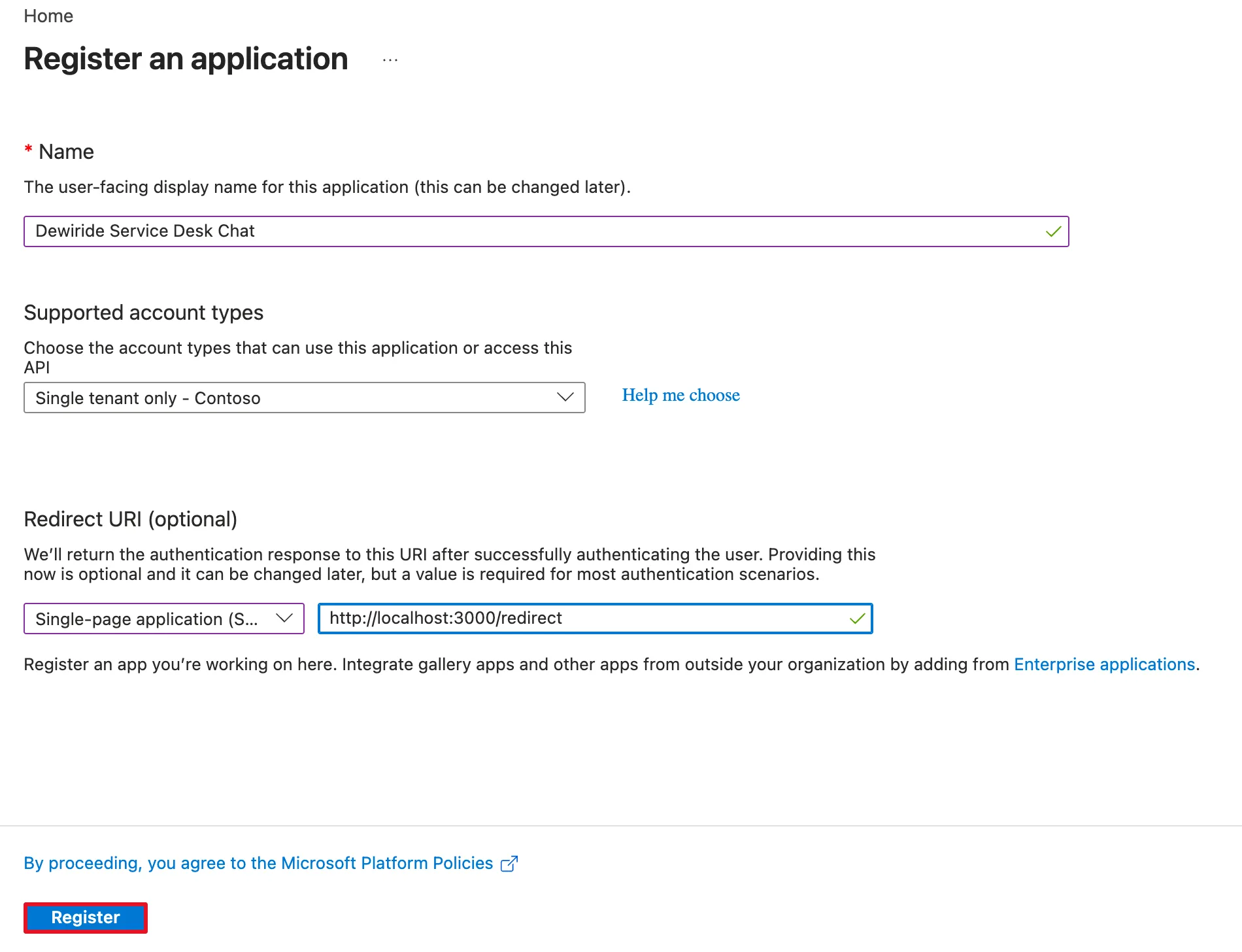
http:// is fine for localhost. When the app goes live, add its real address, starting with https://, as another redirect URI of the same registration.
Select Register. On the registration's Overview page, copy two values, as for any registration (How to Register a Web API in Microsoft Entra ID shows the page):
| Value | Where your app uses it |
|---|---|
| Application (client) ID | MSAL's clientId. On this page it's shown as 33333333-… |
| Directory (tenant) ID | MSAL's authority: https://login.microsoftonline.com/<tenant ID> |
Neither is a secret: the browser needs both to sign anyone in.
Step 3: Check the Default Permission
Every registration made in the admin center starts with one permission: Microsoft Graph > User.Read, which lets the app read the signed-in person's profile through Microsoft Graph. Microsoft's registration guide mentions it: Once you register your application, it gets assigned the User.Read permission.
Keep it if your app calls Microsoft Graph for the profile. If it doesn't, remove it, so the app asks for nothing it doesn't use: signing in alone doesn't need it (How to Add an API Permission to an App Registration in Microsoft Entra ID removes it and adds the permission for your own API).
That's the whole registration. There is no client secret to create, and there must never be one in a browser app: Microsoft's documentation says the platform prevents the use of client credentials in all flows in the presence of an Origin header, to ensure that secrets aren't used from within the browser.
Do It with the Azure CLI
The Azure CLI creates the registration with az ad app create, but has no option for single-page app redirect URIs, so that part goes to Microsoft Graph with az rest. The examples register an app called My Single-Page App. First, create it; the command is the same in every shell:
az ad app create --display-name "My Single-Page App" --sign-in-audience AzureADMyOrg --query "{appId:appId, id:id}"
{
  "appId": "55555555-5555-5555-5555-555555555555",
  "id": "56565656-5656-5656-5656-565656565656"
}
AzureADMyOrg is Single tenant only; appId is the client ID. Keep the client ID in a variable and create the app's service principal, the object the admin center creates for you automatically:
- macOS / Linux
- Windows (PowerShell)
SPA_APP_ID=$(az ad app list --display-name "My Single-Page App" --query "[0].appId" --output tsv)
az ad sp create --id $SPA_APP_ID --query "{appId:appId, displayName:displayName, id:id}"
$spaAppId = az ad app list --display-name "My Single-Page App" --query "[0].appId" --output tsv
az ad sp create --id $spaAppId --query "{appId:appId, displayName:displayName, id:id}"
{
  "appId": "55555555-5555-5555-5555-555555555555",
  "displayName": "My Single-Page App",
  "id": "57575757-5757-5757-5757-575757575757"
}
Now add the redirect URI as a single-page application address. The file spa.json holds the list of the app's SPA redirect URIs:
- macOS / Linux
- Windows (PowerShell)
cat > spa.json <<'EOF'
{
  "spa": {
    "redirectUris": ["http://localhost:3000/redirect"]
  }
}
EOF
az rest --method PATCH --uri "https://graph.microsoft.com/v1.0/applications(appId='$SPA_APP_ID')" --body @spa.json
@"
{
  "spa": {
    "redirectUris": ["http://localhost:3000/redirect"]
  }
}
"@ | Set-Content spa.json
az rest --method PATCH --uri "https://graph.microsoft.com/v1.0/applications(appId='$spaAppId')" --body "@spa.json"
az rest prints nothing when the update works. Check where the address landed:
- macOS / Linux
- Windows (PowerShell)
az ad app show --id $SPA_APP_ID --query "{spa:spa.redirectUris, web:web.redirectUris, publicClient:publicClient.redirectUris}"
az ad app show --id $spaAppId --query "{spa:spa.redirectUris, web:web.redirectUris, publicClient:publicClient.redirectUris}"
{
  "publicClient": [],
  "spa": [
    "http://localhost:3000/redirect"
  ],
  "web": []
}
A registration has three lists of redirect URIs, one per platform, and the address is in the spa list only. az ad app create has --web-redirect-uris and --public-client-redirect-uris options, but they fill the other two lists, which are for web apps with a server and for desktop and mobile apps.
One difference from the admin center: a registration made with az ad app create starts with no permissions. az ad app permission list --id returned [] for it, where the admin center would have added User.Read.
Common Mistakes
| Mistake | What happens | Do this instead |
|---|---|---|
| Choosing the Web platform for a browser app | Exchanging the sign-in code from the browser fails; Microsoft's documentation shows a CORS error in the console | Choose Single-page application (SPA) |
A redirect URI that differs from the app's by a slash, a port or http/https | Microsoft refuses to send the response there | Register the exact address MSAL's redirectUri resolves to |
| Creating a client secret for the app | A secret in a browser app isn't secret, and the platform refuses client credentials from the browser anyway | Never give a single-page app a secret |
| Keeping User.Read without calling Microsoft Graph | The registration asks for more than the app uses | Remove it, or keep it only if the app reads the profile from Graph |
Adding the SPA address with --web-redirect-uris | It lands in the web list, not the spa list | Set spa.redirectUris with az rest |
Troubleshooting
| Symptom | Likely cause | Fix |
|---|---|---|
A CORS error for login.microsoftonline.com/…/token in the browser console | The redirect URI is registered under Web, not Single-page application | Register it as a single-page application address |
| Microsoft's sign-in page says the redirect URI doesn't match | The address your app sends isn't in the SPA list exactly | Compare it character by character with the registration |
| A consent screen at the first sign-in | The person is asked to agree to the permissions the app requests | Expected once per person; for your own API's scope, the API can pre-authorize the app |
FAQ
Can one registration serve both localhost and production?
Yes. The SPA list holds several addresses: add the production address next to the localhost one. Many teams use separate registrations per environment instead, so a test app can never sign anyone in to production.
Is the client ID a secret?
No. It's in every sign-in request your app sends from the browser, and anyone can see it. It identifies the app; it doesn't prove anything.
Does a single-page app need the Microsoft Graph permission to sign people in?
No. Signing in works with the standard sign-in permissions MSAL asks for itself. Microsoft Graph's permission reference says: You don't need to specify the User.Read permission to return an ID token with the v2.0 endpoint.
Conclusion
A single-page app's registration is a normal registration with one special setting: its redirect URI is of the Single-page application type. Register it as Single tenant only with your app's exact /redirect address, copy the client and tenant IDs for MSAL, create no secret, and keep User.Read only if the app calls Microsoft Graph. With the Azure CLI, az ad app create and az ad sp create create it, and az rest sets spa.redirectUris.
Additional Resources
- Register an application in Microsoft Entra ID — the form and the account types.
- Redirect URIs for single-page apps — why the SPA type matters.
- How to add a redirect URI — more addresses for the same app.
Related
- How to Sign Users In to a Next.js App with MSAL React
- How to Add the MSAL Redirect Bridge Page to a Next.js App
- How to Add an API Permission to an App Registration in Microsoft Entra ID
- How to Pre-Authorize a Client Application for Your API in Microsoft Entra ID
- How to Register a Web API in Microsoft Entra ID
