How to Refresh Data in Power Apps with the Refresh Function

Refresh gets a fresh copy of a data source, so the app shows changes other people made while it was running. It has no result, and it only works in formulas that run on an action, such as OnSelect and OnVisible. If your screen keeps data in variables, run its queries again after Refresh.
Syntax
Refresh(DataSource)
- DataSource is the data source to refresh, such as a SharePoint list in your app.
- Refresh has no return value. Microsoft's reference says you can use it only in behavior formulas (Refresh function).
When You Need It
Microsoft documents when an app has fresh data and when it doesn't:
- When the app opens, it gets the data source (Understand canvas-app forms: Refresh data).
- While it runs, it doesn't detect changes made outside it, such as an item edited in SharePoint or by another user (Troubleshoot common data source issues).
Your own app's changes are different. After a Patch in the Career Development Plan app, going back to the list showed the new status at once, without Refresh (Part 6). You need Refresh for other people's changes.
Example: The Status That Didn't Change
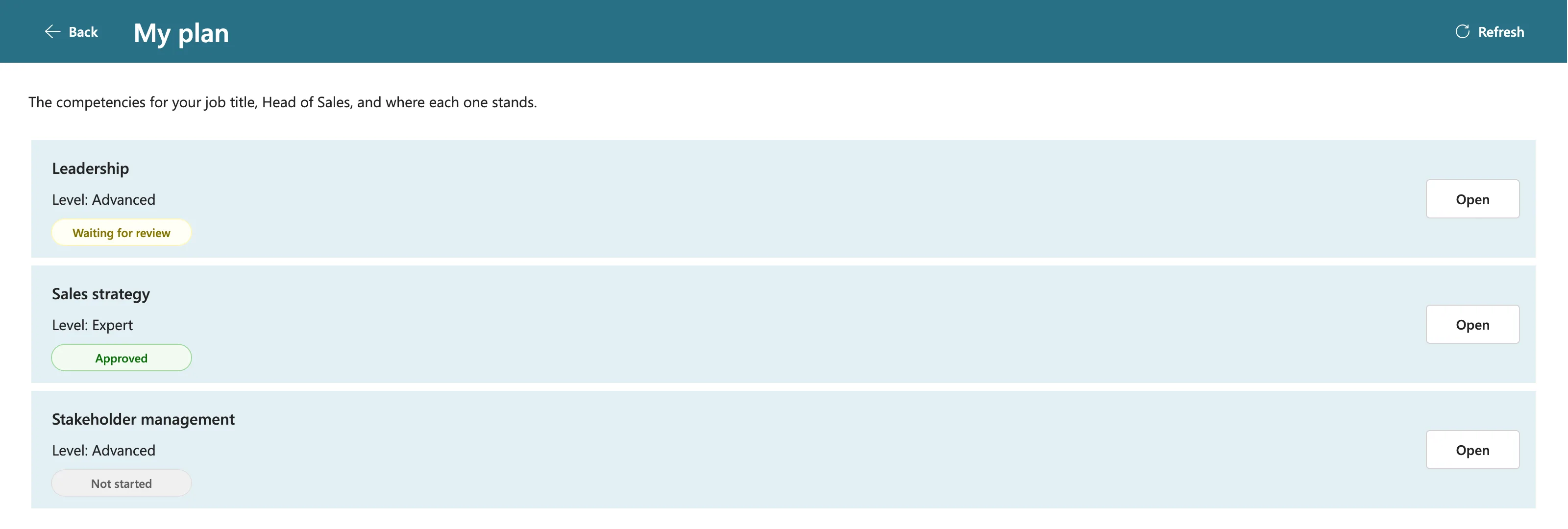
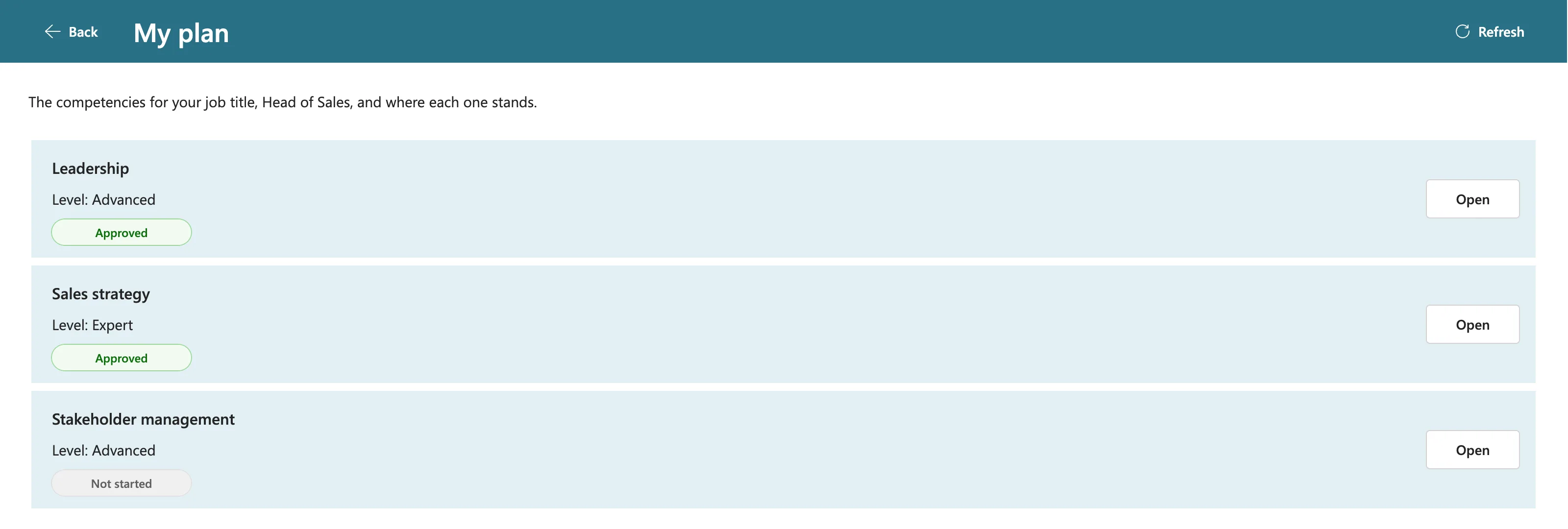
In the Career Development Plan app, an employee's My plan screen lists her competencies with a status each. Her manager approved one in another browser. Opening My plan again still showed Waiting for review, even minutes later (Fixed: Power Apps Doesn't Show Changes Other People Made).
The fix starts the screen's loading formula with Refresh on both lists it reads, and a Refresh button in the header runs the same formula (How to Add a Refresh Button to a Screen). The start of that formula:
UpdateContext({locIsLoading: true});
Refresh(RoleCompetencies);
Refresh(CompetencyResponses);
Here's the screen before a refresh, with Leadership still Waiting for review after the manager approved it:
And after selecting Refresh:
Refresh Updates the Data Source, Not Your Variables
Microsoft's example shows galleries bound to the data source updating after Refresh. A variable is different: UpdateContext, Set and collections hold a copy of the result, made when the formula ran (Delegation and collections). Refresh doesn't change that copy.
So in a screen that loads its data into variables, call Refresh first and then run the queries again:
Refresh(CompetencyResponses);
UpdateContext(
    {
        locMyResponses: Filter(
            CompetencyResponses,
            EmployeeId = MyProfile.id
        )
    }
)
Where to Call It
- At the start of a screen's loading formula, so the screen shows current data every time it opens.
- In a Refresh button, for people who stay on a screen and want the latest data.
In the example, both run one formula: it lives in the button's OnSelect, and the screen's OnVisible selects the button.
Common Mistakes
| Mistake | What happens | Do this instead |
|---|---|---|
| Calling Refresh and nothing else on a screen that uses variables | The screen still shows its old copy | Run the screen's queries again after Refresh |
| Using Refresh in a property such as Text or Items | Not allowed: it only works in behavior formulas | Call it in OnVisible or OnSelect |
| Testing changes with one account | Your own changes always show | Test with a second person in another browser |
Troubleshooting
| Symptom | Likely cause | Fix |
|---|---|---|
| Changes made in SharePoint don't appear | The app doesn't detect outside changes while running | Refresh the list |
| Refresh runs but a gallery stays the same | The gallery shows a variable | Load the variable again after Refresh |
| A save fails because the item changed | The app's copy is older than SharePoint's | Read the item again, then save (Fixed: ETAG Mismatch) |
FAQ
What's the difference between Refresh and Revert?
Both get fresh data. Microsoft's reference says Revert can also refresh a single record, and it clears the errors that the Errors function reports for it (Revert function).
Does Refresh reload my whole SharePoint list into the app?
Microsoft's reference describes it as a fresh copy of the data source and doesn't go further. Your queries decide what the app loads: delegable queries still run in SharePoint.
Conclusion
Refresh(DataSource) is how a running canvas app sees other people's changes. Call it at the start of a screen's loading formula and in a Refresh button, and if the screen uses variables, load them again after it.
