How to Reduce a Quantity Only If There Is Enough in MySQL

Reading a quantity, checking it, and then writing a new one takes three steps, and two people can both pass the check. A single UPDATE with the check in its WHERE takes one step. MySQL holds the row's lock from the check to the change, so there's no gap to fall into. It's the simplest safe way to take stock.
Prerequisites
- MySQL, and two sessions. The examples use MySQL 9.7.4 in Docker, and the
mysqlclient from How to Connect to MySQL in a Docker Container. - A row with a quantity. The quantity of this product starts at
5.
Step 1: Take Three, When There's Enough
UPDATE products SET QuantityOnHand = QuantityOnHand - 3 WHERE Id = 3 AND QuantityOnHand >= 3;
SELECT ROW_COUNT();
Query OK, 1 row affected (0.003 sec)
Rows matched: 1  Changed: 1  Warnings: 0

+-------------+
| ROW_COUNT() |
+-------------+
|           1 |
+-------------+
1 row in set (0.001 sec)
ROW_COUNT() says 1, so you got them. Two are left.
Step 2: Try to Take Three More
UPDATE products SET QuantityOnHand = QuantityOnHand - 3 WHERE Id = 3 AND QuantityOnHand >= 3;
SELECT ROW_COUNT();
Query OK, 0 rows affected (0.001 sec)
Rows matched: 0  Changed: 0  Warnings: 0

+-------------+
| ROW_COUNT() |
+-------------+
|           0 |
+-------------+
1 row in set (0.000 sec)
Rows matched: 0, and no error. The WHERE didn't match, nothing changed, and the quantity stays at 2. That's your "not enough stock" answer.
Step 3: Race for the Last One
With one left, the first session takes it, and hasn't committed yet:
START TRANSACTION;
UPDATE products SET QuantityOnHand = QuantityOnHand - 1 WHERE Id = 3 AND QuantityOnHand >= 1;
The second tries the same statement, and waits on the row's lock:
UPDATE products SET QuantityOnHand = QuantityOnHand - 1 WHERE Id = 3 AND QuantityOnHand >= 1;
The first session commits:
COMMIT;
Query OK, 0 rows affected (3.057 sec)
Rows matched: 0  Changed: 0  Warnings: 0
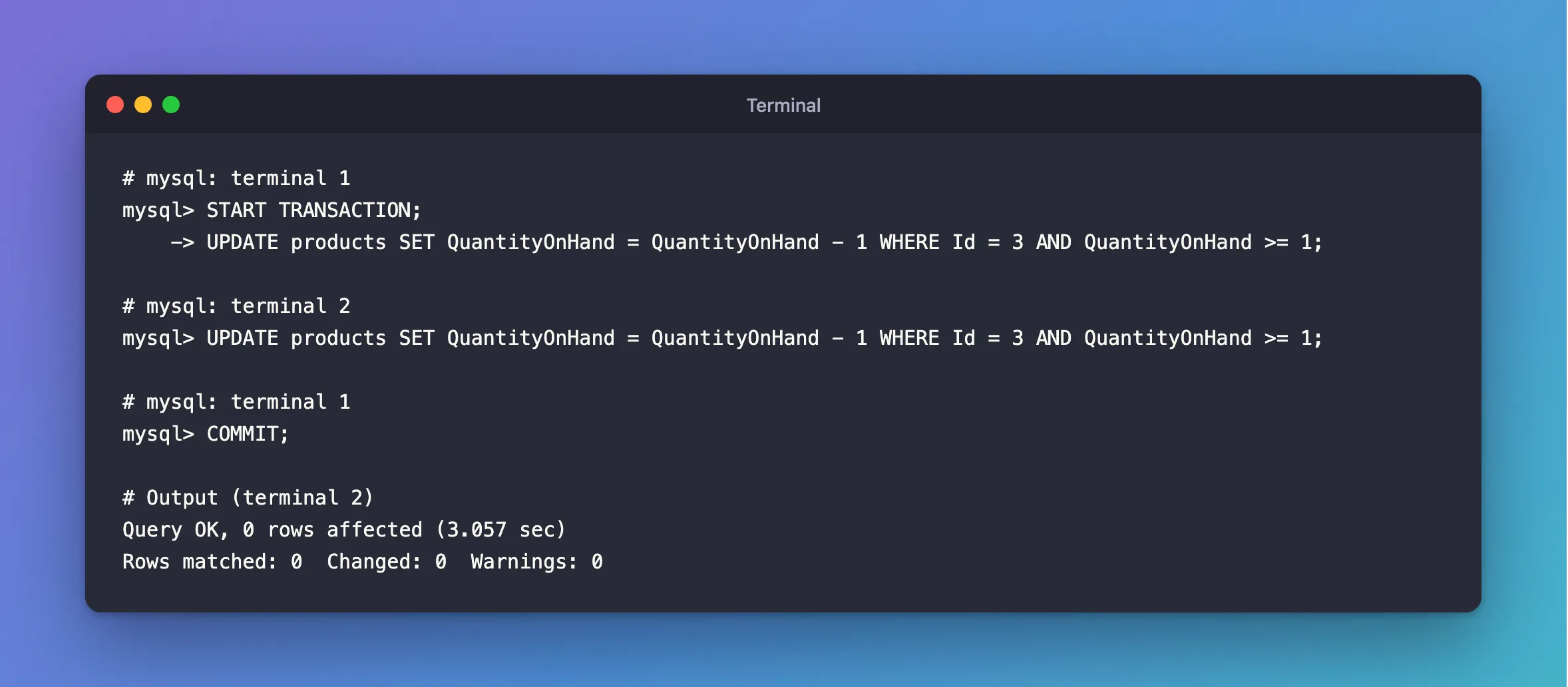
It waited three seconds, then checked the WHERE against the new value, 0, and matched nothing. One buyer got the last one, and the other was told no. The quantity can't go below zero.
This works because an UPDATE doesn't use a transaction's snapshot: it reads the newest committed row. READ COMMITTED vs REPEATABLE READ in MySQL shows that.
Why Not Read First?
Because the check is then out of date by the time you write:
SELECT QuantityOnHand FROM products WHERE Id = 3;
-- Your code sees 1, and decides there's enough.
UPDATE products SET QuantityOnHand = 0 WHERE Id = 3;
Two sessions can both read 1, and both write 0, which sells two with one in stock. Fixed: Two Requests Buy the Last Item in EF Core shows it happening: five buyers, one unit, five orders.
Common Mistakes
| Mistake | What happens | Do this instead |
|---|---|---|
Not checking ROW_COUNT() | You don't know if you got the stock | Check it, and treat 0 as "not enough" |
Writing a fixed number, as in SET QuantityOnHand = 0 | The last write wins | Compute from the column: QuantityOnHand - 1 |
Assuming 0 rows is an error | MySQL treats it as a success | Handle it in your code |
Relying only on a CHECK constraint | It stops the negative number, with an error | Use it as a backstop, and keep the WHERE |
Troubleshooting
| Symptom | Likely cause | Fix |
|---|---|---|
Rows matched: 0, and the row exists | There isn't enough | Tell the user |
| It waits | Another transaction holds the row | Normal, as long as it's short |
Check constraint ... is violated | An UPDATE with no WHERE check | The fix |
FAQ
Does this need a transaction?
Not by itself: one statement is already atomic. You need one when something else must happen with it, such as recording the sale: How to Use a Transaction in MySQL.
Conclusion
UPDATE ... SET q = q - n WHERE Id = ? AND q >= n checks and changes in one step, while MySQL holds the row. A ROW_COUNT() of 1 means you got it, and 0 means there wasn't enough. A second buyer waits, then sees the new value, so the stock can't be oversold.
Additional Resources
- UPDATE Statement — the syntax.
- Information Functions —
ROW_COUNT().
