How to Read Rows from MySQL with EF Core and LINQ

With EF Core, you read rows by writing a LINQ query in C#, and EF Core turns it into SQL. The part that surprises people is timing: building the query sends nothing, and only ToListAsync or a similar call goes to MySQL. This guide reads rows with Where and OrderBy, shows the SQL each piece becomes, and proves the timing with real logs.
Prerequisites
- A .NET C# project with EF Core and a MySQL table with some rows. The examples use EF Core 10, Oracle's
MySql.EntityFrameworkCore, MySQL 9.7, and aproductstable with eight products. - SQL logging on: How to See the SQL That EF Core Sends.
Step 1: Read Every Row
var products = await db.Products.ToListAsync();
db.Products is the table, and ToListAsync runs the query:
info: Microsoft.EntityFrameworkCore.Database.Command[20101]
      Executed DbCommand (3ms) [Parameters=[], CommandType='Text', CommandTimeout='30']
      SELECT `p`.`Id`, `p`.`ArchivedAtUtc`, `p`.`CategoryId`, `p`.`CreatedAtUtc`, `p`.`Description`, `p`.`IsArchived`, `p`.`Name`, `p`.`QuantityOnHand`, `p`.`ReorderLevel`, `p`.`Sku`, `p`.`UnitPrice`, `p`.`UpdatedAtUtc`, `p`.`Version`
      FROM `products` AS `p`
You get a list of Product objects, with every column filled in. That's fine for a small table, and wasteful for a large one, so most real queries narrow it down.
Step 2: Filter and Sort
Each LINQ method adds to the query:
var query = db.Products
    .Where(p => p.UnitPrice < 10)
    .OrderBy(p => p.Name)
    .Select(p => p.Name);

var names = await query.ToListAsync();
| C# | SQL it becomes |
|---|---|
.Where(p => p.UnitPrice < 10) | WHERE p.UnitPrice < 10.0 |
.OrderBy(p => p.Name) | ORDER BY p.Name |
.Select(p => p.Name) | SELECT p.Name |
Step 3: See When the Query Runs
EF Core's How Queries Work page says: "When you call LINQ operators, you're simply building up an in-memory representation of the query. The query is only sent to the database when the results are consumed." To see it, I logged a line between building the query and running it:
var query = db.Products.Where(p => p.UnitPrice < 10).OrderBy(p => p.Name).Select(p => p.Name);
DemoLog.QueryBuilt(logger);

var names = await query.ToListAsync();
DemoLog.QueryDone(logger, names.Count);
info: Demo[1273429049]
      The query is built, and nothing has gone to MySQL yet
info: Microsoft.EntityFrameworkCore.Database.Command[20101]
      Executed DbCommand (9ms) [Parameters=[], CommandType='Text', CommandTimeout='30']
      SELECT `p`.`Name`
      FROM `products` AS `p`
      WHERE `p`.`UnitPrice` < 10.0
      ORDER BY `p`.`Name`
info: Demo[321093777]
      The query returned 5002 names
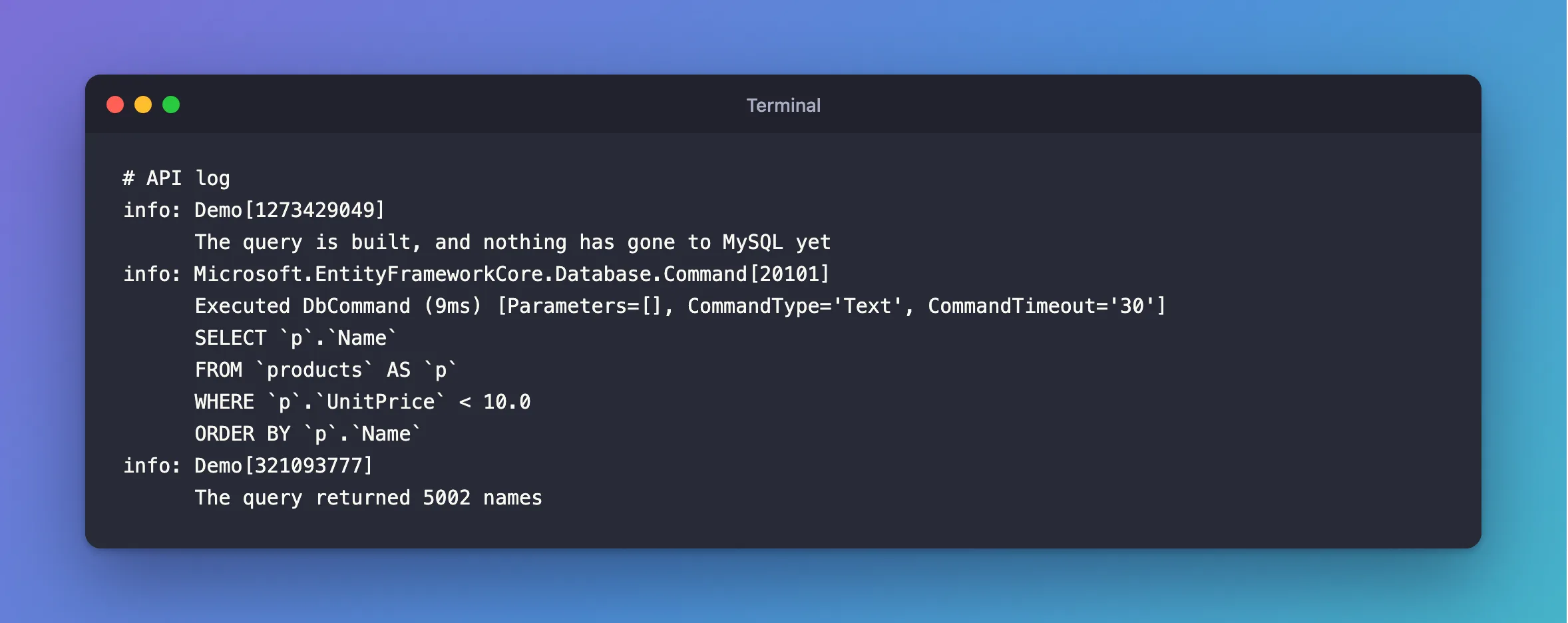
The first message comes before any SQL, so the query really hadn't gone anywhere. The page lists what does send it: "Iterating the results in a for loop", and "Using an operator such as ToList, ToArray, Single, Count, or the equivalent async overloads".
That's what lets you add filters only when a value is given, building the query step by step, for free.
Step 4: Don't Filter After ToListAsync
Order matters. Here, ToListAsync comes first:
var all = await db.Products.ToListAsync();
var cheap = all.Where(p => p.UnitPrice < 10);
info: Microsoft.EntityFrameworkCore.Database.Command[20101]
      Executed DbCommand (3ms) [Parameters=[], CommandType='Text', CommandTimeout='30']
      SELECT `p`.`Id`, `p`.`ArchivedAtUtc`, `p`.`CategoryId`, `p`.`CreatedAtUtc`, `p`.`Description`, `p`.`IsArchived`, `p`.`Name`, `p`.`QuantityOnHand`, `p`.`ReorderLevel`, `p`.`Sku`, `p`.`UnitPrice`, `p`.`UpdatedAtUtc`, `p`.`Version`
      FROM `products` AS `p`
No WHERE. After ToListAsync, you have a C# list, so Where runs in C#, on rows MySQL has already sent. On a table of 5,000 rows, that means loading 5,000 rows to keep a handful. Keep Where, OrderBy and Select before the method that runs the query.
Why Async?
ToListAsync frees the thread while MySQL works. EF Core's async page says async operations "can also increase throughput in web applications where they free up the thread to service other requests". In a Web API, use the async versions, and await them.
Common Mistakes
| Mistake | What happens | Do this instead |
|---|---|---|
ToListAsync before Where | The whole table comes back | Filter first |
Forgetting await | You have a Task, and possibly a second operation error | await every call |
Using a C# method inside Where | EF Core can't translate it to SQL | Use properties and simple operators |
No OrderBy when order matters | MySQL returns rows in no promised order | Sort explicitly |
Missing using Microsoft.EntityFrameworkCore; | CS1929 or CS0411 | Add the using |
FAQ
What's the type of query before it runs?
IQueryable<T>: a description of a query, not its results. Once you call ToListAsync, you have a List<T>.
Do values in Where go into the SQL text?
A constant can, as 10.0 did here. Variables become parameters, such as @p, so they can't change the SQL.
Conclusion
Write db.Table.Where(…).OrderBy(…).Select(…), and finish with ToListAsync(). Each method adds to a query that doesn't run until that last call, so keep everything that can run in SQL before it. The log shows exactly what MySQL received.
Additional Resources
- How Queries Work — the life of a query, and when it runs.
- Querying Data — EF Core's overview.
