How to Query the Items of One Partition in Azure Cosmos DB with C#

An Azure Cosmos DB query from C# stays in one partition when you give it that partition's key, in QueryRequestOptions or as a filter on the partition key's property. Leave both out, and SELECT * FROM c returns the items of every partition. Here are all three, run against a small container, with what each returned and what it cost.
A Cosmos DB for NoSQL container groups its items by a partition key: a property, named by the container's partition key path, such as /listId. All items with the same value form one logical partition. Reading one user's data, one tenant's data or one list's items usually means reading one logical partition, and that's what this post shows.
Syntax
The partition key in the request options:
using FeedIterator<<Type>> <feed> = <container>.GetItemQueryIterator<<Type>>(
    new QueryDefinition("<query>"),
    requestOptions: new QueryRequestOptions { PartitionKey = new PartitionKey("<value>") });

while (<feed>.HasMoreResults)
{
    FeedResponse<<Type>> <page> = await <feed>.ReadNextAsync();
    // use the items in <page>, and <page>.RequestCharge
}
Or a filter on the partition key's property in the query itself:
QueryDefinition <query> = new QueryDefinition("SELECT * FROM c WHERE c.<partition-key-property> = @<parameter>")
    .WithParameter("@<parameter>", "<value>");
| Part | What it is |
|---|---|
<Type> | The C# type each item is read into |
<container> | The Container from CosmosClient.GetContainer |
<query> | The query, in Cosmos DB's SQL, such as SELECT * FROM c |
QueryRequestOptions.PartitionKey | The reference: gets or sets the PartitionKey for the current request. The query runs in that logical partition only |
<value> | The partition key value of the partition to read, such as home |
<feed>.HasMoreResults | Tells if there is more results that need to be retrieved from the service. Results come a page at a time |
<page>.RequestCharge | The request units the page cost |
<partition-key-property> | The property the container's partition key path names, such as listId for /listId |
@<parameter> | A query parameter. WithParameter fills it in, so the value never becomes part of the query text |
Microsoft's article on querying containers explains the filter form: if the query has a partition key filter specified, Azure Cosmos DB automatically optimizes the query. It routes the query to the physical partitions corresponding to the partition key values specified in the filter.
The Example
A small to-do app keeps its items in a container howto-todos, whose partition key path is /listId. There are three lists, home, work and groceries, so the container has three logical partitions. The console app TodoQuery adds seven items, then runs three queries: one with the partition key in the options, one without it, and one with a filter on listId. It signs in with my Azure CLI account.
Prerequisites
- The .NET 10 SDK.
dotnet --versionprints a version that starts with10.0. - The Azure CLI, signed in with
az login. The app uses that sign-in. - A Cosmos DB for NoSQL container whose partition key path is
/listId, and a Cosmos DB data role for your account on it, such as Cosmos DB Built-in Data Contributor. An Azure role such as Owner isn't enough: Connect using role-based access control and Microsoft Entra ID.
Step 1: Create a Console App and Add the Packages
dotnet new console -n TodoQuery
cd TodoQuery
dotnet add package Microsoft.Azure.Cosmos --version 3.64.0
dotnet add package Newtonsoft.Json --version 13.0.4
dotnet add package Azure.Identity --version 1.21.0
dotnet new console creates the project, and each dotnet add package adds one package and ends with lines like these:
info : PackageReference for package 'Azure.Identity' version '1.21.0' added to file '/Users/you/source/TodoQuery/TodoQuery.csproj'.
log  : Restored /Users/you/source/TodoQuery/TodoQuery.csproj (in 702 ms).
Microsoft.Azure.Cosmos is the Cosmos DB SDK, Newtonsoft.Json is a package the SDK requires you to reference yourself, and Azure.Identity has the Microsoft Entra ID credentials. How to Connect to Azure Cosmos DB with Microsoft Entra ID in C# explains each one and the client in detail.
Step 2: Connect and Add the Items
Replace Program.cs with the client and the items:
using System.Text.Json;
using Azure.Identity;
using Microsoft.Azure.Cosmos;

// The account's URI, from its Overview page in the Azure portal.
const string AccountEndpoint = "https://cosmos-maf-servicedesk-4224.documents.azure.com:443/";

using CosmosClient client = new(AccountEndpoint, new AzureCliCredential(), new CosmosClientOptions
{
    UseSystemTextJsonSerializerWithOptions = JsonSerializerOptions.Web,
});
Container todos = client.GetContainer("servicedesk", "howto-todos");

// Three to-do lists. Each list is one partition, because the container's partition key path is /listId.
// Upsert, so running the app again doesn't add the items twice.
TodoItem[] items =
[
    new("1", "home", "Water the plants"),
    new("2", "home", "Pay the electricity bill"),
    new("3", "work", "Send the weekly report"),
    new("4", "work", "Book a meeting room"),
    new("5", "groceries", "Milk"),
    new("6", "groceries", "Bread"),
    new("7", "groceries", "Coffee"),
];
foreach (TodoItem item in items)
{
    await todos.UpsertItemAsync(item, new PartitionKey(item.ListId));
}
AccountEndpointis your account's URI, from its Overview page in the Azure portal.JsonSerializerOptions.Webwrites property names in camelCase, soListIdbecomeslistId, the property the partition key path/listIdnames, andIdbecomesid, the name Cosmos DB requires.UpsertItemAsynccreates each item or replaces it, so running the app twice doesn't add anything twice.
Step 3: Query One Partition with the Partition Key
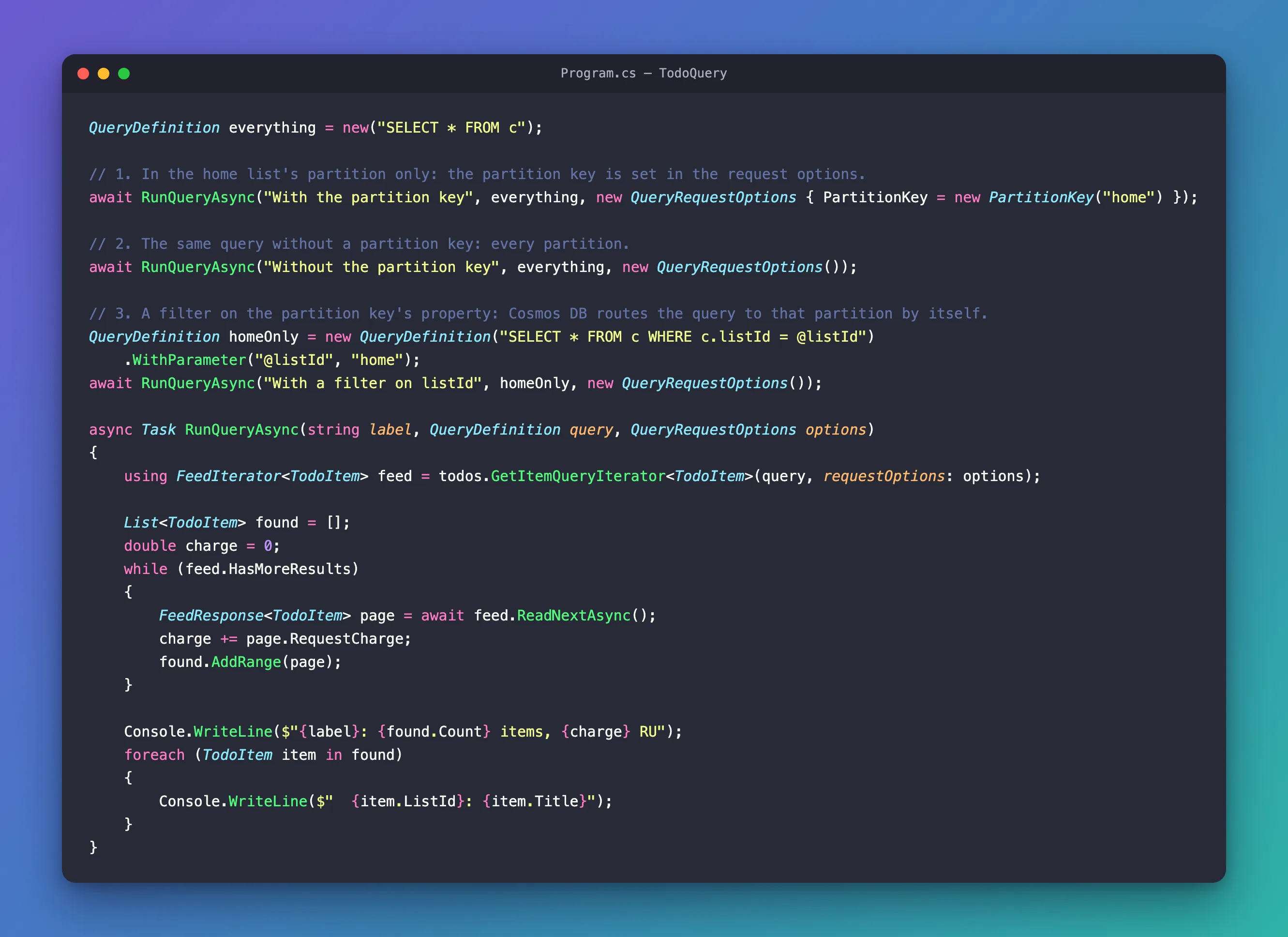
QueryDefinition everything = new("SELECT * FROM c");

// 1. In the home list's partition only: the partition key is set in the request options.
await RunQueryAsync("With the partition key", everything, new QueryRequestOptions { PartitionKey = new PartitionKey("home") });
SELECT * FROM c has no filter at all. The partition key in QueryRequestOptions is what keeps it inside the home list.
RunQueryAsync, at the end of the file, reads every page of results, adds up RequestCharge and prints what came back:
async Task RunQueryAsync(string label, QueryDefinition query, QueryRequestOptions options)
{
    using FeedIterator<TodoItem> feed = todos.GetItemQueryIterator<TodoItem>(query, requestOptions: options);

    List<TodoItem> found = [];
    double charge = 0;
    while (feed.HasMoreResults)
    {
        FeedResponse<TodoItem> page = await feed.ReadNextAsync();
        charge += page.RequestCharge;
        found.AddRange(page);
    }

    Console.WriteLine($"{label}: {found.Count} items, {charge} RU");
    foreach (TodoItem item in found)
    {
        Console.WriteLine($"  {item.ListId}: {item.Title}");
    }
}
Step 4: Run the Same Query Without a Partition Key
// 2. The same query without a partition key: every partition.
await RunQueryAsync("Without the partition key", everything, new QueryRequestOptions());
Same query text, but no partition key: nothing keeps it in one list.
Step 5: Filter on the Partition Key's Property
// 3. A filter on the partition key's property: Cosmos DB routes the query to that partition by itself.
QueryDefinition homeOnly = new QueryDefinition("SELECT * FROM c WHERE c.listId = @listId")
    .WithParameter("@listId", "home");
await RunQueryAsync("With a filter on listId", homeOnly, new QueryRequestOptions());
No partition key in the options this time, but the query filters on listId with =, and Cosmos DB routes it to that partition by itself.
Step 6: Run It
dotnet run
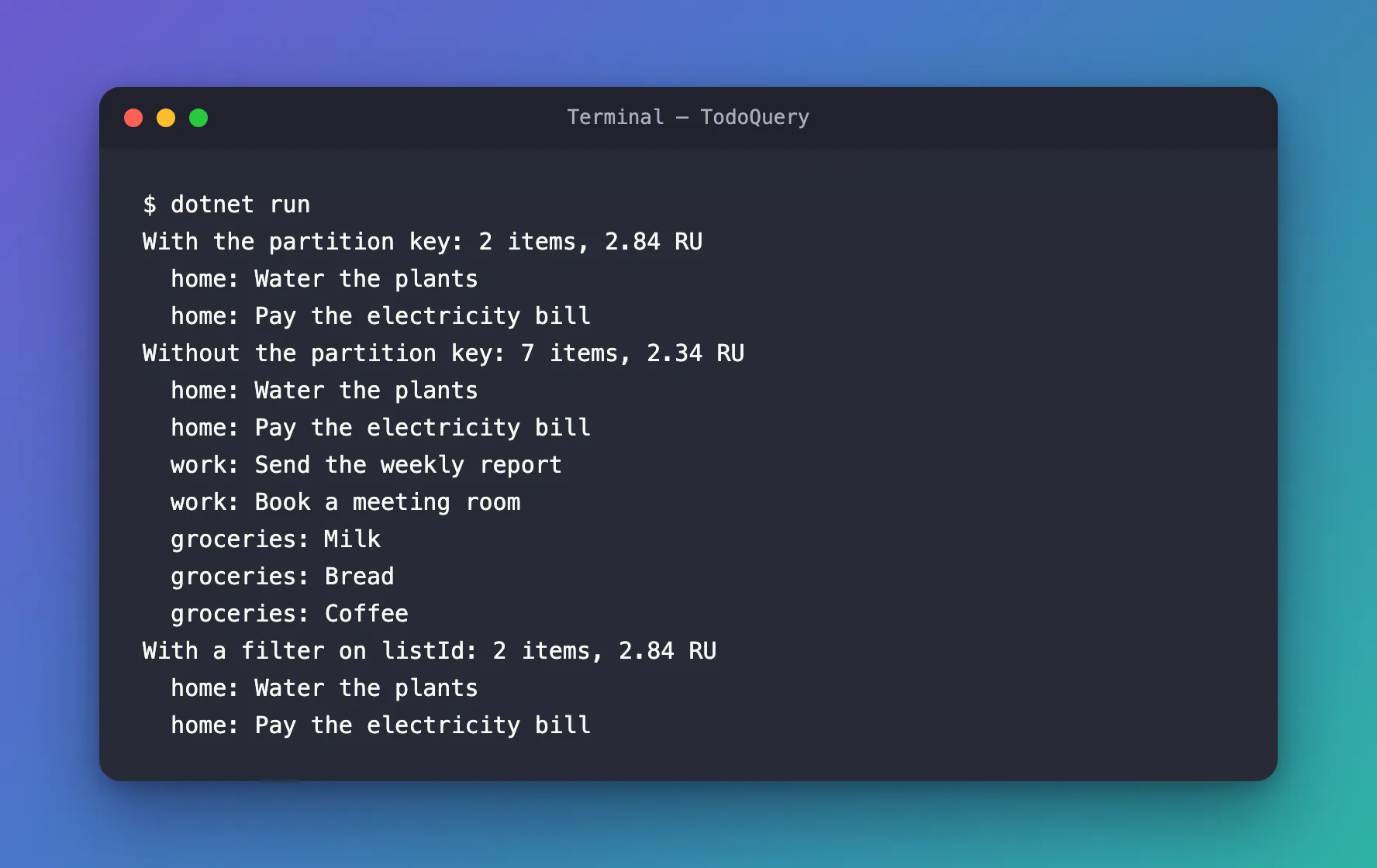
With the partition key: 2 items, 2.84 RU
  home: Water the plants
  home: Pay the electricity bill
Without the partition key: 7 items, 2.34 RU
  home: Water the plants
  home: Pay the electricity bill
  work: Send the weekly report
  work: Book a meeting room
  groceries: Milk
  groceries: Bread
  groceries: Coffee
With a filter on listId: 2 items, 2.84 RU
  home: Water the plants
  home: Pay the electricity bill
- With the partition key: the two
homeitems and nothing else. - Without the partition key: all seven items, from every list. When each partition belongs to one user or one tenant, this is everyone's data.
- With a filter on
listId: the same two items as the first query.
In this small container, the query without a partition key even cost slightly less: 2.34 request units against 2.84. That's expected. Microsoft's guidance: if you have only one (or just a few) physical partitions, cross-partition queries don't consume significantly more RUs than in-partition queries. A physical partition holds up to 50 GB, and the guidance is to avoid cross-partition queries when a container has over 30,000 RUs provisioned or stores over 100 GB of data, because then a query without a partition key must fan out to all physical partitions. In a small container, the difference that matters is which items come back.
The Complete File
using System.Text.Json;
using Azure.Identity;
using Microsoft.Azure.Cosmos;

// The account's URI, from its Overview page in the Azure portal.
const string AccountEndpoint = "https://cosmos-maf-servicedesk-4224.documents.azure.com:443/";

using CosmosClient client = new(AccountEndpoint, new AzureCliCredential(), new CosmosClientOptions
{
    UseSystemTextJsonSerializerWithOptions = JsonSerializerOptions.Web,
});
Container todos = client.GetContainer("servicedesk", "howto-todos");

// Three to-do lists. Each list is one partition, because the container's partition key path is /listId.
// Upsert, so running the app again doesn't add the items twice.
TodoItem[] items =
[
    new("1", "home", "Water the plants"),
    new("2", "home", "Pay the electricity bill"),
    new("3", "work", "Send the weekly report"),
    new("4", "work", "Book a meeting room"),
    new("5", "groceries", "Milk"),
    new("6", "groceries", "Bread"),
    new("7", "groceries", "Coffee"),
];
foreach (TodoItem item in items)
{
    await todos.UpsertItemAsync(item, new PartitionKey(item.ListId));
}

QueryDefinition everything = new("SELECT * FROM c");

// 1. In the home list's partition only: the partition key is set in the request options.
await RunQueryAsync("With the partition key", everything, new QueryRequestOptions { PartitionKey = new PartitionKey("home") });

// 2. The same query without a partition key: every partition.
await RunQueryAsync("Without the partition key", everything, new QueryRequestOptions());

// 3. A filter on the partition key's property: Cosmos DB routes the query to that partition by itself.
QueryDefinition homeOnly = new QueryDefinition("SELECT * FROM c WHERE c.listId = @listId")
    .WithParameter("@listId", "home");
await RunQueryAsync("With a filter on listId", homeOnly, new QueryRequestOptions());

async Task RunQueryAsync(string label, QueryDefinition query, QueryRequestOptions options)
{
    using FeedIterator<TodoItem> feed = todos.GetItemQueryIterator<TodoItem>(query, requestOptions: options);

    List<TodoItem> found = [];
    double charge = 0;
    while (feed.HasMoreResults)
    {
        FeedResponse<TodoItem> page = await feed.ReadNextAsync();
        charge += page.RequestCharge;
        found.AddRange(page);
    }

    Console.WriteLine($"{label}: {found.Count} items, {charge} RU");
    foreach (TodoItem item in found)
    {
        Console.WriteLine($"  {item.ListId}: {item.Title}");
    }
}

record TodoItem(string Id, string ListId, string Title);
Common Mistakes
| Mistake | What happens | Do this instead |
|---|---|---|
| Leaving out the partition key when each partition belongs to one user | The query returns every user's items | Set QueryRequestOptions.PartitionKey, or filter on the partition key's property |
| Building the filter with string concatenation | A value with a quote breaks the query, or changes it | Use @parameters and WithParameter |
| Reading only the first page | Larger results are cut short | Loop while HasMoreResults |
Filtering on the property with > or another range | The query isn't routed to one partition | Filter with =, or IN for a few partitions |
Troubleshooting
| Symptom | Likely cause | Fix |
|---|---|---|
| The query returns items from other partitions | No partition key in the options and no filter on its property | Step 3 or Step 5 |
| The query returns nothing | A different partition key value, or the property name in the filter doesn't match the item's JSON (case matters) | Check the item in Data Explorer |
Forbidden (403); Substatus: 5301 | Your account has no data role on the container | Give it a Cosmos DB data role |
FAQ
Which is better, the options or the filter?
Both read one partition. The options keep the query text free of the partition key, which suits a query that's already written, such as SELECT * FROM c. The filter puts everything in the query, which suits queries you build or log.
Is a cross-partition query wrong?
No. Microsoft says having some cross-partition queries is inevitable, which is okay. It matters when the results must belong to one partition, as with one user's data, and for cost in large containers.
Conclusion
To read one logical partition of a Cosmos DB container from C#, set QueryRequestOptions.PartitionKey or filter on the partition key's property with =. Without either, a query reads every partition. In a small container that costs about the same, but it returns everyone's items.
Additional Resources
- Query an Azure Cosmos DB container — in-partition and cross-partition queries, and when to avoid the second.
- QueryRequestOptions.PartitionKey — the property in the .NET SDK reference.
- Partitioning and horizontal scaling in Azure Cosmos DB — logical and physical partitions.
