How to Put an Expression Inside Text in Power Automate

A field in a flow can hold typed text and an expression side by side, such as Today is followed by today's day name. Power Automate stores the expression inside the text as @{…}, and turns the whole field into one piece of text when the flow runs.
Syntax
<text>@{<expression>}<more text>
<text>and<more text>: text that stays as typed. Either can be empty.@{<expression>}: an expression whose result goes into the text at that point. A field can hold several.
Microsoft's Workflow Definition Language reference calls this string interpolation: The result is always a string, making this capability similar to the concat() function. Its example is "First name: @{parameters('firstName')} Last name: @{parameters('lastName')}".
In the designer you don't type the @{ and }: you type the text, and add the expression where it goes. The code view shows how it's stored.
The Example
A flow, Expression Inside Text, has one Compose action (How to Use the Compose Action in Power Automate) after Manually trigger a flow (How to Create an Instant Cloud Flow Inside a Solution in Power Automate). The action, Today, writes Today is, the day's name, and a full stop. The day's name comes from this expression:
utcNow('dddd')
utcNow() returns the current date and time in UTC, and the format 'dddd' turns it into the day's full name.
Step 1: Type the Text and Add the Expression
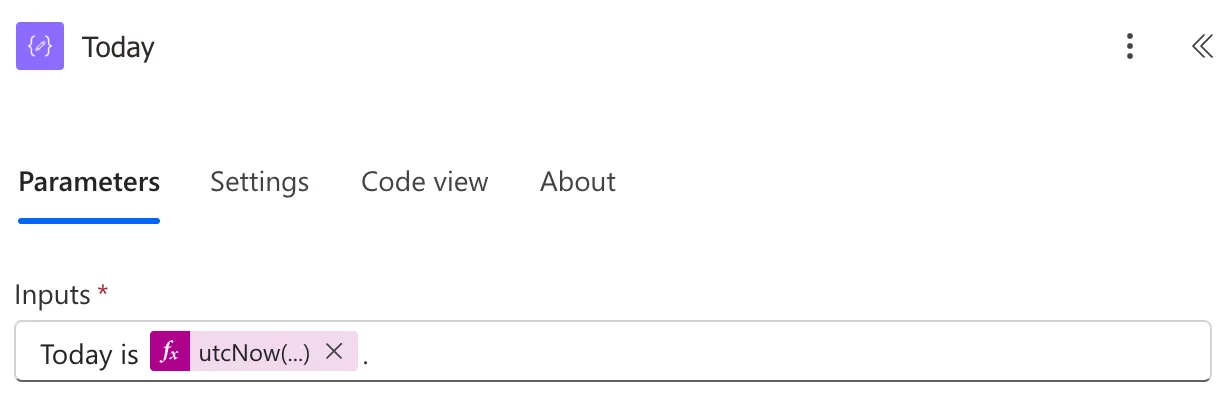
Add a Compose action and rename it Today. In Inputs:
- Type Today is and a space.
- Add the expression
utcNow('dddd')(How to Add an Expression in Power Automate). - Type a full stop after the token.
Step 2: See How It's Stored
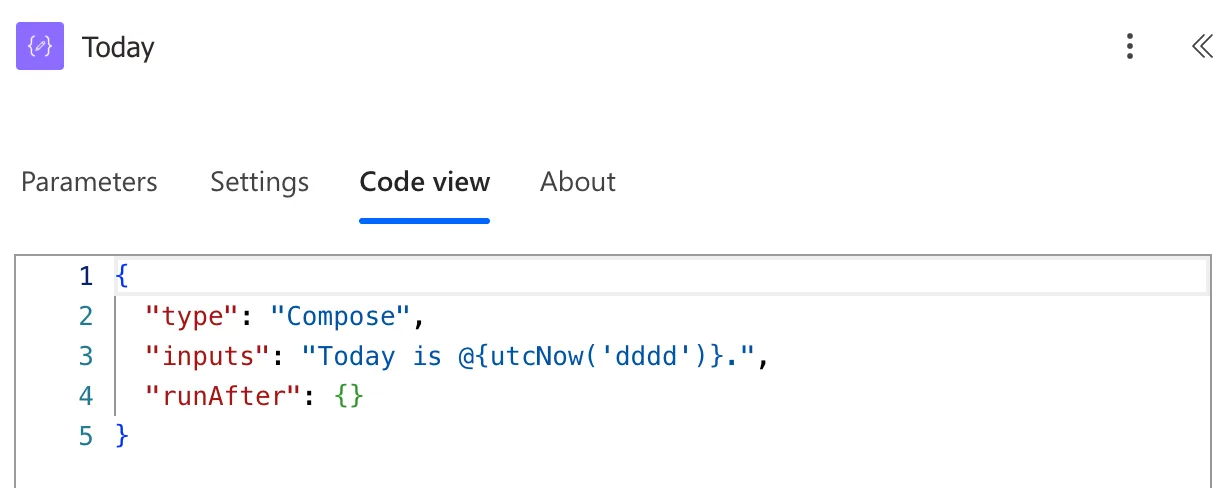
Select the Code view tab. The inputs are one piece of text, with the expression inside @{ and }:
Today is @{utcNow('dddd')}.
Step 3: Run the Flow
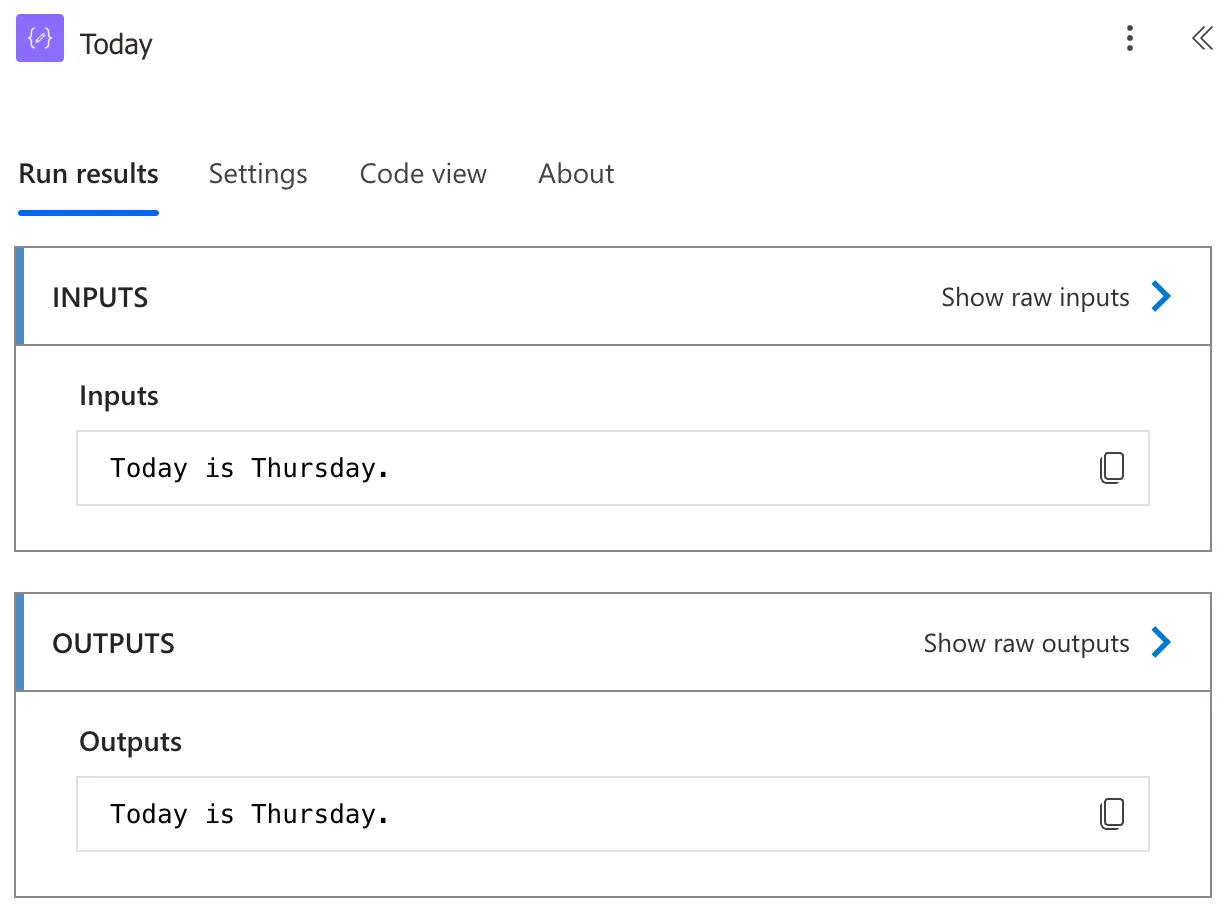
Save the flow and test it manually (How to Test a Cloud Flow Manually in Power Automate). The run was on a Thursday, so Today returned Today is Thursday.:
Common Mistakes
| Mistake | What happens | Do this instead |
|---|---|---|
Typing the expression as text, utcNow('dddd') | The field shows those characters, not the day | Add it with the expression editor |
| Expecting a number or a true/false value | The result of text with an expression in it is always text | Use the expression on its own for other types |
Starting the text with @ | A leading @ marks an expression in the stored definition | Microsoft's reference escapes a leading @ as @@ |
Troubleshooting
| Symptom | Likely cause | Fix |
|---|---|---|
The output shows utcNow('dddd') | The expression was typed as text | Delete it and add it as an expression |
| The day is a day off | utcNow() is in UTC, not your time zone | Convert it to your time zone first |
FAQ
Is this the same as concat()?
It gives the same kind of result: Microsoft's reference calls string interpolation similar to the concat() function. Written as one expression, the same text is concat('Today is ', utcNow('dddd'), '.').
Can a field hold more than one expression?
Yes. Each one becomes its own @{…}, as in Microsoft's example with a first name and a last name.
Where else does this show up?
In any field that mixes text and tokens: a SharePoint request's Uri or body, an email's subject, a Compose. The code view shows each token in the text as @{…}.
Conclusion
Type the text and add the expression where it belongs. Power Automate stores the field as Today is @{utcNow('dddd')}., and at run time the expression's result takes its place: Today is Thursday.
Additional Resources
- Schema reference guide for the Workflow Definition Language: expressions and string interpolation.
- Reference guide to workflow expression functions:
utcNow().
