How to Prevent Overselling with a Conditional UPDATE in EF Core

When two people buy the last item, the safe way to decide who gets it is to let the database decide, in one statement. Put the stock check in the UPDATE's WHERE, and read how many rows changed. That's all of it, and every round I ran gave one winner and four polite refusals.
Prerequisites
- A .NET C# project using EF Core. I used EF Core 10.0.14 and MySQL 9.7.4.
- The problem this solves. Fixed: Two Requests Buy the Last Item in EF Core.
Step 1: Write the Update
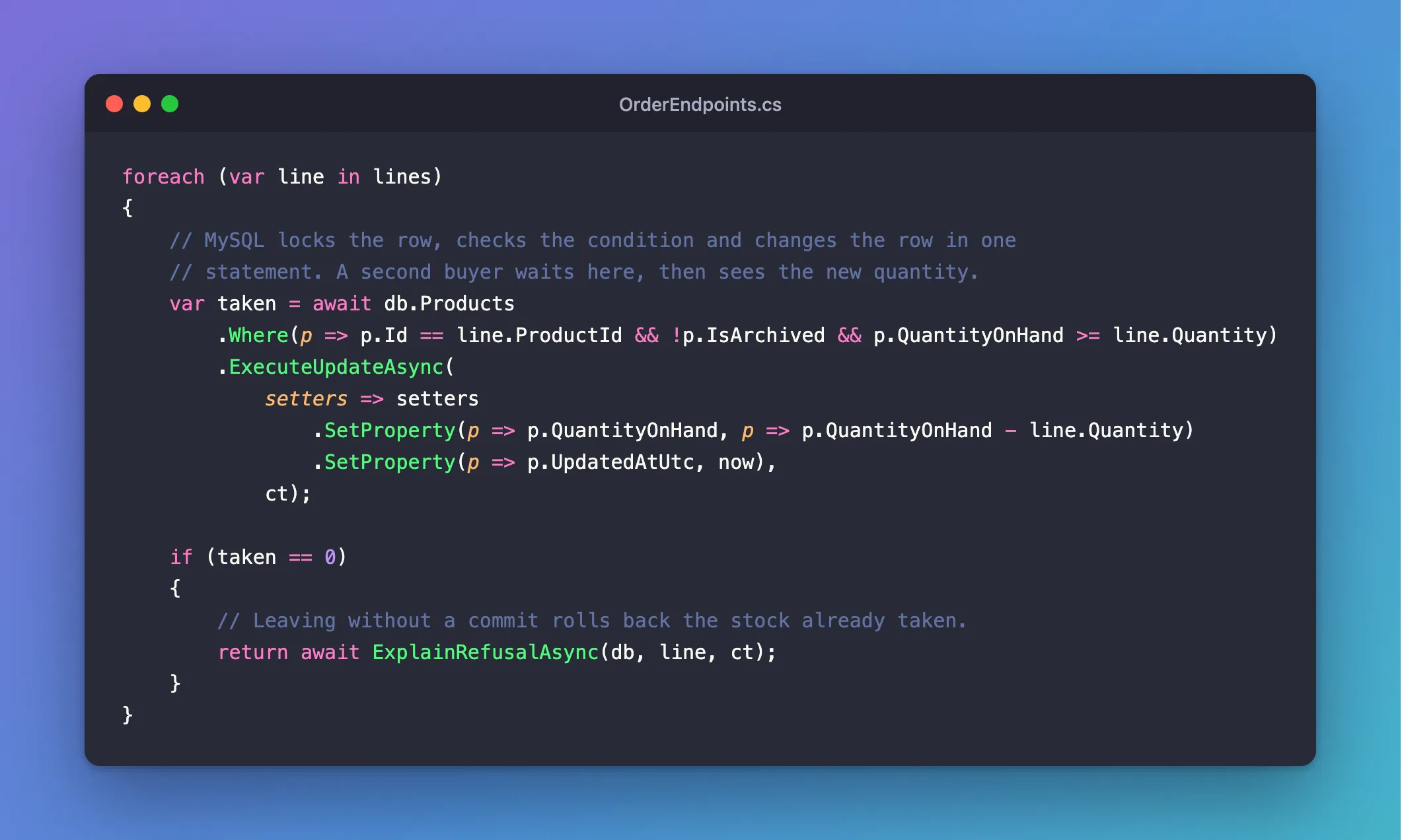
foreach (var line in lines)
{
    // MySQL locks the row, checks the condition and changes the row in one
    // statement. A second buyer waits here, then sees the new quantity.
    var taken = await db.Products
        .Where(p => p.Id == line.ProductId && !p.IsArchived && p.QuantityOnHand >= line.Quantity)
        .ExecuteUpdateAsync(
            setters => setters
                .SetProperty(p => p.QuantityOnHand, p => p.QuantityOnHand - line.Quantity)
                .SetProperty(p => p.UpdatedAtUtc, now),
            ct);

    if (taken == 0)
    {
        // Leaving without a commit rolls back the stock already taken.
        return await ExplainRefusalAsync(db, line, ct);
    }
}
- The
Wherehas the rule in it: this product, not archived, and enough stock. SetPropertysubtracts in the database, using the column's current value, so it can't be stale.takenis the row count.1means it worked, and0means it didn't match.
Step 2: See Why It's Safe
MySQL locks the row, then checks the WHERE, then changes it, all in one statement. A second buyer's statement waits for that lock, and when it runs, it sees the new quantity. There's no gap between the check and the write for anyone to slip through.
In another session, I took the last unit in a transaction, and didn't commit for a while. An order sent in the meantime waited, and then matched nothing:
info: Microsoft.EntityFrameworkCore.Database.Command[20101]
      Executed DbCommand (6,033ms) [Parameters=[@line_Quantity='?' (DbType = Int32), @p='?' (DbType = DateTime), @line_ProductId='?' (DbType = Int32)], CommandType='Text', CommandTimeout='30']
      UPDATE `products` AS `p`
      SET `QuantityOnHand` = `p`.`QuantityOnHand` - @line_Quantity,
          `UpdatedAtUtc` = @p
      WHERE ((`p`.`Id` = @line_ProductId) AND NOT (`p`.`IsArchived`)) AND (`p`.`QuantityOnHand` >= @line_Quantity)
Step 3: Run the Race
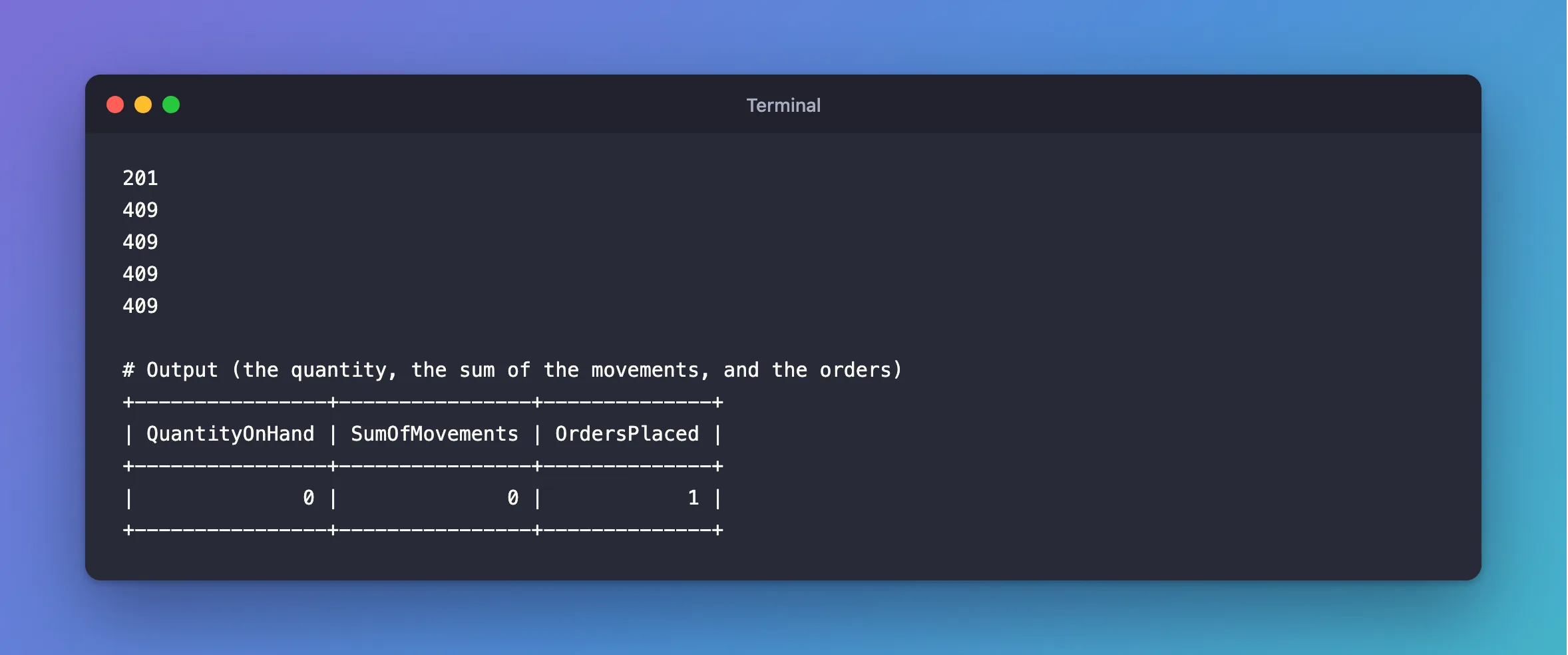
Five orders for the last unit, at once:
201
409
409
409
409
+----------------+----------------+--------------+
| QuantityOnHand | SumOfMovements | OrdersPlaced |
+----------------+----------------+--------------+
|              0 |              0 |            1 |
+----------------+----------------+--------------+
How to Test a Race Condition in a Web API from the Terminal has the command.
Step 4: Explain the Refusal
0 rows doesn't say why, and there are three possible reasons. So look, once you already know you're refusing:
private static async Task<ProblemHttpResult> ExplainRefusalAsync(
    InventoryDbContext db,
    PlaceOrderLine line,
    CancellationToken cancellationToken)
{
    var product = await db.Products
        .Where(p => p.Id == line.ProductId)
        .Select(p => new { p.IsArchived, p.QuantityOnHand })
        .FirstOrDefaultAsync(cancellationToken);

    if (product is null)
    {
        return TypedResults.Problem(
            title: "The product doesn't exist.",
            detail: $"There is no product with Id {line.ProductId}.",
            statusCode: StatusCodes.Status400BadRequest);
    }

    return product.IsArchived
        ? TypedResults.Problem(
            title: "The product isn't for sale.",
            detail: $"Product {line.ProductId} is archived.",
            statusCode: StatusCodes.Status409Conflict)
        : TypedResults.Problem(
            title: "There isn't enough stock.",
            detail: $"Product {line.ProductId} has {product.QuantityOnHand} on hand, and the order asks for {line.Quantity}.",
            statusCode: StatusCodes.Status409Conflict);
}
HTTP/1.1 409 Conflict
Content-Type: application/problem+json

{
  "type": "https://tools.ietf.org/html/rfc9110#section-15.5.10",
  "title": "There isn't enough stock.",
  "status": 409,
  "detail": "Product 13 has 0 on hand, and the order asks for 1.",
  "traceId": "00-110ee5beb526309ea2c360741ddd73f9-05f38dbeba82a661-00"
}
Step 5: Use More Than One Line Safely
Three things matter when an order has several lines:
- Run the loop in a transaction, so a refusal on line 3 gives back lines 1 and 2. See How to Use a Transaction with a Retrying Execution Strategy in EF Core.
- Sort the lines by ID first, or two orders can deadlock.
- Use an index for the
WHERE, or every row gets locked. The primary key is here.
Common Mistakes
| Mistake | What happens | Do this instead |
|---|---|---|
| Checking in C# first | It's a race again | Put the check in the Where |
| Ignoring the row count | Every buyer thinks they won | Read it |
| Setting a value computed in C# | It's stale by the time it's written | Use p => p.QuantityOnHand - quantity |
Dropping the CHECK constraint | Nothing stops a bug elsewhere | Keep it as a backstop |
Troubleshooting
| Symptom | Likely cause | Fix |
|---|---|---|
| The row count is 0 for an update that changes nothing | UseAffectedRows | Leave it at its default |
Deadlock found with several lines | Lines in client order | Sort them |
| A stale value afterwards | A tracked entity | The fix |
Conclusion
Put the rule in the Where of ExecuteUpdateAsync, read the row count, and let MySQL's row lock decide who wins. It's simple, and it held in every round I ran.
Additional Resources
- ExecuteUpdate and ExecuteDelete — set-based updates.
- Locks Set by Different SQL Statements in InnoDB — what an
UPDATElocks.
