How to Pre-Authorize a Client Application for Your API in Microsoft Entra ID

When an app asks for a scope of your API, someone has to agree to it first: the person signing in, or an administrator for everyone. For apps you build or trust yourself, that question is noise. Your API can pre-authorize them, and their users are never asked. This guide pre-authorizes two apps, the Azure CLI and a single-page app, in the Microsoft Entra admin center and with the Azure CLI.
What Pre-Authorizing Does
The Expose an API page says it in one sentence: Authorizing a client application indicates that this API trusts the application and users should not be asked to consent when the client calls this API. The trust is narrow. Microsoft Graph's documentation puts it this way: Users aren't required to consent to any preauthorized application (for the permissions specified). However, any other permissions not listed in preAuthorizedApplications … require user consent.
So each authorization names one app and the scopes it may use without asking. Microsoft's guide adds a warning worth taking literally: pre-authorize only those client applications you trust, since your users won't have the opportunity to decline consent.
Two apps commonly earn that trust:
| App | Why pre-authorize it |
|---|---|
| The Azure CLI | Developers get tokens for the API from the command line to test it. Its client ID is 04b07795-8ddb-461a-bbee-02f9e1bf7b46, the ID Microsoft's documentation lists for the Microsoft Azure CLI |
| Your own front end | You built both the app and the API, so a consent screen between them asks people a question only you can answer |
The examples on this page work on an API registration called Dewiride Service Desk API, with a scope named access_as_user (How to Expose an API Scope in Microsoft Entra ID).
Prerequisites
- Permission to change the API's registration: you're listed under its Owners, or you have a role such as Cloud Application Administrator.
- The client ID of each app you want to authorize. For your own app, it's the Application (client) ID on its registration's Overview page.
- For the Azure CLI route: the Azure CLI signed in to the API's tenant (
az login).
What Happens Without It
A token for your own API, asked for with the Azure CLI before the API trusts it, shows why this step exists:
ERROR: AADSTS9002313: Invalid request. Request is malformed or invalid. Trace ID: 00000000-0000-0000-0000-000000000000 Correlation ID: 00000000-0000-0000-0000-000000000000 Timestamp: 2026-11-19 10:44:34Z
Run the command below to authenticate interactively; additional arguments may be added as needed:
az logout
az login --tenant "11111111-1111-1111-1111-111111111111" --scope "api://22222222-2222-2222-2222-222222222222/access_as_user"
The message hides the cause. With --debug, the real one shows up: AADSTS65001: The user or administrator has not consented to use the application with ID '04b07795-8ddb-461a-bbee-02f9e1bf7b46' named 'Microsoft Azure CLI'. Nobody had agreed that the Azure CLI may use the scope. The full investigation is in Fixed: AADSTS9002313 When the Azure CLI Gets a Token for Your Own API.
Step 1: Add the Azure CLI
In the Microsoft Entra admin center, open your API's registration under Entra ID > App registrations, and select Expose an API under Manage. Under Authorized client applications, select Add a client application, and fill in the panel:
| Field | Value |
|---|---|
| Client ID | 04b07795-8ddb-461a-bbee-02f9e1bf7b46 |
| Authorized scopes | Select api://<client ID>/access_as_user |
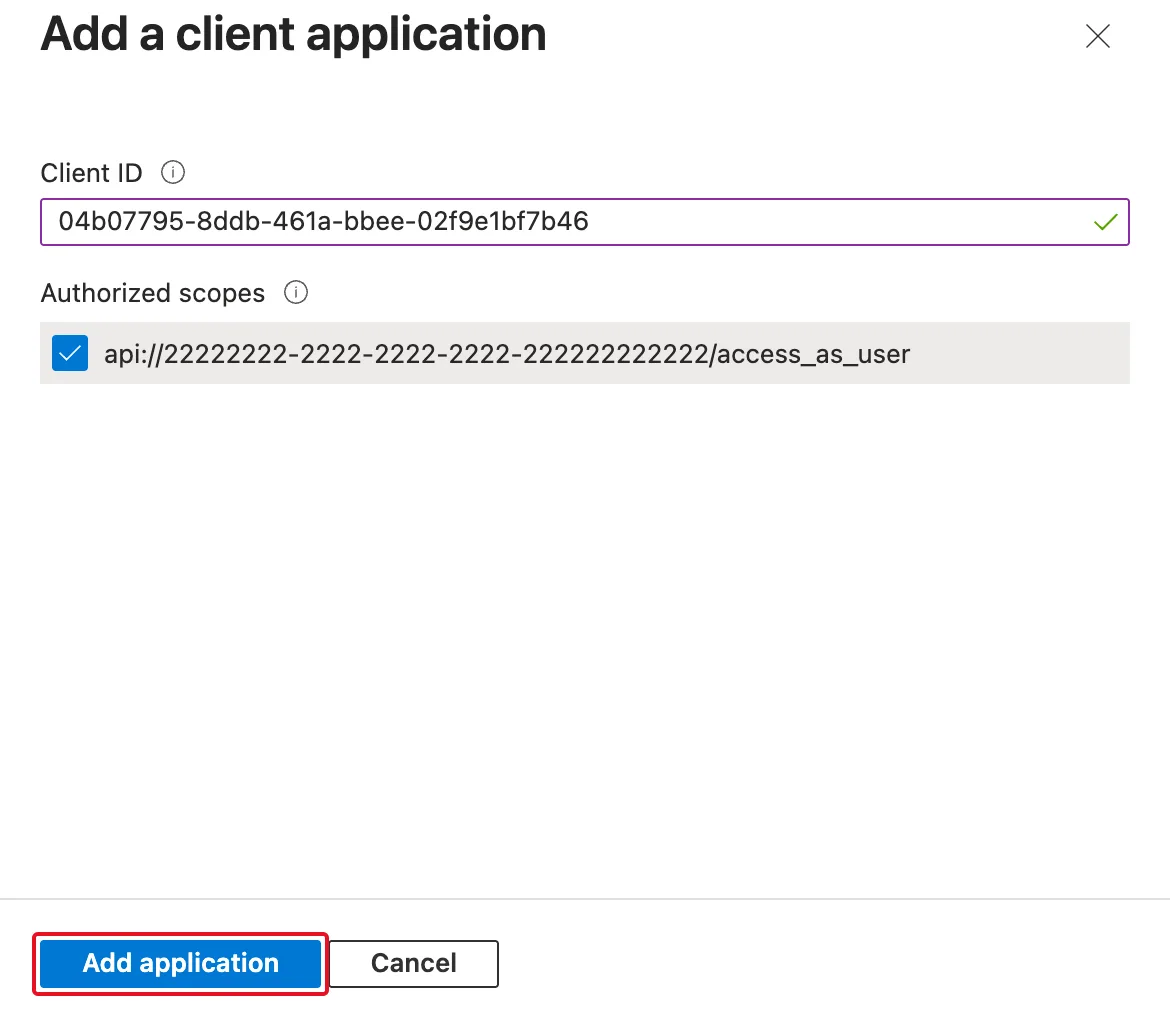
Select Add application. The page lists the Azure CLI with the number of scopes it may use:
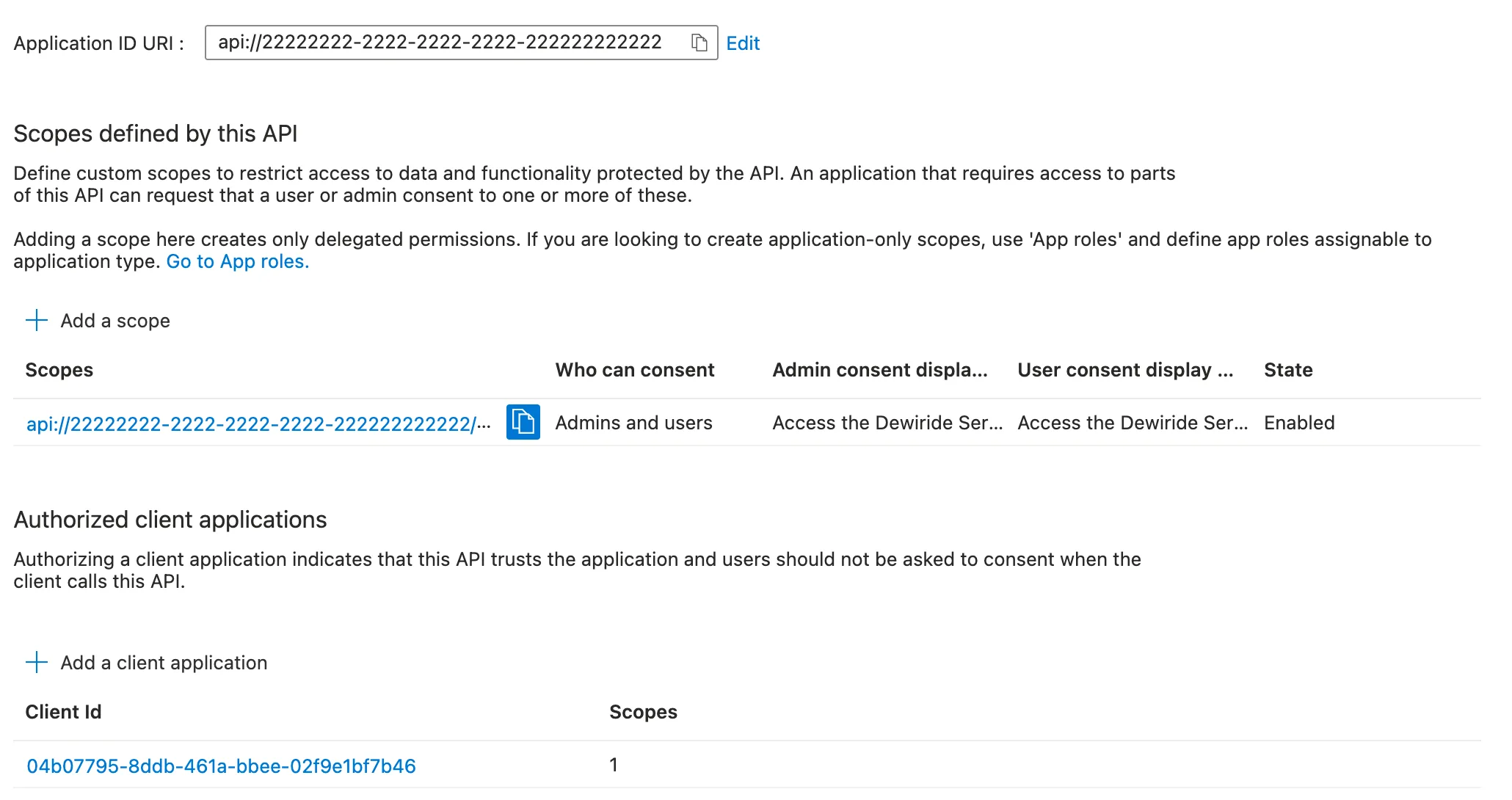
The same token command now works. The Azure CLI is a tool for developers: this authorization lets anyone in your organization who uses it get a token for the API, which is what you want while you build and test (How to Get an Access Token for Your Own API with the Azure CLI).
Step 2: Add Your Own App
Your own front end is authorized the same way, with its client ID. Here it's a single-page app registered as Dewiride Service Desk Chat, shown as 33333333-…:
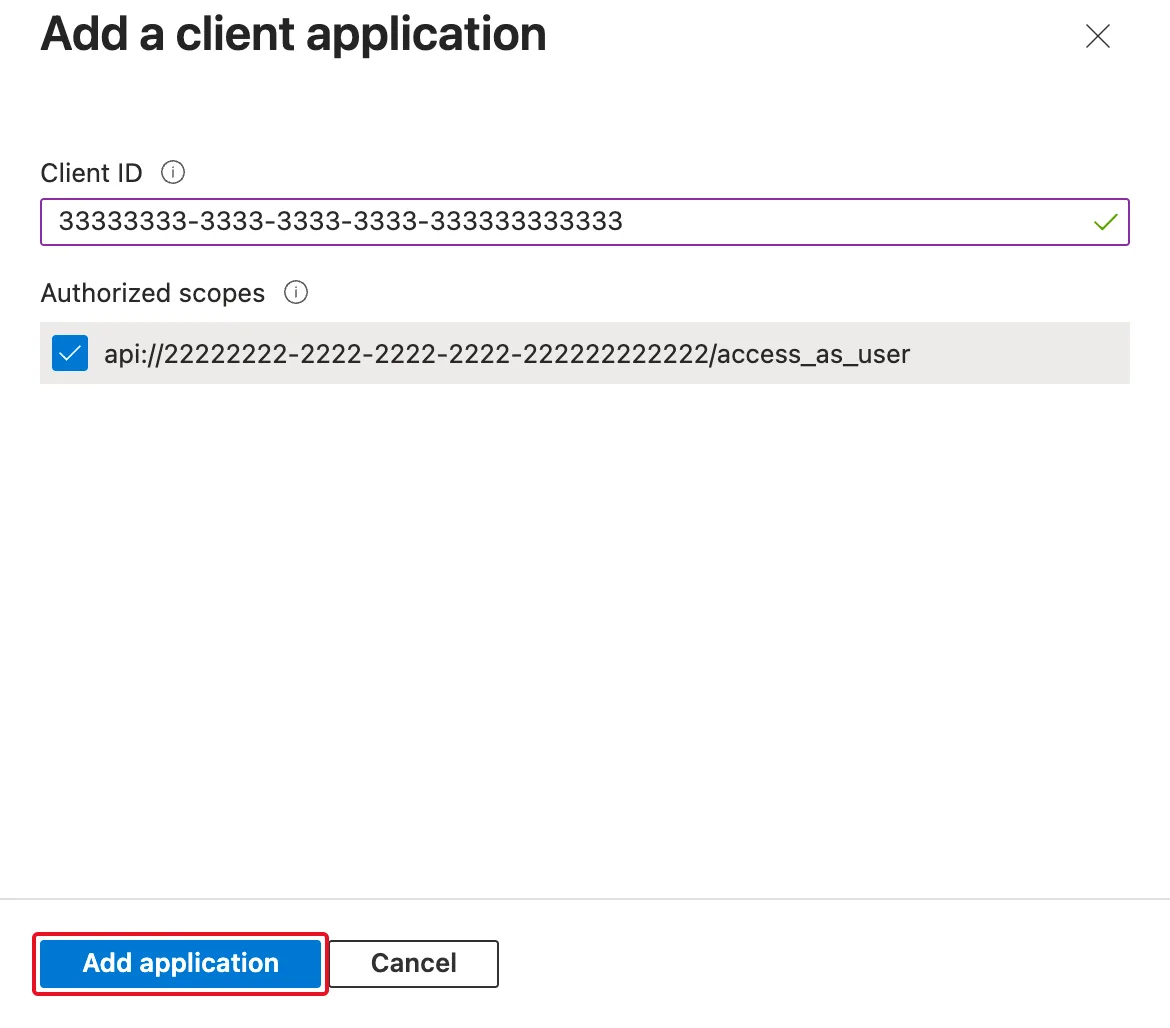
After Add application, both apps are listed:
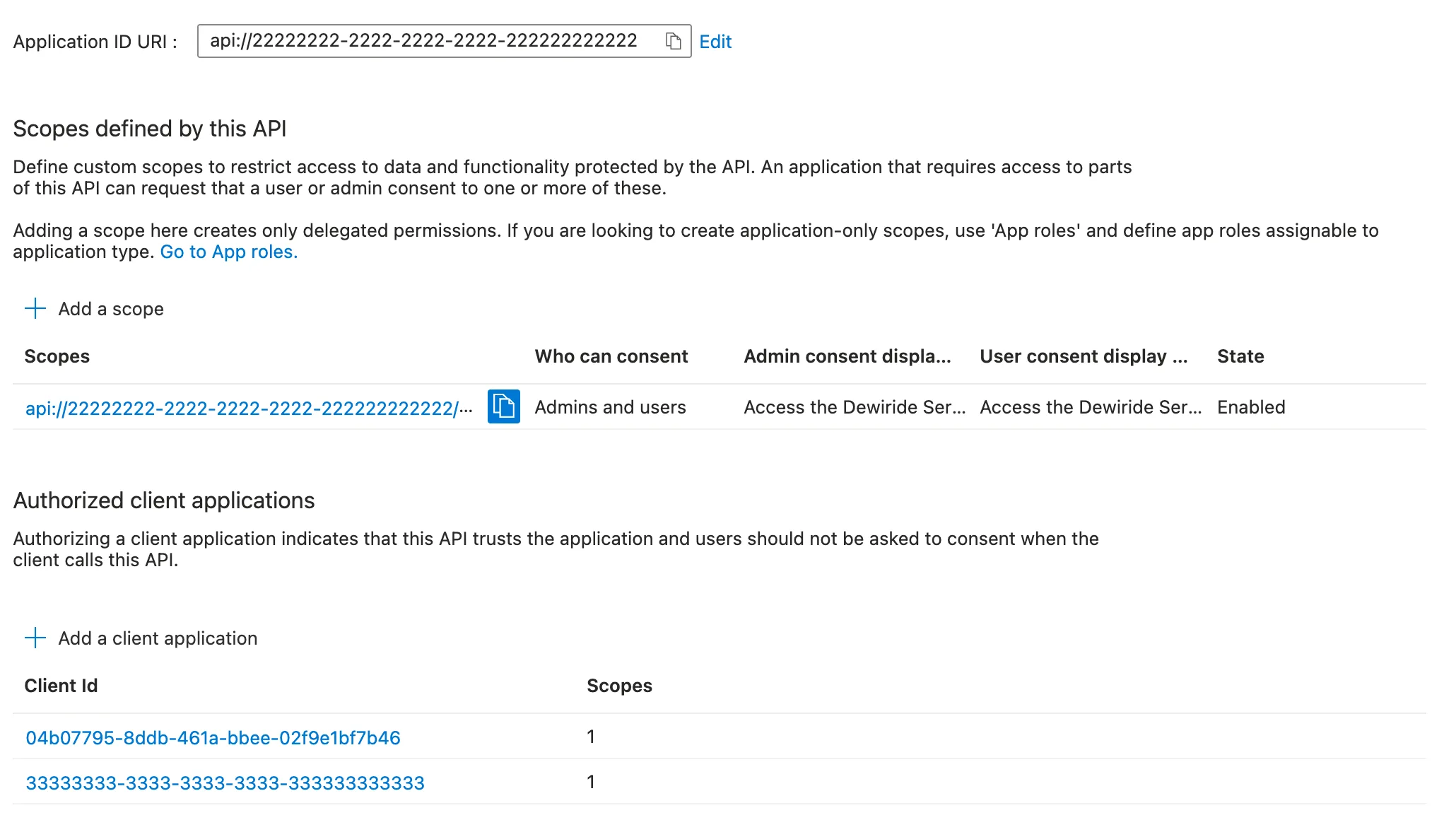
People who sign in to the chat app are no longer asked to let it use the API. The authorization covers access_as_user only. When the same app asked for nothing but to sign someone in, Microsoft still showed a consent screen, for View your basic profile and Maintain access to data you have given it access to: those permissions aren't on the list. The app's own registration should also list the permission it asks for (How to Add an API Permission to an App Registration in Microsoft Entra ID).
Do It with the Azure CLI
az ad app has no option for authorized client applications, so this goes to Microsoft Graph, the API behind the admin center, with az rest. The examples work on an API registration called My Web API and a single-page app called My Single-Page App. First, collect the three IDs the update needs — the API's client ID, its scope's ID and the app's client ID:
- macOS / Linux
- Windows (PowerShell)
API_APP_ID=$(az ad app list --display-name "My Web API" --query "[0].appId" --output tsv)
SCOPE_ID=$(az ad app show --id $API_APP_ID --query "api.oauth2PermissionScopes[?value=='access_as_user'].id" --output tsv)
SPA_APP_ID=$(az ad app list --display-name "My Single-Page App" --query "[0].appId" --output tsv)
$apiAppId = az ad app list --display-name "My Web API" --query "[0].appId" --output tsv
$scopeId = az ad app show --id $apiAppId --query "api.oauth2PermissionScopes[?value=='access_as_user'].id" --output tsv
$spaAppId = az ad app list --display-name "My Single-Page App" --query "[0].appId" --output tsv
The second line finds the ID of the scope whose name is access_as_user: authorizations refer to scopes by ID, not by name.
Now write the list of trusted apps into a file named preauth.json and send it:
- macOS / Linux
- Windows (PowerShell)
cat > preauth.json <<EOF
{
  "api": {
    "preAuthorizedApplications": [
      {
        "appId": "04b07795-8ddb-461a-bbee-02f9e1bf7b46",
        "delegatedPermissionIds": ["$SCOPE_ID"]
      },
      {
        "appId": "$SPA_APP_ID",
        "delegatedPermissionIds": ["$SCOPE_ID"]
      }
    ]
  }
}
EOF
az rest --method PATCH --uri "https://graph.microsoft.com/v1.0/applications(appId='$API_APP_ID')" --body @preauth.json
@"
{
  "api": {
    "preAuthorizedApplications": [
      {
        "appId": "04b07795-8ddb-461a-bbee-02f9e1bf7b46",
        "delegatedPermissionIds": ["$scopeId"]
      },
      {
        "appId": "$spaAppId",
        "delegatedPermissionIds": ["$scopeId"]
      }
    ]
  }
}
"@ | Set-Content preauth.json
az rest --method PATCH --uri "https://graph.microsoft.com/v1.0/applications(appId='$apiAppId')" --body "@preauth.json"
az rest prints nothing when the update works. Each entry is one row of Authorized client applications:
| Field | In the admin center |
|---|---|
appId | Client ID |
delegatedPermissionIds | Authorized scopes, as the scopes' IDs |
Write every app the API should trust into the file, including those already authorized, so the list you send is the list you want. Sending only preAuthorizedApplications inside api left the API's scopes as they were. Check the result:
- macOS / Linux
- Windows (PowerShell)
az ad app show --id $API_APP_ID --query "api.preAuthorizedApplications"
az ad app show --id $apiAppId --query "api.preAuthorizedApplications"
[
  {
    "appId": "55555555-5555-5555-5555-555555555555",
    "delegatedPermissionIds": [
      "66666666-6666-6666-6666-666666666666"
    ]
  },
  {
    "appId": "04b07795-8ddb-461a-bbee-02f9e1bf7b46",
    "delegatedPermissionIds": [
      "66666666-6666-6666-6666-666666666666"
    ]
  }
]
Both apps are there, each with the scope's ID. A token for the API now comes back without an error:
- macOS / Linux
- Windows (PowerShell)
az account get-access-token --scope "api://$API_APP_ID/access_as_user" --query "{expiresOn:expiresOn, tokenType:tokenType}"
az account get-access-token --scope "api://$apiAppId/access_as_user" --query "{expiresOn:expiresOn, tokenType:tokenType}"
{
  "expiresOn": "2026-11-19 20:04:33.000000",
  "tokenType": "Bearer"
}
Common Mistakes
| Mistake | What happens | Do this instead |
|---|---|---|
| Pre-authorizing an app you don't control | Its users can call your API through it without ever being asked | Authorize only the apps you build or fully trust |
| Entering the app's Object ID instead of its client ID | The API trusts an ID the app never presents: apps ask for tokens with their client ID | Copy Application (client) ID from the app's Overview |
| Authorizing one scope and asking for another | The other scope still needs consent: the Azure CLI fails with AADSTS9002313 | Authorize every scope the app asks for, or ask only for authorized ones |
Leaving existing apps out of preauth.json | The list you send may not be the list you want | Write the full list every time |
Troubleshooting
| Symptom | Likely cause | Fix |
|---|---|---|
AADSTS9002313 from az account get-access-token | Run it with --debug: AADSTS65001 means the Azure CLI isn't authorized for that scope | Authorize the Azure CLI for the scope, as in Step 1 |
AADSTS9002313 although the Azure CLI is authorized | The scope in the command isn't one it's authorized for. A misspelled scope name ended the same way, with AADSTS65001 behind it | Check the scope name in the command against Expose an API |
| A consent screen still appears in your app | The app asks for permissions the API didn't pre-authorize, such as those for signing in | Expected for those permissions: the person consents once |
| Add a client application is dimmed | The API has no scope yet | Add a scope first |
FAQ
Is pre-authorizing the same as admin consent?
No. Admin consent is an administrator agreeing, for everyone in the organization, that an app may use a permission. Pre-authorizing is the API itself declaring that it trusts an app for some of its scopes, and it's set on the API's registration by whoever owns it.
Should I pre-authorize the Azure CLI in production?
It's a developer tool: anyone in your organization who uses it could get a token for the API. That's useful while you build and test. For an API whose users should only reach it through your own apps, remove the Azure CLI from the list before it goes live.
Does pre-authorizing grant app-only access?
No. It's for delegated scopes, where an app acts for a signed-in person, as its field name, delegatedPermissionIds, says. An app that calls the API on its own, with no one signed in, gets an app role instead.
Conclusion
Pre-authorizing lets your API trust the apps you choose, for the scopes you choose, without asking their users to consent. Add each app under Authorized client applications on Expose an API with its client ID and its scopes, or send the list to Microsoft Graph with az rest. Authorize the Azure CLI, 04b07795-8ddb-461a-bbee-02f9e1bf7b46, to test your API from the command line, and your own front end so its users go straight in.
Additional Resources
- Configure an application to expose a web API — including the optional pre-authorization step.
- preAuthorizedApplication resource type — the two fields of an authorization.
- Fixed: AADSTS9002313 When the Azure CLI Gets a Token for Your Own API — the error this prevents.
