How to Pin an App to the App Bar in Microsoft Teams

To keep an app in the Teams app bar, right-click its icon there and select Pin. Right-click it again later to Move up or Unpin it.
The example is Hello App, a small app from Power Apps that Maya Patel had just added to her Teams. While it's open, its icon shows in the app bar on the left.
Microsoft's article on the Power Apps personal app describes the same: right click the app and select Pin, and right click again and select Unpin to undo it.
Prerequisites
- User pinning is allowed for you. It's a setting in your Teams setup policy, which your Teams admin controls; Microsoft's setup policy article describes turning it on to allow users to pin apps.
Step 1: Right-Click the App
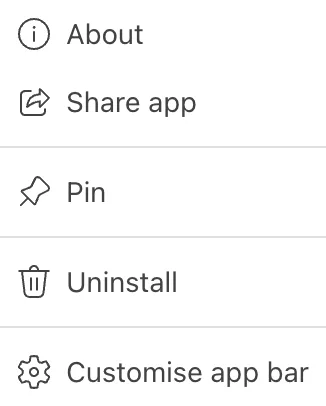
In the app bar on the left, right-click the app's icon. The menu has About, Share app, Pin, Uninstall and Customise app bar:
Step 2: Pin It
Select Pin. The app now stays in the app bar with the other pinned apps.
The Result
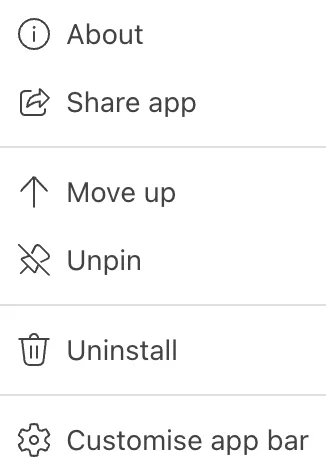
Right-click the icon again: Pin has become Unpin, and Move up has appeared, to move the app higher in the app bar:
Common Mistakes
| Mistake | What happens | Do this instead |
|---|---|---|
| Selecting Uninstall instead of Unpin | The app is removed from your Teams | Unpin only takes it off the app bar |
| Expecting pinning to add the app for colleagues | Pinning is yours only | Each person pins it, or the admin pins it with a setup policy |
Troubleshooting
| Symptom | Likely cause | Fix |
|---|---|---|
| No Pin in the menu | User pinning is off for you | Ask your Teams admin |
| The app isn't in the app bar to right-click | It isn't open | Open it first, from the Store or the more apps list |
FAQ
Can an admin pin an app for everyone?
Yes, with Pinned apps in a Teams setup policy, as Microsoft's setup policy article describes.
Conclusion
Right-click the app's icon in the app bar and select Pin. To change your mind, right-click it and select Unpin, or Move up to reorder it.
Additional Resources
- Install the Power Apps personal app in Microsoft Teams
- Use setup policies to manage, install and pin agents and apps for users
