How to Permanently Delete MLflow Runs with mlflow gc

Deleting an MLflow run only moves it to a deleted stage: its parameters, metrics and files stay on the server, and it can be restored. mlflow gc is the step that removes deleted runs for good, from the database and from disk. This guide permanently deletes one run and checks that its files are gone, with real output from MLflow 3.18.0.
Syntax
mlflow gc --run-ids <run ID>[,<run ID>...] --tracking-uri <server address>
mlflow gc --older-than <time> --tracking-uri <server address>
| Part | What it means |
|---|---|
--run-ids | The runs to remove, separated by commas. Each must already be deleted. Without it, gc removes every run in the deleted stage |
--older-than | Only runs deleted longer ago than this, written like 30d, 12h or 1d2h3m4s |
--tracking-uri | The tracking server's address. gc needs it, or the MLFLOW_TRACKING_URI variable, to find and remove the runs' files |
--backend-store-uri | Where the runs' records are kept. By default gc uses sqlite:///mlflow.db in the current folder, so run it in the folder the server was started in |
Experiments that were deleted can be removed the same way with --experiment-ids.
Prerequisites
- An MLflow tracking server at
http://127.0.0.1:8080, started in a folder you can open. MLflow's tracking server guide shows how to start one.
Step 1: Create a Deleted Run with a File
The example is a scratch run that saves a small text file and is deleted straight away. Create scratch_run.py:
import mlflow

mlflow.set_tracking_uri("http://127.0.0.1:8080")
mlflow.set_experiment("gc-demo")

with mlflow.start_run(run_name="scratch") as run:
    mlflow.log_text("Temporary notes\n", "notes.txt")

mlflow.delete_run(run.info.run_id)
print("Experiment ID:", run.info.experiment_id)
print("Run ID:       ", run.info.run_id)
uv run python scratch_run.py
Experiment ID: 23
Run ID:        216d8ead246a489597ccd506fd8693d8
Step 2: Look at the Run's Files
A local tracking server keeps runs' files in an mlartifacts folder next to its mlflow.db, one folder per experiment and run. In a terminal in the server's folder, list experiment 23's files:
- macOS / Linux
- Windows (PowerShell)
find mlartifacts/23
Get-ChildItem -Recurse mlartifacts\23
mlartifacts/23
mlartifacts/23/216d8ead246a489597ccd506fd8693d8
mlartifacts/23/216d8ead246a489597ccd506fd8693d8/artifacts
mlartifacts/23/216d8ead246a489597ccd506fd8693d8/artifacts/notes.txt
The run is deleted, but notes.txt is still on disk.
Step 3: Run mlflow gc
In the same folder, so gc uses the server's mlflow.db:
uv run mlflow gc --run-ids 216d8ead246a489597ccd506fd8693d8 --tracking-uri http://127.0.0.1:8080
Run with ID 216d8ead246a489597ccd506fd8693d8 has been permanently deleted.
Step 4: Check That It's Gone
List the folder again:
mlartifacts/23
mlartifacts/23/216d8ead246a489597ccd506fd8693d8
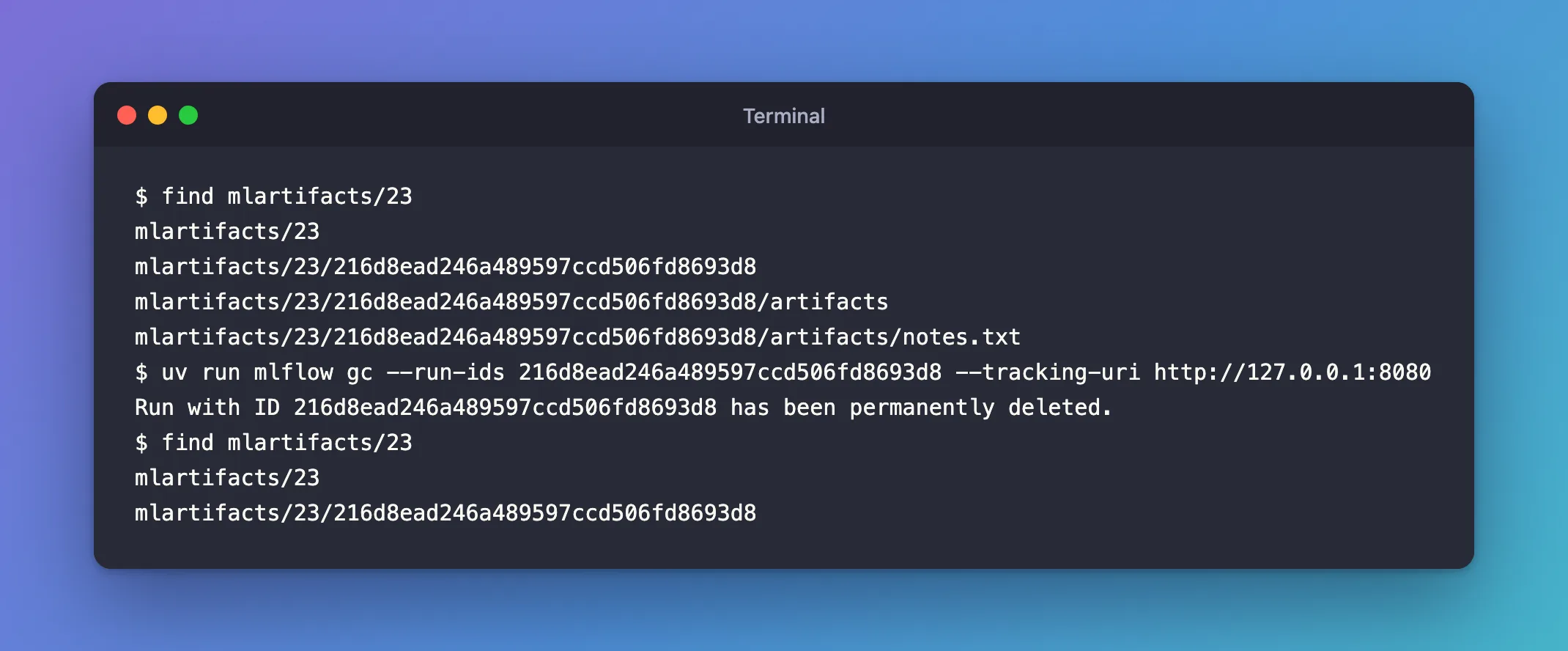
The artifacts folder and notes.txt are gone; an empty folder named after the run is left behind. The run's records are gone from the database too, so it can't be restored any more. In a terminal pointed at the server:
- macOS / Linux
- Windows (PowerShell)
export MLFLOW_TRACKING_URI=http://127.0.0.1:8080
uv run mlflow runs restore --run-id 216d8ead246a489597ccd506fd8693d8
$env:MLFLOW_TRACKING_URI = "http://127.0.0.1:8080"
uv run mlflow runs restore --run-id 216d8ead246a489597ccd506fd8693d8
mlflow.exceptions.RestException: RESOURCE_DOES_NOT_EXIST: Run with id=216d8ead246a489597ccd506fd8693d8 not found
Common Mistakes
| Mistake | What happens | Do this instead |
|---|---|---|
No --tracking-uri and no MLFLOW_TRACKING_URI | MlflowException: Tracking URL is not set. Please set MLFLOW_TRACKING_URI environment variable or provide --tracking-uri cli option. | Add --tracking-uri http://127.0.0.1:8080 |
Running gc in another folder | MlflowException: Run with id=... not found: gc created a new mlflow.db with no runs in that folder and looked there, not in the server's | Delete the new mlflow.db, and run gc in the server's folder |
| A run that isn't deleted | MlflowException: Run ... is not in `deleted` lifecycle stage. Only runs in `deleted` lifecycle stage can be deleted. | Delete it first, then run gc |
gc with no --run-ids | Every deleted run in the store is removed for good | Name the runs, or limit by age with --older-than |
Troubleshooting
| Symptom | Likely cause | Fix |
|---|---|---|
An empty folder named after the run is left in mlartifacts | gc removed the run's artifacts folder, not the folder above it | Delete the empty folder yourself if it bothers you |
You need a run back after gc | It's permanently deleted | Restore runs before running gc: How to Restore a Deleted Run in MLflow |
FAQ
Do I have to stop the server first?
No. Here gc ran while the server was running.
How do I clean up regularly?
mlflow gc --older-than 30d --tracking-uri http://127.0.0.1:8080 removes every run deleted more than 30 days ago, which gives you a month to change your mind about each one.
Does gc touch active runs?
No. It only considers runs in the deleted stage, and refuses a run ID that isn't deleted.
Conclusion
mlflow gc --run-ids <run ID> --tracking-uri <server address>, run in the server's folder, permanently deleted a deleted run: its records left the database and its artifacts folder left the disk, and it could no longer be restored. Run it only on runs you're sure about.
Additional Resources
- mlflow gc — the command's reference, with more examples.
