How to Match Whole Words with a Word Boundary in a C# Regex

Search for cat with a regular expression and it also finds the cat inside category and concat. Put \b on both sides, \bcat\b, and it only finds cat as a word of its own.
\b is an anchor: it matches a position between characters, not a character. Microsoft's reference: The \b anchor specifies that the match must occur on a boundary between a word character (the \w language element) and a non-word character (the \W language element). Word characters consist of alphanumeric characters and underscores.
Syntax
Regex.IsMatch(<text>, @"\b<word>\b")
| Part | What it is |
|---|---|
\b | A word boundary: the point between a word character and any other character, or the start or end of the text |
<word> | The word to find |
@ | Makes the string verbatim, so \b reaches the regular expression as written |
| Word characters | Letters, digits and _ |
The reference names the usual use: The \b anchor is frequently used to ensure that a subexpression matches an entire word instead of just the beginning or end of a word.
The Example
A console app called WordBoundary puts square brackets around every match of cat in cat, category, concat, cat!, first without \b and then with it.
Prerequisites
- The .NET 10 SDK.
dotnet --versionprints a version that starts with10.0.
Step 1: Create a Console App
dotnet new console -n WordBoundary
cd WordBoundary
The template "Console App" was created successfully.

Processing post-creation actions...
Restoring /Users/you/source/WordBoundary/WordBoundary.csproj:
  Determining projects to restore...
  Restored /Users/you/source/WordBoundary/WordBoundary.csproj (in 55 ms).
Restore succeeded.
dotnet new console -n WordBoundary creates a folder named WordBoundary with a project file and a Program.cs, and cd moves into it. Everything this example uses is part of .NET, so there's no package to add. Open the folder in VS Code, or WordBoundary.csproj in Visual Studio.
Step 2: Write the Code
Replace everything in Program.cs. First the text:
using System.Text.RegularExpressions;

string text = "cat, category, concat, cat!";
Then the two searches:
// Without word boundaries, "cat" is found inside other words too.
Console.WriteLine(Regex.Replace(text, "cat", "[$0]"));

// \b on both sides: "cat" only as a whole word.
Console.WriteLine(Regex.Replace(text, @"\bcat\b", "[$0]"));
Regex.Replace(text, "cat", "[$0]")replaces every match with itself between brackets:$0stands for the whole match.@"\bcat\b"is the same word with a boundary on both sides.
Step 3: Run It
Run it in VS Code's terminal, or press Ctrl+F5 in Visual Studio:
dotnet run
[cat], [cat]egory, con[cat], [cat]!
[cat], category, concat, [cat]!
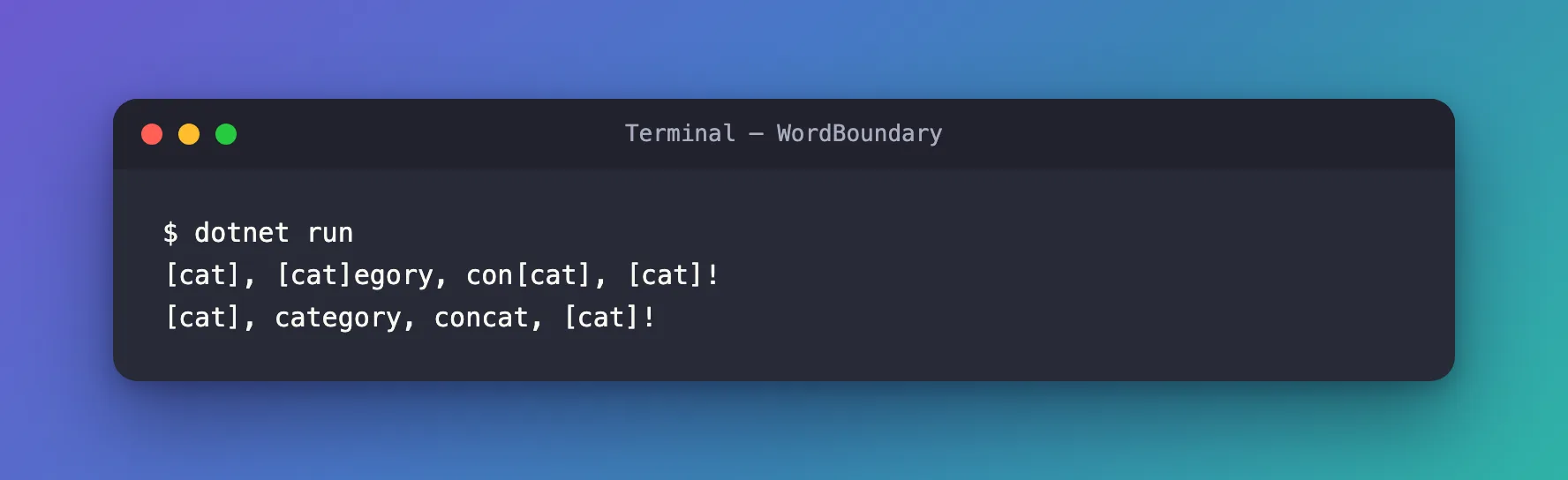
Without \b, cat was found four times, twice inside other words. With \b, only the two that stand alone matched: in category the c has a word character after the t, and in concat one before the c.
The Complete File
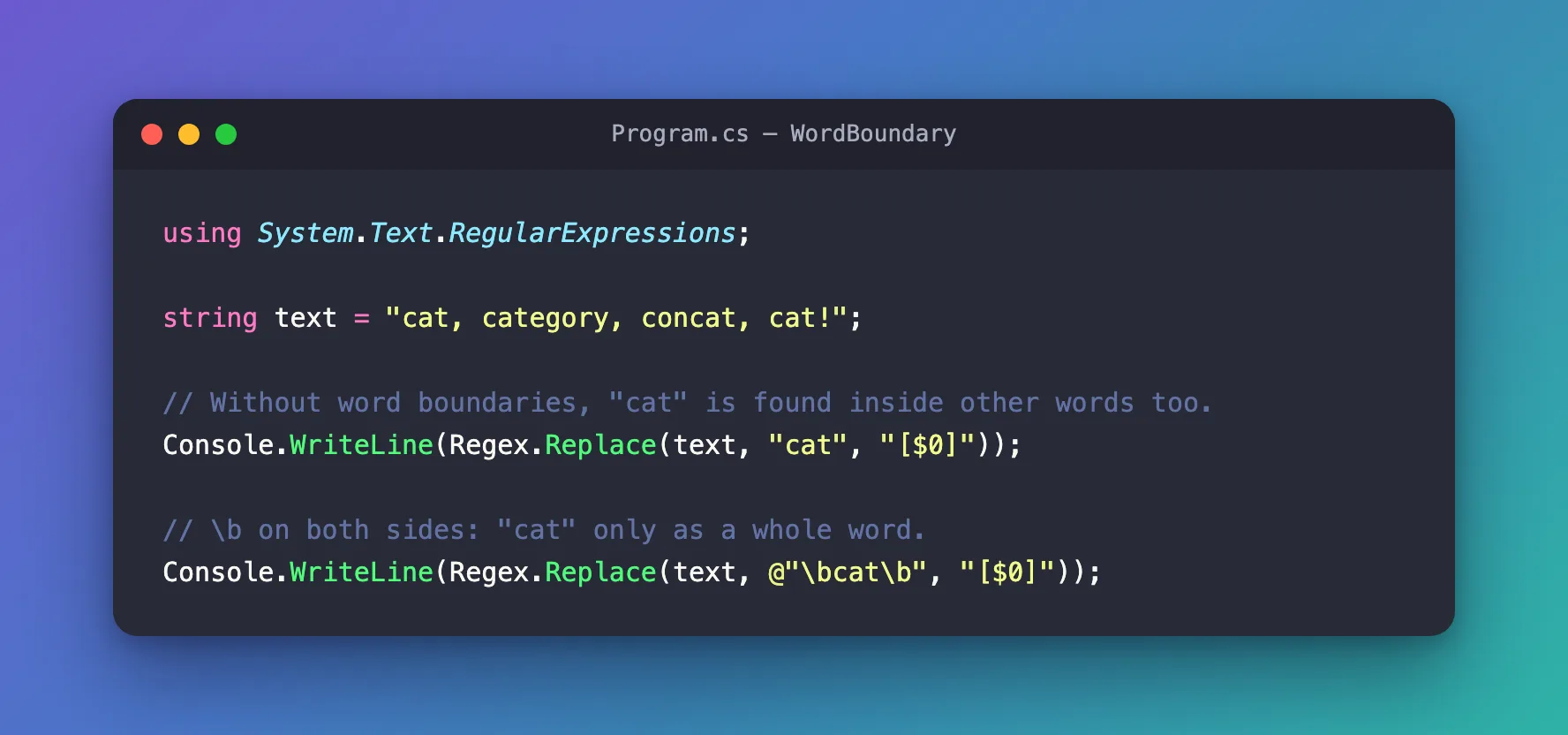
using System.Text.RegularExpressions;

string text = "cat, category, concat, cat!";

// Without word boundaries, "cat" is found inside other words too.
Console.WriteLine(Regex.Replace(text, "cat", "[$0]"));

// \b on both sides: "cat" only as a whole word.
Console.WriteLine(Regex.Replace(text, @"\bcat\b", "[$0]"));
Common Mistakes
| Mistake | What happens | Do this instead |
|---|---|---|
Writing \b in a normal string, such as "\bcat\b" | In a normal C# string, \b is a backspace character, so the pattern looks for backspaces: Regex.IsMatch("cat", "\bcat\b") returned False | Use a verbatim string: @"\bcat\b" returned True |
Expecting _ or a digit to end a word | Both are word characters: \bcat\b didn't match in cat_2, though it did in cat-2 | When only letters should count, check for letters around the word instead: (?<![A-Za-z])cat(?![A-Za-z]) matched in cat_2 and not in concat |
FAQ
Does \b work with accented letters?
Yes: \bcafé\b matched in un café noir, because accented letters are word characters too.
Does \b take up a character?
No. The reference describes anchors as positions: Anchors, or atomic zero-width assertions, specify a position in the string where a match must occur. The brackets in the example went right around cat, with no extra character inside.
Conclusion
\bword\b finds word only where it stands as a word of its own, with letters, digits and _ counting as part of a word. Write the pattern as a verbatim string, or \b turns into a backspace.
Additional Resources
- Anchors in regular expressions —
\band the other anchors. - Character classes in regular expressions — which characters count as word characters.
