How to Match Messages with a Regular Expression in the Microsoft 365 Agents SDK in C#

OnMessage("help", ...) only matches a message that is exactly help. Messages that carry a value, such as add 2 and 3, need a pattern: give OnMessage a regular expression instead, and read the values from the pattern in your handler.
Syntax
OnMessage(new Regex(pattern, options), handler);
patternis the regular expression the message's text must match. The SDK checks it withRegex.IsMatch, which finds a match anywhere in the text, so start the pattern with^and end it with$when it should match the whole message.optionsis optional.RegexOptions.IgnoreCaseaccepts any capitalization; without it, the match is case-sensitive.handleris the method that runs when the pattern matches, with the signatureTask Name(ITurnContext turnContext, ITurnState turnState, CancellationToken cancellationToken).
OnMessage is a method of AgentApplication; call it in your agent's constructor. It also takes an optional rank, which decides the order your routes are tried in.
The Example
The agent for this post is a tiny calculator. Send it add 2 and 3, and it answers 2 + 3 = 5:
using System.Text.RegularExpressions;
using Microsoft.Agents.Builder;
using Microsoft.Agents.Builder.App;
using Microsoft.Agents.Builder.State;

namespace RegexDemo;

public class CalculatorAgent : AgentApplication
{
    // "add", a number, "and", another number. Up to nine digits each, so the sum always fits in an int.
    private static readonly Regex AddPattern = new(@"^add (\d{1,9}) and (\d{1,9})$", RegexOptions.IgnoreCase);

    public CalculatorAgent(AgentApplicationOptions options) : base(options)
    {
        OnMessage(AddPattern, AddAsync);
    }

    private async Task AddAsync(ITurnContext turnContext, ITurnState turnState, CancellationToken cancellationToken)
    {
        // The route matched, so the pattern matches: read the two numbers from its groups.
        Match match = AddPattern.Match(turnContext.Activity.Text);
        int first = int.Parse(match.Groups[1].Value);
        int second = int.Parse(match.Groups[2].Value);

        await turnContext.SendActivityAsync($"{first} + {second} = {first + second}", cancellationToken: cancellationToken);
    }
}
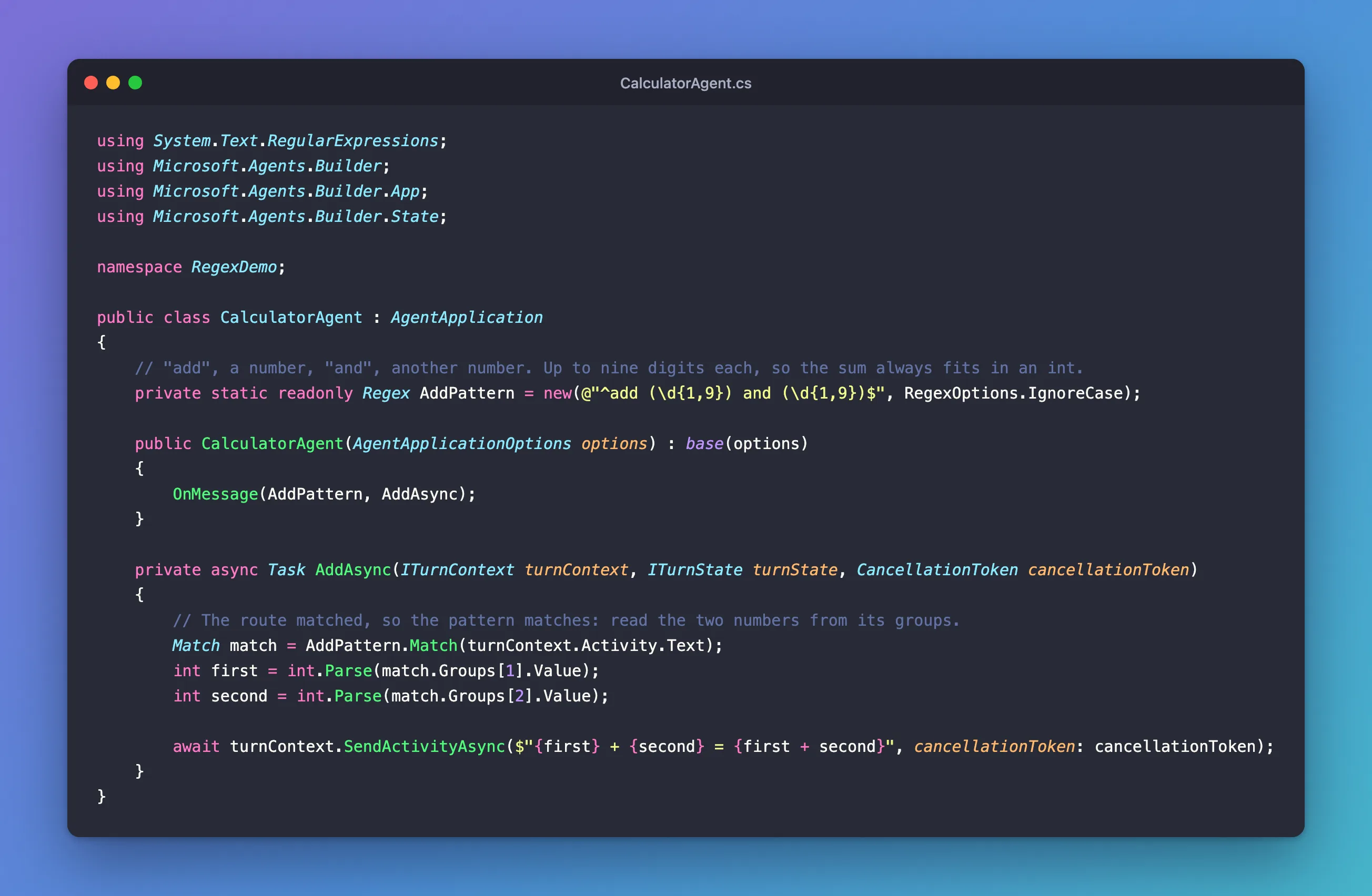
It's one class in an ASP.NET Core project with the Agents SDK, hosted with AddAgent<CalculatorAgent>() and listening on port 3978.
Prerequisites
- The Microsoft 365 Agents Playground, to send the agent messages on your own machine.
agentsplayground --versionshould print0.2.30; if the command isn't found, install it withnpm install -g @microsoft/m365agentsplayground.
Step 1: Write the Pattern
Write the pattern once, as a static readonly field, so it's built when the class is first used and not again for every message:
private static readonly Regex AddPattern = new(@"^add (\d{1,9}) and (\d{1,9})$", RegexOptions.IgnoreCase);
Read it from left to right:
^is the start of the message, and$its end, so the whole message must fit the pattern.addandandare the words, spaces included.(\d{1,9})is one to nine digits. The brackets make it a group, a part of the match you can read later. The two groups are numbered1and2, from left to right.RegexOptions.IgnoreCaseletsAddandADDmatch too.
Nine digits is a limit on purpose: the largest sum, 999999999 + 999999999, still fits in an int, so the handler never fails on a number that's too long.
Step 2: Register the Route
Pass the pattern to OnMessage in the constructor:
public CalculatorAgent(AgentApplicationOptions options) : base(options)
{
    OnMessage(AddPattern, AddAsync);
}
The route matches only message activities, and only when their text matches the pattern.
Step 3: Read the Values in the Handler
The route only tells the handler that the pattern matched. To get the numbers, match again and read the groups:
private async Task AddAsync(ITurnContext turnContext, ITurnState turnState, CancellationToken cancellationToken)
{
    // The route matched, so the pattern matches: read the two numbers from its groups.
    Match match = AddPattern.Match(turnContext.Activity.Text);
    int first = int.Parse(match.Groups[1].Value);
    int second = int.Parse(match.Groups[2].Value);

    await turnContext.SendActivityAsync($"{first} + {second} = {first + second}", cancellationToken: cancellationToken);
}
match.Groups[1].Value is the text of the first group, such as 2. int.Parse is safe here, because the pattern only lets through one to nine digits.
Step 4: Try It
Run the agent with dotnet run, start the Agents Playground in a second terminal, and send four messages: add 2 and 3, Add 40 and 2, add two and three and please add 2 and 3.
agentsplayground -e http://localhost:3978/api/messages -c emulator
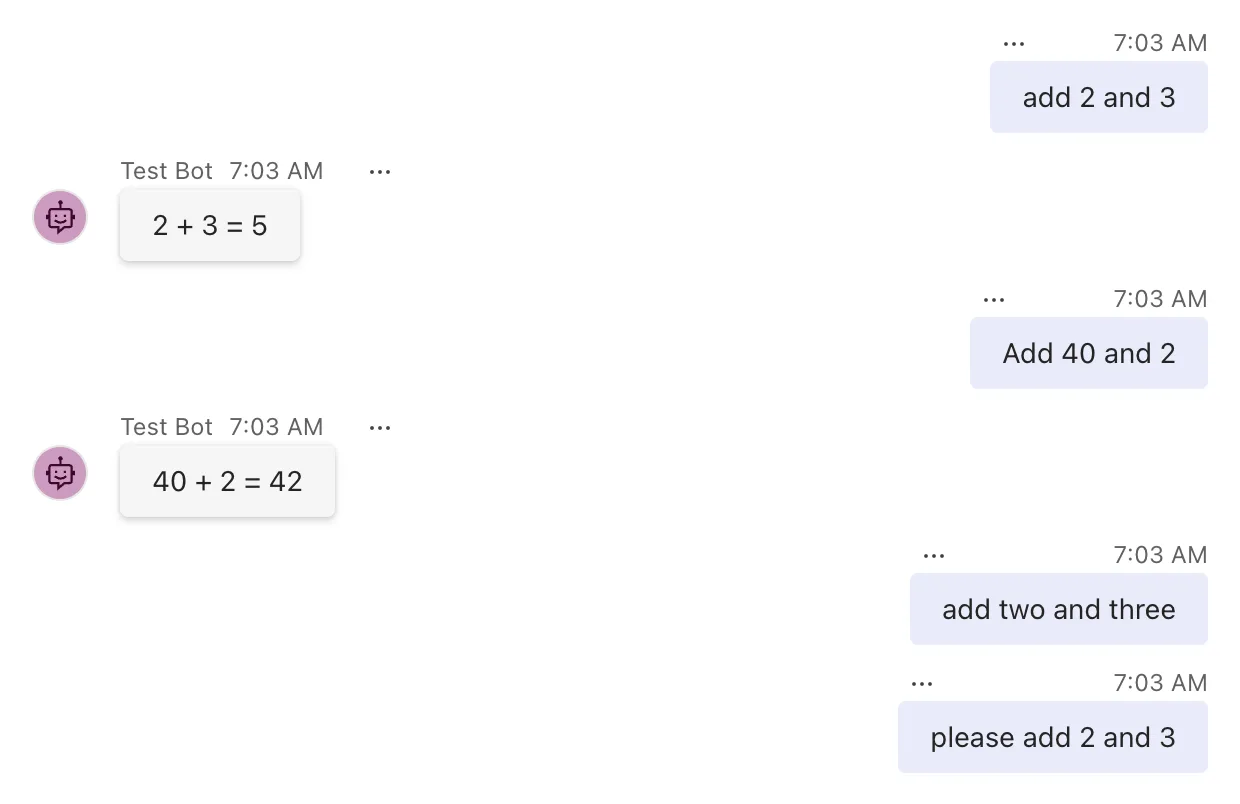
add 2 and 3matched and got its sum.Add 40 and 2matched too, thanks toRegexOptions.IgnoreCase.add two and threehas no digits, so it didn't match.please add 2 and 3contains a matching phrase, but^requiresaddat the very start, so it didn't match either.
The last two got no answer at all, because this agent has no other route: an activity no route matches is accepted and ignored. To answer those too, add a catch-all route, as How to Add a Catch-All Route in the Microsoft 365 Agents SDK in C# shows.
Common Mistakes
| Mistake | What happens | Do this instead |
|---|---|---|
A pattern without ^ and $ | It matches inside longer messages, such as I don't want to add 2 and 3 | Anchor the pattern to the whole message |
Forgetting RegexOptions.IgnoreCase | Add 40 and 2 gets no answer | Pass RegexOptions.IgnoreCase, or write the pattern for every capitalization |
\d+ with int.Parse | A long enough number throws an OverflowException | Limit the digits, as \d{1,9} does, or use int.TryParse |
Creating the Regex inside the handler | The pattern is built again for every message | Keep it in a static readonly field |
Troubleshooting
| Symptom | Likely cause | Fix |
|---|---|---|
No answer, and the Log Panel shows message 202 | The text doesn't match the pattern | Compare the text with the pattern character by character, spaces included |
Add 40 and 2 gets no answer, add 40 and 2 does | The pattern is case-sensitive | Add RegexOptions.IgnoreCase |
| An exact-text route answers instead | Another route that matches the same message is tried first | Check the order of your routes and their ranks |
FAQ
Can I use named groups?
Yes. Write (?<first>\d{1,9}) in the pattern and read match.Groups["first"].Value in the handler. Names make long patterns easier to read than numbers.
Do I have to match the pattern twice?
The route uses the pattern only to decide; it doesn't pass the match to your handler. Matching once more in the handler is cheap, and it's the simplest way to read the values.
What does OnMessage with a string do instead?
It compares the whole message text with the string, ignoring case. OnMessage("help", ...) matches help and HELP, but not help me.
Conclusion
To route messages by pattern, give OnMessage a Regex: anchor it with ^ and $, add RegexOptions.IgnoreCase when capitalization shouldn't matter, and keep it in a static readonly field. In the handler, match again and read the values from the pattern's groups. Messages that don't fit the pattern skip the route, so pair it with a catch-all if they need an answer.
Additional Resources
- AgentApplication in Microsoft 365 Agents SDK — message routes, including regular expressions.
- Regular expression language quick reference — every element of .NET patterns.
