How to Make EF Core Columns Required or Nullable with C# Nullable Reference Types

Whether a database column may be empty should be decided once, in your C# code, and enforced everywhere: by the compiler, by EF Core and by MySQL. With nullable reference types turned on, EF Core does exactly that: string? becomes a column that allows NULL, string one that doesn't. This guide shows the rule in a real migration, adds C#'s required modifier so the compiler catches missing values, and changes an existing column from nullable to required without breaking.
The Rule
EF Core's entity properties page states it: "If nullable reference types are enabled, properties will be configured based on the C# nullability of their .NET type: string? will be configured as optional, but string will be configured as required." And it recommends working this way: "Using nullable reference types is recommended since it flows the nullability expressed in C# code to EF Core's model and to the database".
In the database, that means: "required properties are created as non-nullable columns, and optional properties are created as nullable columns."
Prerequisites
- A .NET C# project using EF Core, with nullable reference types on:
<Nullable>enable</Nullable>in the project file, the default for new .NET projects. The examples use .NET 10, EF Core 10 and MySQL 9.7 from How to Connect a .NET C# Web API to a MySQL Database — Part 1. - The EF Core tools: How to Install dotnet-ef as a Local Tool in a .NET C# Project.
Step 1: See the Rule in a Migration
A product entity mixes required and optional values:
public required string Sku { get; set; }

public required string Name { get; set; }

public string? Description { get; set; }

public decimal UnitPrice { get; set; }

public DateTime? ArchivedAtUtc { get; set; }
With no configuration at all, the first migration made:
Sku = table.Column<string>(type: "longtext", nullable: false),
Name = table.Column<string>(type: "longtext", nullable: false),
Description = table.Column<string>(type: "longtext", nullable: true),
UnitPrice = table.Column<decimal>(type: "decimal(18,2)", nullable: false),
ArchivedAtUtc = table.Column<DateTime>(type: "datetime(6)", nullable: true),
stringgivesnullable: false, andstring?givesnullable: true.- Value types such as
decimalandDateTimecan't benullin C#, so they'reNOT NULL. Add?, as inDateTime?, for an optional value:ArchivedAtUtcis empty until a product is archived.
No attributes and no configuration: the ? alone decided it.
Step 2: Let the Compiler Enforce It with required
With nullable reference types on, a non-nullable string property with no value gets a compiler warning. I changed Description from string? to plain string:
public string Description { get; set; }
  Dewiride.Inventory.Data net10.0 failed with 1 error(s) (0.1s)
    /Users/you/projects/dewiride-inventory-api/src/Dewiride.Inventory.Data/Entities/Product.cs(15,19): error CS8618: Non-nullable property 'Description' must contain a non-null value when exiting constructor. Consider adding the 'required' modifier or declaring the property as nullable.
It's an error here because the solution treats warnings as errors. EF Core's nullable reference types page explains the warning, and the fix it recommends: "If you're using C# 11 or above, required members provide the perfect solution to this problem". So:
public required string Description { get; set; }
required moves the check to every place that creates a product. Code that forgets it doesn't compile:
  Dewiride.Inventory.Api net10.0 failed with 1 error(s) (0.9s)
    /Users/you/projects/dewiride-inventory-api/src/Dewiride.Inventory.Api/Program.cs(95,23): error CS9035: Required member 'Product.Description' must be set in the object initializer or attribute constructor.
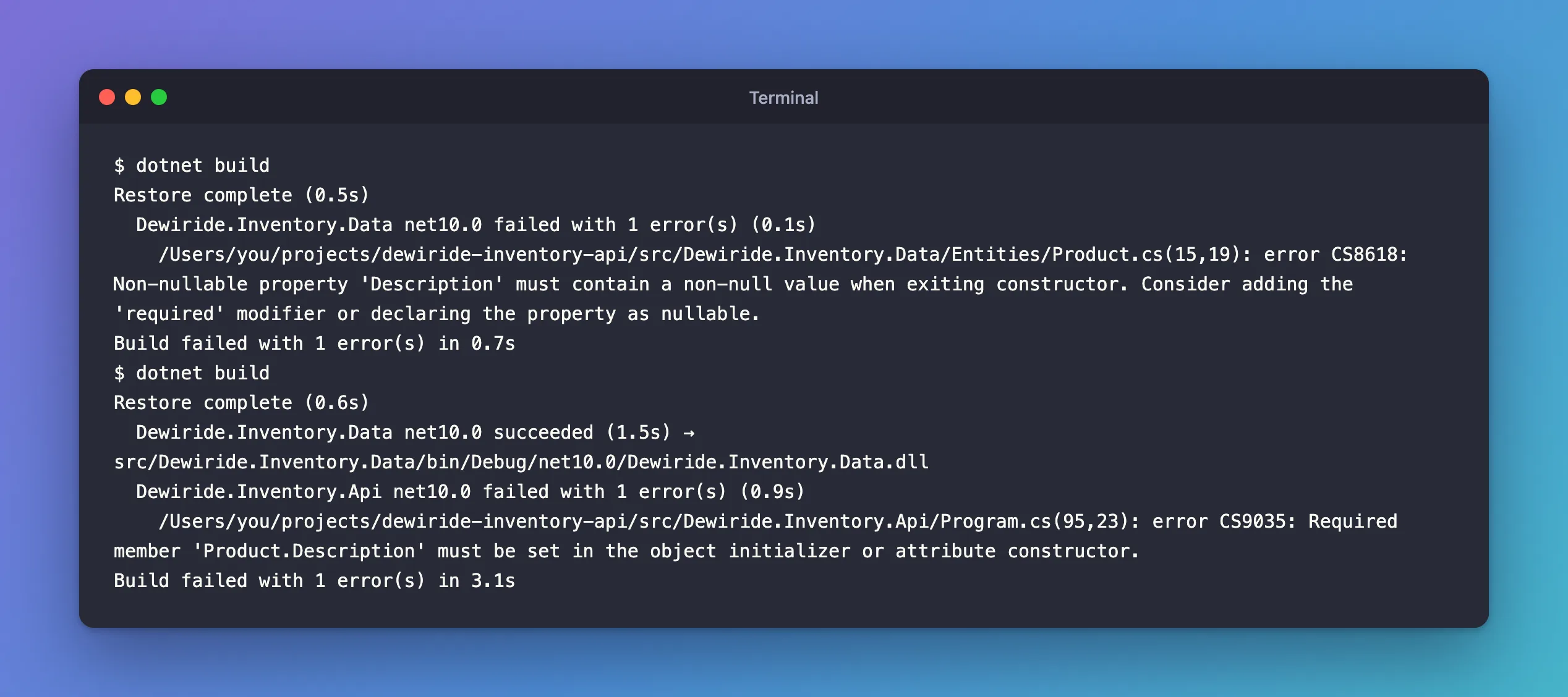
The docs describe the result: "The compiler now guarantees that when your code instantiates a Customer, it always initializes its Name property. And since the database column mapped to the property is non-nullable, any instances loaded by EF always contain a non-null Name as well." One keyword, three layers of protection. Fixed: error CS8618 covers the other ways to answer that warning.
Step 3: Change an Existing Column from Nullable to Required
Making Description required changes the model, which EF Core notices:
Changes have been made to the model since the last migration. Add a new migration.
The migration has a detail worth understanding:
migrationBuilder.AlterColumn<string>(
    name: "Description",
    table: "products",
    type: "longtext",
    nullable: false,
    defaultValue: "",
    oldClrType: typeof(string),
    oldType: "longtext",
    oldNullable: true);
defaultValue: "" is there for the rows that already exist: they hold NULL, and a NOT NULL column can't keep them. On MySQL, though, this exact migration fails for a longtext column with "BLOB, TEXT, GEOMETRY or JSON column 'Description' can't have a default value". The fix is to fill the empty rows yourself and drop the default:
protected override void Up(MigrationBuilder migrationBuilder)
{
    // MySQL can't give a longtext column a literal default, so fill the empty
    // rows first, then make the column NOT NULL without a default.
    migrationBuilder.Sql("UPDATE `products` SET `Description` = '' WHERE `Description` IS NULL;");

    migrationBuilder.AlterColumn<string>(
        name: "Description",
        table: "products",
        type: "longtext",
        nullable: false,
        oldClrType: typeof(string),
        oldType: "longtext",
        oldNullable: true);
}
Applying migration '20261103044430_MakeDescriptionRequired'.
      UPDATE `products` SET `Description` = '' WHERE `Description` IS NULL;
      ALTER TABLE `products` MODIFY `Description` longtext NOT NULL;
Done.
The fixes post for that error shows the failure and two alternatives. With a varchar column, the generated migration works unchanged.
Explicit Configuration
Nullable reference types are the recommended way, but two explicit forms exist, for example when a property is optional in C# but must be required in the database:
builder.Property(p => p.Description).IsRequired();
or the [Required] attribute on the property. The docs present both: "A property that would be optional by convention can be configured to be required as follows".
Common Mistakes
| Mistake | What happens | Do this instead |
|---|---|---|
| Turning off nullable reference types | Every string column becomes nullable | Keep <Nullable>enable</Nullable> |
Silencing CS8618 with = null! on entity properties | Code can create entities without the value; MySQL refuses later | Use required |
Making a column required without handling existing NULLs | The migration fails | Fill the rows in the migration first |
Expecting required to validate API input | It's a compile-time check on your code | Validate requests separately |
Troubleshooting
| Symptom | Likely cause | Fix |
|---|---|---|
error CS8618: Non-nullable property … | A non-nullable property without a value | required, an initializer, or ? |
error CS9035: Required member … must be set | Code creates the entity without a required value | Set it in the object initializer |
| A column is nullable but the property isn't | Nullable reference types are off in that project | Enable them and create a migration |
FAQ
What about navigation properties like Category?
A reference navigation that's always set by EF Core when loaded, such as public Category Category { get; set; } = null!;, is the one place null! is common: EF Core fills it, and the foreign key CategoryId is what decides whether the relationship is required.
Do DbSet properties need required?
No. The docs explain that for DbSet properties, "EF Core 7.0 and above suppress this warning, since EF automatically initializes these properties via reflection."
Conclusion
With nullable reference types on, the ? decides: string? and DateTime? become nullable columns, string and value types become NOT NULL. Add required to non-nullable strings so the compiler rejects code that forgets them, and when an existing column becomes required, fill its NULL rows in the migration before the ALTER, which on MySQL also avoids a longtext default.
Additional Resources
- Entity Properties: Required and optional properties
- Working with Nullable Reference Types
- required modifier
