How to Look Up Azure OpenAI Model Prices with the Azure Retail Prices API

A cost estimate is only as good as the price in it, and model prices change. Microsoft publishes every Azure price, including what each Azure OpenAI model costs per million tokens, through the Azure Retail Prices API: a public web address that needs no Azure account. This guide finds one model's prices, decodes the meter names, narrows the list to one deployment type and converts it to another currency, with curl and jq or with PowerShell.
Syntax
https://prices.azure.com/api/retail/prices?$filter=<field> eq '<value>' and contains(<field>, '<text>')¤cyCode='<currency>'
| Part | What to put there |
|---|---|
$filter | Which prices to return, written as conditions on the prices' fields |
<field> eq '<value>' | Keep the prices whose field is exactly that value, such as armRegionName eq 'eastus2'. Values are case-sensitive |
contains(<field>, '<text>') | Keep the prices whose field contains that text, such as contains(meterName, '5.6 luna') |
and | Joins conditions. A price is returned only when all of them are true |
currencyCode | Optional. The currency, such as 'EUR'. Without it, prices are in US dollars |
The fields you can filter on are listed in Microsoft's reference: armRegionName, Location, meterId, meterName, productid, skuId, productName, skuName, serviceName, serviceId, serviceFamily, priceType and armSkuName. In a terminal, the spaces and quotes in the filter have to be encoded for a web address, which curl and PowerShell do for you, as the steps show.
The Example
The example finds what the gpt-5.6-luna model costs on a Global Standard deployment in East US 2: input, cached input, cache writes and output, per million tokens.
Prerequisites
- In bash or zsh: curl and jq, a command-line JSON tool. On my Mac, running macOS 26, both came with the system. On Linux, install jq from your distribution's packages if
jq --versiondoesn't print a version. - In PowerShell: PowerShell 7. I ran these commands in PowerShell 7.6.
Step 1: Find the Model's Service and Product
You don't need to know where Azure files a model's prices: filter by part of the model's name and look. Model meters name the model without its gpt- prefix, so search for 5.6 luna in one region:
- bash/zsh
- PowerShell
curl -s -G "https://prices.azure.com/api/retail/prices" \
  --data-urlencode "\$filter=armRegionName eq 'eastus2' and contains(meterName, '5.6 luna')" \
  | jq -r '.Items[] | [.serviceName, .productName] | @tsv' | sort -u | column -t -s $'\t'
Foundry Models Azure OpenAI GPT5
$filter = "armRegionName eq 'eastus2' and contains(meterName, '5.6 luna')"
$prices = Invoke-RestMethod -Uri 'https://prices.azure.com/api/retail/prices' -Body @{ '$filter' = $filter }
$prices.Items | Select-Object serviceName, productName -Unique | Format-Table
serviceName    productName
-----------    -----------
Foundry Models Azure OpenAI GPT5
curl -s -Gsends a quietGETrequest, and--data-urlencodeadds the filter to the address, encoded. The backslash in\$filterstops the shell from treating$filteras a variable.jq -r '.Items[] | ...'picks two fields from every price in the answer'sItemslist, andsort -ukeeps one copy of each line.- In PowerShell,
-Bodyturns the hashtable into the same query string, because the request is aGET.Invoke-RestMethodturns the JSON into objects, soSelect-Objectcan pick the fields.
The model's prices are under the service Foundry Models, in the product Azure OpenAI GPT5.
Step 2: List the Model's Prices
Filter by the service, the region and the short-context version of the model, and show each meter's name and price:
- bash/zsh
- PowerShell
curl -s -G "https://prices.azure.com/api/retail/prices" \
  --data-urlencode "\$filter=serviceName eq 'Foundry Models' and armRegionName eq 'eastus2' and contains(meterName, '5.6 luna ShortCo')" \
  | jq -r '.Items[] | [.meterName, .retailPrice] | @tsv' | sort | column -t -s $'\t'
5.6 luna ShortCo Cd Inp PP DZ 1M Tokens   0.044
5.6 luna ShortCo Cd Inp PP Gl 1M Tokens   0.04
5.6 luna ShortCo Cd Inp Std DZ 1M Tokens  0.022
5.6 luna ShortCo Cd Inp Std Gl 1M Tokens  0.02
5.6 luna ShortCo Cd Wr PP DZ 1M Tokens    0.55
5.6 luna ShortCo Cd Wr PP Gl 1M Tokens    0.5
5.6 luna ShortCo Cd Wr Std DZ 1M Tokens   0.275
5.6 luna ShortCo Cd Wr Std Gl 1M Tokens   0.25
5.6 luna ShortCo Inp PP DZ 1M Tokens      0.44
5.6 luna ShortCo Inp PP Gl 1M Tokens      0.4
5.6 luna ShortCo Inp Std DZ 1M Tokens     0.22
5.6 luna ShortCo Inp Std Gl 1M Tokens     0.2
5.6 luna ShortCo Opt PP DZ 1M Tokens      2.64
5.6 luna ShortCo Opt PP Gl 1M Tokens      2.4
5.6 luna ShortCo Opt Std DZ 1M Tokens     1.32
5.6 luna ShortCo Opt Std Gl 1M Tokens     1.2
$filter = "serviceName eq 'Foundry Models' and armRegionName eq 'eastus2' and contains(meterName, '5.6 luna ShortCo')"
$prices = Invoke-RestMethod -Uri 'https://prices.azure.com/api/retail/prices' -Body @{ '$filter' = $filter }
$prices.Items | Sort-Object meterName | Format-Table meterName, retailPrice
meterName                                retailPrice
---------                                -----------
5.6 luna ShortCo Cd Inp PP DZ 1M Tokens        0.044
5.6 luna ShortCo Cd Inp PP Gl 1M Tokens        0.040
5.6 luna ShortCo Cd Inp Std DZ 1M Tokens       0.022
5.6 luna ShortCo Cd Inp Std Gl 1M Tokens       0.020
5.6 luna ShortCo Cd Wr PP DZ 1M Tokens         0.550
5.6 luna ShortCo Cd Wr PP Gl 1M Tokens         0.500
5.6 luna ShortCo Cd Wr Std DZ 1M Tokens        0.275
5.6 luna ShortCo Cd Wr Std Gl 1M Tokens        0.250
5.6 luna ShortCo Inp PP DZ 1M Tokens           0.440
5.6 luna ShortCo Inp PP Gl 1M Tokens           0.400
5.6 luna ShortCo Inp Std DZ 1M Tokens          0.220
5.6 luna ShortCo Inp Std Gl 1M Tokens          0.200
5.6 luna ShortCo Opt PP DZ 1M Tokens           2.640
5.6 luna ShortCo Opt PP Gl 1M Tokens           2.400
5.6 luna ShortCo Opt Std DZ 1M Tokens          1.320
5.6 luna ShortCo Opt Std Gl 1M Tokens          1.200
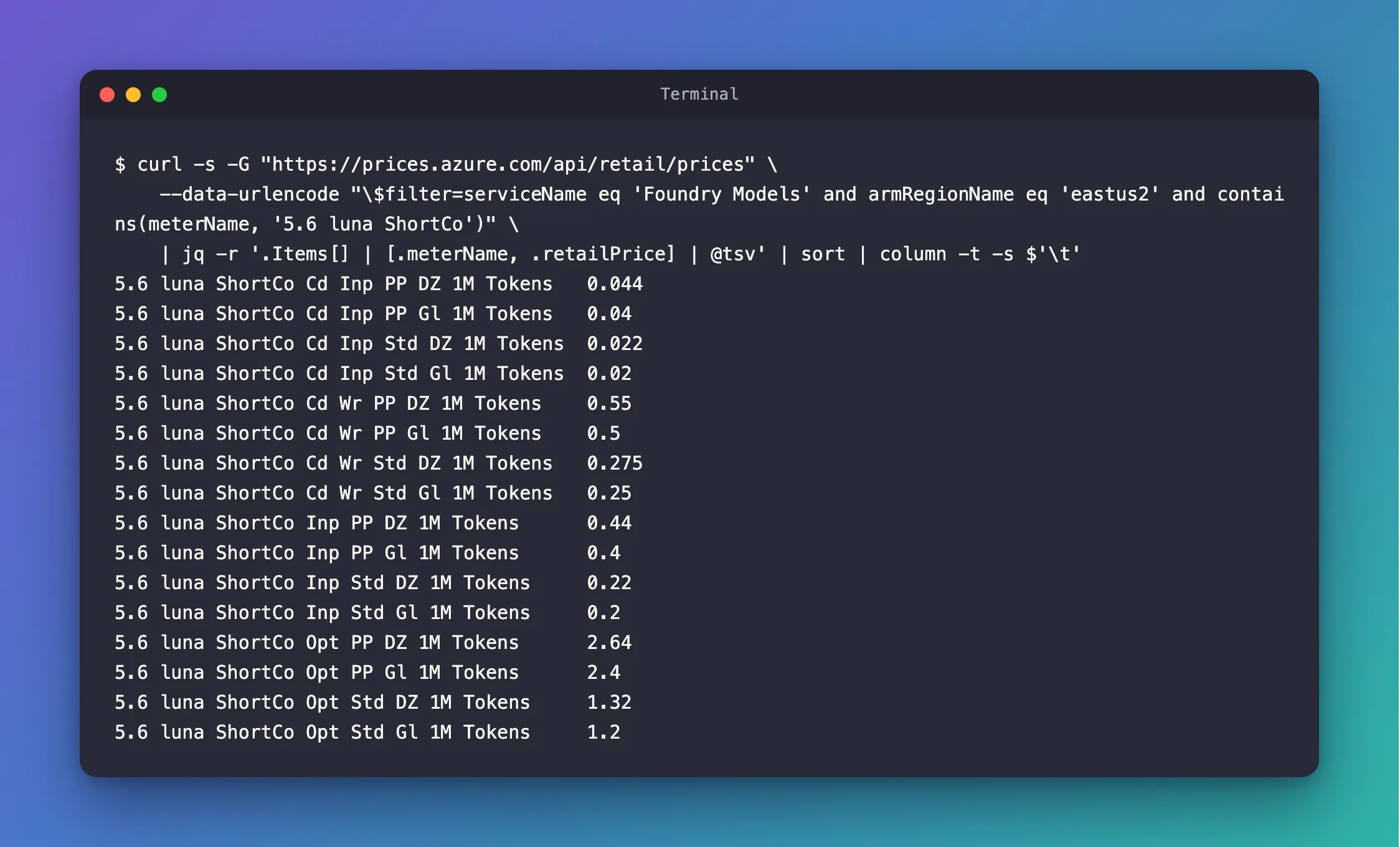
Sixteen prices for one model, because each combination of token type, pricing tier and deployment type has its own meter. Every price is per million tokens: the names end in 1M Tokens.
Step 3: Decode the Meter Names
Microsoft doesn't document these abbreviations. To decode them, I compared every price with Microsoft's Azure OpenAI pricing page for East US on November 21, 2026, where the same numbers appear under full names:
| In the meter name | Means | On the pricing page |
|---|---|---|
ShortCo, LongCo | Short context, long context | Two versions of the model: GPT-5.6-luna (short context) and (long context) |
Inp | Input tokens | Input: $0.20 for Global |
Cd Inp | Cached input tokens | Cached Input: $0.02 |
Cd Wr | Cache writes | Cache writes: $0.25 |
Opt | Output tokens | Output: $1.20 |
Gl, DZ | Global or Data Zone deployment | The Global and Data Zone rows: Data Zone input is $0.22 |
Std | The standard pay-as-you-go price | The first price column |
PP | Priority Processing | The Priority Processing column: for the long-context model on Global, $0.80, $0.08, $1 and $3.60, the API's LongCo ... PP Gl meters |
So a Global Standard deployment of the short-context model costs $0.20 per million input tokens, $0.02 per million cached input tokens, $0.25 per million tokens written to the cache, and $1.20 per million output tokens.
Step 4: Keep One Deployment Type
Add contains(meterName, 'Std Gl') to the filter to keep the four prices that apply to a Global Standard deployment, and show the unit too:
- bash/zsh
- PowerShell
curl -s -G "https://prices.azure.com/api/retail/prices" \
  --data-urlencode "\$filter=serviceName eq 'Foundry Models' and armRegionName eq 'eastus2' and contains(meterName, '5.6 luna ShortCo') and contains(meterName, 'Std Gl')" \
  | jq -r '.Items[] | [.meterName, .retailPrice, .unitOfMeasure] | @tsv' | sort | column -t -s $'\t'
5.6 luna ShortCo Cd Inp Std Gl 1M Tokens  0.02  1M
5.6 luna ShortCo Cd Wr Std Gl 1M Tokens   0.25  1M
5.6 luna ShortCo Inp Std Gl 1M Tokens     0.2   1M
5.6 luna ShortCo Opt Std Gl 1M Tokens     1.2   1M
$filter = "serviceName eq 'Foundry Models' and armRegionName eq 'eastus2' and contains(meterName, '5.6 luna ShortCo') and contains(meterName, 'Std Gl')"
$prices = Invoke-RestMethod -Uri 'https://prices.azure.com/api/retail/prices' -Body @{ '$filter' = $filter }
$prices.Items | Sort-Object meterName | Format-Table meterName, retailPrice, unitOfMeasure
meterName                                retailPrice unitOfMeasure
---------                                ----------- -------------
5.6 luna ShortCo Cd Inp Std Gl 1M Tokens       0.020 1M
5.6 luna ShortCo Cd Wr Std Gl 1M Tokens        0.250 1M
5.6 luna ShortCo Inp Std Gl 1M Tokens          0.200 1M
5.6 luna ShortCo Opt Std Gl 1M Tokens          1.200 1M
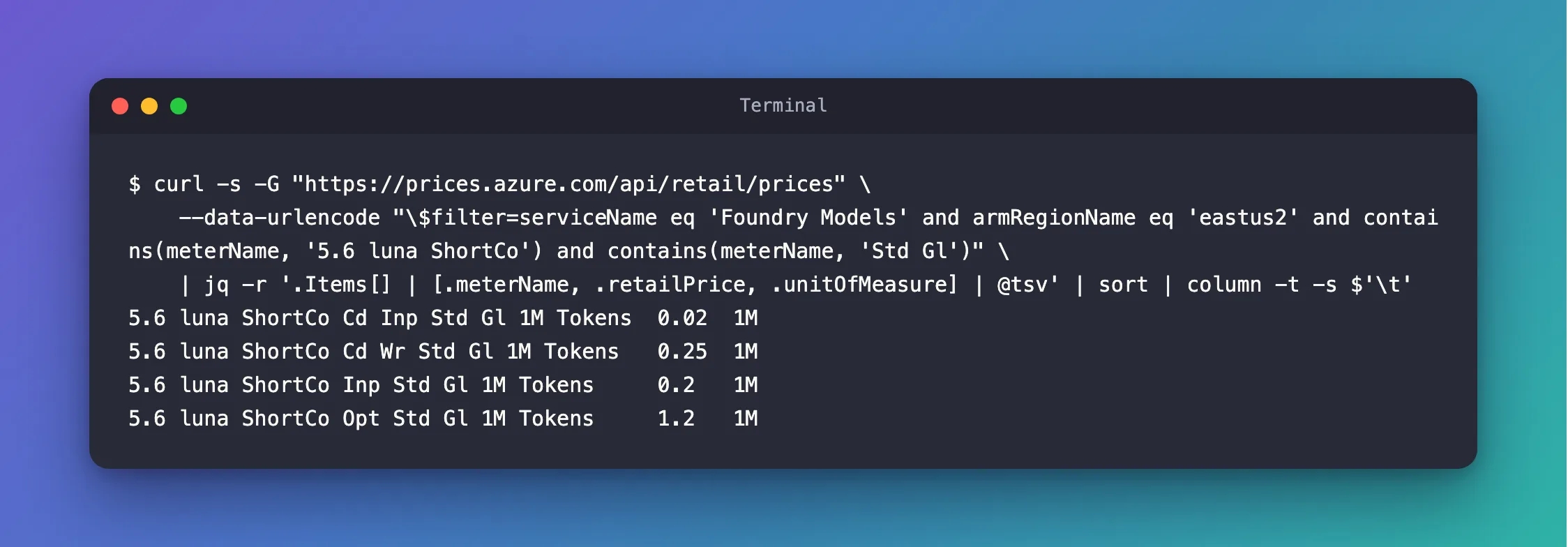
Four prices, each per 1M, a million tokens. Each price also has an effectiveStartDate, the date it took effect: August 1, 2026, for these four.
Step 5: Get the Prices in Another Currency
Add currencyCode='EUR' to the request:
- bash/zsh
- PowerShell
curl -s -G "https://prices.azure.com/api/retail/prices" \
  --data-urlencode "currencyCode='EUR'" \
  --data-urlencode "\$filter=serviceName eq 'Foundry Models' and armRegionName eq 'eastus2' and contains(meterName, '5.6 luna ShortCo') and contains(meterName, 'Std Gl')" \
  | jq -r '.Items[] | [.meterName, .retailPrice, .currencyCode] | @tsv' | sort | column -t -s $'\t'
5.6 luna ShortCo Cd Inp Std Gl 1M Tokens  0.0180  EUR
5.6 luna ShortCo Cd Wr Std Gl 1M Tokens   0.2244  EUR
5.6 luna ShortCo Inp Std Gl 1M Tokens     0.1795  EUR
5.6 luna ShortCo Opt Std Gl 1M Tokens     1.0772  EUR
$filter = "serviceName eq 'Foundry Models' and armRegionName eq 'eastus2' and contains(meterName, '5.6 luna ShortCo') and contains(meterName, 'Std Gl')"
$prices = Invoke-RestMethod -Uri 'https://prices.azure.com/api/retail/prices' -Body @{ currencyCode = "'EUR'"; '$filter' = $filter }
$prices.Items | Sort-Object meterName | Format-Table meterName, retailPrice, currencyCode
meterName                                retailPrice currencyCode
---------                                ----------- ------------
5.6 luna ShortCo Cd Inp Std Gl 1M Tokens       0.018 EUR
5.6 luna ShortCo Cd Wr Std Gl 1M Tokens        0.224 EUR
5.6 luna ShortCo Inp Std Gl 1M Tokens          0.179 EUR
5.6 luna ShortCo Opt Std Gl 1M Tokens          1.077 EUR
PowerShell's table shows three decimals, so 0.1795 appears as 0.179. Microsoft's reference adds a caution about other currencies: Prices shown in USD currency are Microsoft retail prices. Other non-USD prices returned by the API are for your reference to help you estimate budget expenses.
Common Mistakes
| Mistake | What happens | Do this instead |
|---|---|---|
Writing "$filter=..." in bash or zsh without the backslash | The shell swaps $filter for an empty variable, so the API gets no filter. When I tried it, the answer held 1,000 prices for everything, starting with Virtual Machines | Write "\$filter=...", or put the whole argument in single quotes |
| Writing a value in the wrong case | No match: serviceName eq 'foundry models' returned nothing | Copy the value exactly, such as 'Foundry Models'. Microsoft's reference: the value is case sensitive |
| Leaving out the region | Prices for every region: without it, Step 2's filter returned 306 prices from 27 regions instead of 16 | Add armRegionName eq '<region>' |
| Reading a price without its unit | A price per million tokens read as a price per token | Show unitOfMeasure, as Step 4 does |
Troubleshooting
| Symptom | Likely cause | Fix |
|---|---|---|
Items is empty | A value doesn't match exactly, often the case of a letter | Start broad, with only the region and part of the meter name, as in Step 1 |
| Exactly 1,000 items | The API returns at most 1,000 per request | Narrow the filter, or follow NextPageLink for the next page |
FAQ
Do I need an Azure account?
No. Microsoft's reference calls it an unauthenticated experience: the API needs no sign-in and no subscription.
Are these the prices I'll pay?
They're Azure's retail prices. Microsoft's reference describes retailPrice as Microsoft Retail Prices without discount, so a discount your organization has doesn't show here.
What if a filter returns more than 1,000 prices?
The answer then ends with a NextPageLink, the address of the next page. Microsoft's reference: For each API request, a maximum of 1,000 records are returned. At the end of the API response, it has the link to next page. Request that address to get the next 1,000, until there's no more link.
Conclusion
The Azure Retail Prices API answers "what does this model cost?" with a single public request. Filter by serviceName eq 'Foundry Models', the region and part of the model's meter name. Read the abbreviations: Inp, Cd Inp, Cd Wr and Opt for the token types, Std or PP for the tier, Gl or DZ for the deployment type. Every price is per million tokens, and currencyCode converts the list for budgeting.
Additional Resources
- Azure Retail Prices overview — the API, its filters, fields and paging.
- Azure OpenAI pricing — the same prices, by model and deployment type.
- jq manual — the filters used to pick fields from the JSON.
