How to Log Test Metrics Automatically with MLflow Autologging

Autologging's own metrics are measured on the training data. What matters is the score on data the model never saw, and MLflow can log that by itself too: with autologging on, when you call a sklearn.metrics function on a model's predictions, MLflow logs the result to the model's run. MLflow calls these post training metrics. This guide logs a test error without a log call, then shows the import order that silently breaks it, with real output from MLflow 3.18.0.
Syntax
mlflow.sklearn.autolog()
from sklearn.metrics import <metric>  # after autolog()

predictions = model.predict(X_test)
<metric>(y_test, predictions)  # logged as "<metric>_X_test"
| Part | What it means |
|---|---|
mlflow.sklearn.autolog() | Turns on autologging, post training metrics included (log_post_training_metrics=True by default) |
from sklearn.metrics import ... after it | MLflow's reference: "Autologging must be enabled before scikit-learn metric APIs are imported from sklearn.metrics" |
model.predict(X_test) | Predictions MLflow can trace back to the model, and so to its run |
| The metric's name | <metric function>_<variable name>: here mean_absolute_error_X_test, after the variable passed to predict |
Prerequisites
- An MLflow tracking server at
http://127.0.0.1:8080. MLflow's tracking server guide shows how to start one.
Step 1: Log a Test Metric Without a Log Call
The example trains a linear regression on three quarters of scikit-learn's diabetes data and measures its mean absolute error (MAE) on the other quarter. Create post_training.py. The sklearn imports come after autolog() on purpose, which is why they carry # noqa: E402, a note that silences the linter's rule about imports at the top:
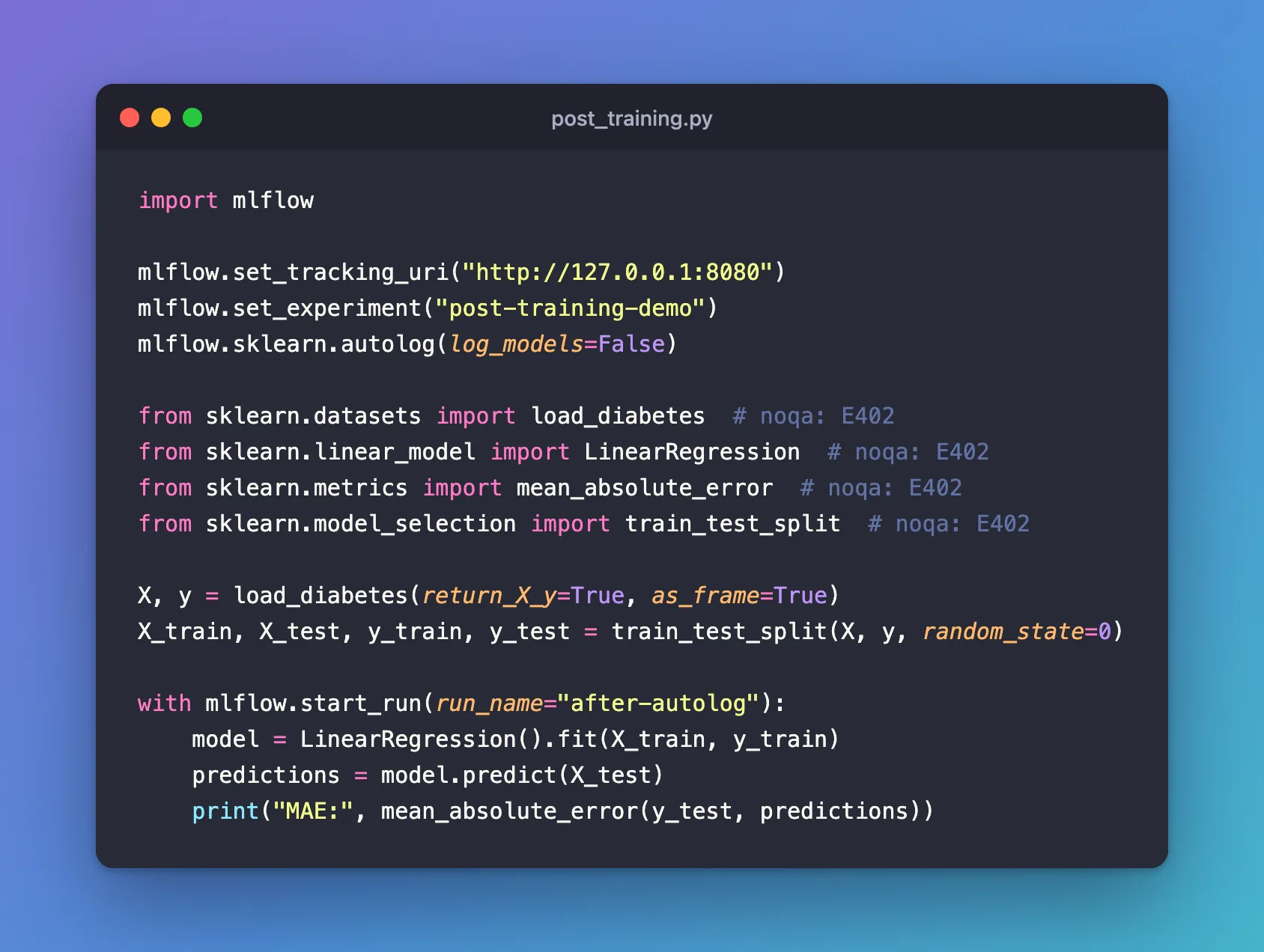
import mlflow

mlflow.set_tracking_uri("http://127.0.0.1:8080")
mlflow.set_experiment("post-training-demo")
mlflow.sklearn.autolog(log_models=False)

from sklearn.datasets import load_diabetes  # noqa: E402
from sklearn.linear_model import LinearRegression  # noqa: E402
from sklearn.metrics import mean_absolute_error  # noqa: E402
from sklearn.model_selection import train_test_split  # noqa: E402

X, y = load_diabetes(return_X_y=True, as_frame=True)
X_train, X_test, y_train, y_test = train_test_split(X, y, random_state=0)

with mlflow.start_run(run_name="after-autolog"):
    model = LinearRegression().fit(X_train, y_train)
    predictions = model.predict(X_test)
    print("MAE:", mean_absolute_error(y_test, predictions))
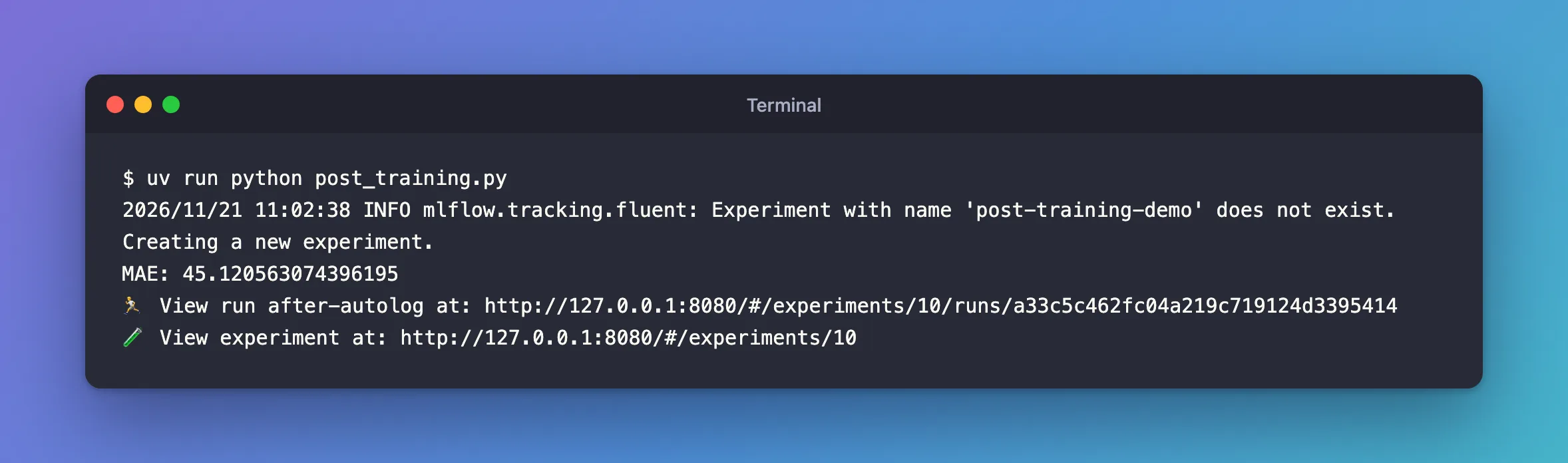
uv run python post_training.py
2026/11/21 11:02:38 INFO mlflow.tracking.fluent: Experiment with name 'post-training-demo' does not exist. Creating a new experiment.
MAE: 45.120563074396195
🏃 View run after-autolog at: http://127.0.0.1:8080/#/experiments/10/runs/a33c5c462fc04a219c719124d3395414
🧪 View experiment at: http://127.0.0.1:8080/#/experiments/10
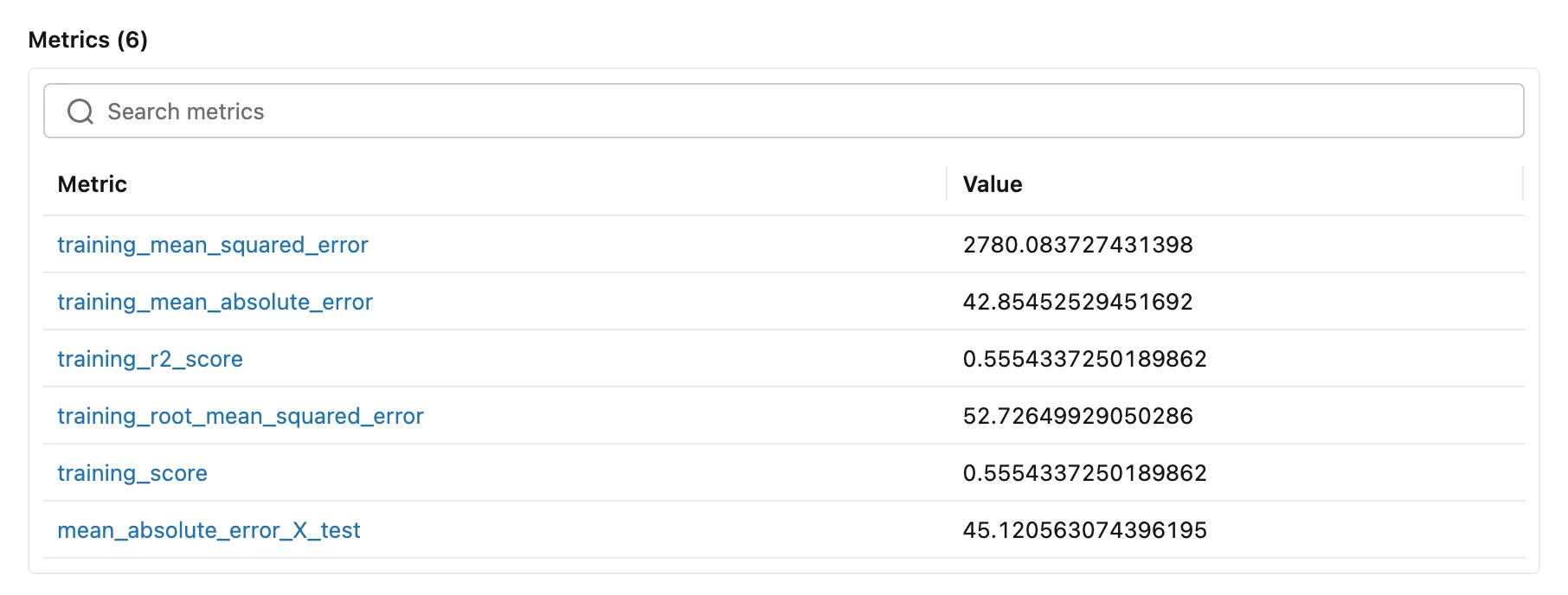
The script only printed the MAE. Open the run: next to autologging's five training metrics is a sixth, the test MAE:
The run also got a file, metric_info.json, that records which call produced the metric:
{
  "mean_absolute_error_X_test": "mean_absolute_error(y_true=y_test, y_pred=predictions)"
}
The test MAE, 45.12, is a little worse than the training MAE, 42.85: the model does slightly better on the rows it learned from.
Step 2: See What the Import Order Does
The same script with the sklearn.metrics import at the top, before autolog(), as linters prefer, is post_training_early_import.py. A third version, post_training_module.py, imports the module, import sklearn.metrics, at the top and calls sklearn.metrics.mean_absolute_error(...):
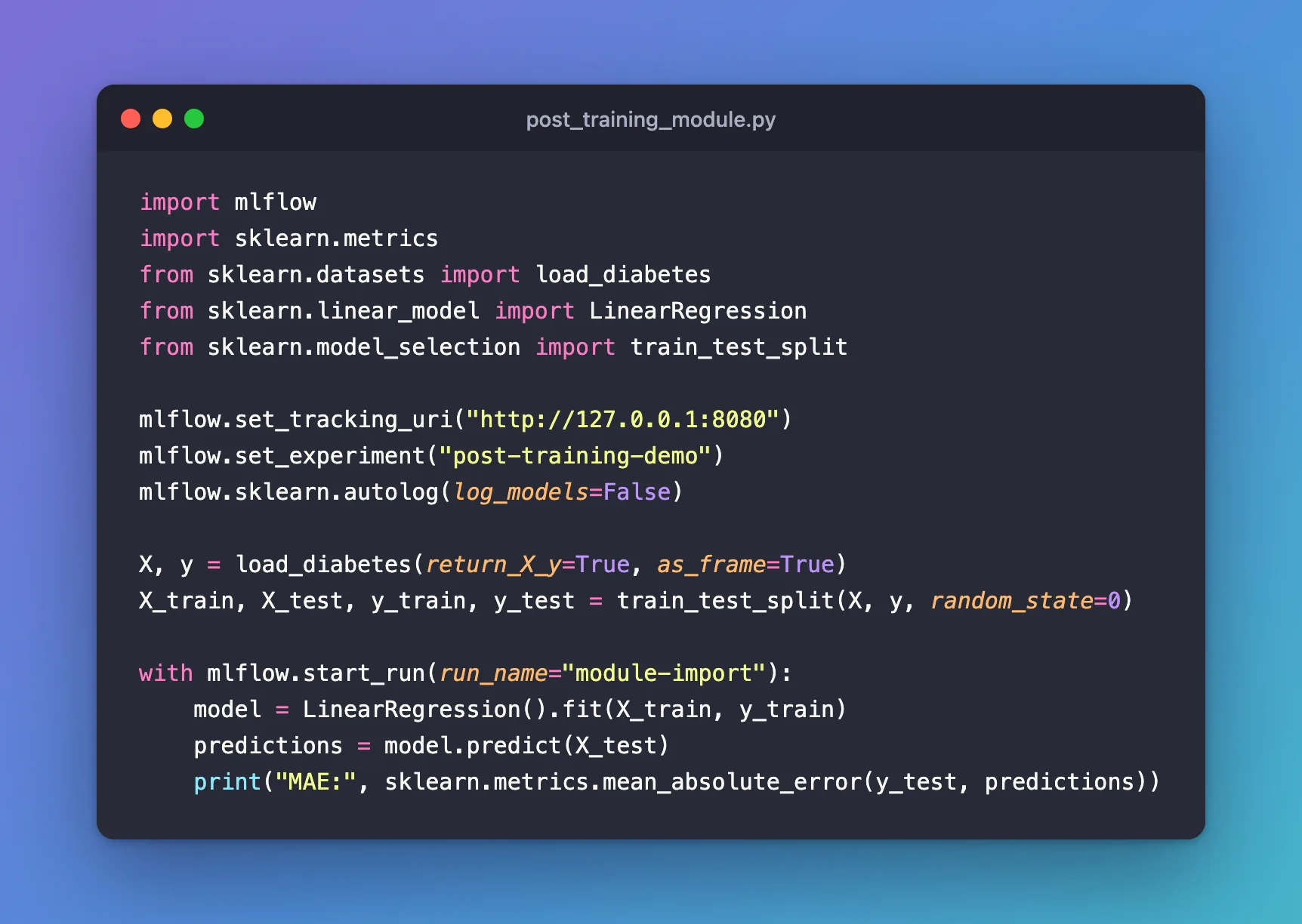
import mlflow
import sklearn.metrics
from sklearn.datasets import load_diabetes
from sklearn.linear_model import LinearRegression
from sklearn.model_selection import train_test_split

mlflow.set_tracking_uri("http://127.0.0.1:8080")
mlflow.set_experiment("post-training-demo")
mlflow.sklearn.autolog(log_models=False)

X, y = load_diabetes(return_X_y=True, as_frame=True)
X_train, X_test, y_train, y_test = train_test_split(X, y, random_state=0)

with mlflow.start_run(run_name="module-import"):
    model = LinearRegression().fit(X_train, y_train)
    predictions = model.predict(X_test)
    print("MAE:", sklearn.metrics.mean_absolute_error(y_test, predictions))
uv run python post_training_early_import.py
uv run python post_training_module.py
MAE: 45.120563074396195
🏃 View run imported-before-autolog at: http://127.0.0.1:8080/#/experiments/10/runs/32720073d0734a638e7ba3d3176917d3
🧪 View experiment at: http://127.0.0.1:8080/#/experiments/10
MAE: 45.120563074396195
🏃 View run module-import at: http://127.0.0.1:8080/#/experiments/10/runs/6cb2838615474634826c30e7cfd034f7
🧪 View experiment at: http://127.0.0.1:8080/#/experiments/10
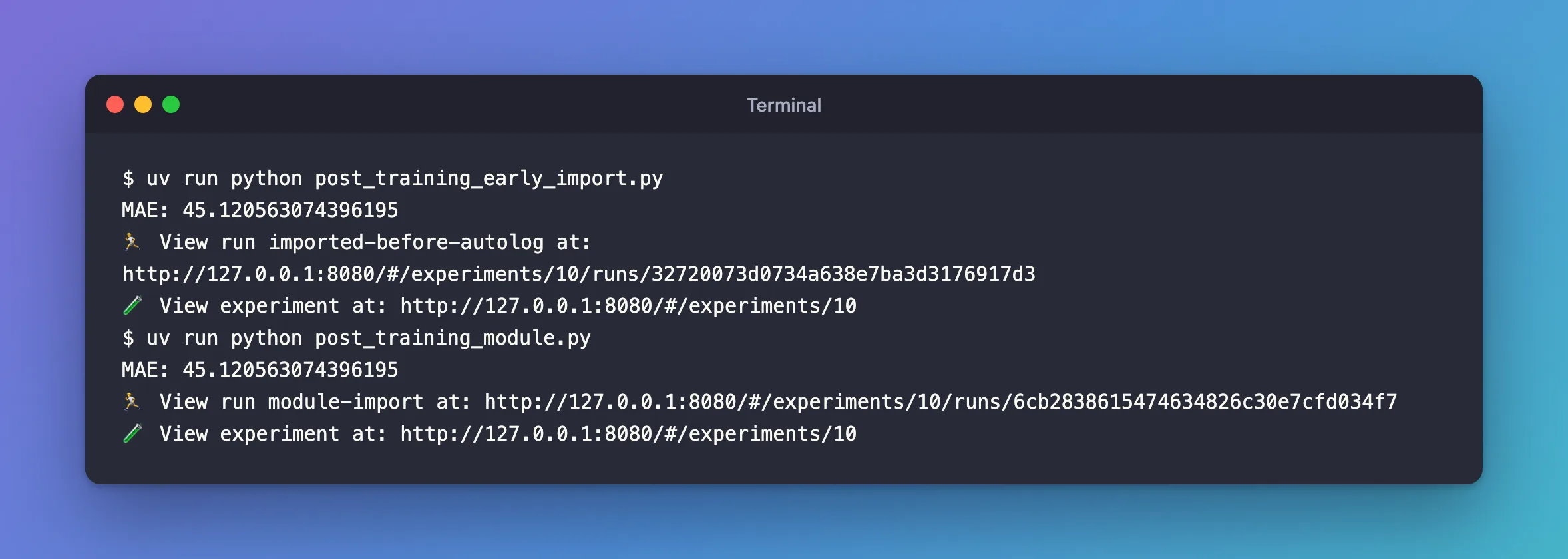
Both printed the same MAE, but only one logged it:
| Run | How mean_absolute_error was reached | mean_absolute_error_X_test logged? |
|---|---|---|
after-autolog | from sklearn.metrics import ... after autolog() | Yes |
imported-before-autolog | from sklearn.metrics import ... before autolog() | No, with no warning |
module-import | import sklearn.metrics at the top, sklearn.metrics.mean_absolute_error(...) | Yes |
autolog() replaces the functions in sklearn.metrics with versions that log. A from ... import done earlier keeps a direct reference to the old function, so MLflow never sees the call; sklearn.metrics.mean_absolute_error looks the function up when it's called, after the switch. Importing the module is the simplest way to keep your imports at the top.
Common Mistakes
| Mistake | What happens | Do this instead |
|---|---|---|
from sklearn.metrics import ... before autolog() | Nothing is logged, silently | Import the module, import sklearn.metrics, or import after autolog() |
Passing a slice or copy of the predictions, such as predict_proba(X_test)[:, 1] | Not logged: MLflow only recognizes the object predict returned | Log that metric yourself with mlflow.log_metric |
Passing data.X_test instead of a variable | The metric's name ends in unknown_dataset | Put the data in a variable first; its name becomes the suffix |
Troubleshooting
| Symptom | Likely cause | Fix |
|---|---|---|
| The metric prints but isn't in the run | The import order, or a derived prediction object | See the table above |
mean_absolute_error-2_X_test appears | The same metric was called twice on the same data | Expected: MLflow numbers repeated calls |
FAQ
Can I turn this off?
Yes: mlflow.sklearn.autolog(log_post_training_metrics=False).
What about model.score?
It's logged too, as <ModelClass>_score_<dataset>, such as LinearRegression_score_X_test.
Conclusion
With autologging on and mean_absolute_error imported after autolog(), one call on the test predictions logged mean_absolute_error_X_test, 45.12, with no log call. Import sklearn.metrics as a module, pass the object predict returned, and keep the data in a named variable.
Additional Resources
- mlflow.sklearn.autolog — "Post training metrics", the naming rule and the limitations.
