How to Log Parameters in MLflow

Parameters are the settings that shape a run: the number of trees, a learning rate, which features you used. Logging them is what lets you answer "what was different about the good run?" later. This guide logs parameters one at a time and in a batch, shows how MLflow stores them, and runs into the one rule people trip over: a parameter can't change once it's logged.
Syntax
mlflow.log_param("<key>", <value>)
mlflow.log_params({"<key>": <value>, "<key>": <value>})
| Part | What it means |
|---|---|
mlflow.log_param(key, value) | Logs one parameter to the active run |
mlflow.log_params(dictionary) | Logs several in one request |
key | The parameter's name: letters, digits, spaces and the characters _, -, . and /, up to 250 characters |
value | Any value. MLflow stores it as text: it "will be string-ified" |
If no run is active, MLflow starts one for you: its reference says the call "will create a new active run". The example logs inside a with mlflow.start_run() block, so it's clear which run gets the values.
Prerequisites
- MLflow in a uv project and a running tracking server at
http://127.0.0.1:8080: see How to Start an MLflow Tracking Server on Your Computer.
Step 1: Log Parameters
Create params_demo.py:
import mlflow

mlflow.set_tracking_uri("http://127.0.0.1:8080")
mlflow.set_experiment("params-demo")

with mlflow.start_run(run_name="params-demo") as run:
    mlflow.log_param("learning_rate", 0.01)
    mlflow.log_params(
        {"n_estimators": 200, "max_depth": None, "use_scaler": True, "features": ["MedInc", "HouseAge"]}
    )

for key, value in mlflow.get_run(run.info.run_id).data.params.items():
    print(f"{key}: {value!r} ({type(value).__name__})")
mlflow.log_param(key, value)logs one parameter.mlflow.log_params(dict)logs several in one request, which is faster and keeps related settings together.- The last two lines read the run back from the server and print each value with its type.
uv run python params_demo.py
2026/11/13 17:08:12 INFO mlflow.tracking.fluent: Experiment with name 'params-demo' does not exist. Creating a new experiment.
🏃 View run params-demo at: http://127.0.0.1:8080/#/experiments/5/runs/554457be6c884a4d9515592a3eabe7e5
🧪 View experiment at: http://127.0.0.1:8080/#/experiments/5
learning_rate: '0.01' (str)
n_estimators: '200' (str)
max_depth: 'None' (str)
use_scaler: 'True' (str)
features: "['MedInc', 'HouseAge']" (str)
Step 2: Notice That Everything Became Text
Every value came back as a string: the number 200 is now '200', None is 'None', the list is its text form. MLflow stores parameters as text, whatever you log. So:
- Convert back when you read them, for example
int(params["n_estimators"]). - Sort and filter them as text in searches:
'50'sorts after'200'. - Use metrics for numbers you want to compare or chart, such as scores: How to Log Metrics in MLflow.
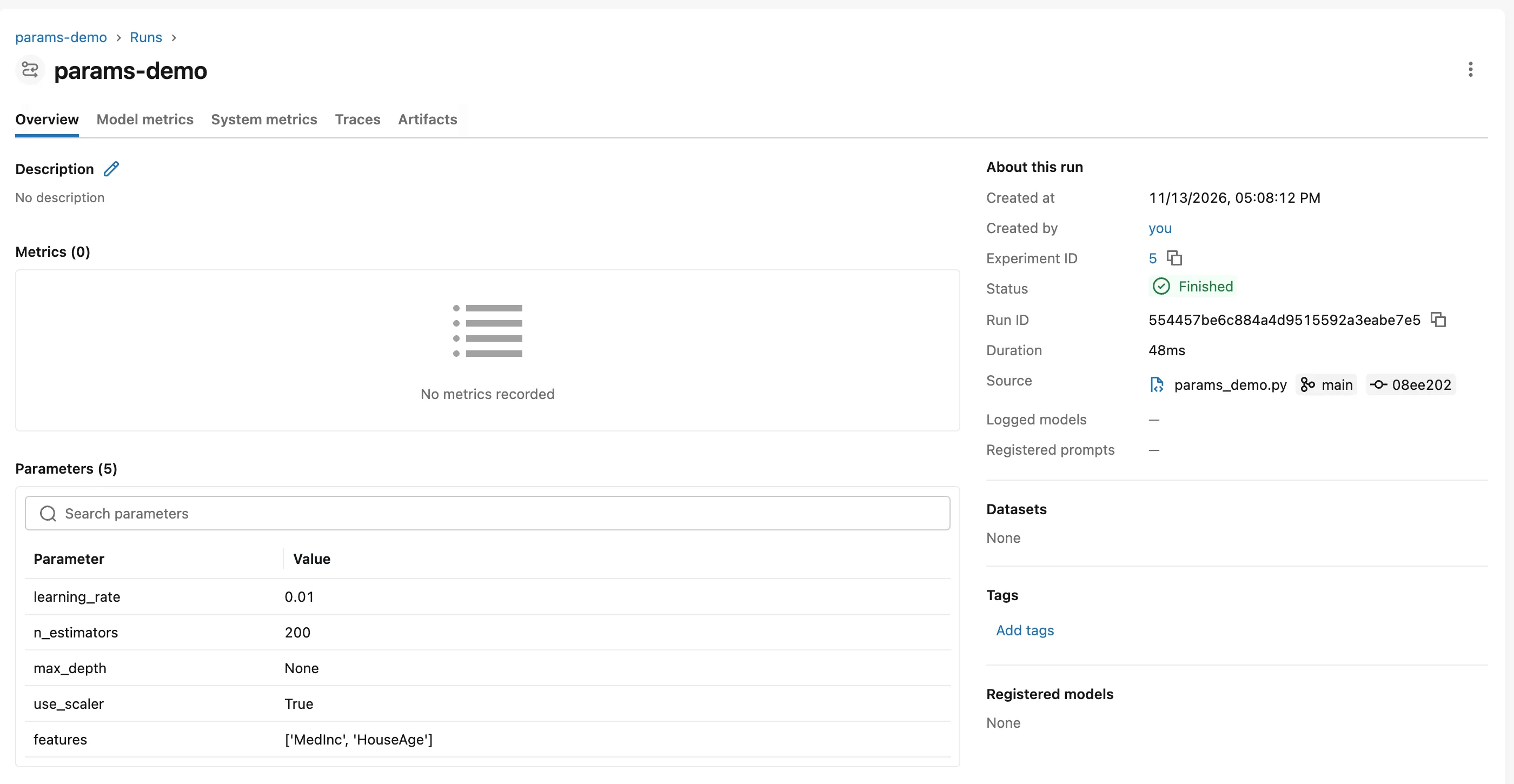
The run page shows them in the Parameters table:
Step 3: Try to Change a Parameter
import mlflow

mlflow.set_tracking_uri("http://127.0.0.1:8080")
mlflow.set_experiment("params-demo")

with mlflow.start_run(run_name="change-a-param"):
    mlflow.log_param("learning_rate", 0.01)
    mlflow.log_param("learning_rate", 0.01)
    print("Logging the same value again is fine")
    mlflow.log_param("learning_rate", 0.02)
uv run python params_change.py
Logging the same value again is fine
Traceback (most recent call last):
...
mlflow.exceptions.MlflowException: INVALID_PARAMETER_VALUE: Changing param values is not allowed. Param with key='learning_rate' was already logged with value='0.01' for run ID='44faf5903be2450a9fa4f83be4acdb93'. Attempted logging new value '0.02'.

The cause of this error is typically due to repeated calls
to an individual run_id event logging.

Incorrect Example:
---------------------------------------
with mlflow.start_run():
    mlflow.log_param("depth", 3)
    mlflow.log_param("depth", 5)
---------------------------------------

Which will throw an MlflowException for overwriting a
logged parameter.

Correct Example:
---------------------------------------
with mlflow.start_run():
    with mlflow.start_run(nested=True):
        mlflow.log_param("depth", 3)
    with mlflow.start_run(nested=True):
        mlflow.log_param("depth", 5)
---------------------------------------

Which will create a new nested run for each individual
model and prevent parameter key collisions within the
tracking store.
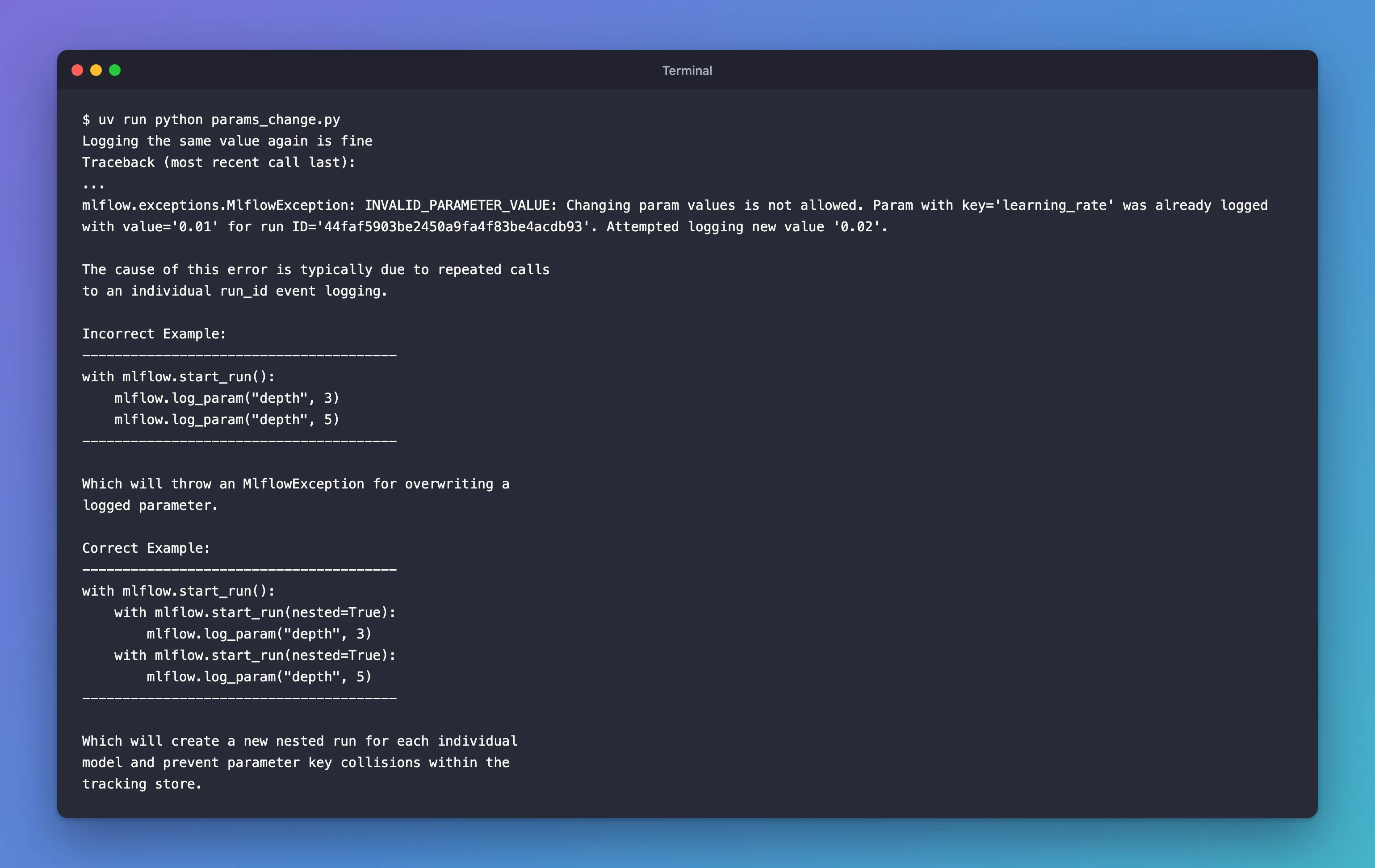
Logging the same value twice is fine. A different value is refused, because a parameter describes how the run was set up, and that can't change after the fact. MLflow's own message suggests the fix: try each setting in its own run, or in nested runs under one parent.
Limits to Know
MLflow 3.18.0's validation code sets these limits:
| Limit | Value |
|---|---|
| Parameter value length | 6,000 characters |
| Parameter or tag name length | 250 characters |
| Parameters and tags in one batch call | 100 |
Long values, such as a whole configuration file, belong in an artifact instead.
Common Mistakes
| Mistake | What happens | Do this instead |
|---|---|---|
| Logging a new value for the same parameter in one run | MlflowException: INVALID_PARAMETER_VALUE: Changing param values is not allowed | Start a new run, or use nested runs |
| Logging scores as parameters | They're text, so they can't be charted or sorted as numbers | Log scores as metrics |
| Not logging settings that come from defaults | You can't tell later what a run used | Log every setting that shapes the result, defaults included |
Troubleshooting
| Symptom | Likely cause | Fix |
|---|---|---|
Changing param values is not allowed in a loop | The loop logs each try into the same run | Start a run per try, nested under one parent |
| A parameter sorts wrongly in the UI | Parameters are text | Log it as a metric too, if you need numeric sorting |
FAQ
What's the difference between a parameter, a metric and a tag?
A parameter is an input setting, logged once, as text. A metric is a measured number, which can be logged many times. A tag is a label you can change later. See How to Add Tags to an MLflow Run.
Can MLflow log parameters for me?
Yes, autologging records a model's parameters by itself; a later part of the MLflow series covers it.
Which parameters should I log?
Everything that changes the result: model settings, the data split (test_size, random_state) and any preprocessing choices.
Conclusion
mlflow.log_param() and mlflow.log_params() recorded five settings, and MLflow stored every one as text: 200 became '200', None became 'None'. Logging the same value again was fine, but a new value for learning_rate was refused with Changing param values is not allowed, because a run's settings can't change after the fact.
Additional Resources
- mlflow.log_param and mlflow.log_params — the API reference.
- MLflow Tracking — parameters, metrics, tags and artifacts.
