How to Log Metrics in MLflow

Metrics are the numbers a run produces: error scores, accuracy, a loss that falls during training. Unlike parameters, a metric can be logged many times, so MLflow keeps its whole history and draws it as a chart. This guide logs single values, a batch, and a metric at ten steps, reads the history back, and shows what happens when a value isn't a number.
Syntax
mlflow.log_metric("<key>", <number>, step=<step>)
mlflow.log_metrics({"<key>": <number>, "<key>": <number>}, step=<step>)
| Part | What it means |
|---|---|
mlflow.log_metric(key, value) | Logs one number to the active run |
mlflow.log_metrics(dictionary) | Logs several in one request |
key | The metric's name, with the same allowed characters as a parameter's |
value | A number |
step=<step> | Optional: a whole number for when the value was measured, such as the training round. It "Defaults to zero if unspecified" |
Logging the same key again doesn't replace the old value. It adds to the metric's history, which is how a training curve is built.
Prerequisites
- MLflow in a uv project and a running tracking server at
http://127.0.0.1:8080: see How to Start an MLflow Tracking Server on Your Computer.
Step 1: Log Metrics
Create metrics_demo.py:
import mlflow
from mlflow import MlflowClient

mlflow.set_tracking_uri("http://127.0.0.1:8080")
mlflow.set_experiment("metrics-demo")

with mlflow.start_run(run_name="metrics-demo") as run:
    mlflow.log_metric("rmse", 0.506)
    mlflow.log_metrics({"mae": 0.328, "r2": 0.804})
    for step in range(1, 11):
        mlflow.log_metric("training_loss", round(1 / step, 3), step=step)

history = MlflowClient().get_metric_history(run.info.run_id, "training_loss")
print("training_loss history:", [(m.step, m.value) for m in history])
print("Latest values:", mlflow.get_run(run.info.run_id).data.metrics)
mlflow.log_metric(key, value)logs one number.mlflow.log_metrics(dict)logs several in one request.step=steprecords when in training the value was measured. Loggingtraining_lossat steps 1 to 10 gives a curve. Here the values are made up (1, 0.5, 0.333…) to keep the example short; in real training they come from your model.get_metric_history()returns every logged value of a metric.get_run(...).data.metricsreturns only the latest value of each.
uv run python metrics_demo.py
2026/11/13 17:08:27 INFO mlflow.tracking.fluent: Experiment with name 'metrics-demo' does not exist. Creating a new experiment.
🏃 View run metrics-demo at: http://127.0.0.1:8080/#/experiments/6/runs/073244595eb8458882aa7d55547676ba
🧪 View experiment at: http://127.0.0.1:8080/#/experiments/6
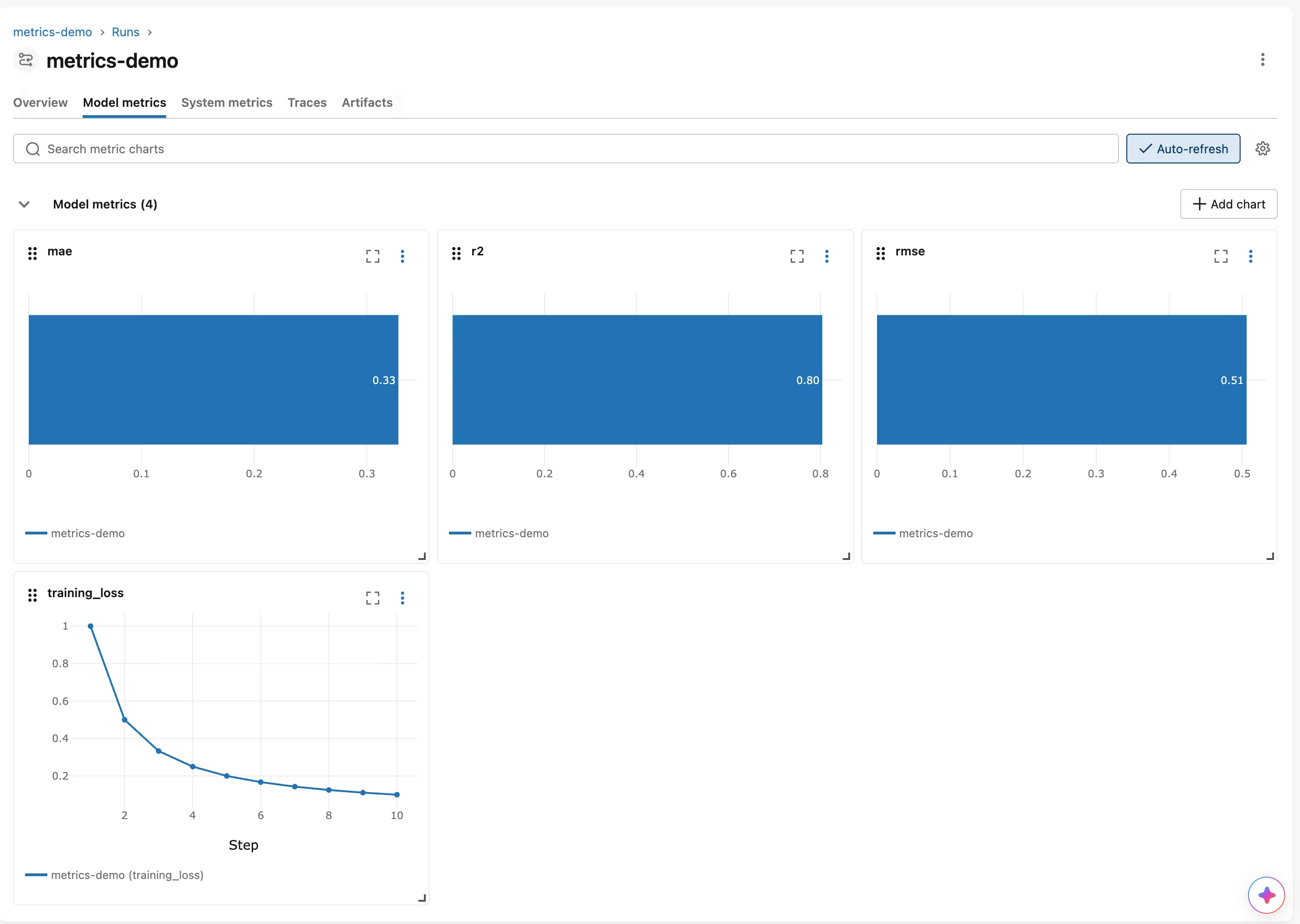
training_loss history: [(1, 1.0), (2, 0.5), (3, 0.333), (4, 0.25), (5, 0.2), (6, 0.167), (7, 0.143), (8, 0.125), (9, 0.111), (10, 0.1)]
Latest values: {'rmse': 0.506, 'mae': 0.328, 'r2': 0.804, 'training_loss': 0.1}
Unlike parameters, metrics stay real numbers, and training_loss kept all ten values, while the run's summary shows the last one, 0.1.
Step 2: See the Charts
Open the run and click Model metrics. Each metric logged once is a bar; training_loss, logged at ten steps, is a line with Step along the bottom:
The runs table and the comparison views show each metric's latest value, which is usually what you compare runs by.
Step 3: Log a Value That Isn't a Number
import mlflow

mlflow.set_tracking_uri("http://127.0.0.1:8080")
mlflow.set_experiment("metrics-demo")

with mlflow.start_run(run_name="metric-text-value"):
    mlflow.log_metric("quality", "high")
uv run python metrics_not_a_number.py
  File "/Users/you/source/mlflow-demo/.venv/lib/python3.15/site-packages/mlflow/store/tracking/rest_store.py", line 1414, in log_metric
    LogMetric(
        run_uuid=run_id,
    ...<7 lines>...
        dataset_digest=metric.dataset_digest,
    )
TypeError: must be real number, not str
Metrics must be numbers. A label such as "high" belongs in a tag: How to Add Tags to an MLflow Run. Because the error happened inside the with block, MLflow also marked that run as failed.
Common Mistakes
| Mistake | What happens | Do this instead |
|---|---|---|
| Logging text as a metric | TypeError: must be real number, not str | Log text as a tag |
Logging every epoch without step | Every value gets step 0, MLflow's default, so they all sit at the same step | Pass step=epoch |
Reading run.data.metrics and expecting the history | You get only the latest value | Use MlflowClient().get_metric_history() |
Troubleshooting
| Symptom | Likely cause | Fix |
|---|---|---|
| A metric shows as a bar, not a line | It was logged once | Log it at several steps to get a line |
TypeError: must be real number, not str | A value is a string, such as "0.5" read from a file | Convert it with float() before logging |
FAQ
When should something be a metric, not a parameter?
When it's a result you measure: errors, accuracy, loss, time. Settings you choose are parameters: How to Log Parameters in MLflow.
Can I log a metric for a step I skipped?
Yes. Steps don't have to be continuous; MLflow stores whatever steps you log.
How do I log metrics for the training and the test data?
Use different names, such as train_rmse and test_rmse.
Conclusion
mlflow.log_metric() and mlflow.log_metrics() recorded the run's scores as numbers. Logged at ten steps with step=, training_loss became a history that get_metric_history() returned in full and the Model metrics tab drew as a falling line. A text value was refused with TypeError: must be real number, not str.
Additional Resources
- mlflow.log_metric and mlflow.log_metrics — the API reference.
- MlflowClient.get_metric_history — reading every value of a metric.
