How to Log a Dataset in MLflow

A model is only as good as the data it learned from, so a run should record which data that was. MLflow does it in two calls: mlflow.data.from_pandas() describes a pandas DataFrame as a dataset, and mlflow.log_input() attaches that description to the run. This guide logs a small CSV file of houses, with real output from MLflow 3.18.0.
Syntax
dataset = mlflow.data.from_pandas(<dataframe>, source="<where it came from>", targets="<target column>", name="<name>")

with mlflow.start_run():
    mlflow.log_input(dataset, context="<training|validation|testing|...>")
| Part | What it means |
|---|---|
mlflow.data.from_pandas(<dataframe>) | Describes the DataFrame as an MLflow dataset: a digest (a short fingerprint of the data), a schema (the columns and their types) and a profile (the row count). The data itself stays on your computer |
source= | Where the data came from, such as a file path or an https:// address. Without it, MLflow records the code that created the dataset |
targets= | Optional: the column the model learns to predict. It must exist in the DataFrame |
name= | The dataset's name in the UI. Without it, MLflow names it dataset |
mlflow.log_input(dataset, context=...) | Attaches the dataset to the current run. context says what the run used it for; MLflow's examples use training, validation and testing |
Prerequisites
- An MLflow tracking server at
http://127.0.0.1:8080. MLflow's tracking server guide shows how to start one. For another address, change it in the script.
Step 1: Create the Data File
The example data is five houses: their number of rooms, size in square metres and price. Create houses.csv in your project folder:
rooms,size_m2,price
3,72,310000
2,48,205000
4,95,420000
3,80,335000
5,130,560000
Step 2: Write the Script
The script reads the file with pandas, describes it as a dataset whose source is the file and whose target is the price, prints what MLflow worked out, and logs it to a run as training data. Create log_dataset.py:
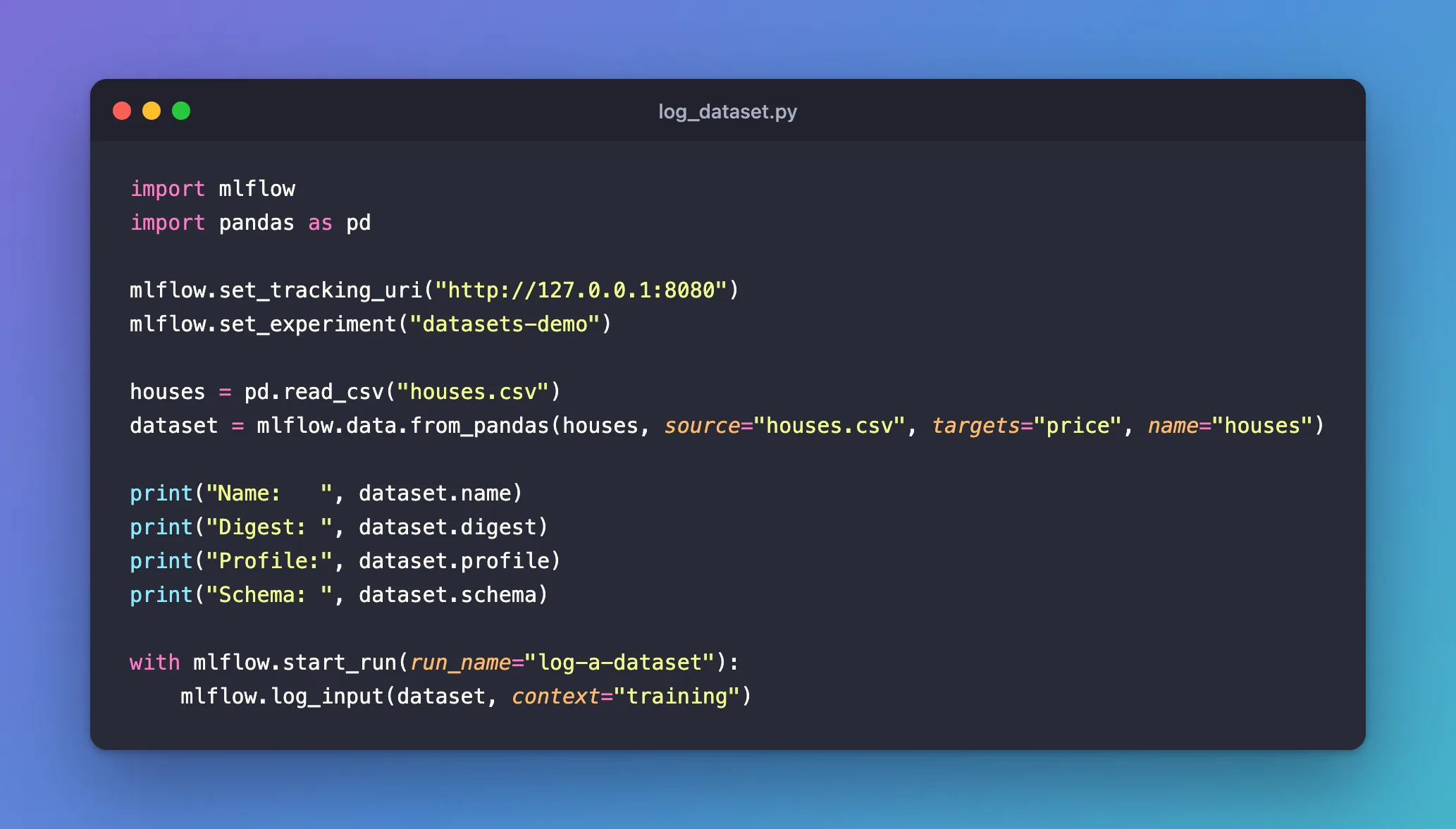
import mlflow
import pandas as pd

mlflow.set_tracking_uri("http://127.0.0.1:8080")
mlflow.set_experiment("datasets-demo")

houses = pd.read_csv("houses.csv")
dataset = mlflow.data.from_pandas(houses, source="houses.csv", targets="price", name="houses")

print("Name:   ", dataset.name)
print("Digest: ", dataset.digest)
print("Profile:", dataset.profile)
print("Schema: ", dataset.schema)

with mlflow.start_run(run_name="log-a-dataset"):
    mlflow.log_input(dataset, context="training")
| Line | What it does |
|---|---|
pd.read_csv("houses.csv") | Reads the file into a DataFrame |
mlflow.data.from_pandas(...) | Describes it as a dataset named houses, from houses.csv, with price as the target |
The print lines | Show what MLflow computed, before anything is logged |
mlflow.log_input(dataset, context="training") | Records the dataset in the run, marked as training data |
import mlflow is enough: it also loads mlflow.data.
Step 3: Run It
uv run python log_dataset.py
2026/11/19 16:21:35 INFO mlflow.tracking.fluent: Experiment with name 'datasets-demo' does not exist. Creating a new experiment.
/Users/you/source/mlflow-demo/.venv/lib/python3.15/site-packages/mlflow/data/dataset_source_registry.py:148: UserWarning: The specified dataset source can be interpreted in multiple ways: LocalArtifactDatasetSource, LocalArtifactDatasetSource. MLflow will assume that this is a LocalArtifactDatasetSource source.
  return _dataset_source_registry.resolve(
Name:    houses
Digest:  24586459
Profile: {'num_rows': 5, 'num_elements': 15}
/Users/you/source/mlflow-demo/.venv/lib/python3.15/site-packages/mlflow/types/utils.py:440: UserWarning: Hint: Inferred schema contains integer column(s). Integer columns in Python cannot represent missing values. If your input data contains missing values at inference time, it will be encoded as floats and will cause a schema enforcement error. The best way to avoid this problem is to infer the model schema based on a realistic data sample (training dataset) that includes missing values. Alternatively, you can declare integer columns as doubles (float64) whenever these columns may have missing values. See `Handling Integers With Missing Values <https://www.mlflow.org/docs/latest/models.html#handling-integers-with-missing-values>`_ for more details.
  warnings.warn(
Schema:  ['rooms': long (required), 'size_m2': long (required), 'price': long (required)]
🏃 View run log-a-dataset at: http://127.0.0.1:8080/#/experiments/6/runs/257be85c3a7447228d0b2bcab91cd0e0
🧪 View experiment at: http://127.0.0.1:8080/#/experiments/6
Name: housesis the name you gave.Digest: 24586459is the data's fingerprint: the same data gives the same digest, so two runs can be checked for using identical data. How to Check Whether Two MLflow Runs Used the Same Data shows how.Profilecounts 5 rows and 15 values.Schemalists the columns and their types:longis MLflow's name for whole numbers.
Two warnings appear in between, and neither stops the run. The first comes from a known MLflow bug with local file sources: Fixed: "The specified dataset source can be interpreted in multiple ways". The second is a hint about whole-number columns that matters for models, not datasets: Fixed: "Hint: Inferred schema contains integer column(s)". Each post explains the warning and shows how to remove it.
Step 4: See the Dataset in the UI
Open the run with the View run link. Under About this run, Datasets shows houses (24586459) with a Training label. Click the name:
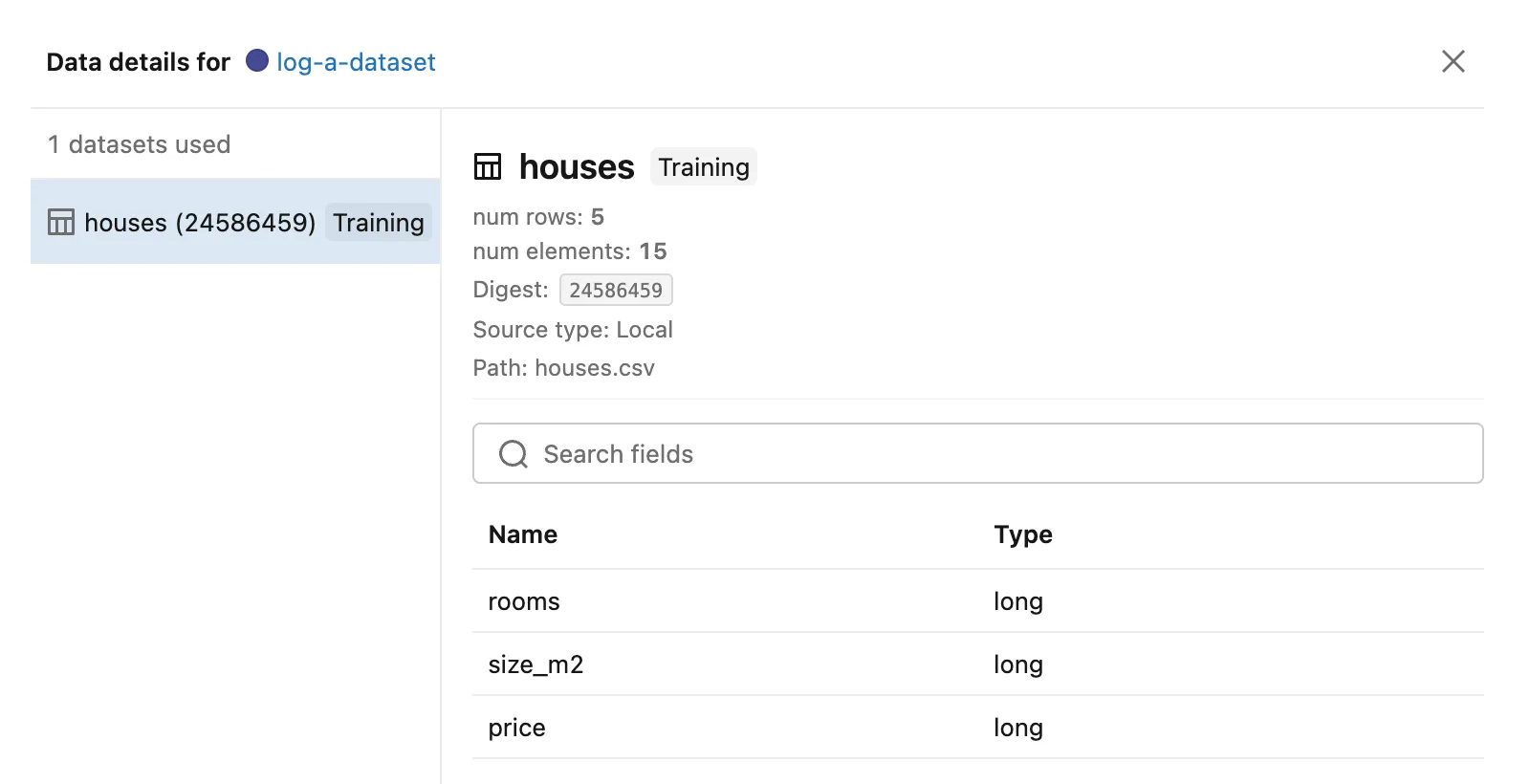
The panel shows everything the run recorded: the context, the row and value counts, the digest, the source (Local, houses.csv) and the schema. How to See Which Datasets an MLflow Run Used covers the other places MLflow shows it.
What MLflow did not store is the data. The run's Artifacts tab is empty: a logged dataset is a description of the data, and houses.csv stays where it is. To keep a copy of the data with the run, log the file as well: How to Log a File to MLflow with log_artifact.
Common Mistakes
| Mistake | What happens | Do this instead |
|---|---|---|
Passing the DataFrame straight to log_input | ValueError: The truth value of a DataFrame is ambiguous. Use a.empty, a.item(), a.any() or a.all(). | Wrap it first: mlflow.data.from_pandas(df) |
A targets column that isn't in the DataFrame | MlflowException: The specified pandas DataFrame does not contain the specified targets column 'price'. | Check the column's name, or leave out targets |
Calling log_input outside a with mlflow.start_run() block | MLflow starts a new run for it, which stays open until your script ends | Log inputs inside the run they belong to |
| Logging the same dataset twice in one run with different contexts | Only the first is kept: the run shows one entry, with the first context | Give the run's training and test data different names, as they hold different rows |
Troubleshooting
| Symptom | Likely cause | Fix |
|---|---|---|
| The run shows no datasets | log_input ran in a different run, or not at all | Call it inside the with block of the run |
The dataset is called dataset | No name= was given | Pass name= to from_pandas |
| The dataset's source is your script, not your file | No source= was given | Pass source="<path or address>" |
FAQ
Can I log several datasets in one run?
Yes: call mlflow.log_input once per dataset, each with its own context, such as training, validation and testing. The run lists them all.
What other kinds of data can be logged?
mlflow.data also has from_numpy for NumPy arrays, and functions for Spark, Polars and Hugging Face datasets, among others. Each creates a dataset you pass to log_input the same way.
Does logging a dataset slow the run down?
MLflow computes the digest from at most the first 10,000 rows and the row count, and sends only the description to the server, so even a large table logs quickly. How to Make an MLflow Dataset Digest Cover Every Row explains what that means for the digest.
Conclusion
mlflow.data.from_pandas(houses, source="houses.csv", targets="price", name="houses") described a five-row CSV file as a dataset with a digest, a schema and a row count, and mlflow.log_input(dataset, context="training") attached it to the run. The UI shows it under Datasets, and the data itself stays where it is.
Additional Resources
- MLflow Dataset Tracking — MLflow's guide to
mlflow.data. - mlflow.data.from_pandas — the function's reference.
- mlflow.log_input — the function's reference, including
context.
