How to Load Related Data in EF Core: Include vs Select

A product belongs to a category, but a query for products doesn't load the category unless you ask. There are two ways to ask: Include and Select. They both produce a join and differ in how much they load. This guide runs each one on MySQL and reads the SQL, including what happens if you ask for neither.
Prerequisites
- A .NET C# project with EF Core and a one-to-many relationship. The examples use EF Core 10, Oracle's
MySql.EntityFrameworkCore, MySQL 9.7, andproductswith aCategorynavigation, as set up in How to Configure a One-to-Many Relationship in EF Core.
If You Ask for Nothing
var products = await db.Products.OrderBy(p => p.Id).ToListAsync();
return Results.Ok(products.Select(p => new { p.Sku, Category = p.Category?.Name }));
[
  { "sku": "CBL-USBC-2M", "category": null },
  { "sku": "CBL-USBC-1M", "category": null }
]
info: Microsoft.EntityFrameworkCore.Database.Command[20101]
      Executed DbCommand (3ms) [Parameters=[], CommandType='Text', CommandTimeout='30']
      SELECT `p`.`Id`, `p`.`ArchivedAtUtc`, `p`.`CategoryId`, `p`.`CreatedAtUtc`, `p`.`Description`, `p`.`IsArchived`, `p`.`Name`, `p`.`QuantityOnHand`, `p`.`ReorderLevel`, `p`.`Sku`, `p`.`UnitPrice`, `p`.`UpdatedAtUtc`, `p`.`Version`
      FROM `products` AS `p`
      ORDER BY `p`.`Id`
No join, so Category is null, and it stays that way: EF Core doesn't load it later by itself, unless you turn on lazy loading.
With Include
Include loads the related entity in the same query:
var products = await db.Products.Include(p => p.Category).OrderBy(p => p.Id).ToListAsync();
return Results.Ok(products.Select(p => new { p.Sku, Category = p.Category.Name }));
info: Microsoft.EntityFrameworkCore.Database.Command[20101]
      Executed DbCommand (2ms) [Parameters=[], CommandType='Text', CommandTimeout='30']
      SELECT `p`.`Id`, `p`.`ArchivedAtUtc`, `p`.`CategoryId`, `p`.`CreatedAtUtc`, `p`.`Description`, `p`.`IsArchived`, `p`.`Name`, `p`.`QuantityOnHand`, `p`.`ReorderLevel`, `p`.`Sku`, `p`.`UnitPrice`, `p`.`UpdatedAtUtc`, `p`.`Version`, `c`.`Id`, `c`.`CreatedAtUtc`, `c`.`Name`
      FROM `products` AS `p`
      INNER JOIN `categories` AS `c` ON `p`.`CategoryId` = `c`.`Id`
      ORDER BY `p`.`Id`
There's the INNER JOIN. It's INNER because a product must have a category. The answer is right, but look at the columns: all of products, and all of categories, sixteen in total, to use two values.
With Select
Use the navigation inside Select, with no Include:
var products = await db.Products
    .OrderBy(p => p.Id)
    .Select(p => new { p.Sku, Category = p.Category.Name })
    .ToListAsync();
info: Microsoft.EntityFrameworkCore.Database.Command[20101]
      Executed DbCommand (2ms) [Parameters=[], CommandType='Text', CommandTimeout='30']
      SELECT `p`.`Sku`, `c`.`Name` AS `Category`
      FROM `products` AS `p`
      INNER JOIN `categories` AS `c` ON `p`.`CategoryId` = `c`.`Id`
      ORDER BY `p`.`Id`
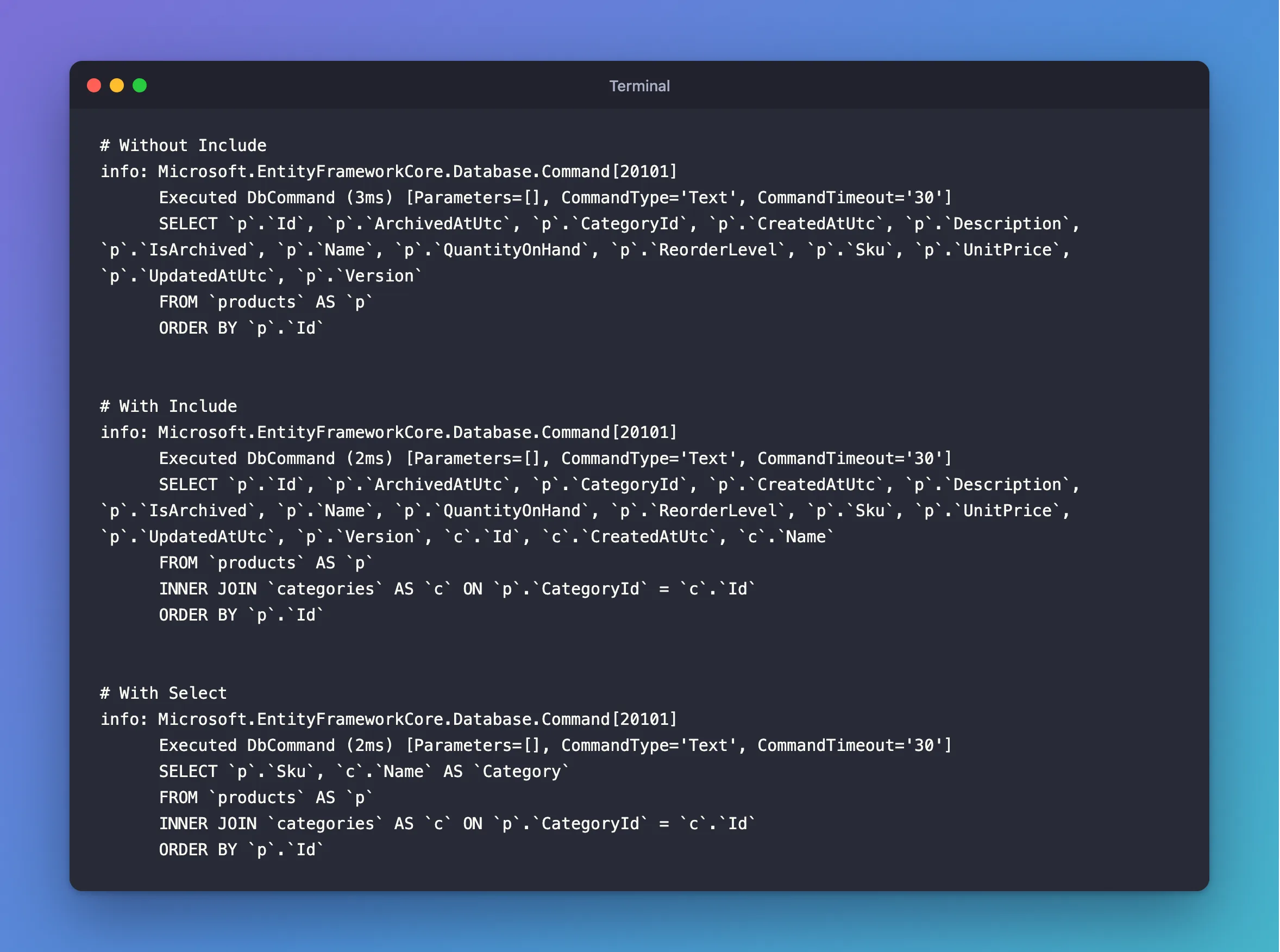
The same join, and two columns. EF Core saw p.Category.Name and added the join by itself.
Going the Other Way: Collections
From a category to its products, Include uses a LEFT JOIN, because a category may have none:
var categories = await db.Categories.Include(c => c.Products).OrderBy(c => c.Id).ToListAsync();
info: Microsoft.EntityFrameworkCore.Database.Command[20101]
      Executed DbCommand (2ms) [Parameters=[], CommandType='Text', CommandTimeout='30']
      SELECT `c`.`Id`, `c`.`CreatedAtUtc`, `c`.`Name`, `p`.`Id`, `p`.`ArchivedAtUtc`, `p`.`CategoryId`, `p`.`CreatedAtUtc`, `p`.`Description`, `p`.`IsArchived`, `p`.`Name`, `p`.`QuantityOnHand`, `p`.`ReorderLevel`, `p`.`Sku`, `p`.`UnitPrice`, `p`.`UpdatedAtUtc`, `p`.`Version`
      FROM `categories` AS `c`
      LEFT JOIN `products` AS `p` ON `c`.`Id` = `p`.`CategoryId`
      ORDER BY `c`.`Id`
Each product row repeats its category's columns, and EF Core sorts it out afterwards. If all you need is how many, Select does it with a subquery, and no product columns:
var categories = await db.Categories
    .OrderBy(c => c.Name)
    .Select(c => new { c.Name, ProductCount = c.Products.Count })
    .ToListAsync();
info: Microsoft.EntityFrameworkCore.Database.Command[20101]
      Executed DbCommand (1ms) [Parameters=[], CommandType='Text', CommandTimeout='30']
      SELECT `c`.`Name`, (
          SELECT COUNT(*)
          FROM `products` AS `p`
          WHERE `c`.`Id` = `p`.`CategoryId`) AS `ProductCount`
      FROM `categories` AS `c`
      ORDER BY `c`.`Name`
HTTP/1.1 200 OK
Content-Type: application/json; charset=utf-8

[
  {
    "name": "Adapters",
    "productCount": 2
  },
  {
    "name": "Cables",
    "productCount": 4
  },
  {
    "name": "Chargers",
    "productCount": 2
  }
]
Which to Use
| You want | Use | Why |
|---|---|---|
| Data to send to a client | Select | Only the columns you need, and no JSON cycle |
| Entities you'll change and save, with their related data | Include | The entities are tracked, and the navigation is filled |
| Only a count or a total | Select | A subquery, with no extra rows |
Common Mistakes
| Mistake | What happens | Do this instead |
|---|---|---|
Reading a navigation without Include or Select | It's null, or NullReferenceException | Ask for it in the query |
Include on a query that ends in Select | EF Core ignores it, since Select decides what loads | Leave it out |
Several collection Includes in one query | Rows multiply, which EF Core calls a cartesian explosion | Use AsSplitQuery, or Select |
| A query per row in a loop | One query for each category | One query with Select |
FAQ
What about lazy loading?
EF Core can load navigations when you first touch them, with a separate package. Its efficient querying page warns it "makes it extremely easy to inadvertently trigger the N+1 problem", and recommends avoiding it.
Does Select track anything here?
No, because the results aren't entities. See How to Use AsNoTracking.
Conclusion
Related data doesn't load by itself. Include adds a join and loads the whole related entity, which suits data you'll change. Select adds the same join but reads only the columns you name, which suits everything you send to a client. To count related rows, Select with .Count uses a subquery.
Additional Resources
- Loading Related Data and Eager Loading — the options.
- Efficient Querying — cartesian explosion and lazy loading.
