How to List EF Core Migrations and See Which Ones Are Applied

Before applying, reverting or scripting migrations, you need two answers: which migrations exist in the code, and which ones this database already has. dotnet ef migrations list gives both in one list. This guide reads its output, including the (Pending) marker, gets the same list as JSON, lists without a database, and looks at the __EFMigrationsHistory table where EF Core keeps the record.
Prerequisites
- A .NET C# project with EF Core migrations, and its database. The examples use EF Core 10 with Oracle's
MySql.EntityFrameworkCoreand MySQL 9.7, with theDbContextin a class library; How to Use EF Core Migrations When the DbContext Is in a Class Library explains the two project options. dotnet ef: How to Install dotnet-ef as a Local Tool in a .NET C# Project.
Step 1: List the Migrations
dotnet ef migrations list --project src/Dewiride.Inventory.Data --startup-project src/Dewiride.Inventory.Api
Build started...
Build succeeded.
info: Microsoft.EntityFrameworkCore.Database.Command[20101]
      Executed DbCommand (2ms) [Parameters=[], CommandType='Text', CommandTimeout='30']
      SELECT 1 FROM INFORMATION_SCHEMA.TABLES WHERE TABLE_SCHEMA='inventory' AND TABLE_NAME='__EFMigrationsHistory';
info: Microsoft.EntityFrameworkCore.Database.Command[20101]
      Executed DbCommand (1ms) [Parameters=[], CommandType='Text', CommandTimeout='30']
      SELECT `MigrationId`, `ProductVersion`
      FROM `__EFMigrationsHistory`
      ORDER BY `MigrationId`;
20261103043401_CreateCatalogTables
20261103043533_LowercaseTableNames
20261103043612_AddCategoryNameIndex (Pending)
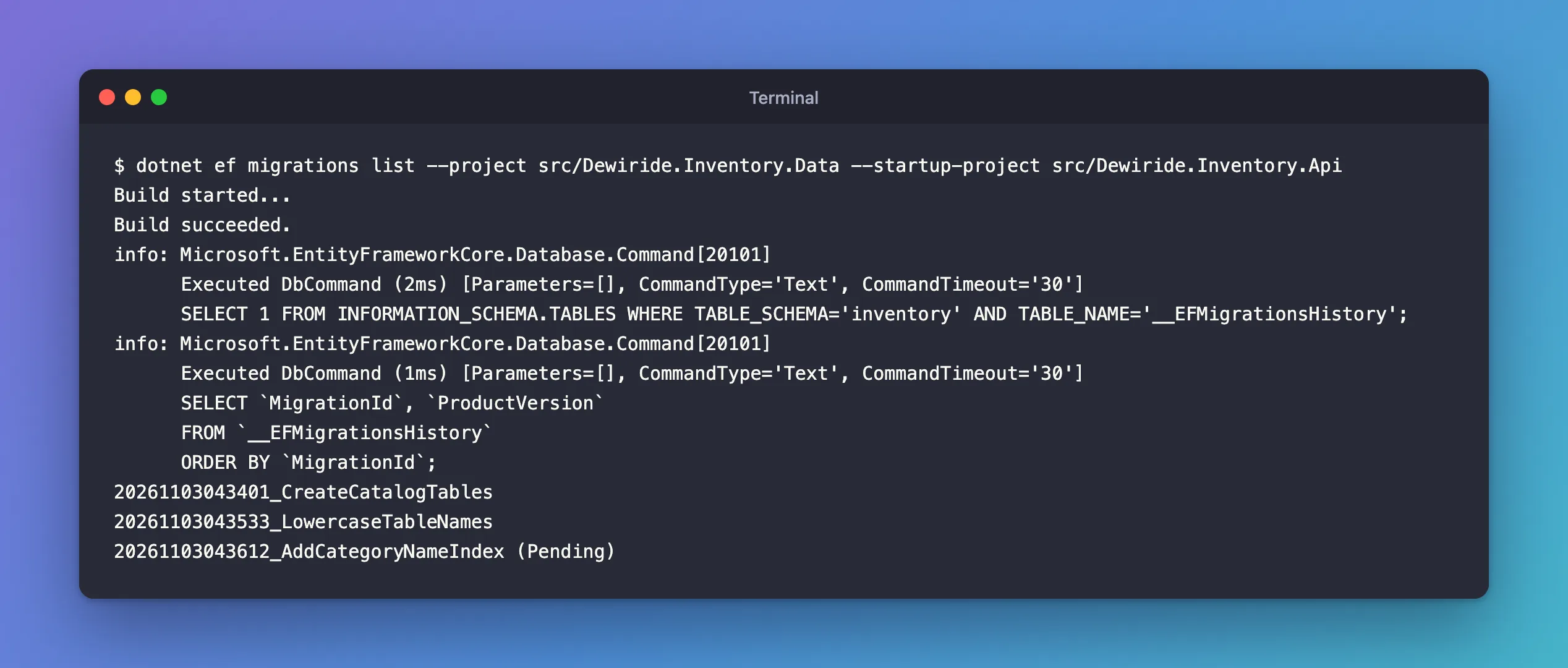
How to read it:
- Each line is one migration, by its Id: a timestamp from when it was created, then its name. They're listed oldest first, which is also the order they apply in.
(Pending)marks a migration that exists in the code but isn't applied to this database yet. Lines without it are applied.- The
info:lines are EF Core's own SQL, logged because this app logs EF Core commands at theInformationlevel. They show how the list is made: first check that__EFMigrationsHistoryexists, then read it. Logging levels are configurable; with the SQL category atWarning, these lines disappear.
EF Core's managing migrations page introduces the command plainly: "You can list all existing migrations as follows". Its tools reference adds what the options do.
Step 2: Get JSON for Scripts
For a build script or a check in a pipeline, parse JSON instead of text:
dotnet ef migrations list --json --project src/Dewiride.Inventory.Data --startup-project src/Dewiride.Inventory.Api
[
  {
    "id": "20261103043401_CreateCatalogTables",
    "name": "CreateCatalogTables",
    "safeName": "CreateCatalogTables",
    "applied": true
  },
  {
    "id": "20261103043533_LowercaseTableNames",
    "name": "LowercaseTableNames",
    "safeName": "LowercaseTableNames",
    "applied": true
  },
applied is the same information as the (Pending) marker, as true or false.
Step 3: List Without a Database
--no-connect lists the migrations in the code without touching the database. The tools reference describes it as "Don't connect to the database."
dotnet ef migrations list --no-connect --project src/Dewiride.Inventory.Data --startup-project src/Dewiride.Inventory.Api
Build started...
Build succeeded.
20261103043401_CreateCatalogTables
20261103043533_LowercaseTableNames
20261103043648_SetMaxLengths
20261103044122_AddUniqueIndexes
20261103044154_SetUnitPricePrecision
20261103044219_AddProductCheckConstraints
20261103044319_RestrictCategoryDelete
20261103044922_AddStockMovements
20261103044948_StoreMovementTypeAsString
20261103045135_AddMovementHistoryIndex
Pending status not shown. Unable to determine which migrations have been applied. This can happen when your project uses a version of Entity Framework Core lower than 5.0.0 or when an error occurs while accessing the database.
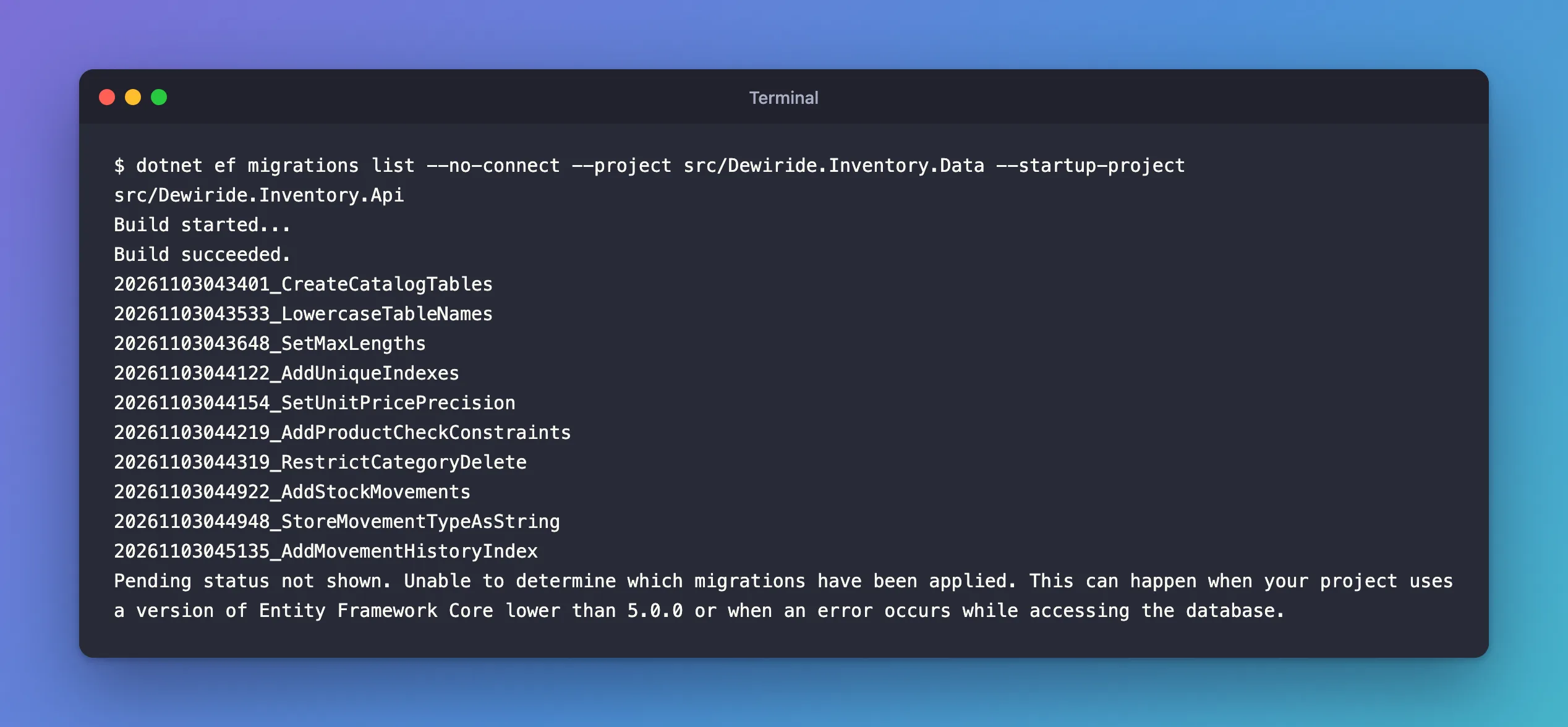
The last line sounds like something went wrong, but nothing did: with --no-connect, EF Core didn't ask the database, so it can't say what's applied. Use it when the database is unreachable, or in a build that has no database.
Step 4: Look at the History Table
The applied list lives in the database itself, in a table EF Core creates with the first migration:
SELECT * FROM __EFMigrationsHistory;
+-------------------------------------------+----------------+
| MigrationId                               | ProductVersion |
+-------------------------------------------+----------------+
| 20261103043401_CreateCatalogTables        | 10.0.14        |
| 20261103043533_LowercaseTableNames        | 10.0.14        |
| 20261103043648_SetMaxLengths              | 10.0.14        |
| 20261103044122_AddUniqueIndexes           | 10.0.14        |
| 20261103044154_SetUnitPricePrecision      | 10.0.14        |
| 20261103044219_AddProductCheckConstraints | 10.0.14        |
| 20261103044319_RestrictCategoryDelete     | 10.0.14        |
| 20261103044922_AddStockMovements          | 10.0.14        |
| 20261103044948_StoreMovementTypeAsString  | 10.0.14        |
| 20261103045135_AddMovementHistoryIndex    | 10.0.14        |
+-------------------------------------------+----------------+
10 rows in set (0.000 sec)
MigrationId: one row per applied migration.ProductVersion: the EF Core version that applied it, here 10.0.14.
Applying a migration inserts its row; reverting one deletes it. That's all dotnet ef compares with your code. Never edit this table by hand: if it says a migration is applied when it isn't, EF Core skips it, and the database and the model drift apart.
When to Use Which
| Question | Command |
|---|---|
| What's applied here, and what's pending? | dotnet ef migrations list |
| Same, for a script | … --json |
| Which migrations exist, without a database? | … --no-connect |
| What exactly does this database say? | SELECT * FROM __EFMigrationsHistory; |
| Is the model ahead of the last migration? | dotnet ef migrations has-pending-model-changes |
The last row is a different question: whether you changed the model but forgot to create a migration. The docs make the distinction for the related API: it "doesn't detect model changes that haven't been captured in a migration; use the pending model changes check below for that." How to Check for Pending Model Changes in EF Core covers that check.
Common Mistakes
| Mistake | What happens | Do this instead |
|---|---|---|
Reading (Pending) as "not created" | The migration exists; it isn't applied | Apply it with dotnet ef database update |
Editing __EFMigrationsHistory to skip a migration | The database and model drift apart | Apply or revert migrations properly |
Expecting migrations list to show model changes | It lists migration files only | Use has-pending-model-changes |
| Running against the wrong database | The pending list is for another database | Check the connection string the startup project uses |
FAQ
Why are the migration Ids timestamps?
So they sort in the order they were created, which is the order they must be applied. The timestamp is UTC, from when you ran migrations add.
What if the history table doesn't exist?
Then no migration has been applied, and every migration shows as pending. EF Core creates the table with the first database update.
Conclusion
dotnet ef migrations list shows every migration in the code, oldest first, and marks the ones this database hasn't applied with (Pending). --json gives the same list to scripts, --no-connect lists without a database, and __EFMigrationsHistory is the table behind the applied list: one row per applied migration, with the EF Core version that applied it.
