How to Let More Than One Route Handle a Message in the Microsoft 365 Agents SDK in C#

In the Microsoft 365 Agents SDK, one activity normally means one route: the first route that matches handles it, and the rest are never asked. Sometimes you want two, such as a warning and the normal answer. Mark the first route non-terminal, and the SDK keeps going.
Syntax
AddRoute(MessageRouteBuilder.Create()
    .WithText(textOrPattern)
    .WithHandler(handler)
    .WithOrderRank(rank)
    .AsNonTerminal()
    .Build());
MessageRouteBuilder.Create()starts a route formessageactivities. The SDK has a builder for each kind of route, such asTypeRouteBuilderandEventRouteBuilder, and all of them haveAsNonTerminal()..WithText(textOrPattern)sets what the message must say: a string, for the whole text ignoring case, or aRegex. Use.WithSelector(...)instead to decide with your own function..WithHandler(handler)names the method that runs, with the signatureTask Name(ITurnContext turnContext, ITurnState turnState, CancellationToken cancellationToken)..WithOrderRank(rank)sets the route's rank. A non-terminal route only helps the routes tried after it, so it usually getsRouteRank.First..AsNonTerminal()is the key: after this route's handler runs, the SDK goes on trying the routes after it..Build()returns the route, andAddRoute, a method ofAgentApplication, registers it. Do this in your agent's constructor.
The Example
The agent for this post answers every message with a thank-you. When a message mentions a password, it warns first, then still answers:
using System.Text.RegularExpressions;
using Microsoft.Agents.Builder;
using Microsoft.Agents.Builder.App;
using Microsoft.Agents.Builder.State;
using Microsoft.Agents.Core.Models;

namespace NonTerminalDemo;

public class SafetyAgent : AgentApplication
{
    public SafetyAgent(AgentApplicationOptions options) : base(options)
    {
        // Any message with the word "password": tried first, and the routes after it still run.
        AddRoute(MessageRouteBuilder.Create()
            .WithText(new Regex(@"\bpassword\b", RegexOptions.IgnoreCase))
            .WithHandler(WarnAsync)
            .WithOrderRank(RouteRank.First)
            .AsNonTerminal()
            .Build());

        OnActivity(ActivityTypes.Message, AnswerAsync, rank: RouteRank.Last);
    }

    private async Task WarnAsync(ITurnContext turnContext, ITurnState turnState, CancellationToken cancellationToken)
    {
        await turnContext.SendActivityAsync("Never share a password in chat, not even with me.", cancellationToken: cancellationToken);
    }

    private async Task AnswerAsync(ITurnContext turnContext, ITurnState turnState, CancellationToken cancellationToken)
    {
        await turnContext.SendActivityAsync("Thanks! I've passed your message to the help desk.", cancellationToken: cancellationToken);
    }
}
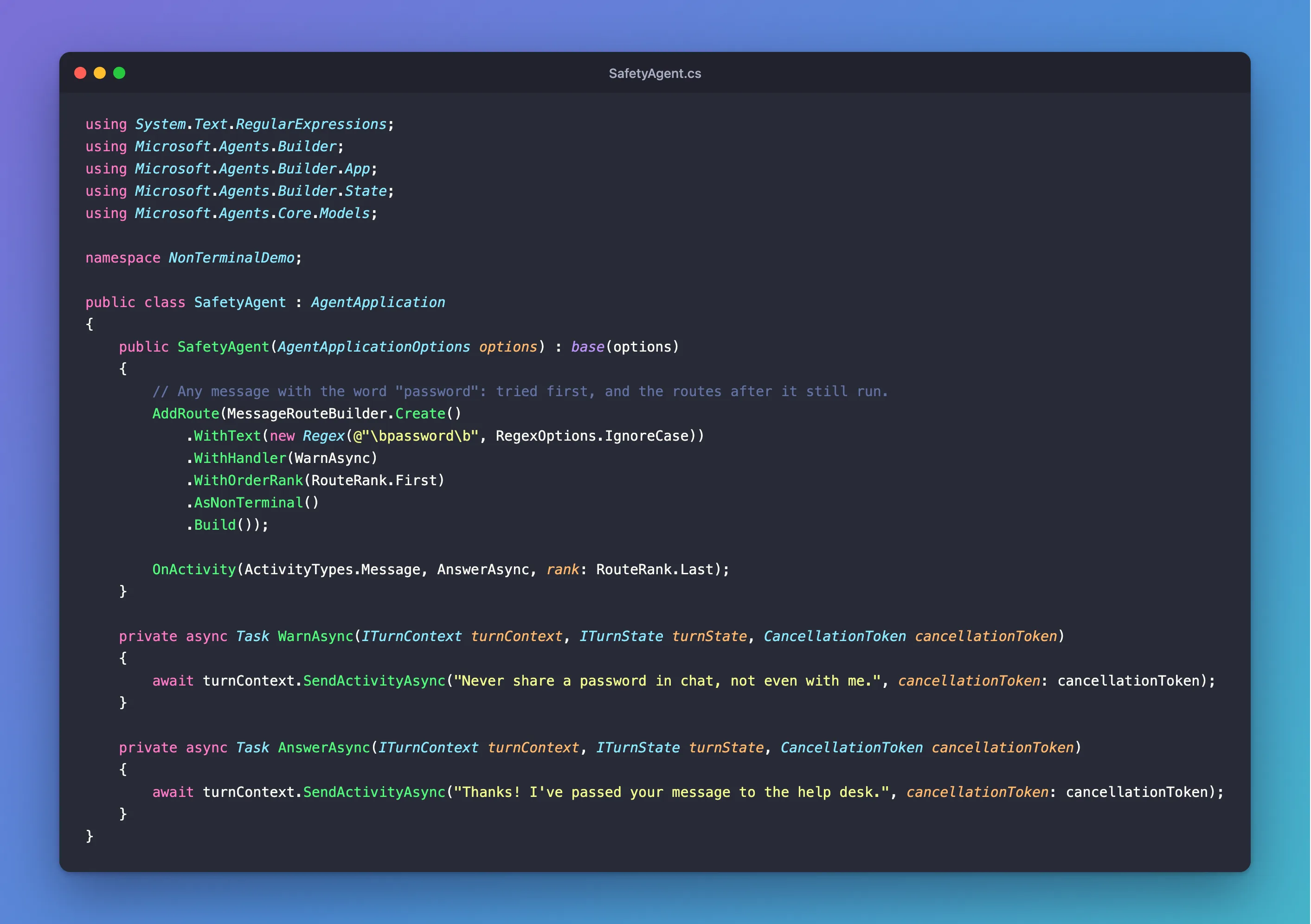
It's one class in an ASP.NET Core project with the Agents SDK, hosted with AddAgent<SafetyAgent>() and listening on port 3978.
Prerequisites
- The Microsoft 365 Agents Playground, to send the agent messages on your own machine.
agentsplayground --versionshould print0.2.30; if the command isn't found, install it withnpm install -g @microsoft/m365agentsplayground.
Step 1: Build the Non-Terminal Route
The On... shortcuts, such as OnMessage, can't mark a route non-terminal, so build the route yourself:
// Any message with the word "password": tried first, and the routes after it still run.
AddRoute(MessageRouteBuilder.Create()
    .WithText(new Regex(@"\bpassword\b", RegexOptions.IgnoreCase))
    .WithHandler(WarnAsync)
    .WithOrderRank(RouteRank.First)
    .AsNonTerminal()
    .Build());
\bpassword\bmatches password as a whole word anywhere in the message,\bbeing a word boundary, andRegexOptions.IgnoreCaseaccepts Password too.RouteRank.Firstmakes it the first route tried, so the warning comes before any answer..AsNonTerminal()lets the routes after it run.
Step 2: Add the Route That Answers
The normal answer is a catch-all for every message, tried last:
OnActivity(ActivityTypes.Message, AnswerAsync, rank: RouteRank.Last);
For a message that mentions a password, the SDK runs the warning route, carries on because it's non-terminal, and reaches this route. For any other message, the warning route doesn't match, and this one answers alone.
Step 3: Try It
Run the agent with dotnet run, start the Agents Playground in a second terminal, and send My printer is jammed, then I forgot my Password:
agentsplayground -e http://localhost:3978/api/messages -c emulator
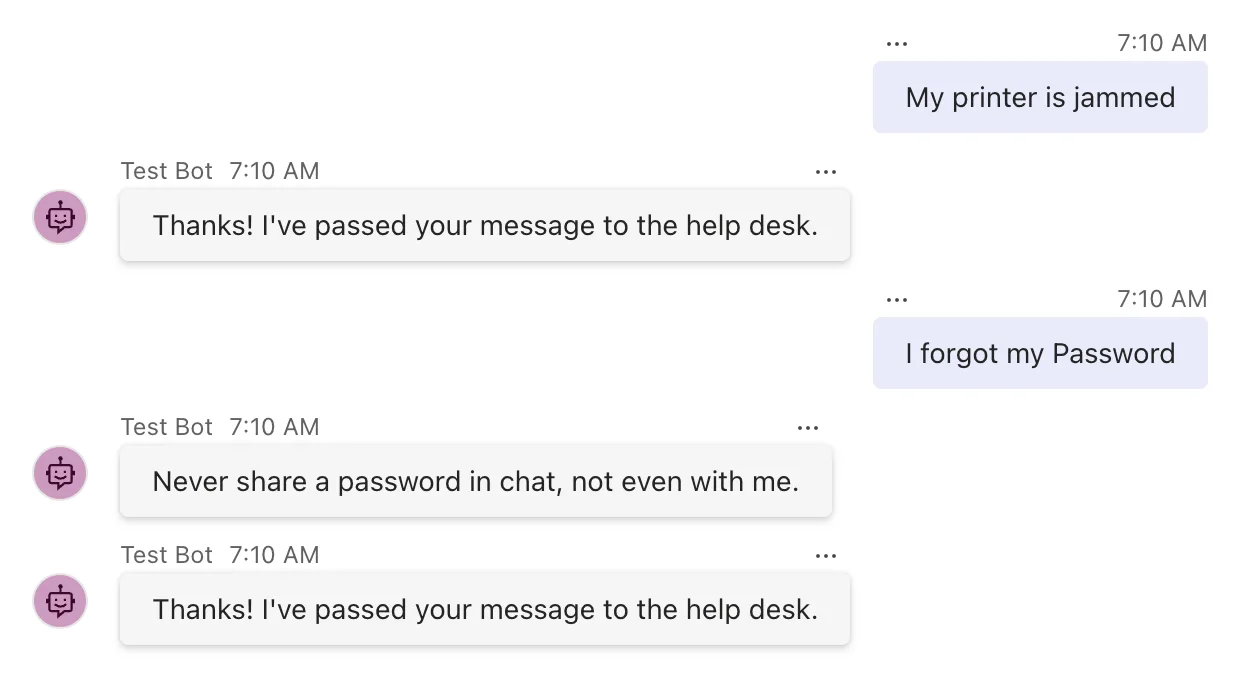
The printer message got one answer. The password message got two, in rank order: the warning, then the answer.
Step 4: See What Happens Without AsNonTerminal
Remove the .AsNonTerminal() line, restart the agent, and send I forgot my Password again:
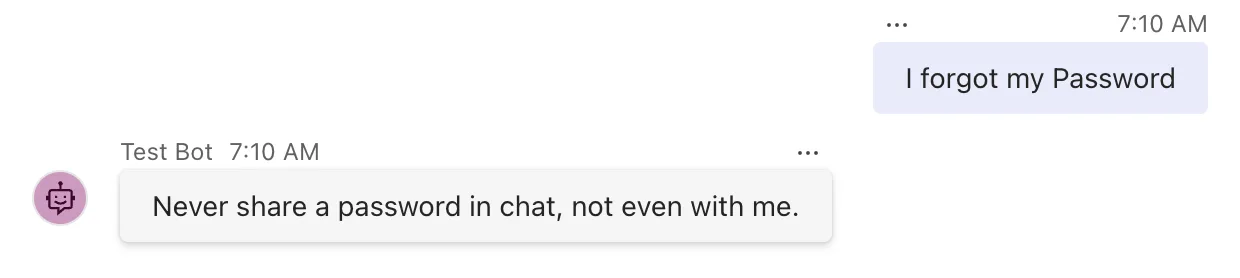
Only the warning comes back. The warning route matched first and, being an ordinary route, ended routing for the message, so the answer route was never asked. Put the line back to get both answers again.
Common Mistakes
| Mistake | What happens | Do this instead |
|---|---|---|
Forgetting .AsNonTerminal() | The non-terminal route's answer is the only one | Call .AsNonTerminal() on the builder |
| Giving the non-terminal route a later rank than the route that answers | The answering route runs first and ends routing, so the non-terminal route never runs | Rank it before the routes it should precede, usually RouteRank.First |
| Marking the answering route non-terminal too | The SDK keeps trying the routes after it as well | Mark only the routes that should let others run |
Looking for AsNonTerminal on OnMessage | The shortcuts have no such option | Build the route with a route builder |
Troubleshooting
| Symptom | Likely cause | Fix |
|---|---|---|
| Only the warning appears | The route isn't non-terminal | Add .AsNonTerminal() |
| Only the answer appears | The warning route didn't match, or it's ranked after the answer | Check its pattern, and give it RouteRank.First |
| The answers come in the wrong order | The ranks put them in that order | Lower ranks run first; adjust them |
FAQ
Does the route after a non-terminal route have to match?
Yes. The SDK goes on asking the remaining routes in order, and the next one whose selector says yes runs. If none does, the non-terminal route's handler was the only one.
Can more than one route be non-terminal?
Yes. Each non-terminal route lets the search continue after it, so several can run for one activity, followed by one ordinary route that ends it.
How is this different from running code before every turn?
A non-terminal route runs only when its selector matches, and it runs in its place in the route order. Code that should run for every activity, whatever it is, belongs in a before-turn handler: How to Run Code Before Every Turn in the Microsoft 365 Agents SDK in C# shows one.
Conclusion
To let more than one route handle a message, build the earlier route with a route builder, give it a rank that puts it first, and call .AsNonTerminal(). Its handler runs, and the SDK goes on to the next matching route, which answers as usual.
Additional Resources
- AgentApplication in Microsoft 365 Agents SDK — routes and their evaluation order.
- MessageRouteBuilder class — the builder's methods.
