How to Keep the Class Balance in a Train-Test Split with stratify

When only 1 row in 10 is a "yes", a random split can put 3 of them in the test set, or none at all, and the test score then says more about luck than about the model. train_test_split(..., stratify=y) splits so that both parts keep the same share of each class. This guide splits 100 rows with 10 yeses five times each way, with real output from scikit-learn 1.9.1.
Syntax
X_train, X_test, y_train, y_test = train_test_split(
    X, y, test_size=share, random_state=seed, stratify=y
)
| Part | What it means |
|---|---|
stratify=y | Split so that each class keeps its share in both parts. Pass the labels, usually the same y |
test_size=share | The share of rows that goes to the test set, such as 0.2 |
random_state=seed | Makes the split repeatable |
How to Split Data into Training and Test Sets with scikit-learn covers the rest of train_test_split.
Step 1: Compare Plain and Stratified Splits
The example is 100 rows, 10 labelled 1 and 90 labelled 0. A 20% test set should hold 2 of the 1s. Create stratify_split.py, which splits with five different seeds, without and with stratify, and counts the 1s in each test set:
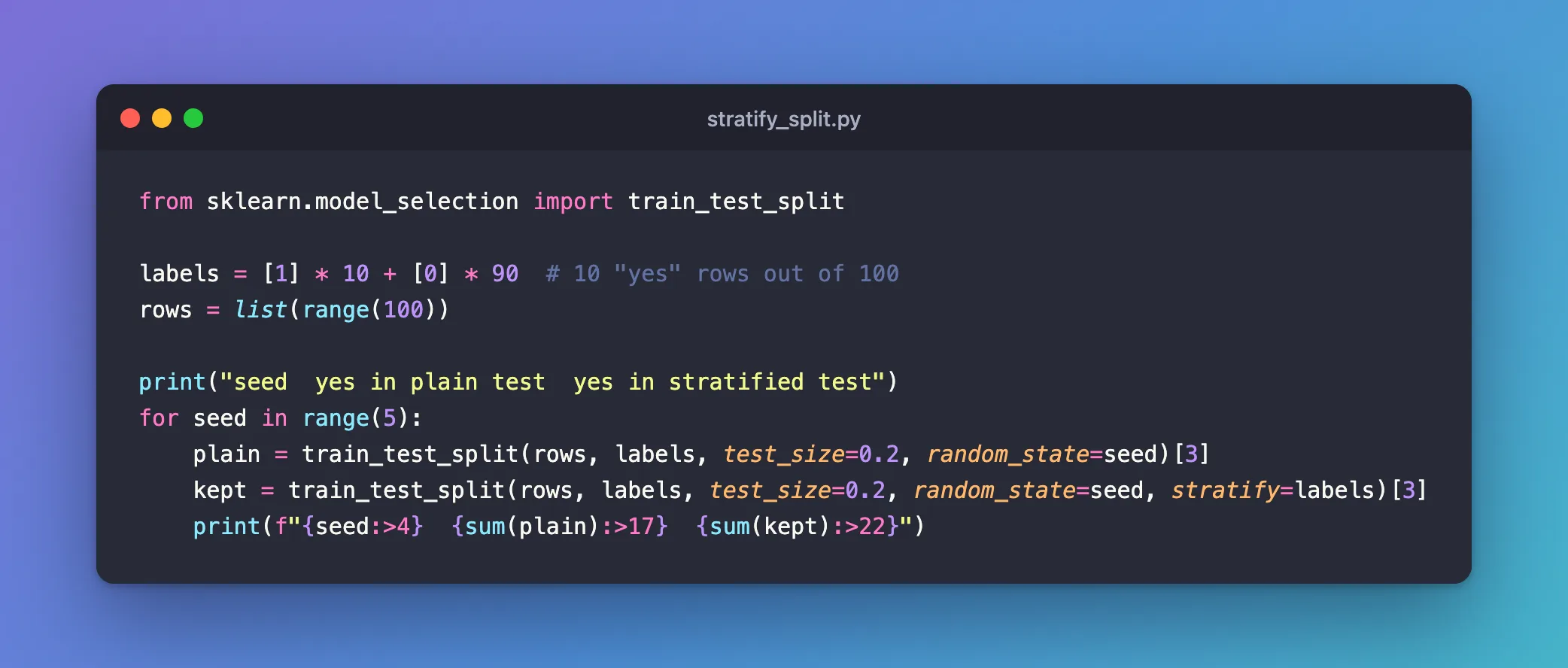
from sklearn.model_selection import train_test_split

labels = [1] * 10 + [0] * 90  # 10 "yes" rows out of 100
rows = list(range(100))

print("seed  yes in plain test  yes in stratified test")
for seed in range(5):
    plain = train_test_split(rows, labels, test_size=0.2, random_state=seed)[3]
    kept = train_test_split(rows, labels, test_size=0.2, random_state=seed, stratify=labels)[3]
    print(f"{seed:>4}  {sum(plain):>17}  {sum(kept):>22}")
[3] takes the fourth result of train_test_split, the test labels; their sum is the number of 1s.
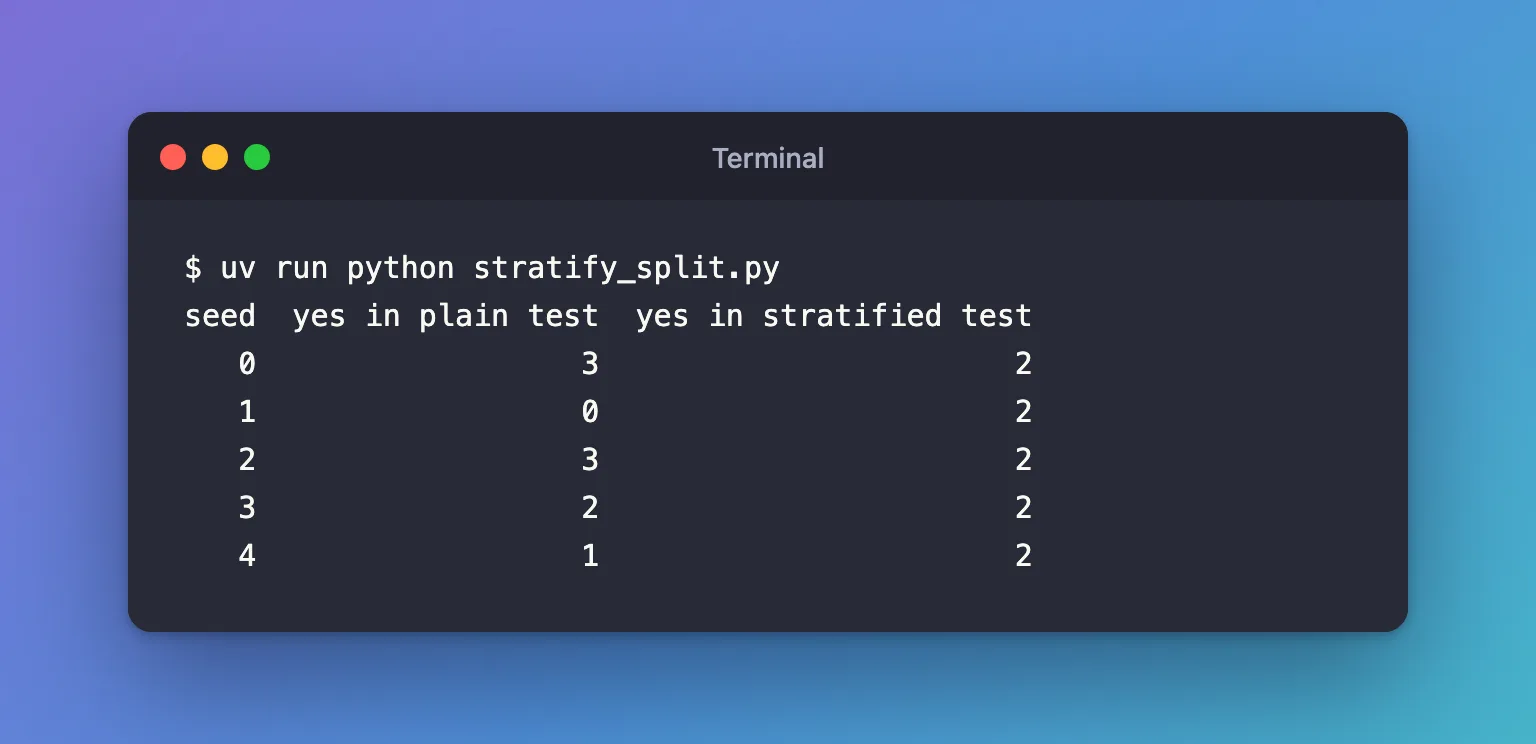
uv run python stratify_split.py
seed  yes in plain test  yes in stratified test
   0                  3                       2
   1                  0                       2
   2                  3                       2
   3                  2                       2
   4                  1                       2
Step 2: Read the Comparison
- Plain splits gave the test set 3, 0, 3, 2 and 1 yeses. With seed 1, the test set had none: no score on it could tell whether the model finds yeses at all.
- Stratified splits gave exactly 2 every time: the same 10% as the whole data.
The rarer a class, the more this matters: with only 10 yeses, one or two rows more or less in the test set change its share of yeses a lot.
Common Mistakes
| Mistake | What happens | Do this instead |
|---|---|---|
| Stratifying a regression target, such as prices | Almost every value is its own "class", and the split fails | Use stratify for class labels only |
| A class with a single row | ValueError: The least populated classes in y have only 1 member, which is too few. The minimum number of groups for any class cannot be less than 2. | Collect more rows of that class, or merge it with another |
Splitting again later without stratify | A validation split can lose the balance the first split kept | Pass stratify to every split |
Troubleshooting
| Symptom | Likely cause | Fix |
|---|---|---|
ValueError: The least populated classes in y have only 1 member... | One class has a single row | See the row above |
| Test scores jump between seeds | Few rows of a rare class, split unevenly | stratify=y |
FAQ
Does cross-validation stratify too?
For classifiers, yes: cross_val_score and GridSearchCV with cv=5 use StratifiedKFold, which keeps the balance in every fold.
Should I always stratify classification splits?
It never hurts a classification split, and it matters most when a class is rare.
Conclusion
Over five seeds, plain splits put between 0 and 3 of the 10 yeses into the test set, while stratify=labels put exactly 2 every time. Pass stratify=y whenever you split class labels, and especially when one class is rare.
Additional Resources
- train_test_split —
stratifyand the other options.
