How to Keep Streaming Working with Agent Run Middleware in Microsoft Agent Framework

Add agent run middleware to a Microsoft Agent Framework agent with only a runFunc, and a streaming agent stops streaming: the whole answer arrives as one piece, when it's finished. Agent Framework has three ways to add agent run middleware, and this post measures what each one does to a streaming run.
Syntax
AIAgent withMiddleware = agent.AsBuilder()
    .Use(runFunc: <runFunction>, runStreamingFunc: <runStreamingFunction>)
    .Build();

AIAgent withInputMiddleware = agent.AsBuilder()
    .Use(sharedFunc: <sharedFunction>)
    .Build();
| Part | What it is |
|---|---|
agent | The agent the middleware wraps. It doesn't change: Build() returns a new agent around it. |
<runFunction> | A function for runs that don't stream, called for RunAsync. It gets the messages, the session, the run options, the agent inside and a cancellation token, and returns a Task<AgentResponse>. |
<runStreamingFunction> | A function for streaming runs, called for RunStreamingAsync. It gets the same five things and returns an IAsyncEnumerable<AgentResponseUpdate>. |
<sharedFunction> | One function for both kinds of run. It gets the messages, the session, the run options, a next function and a cancellation token, and returns a Task. |
You can give runFunc and runStreamingFunc together, or one of them with null for the other. Microsoft's documentation explains what happens when the streaming one is missing: When providing just the non-streaming middleware, the agent will use it for both streaming and non-streaming invocations. Streaming will only run in non-streaming mode to suffice the middleware expectations. About sharedFunc, it says that it allows you to provide the same middleware for non-streaming and streaming without blocking the streaming. However, the shared middleware won't be able to intercept or override the output.
The Example
A console app called StreamCheck has an agent that answers in about 60 words. It wraps the agent three times, once in each way, streams the same question through each, Why is the sky blue?, and prints how many pieces of text arrived and when.
Prerequisites
- A Microsoft Foundry project with a model deployment, and the Foundry User role on it.
- The Azure CLI, signed in with
az login. - The .NET 10 SDK.
Step 1: Create a Console App
dotnet new console -n StreamCheck
cd StreamCheck
dotnet add package Microsoft.Agents.AI.Foundry --version 1.28.0-preview.261106.1
dotnet add package Azure.Identity --version 1.21.0
Microsoft.Agents.AI.Foundry brings Agent Framework and its Microsoft Foundry support, and Azure.Identity signs in with your Azure CLI sign-in.
Step 2: Create the Agent
Replace everything in Program.cs with this, using your own project endpoint and model deployment:
using System.Diagnostics;
using Azure.AI.Projects;
using Azure.Identity;
using Microsoft.Agents.AI;
using Microsoft.Extensions.AI;

AIAgent agent = new AIProjectClient(
        new Uri("https://foundry-devblogs-exp.services.ai.azure.com/api/projects/proj-devblogs-exp"),
        new AzureCliCredential())
    .AsAIAgent(model: "gpt-5.6-luna", instructions: "Answer in about 60 words.", name: "StreamCheck");
Step 3: Write the Middleware
Add three functions at the end of Program.cs, one for each part of the syntax:
// Runs around a whole run that doesn't stream.
async Task<AgentResponse> AroundRunAsync(
    IEnumerable<ChatMessage> messages, AgentSession? session, AgentRunOptions? options,
    AIAgent innerAgent, CancellationToken cancellationToken)
{
    AgentResponse response = await innerAgent.RunAsync(messages, session, options, cancellationToken);
    return response;
}

// Runs around a streaming run, and passes each update on as soon as it arrives.
async IAsyncEnumerable<AgentResponseUpdate> AroundStreamingRun(
    IEnumerable<ChatMessage> messages, AgentSession? session, AgentRunOptions? options,
    AIAgent innerAgent, [System.Runtime.CompilerServices.EnumeratorCancellation] CancellationToken cancellationToken)
{
    await foreach (AgentResponseUpdate update in innerAgent.RunStreamingAsync(messages, session, options, cancellationToken))
    {
        yield return update;
    }
}

// Runs before both kinds of run. It can look at or change the input, but not the answer.
Task BeforeRunAsync(
    IEnumerable<ChatMessage> messages, AgentSession? session, AgentRunOptions? options,
    Func<IEnumerable<ChatMessage>, AgentSession?, AgentRunOptions?, CancellationToken, Task> next,
    CancellationToken cancellationToken)
{
    return next(messages, session, options, cancellationToken);
}
AroundRunAsyncwraps a run that doesn't stream: it callsinnerAgent.RunAsyncand gets the whole answer.AroundStreamingRunwraps a streaming run: it callsinnerAgent.RunStreamingAsyncand passes each update on withyield returnas soon as it arrives.[EnumeratorCancellation]connects the cancellation token to the loop that reads it.BeforeRunAsyncruns before both kinds of run and callsnext, the rest of the pipeline. It can look at or change the messages, but it never sees the answer.
All three only pass the run on, so the comparison measures the way they're added and nothing else. Real middleware does its work before or after the call.
Step 4: Stream Through Each Wrapping
Add the three wrappings after the agent:
// 1. Middleware with only a function for runs that don't stream.
await StreamAsync("runFunc only", agent.AsBuilder()
    .Use(runFunc: AroundRunAsync, runStreamingFunc: null)
    .Build());

// 2. The same middleware with a function for streaming runs too.
await StreamAsync("runFunc and runStreamingFunc", agent.AsBuilder()
    .Use(runFunc: AroundRunAsync, runStreamingFunc: AroundStreamingRun)
    .Build());

// 3. Middleware that only looks at the input: one function for both kinds of run.
await StreamAsync("sharedFunc", agent.AsBuilder()
    .Use(sharedFunc: BeforeRunAsync)
    .Build());
And the function that streams one answer and reports how it arrived, at the end of the file:
// Streams one answer and reports how it arrived.
async Task StreamAsync(string name, AIAgent middlewareAgent)
{
    Stopwatch watch = Stopwatch.StartNew();
    double firstText = 0;
    int pieces = 0;

    await foreach (AgentResponseUpdate update in middlewareAgent.RunStreamingAsync("Why is the sky blue?"))
    {
        if (string.IsNullOrEmpty(update.Text))
        {
            continue;
        }

        if (pieces == 0)
        {
            firstText = watch.Elapsed.TotalSeconds;
        }

        pieces++;
    }

    string count = pieces == 1 ? "1 piece" : $"{pieces} pieces";
    Console.WriteLine($"{name}: {count} of text, the first after {firstText:F1} s, the last after {watch.Elapsed.TotalSeconds:F1} s");
}
RunStreamingAsync returns the answer as AgentResponseUpdates. Some carry no text, so the function counts only those that do, and notes when the first and the last one arrived.
Step 5: Run It
dotnet run
runFunc only: 1 piece of text, the first after 4.2 s, the last after 4.2 s
runFunc and runStreamingFunc: 35 pieces of text, the first after 1.7 s, the last after 2.2 s
sharedFunc: 36 pieces of text, the first after 1.5 s, the last after 2.1 s
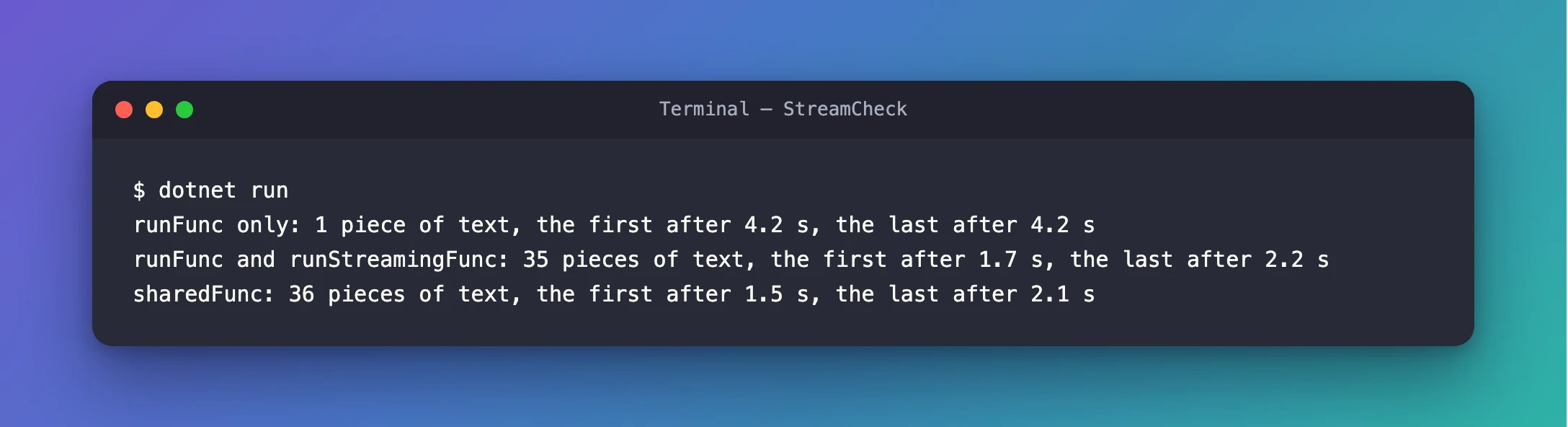
runFunconly: the whole answer came as one piece, and the first and last text arrived at the same moment. The agent ran the middleware's non-streaming function and handed back its answer when it was complete.runFuncandrunStreamingFunc: 35 pieces, the first after 1.7 seconds and the answer complete after 2.2.sharedFunc: 36 pieces, streaming as if no middleware were there.
The first wrapping is also the first request the app makes, so its time includes signing in. I ran the three in reverse order as well, and runFunc alone still sent one piece, with the first and last text at the same moment.
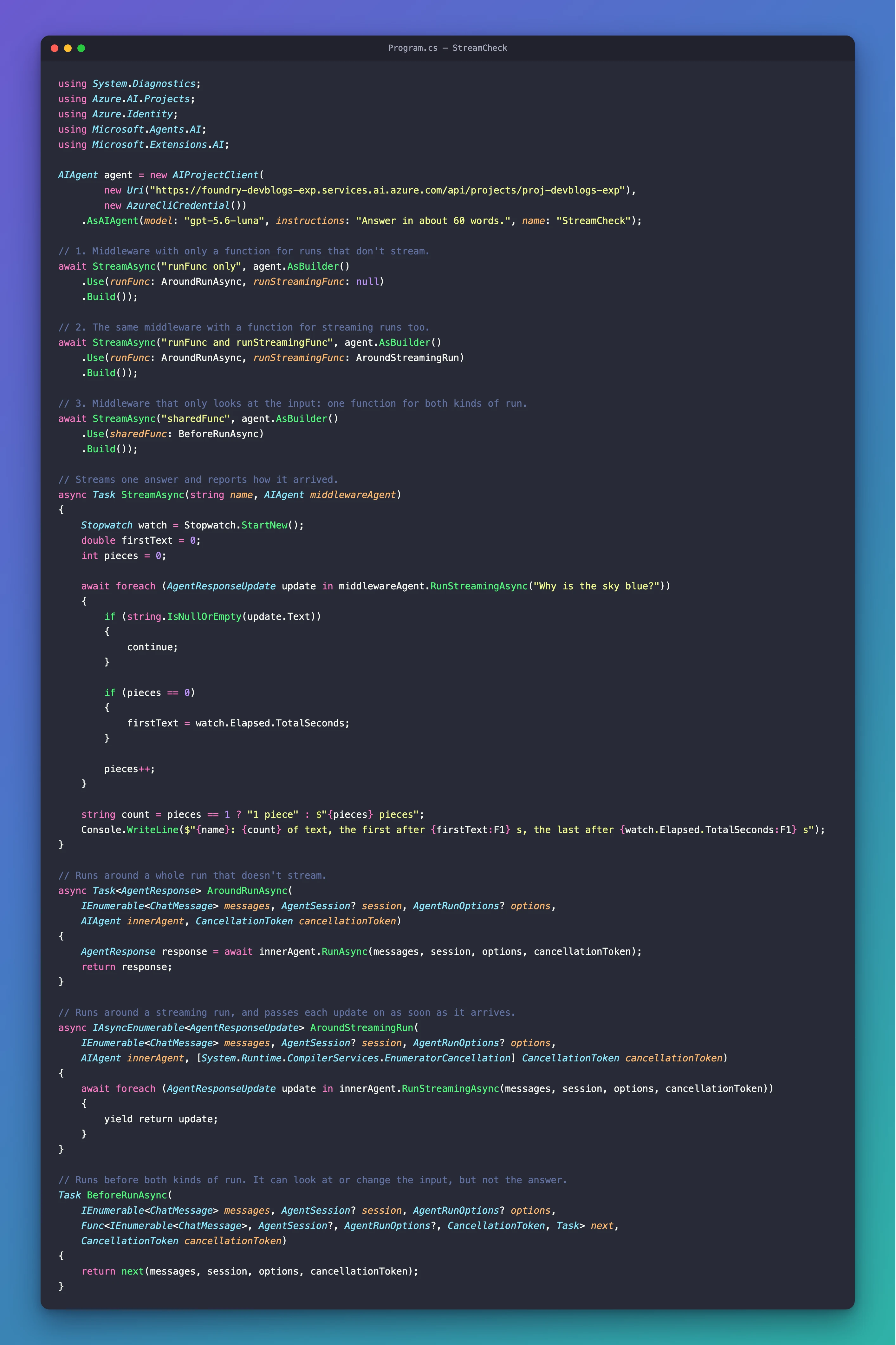
The Complete File
using System.Diagnostics;
using Azure.AI.Projects;
using Azure.Identity;
using Microsoft.Agents.AI;
using Microsoft.Extensions.AI;

AIAgent agent = new AIProjectClient(
        new Uri("https://foundry-devblogs-exp.services.ai.azure.com/api/projects/proj-devblogs-exp"),
        new AzureCliCredential())
    .AsAIAgent(model: "gpt-5.6-luna", instructions: "Answer in about 60 words.", name: "StreamCheck");

// 1. Middleware with only a function for runs that don't stream.
await StreamAsync("runFunc only", agent.AsBuilder()
    .Use(runFunc: AroundRunAsync, runStreamingFunc: null)
    .Build());

// 2. The same middleware with a function for streaming runs too.
await StreamAsync("runFunc and runStreamingFunc", agent.AsBuilder()
    .Use(runFunc: AroundRunAsync, runStreamingFunc: AroundStreamingRun)
    .Build());

// 3. Middleware that only looks at the input: one function for both kinds of run.
await StreamAsync("sharedFunc", agent.AsBuilder()
    .Use(sharedFunc: BeforeRunAsync)
    .Build());

// Streams one answer and reports how it arrived.
async Task StreamAsync(string name, AIAgent middlewareAgent)
{
    Stopwatch watch = Stopwatch.StartNew();
    double firstText = 0;
    int pieces = 0;

    await foreach (AgentResponseUpdate update in middlewareAgent.RunStreamingAsync("Why is the sky blue?"))
    {
        if (string.IsNullOrEmpty(update.Text))
        {
            continue;
        }

        if (pieces == 0)
        {
            firstText = watch.Elapsed.TotalSeconds;
        }

        pieces++;
    }

    string count = pieces == 1 ? "1 piece" : $"{pieces} pieces";
    Console.WriteLine($"{name}: {count} of text, the first after {firstText:F1} s, the last after {watch.Elapsed.TotalSeconds:F1} s");
}

// Runs around a whole run that doesn't stream.
async Task<AgentResponse> AroundRunAsync(
    IEnumerable<ChatMessage> messages, AgentSession? session, AgentRunOptions? options,
    AIAgent innerAgent, CancellationToken cancellationToken)
{
    AgentResponse response = await innerAgent.RunAsync(messages, session, options, cancellationToken);
    return response;
}

// Runs around a streaming run, and passes each update on as soon as it arrives.
async IAsyncEnumerable<AgentResponseUpdate> AroundStreamingRun(
    IEnumerable<ChatMessage> messages, AgentSession? session, AgentRunOptions? options,
    AIAgent innerAgent, [System.Runtime.CompilerServices.EnumeratorCancellation] CancellationToken cancellationToken)
{
    await foreach (AgentResponseUpdate update in innerAgent.RunStreamingAsync(messages, session, options, cancellationToken))
    {
        yield return update;
    }
}

// Runs before both kinds of run. It can look at or change the input, but not the answer.
Task BeforeRunAsync(
    IEnumerable<ChatMessage> messages, AgentSession? session, AgentRunOptions? options,
    Func<IEnumerable<ChatMessage>, AgentSession?, AgentRunOptions?, CancellationToken, Task> next,
    CancellationToken cancellationToken)
{
    return next(messages, session, options, cancellationToken);
}
Common Mistakes
| Mistake | What happens | Do this instead |
|---|---|---|
Giving only runFunc to an agent that streams | The answer arrives in one piece, when it's finished | Give runStreamingFunc too, or use sharedFunc |
Using sharedFunc to change the answer | It never sees the answer | Use runFunc and runStreamingFunc |
Collecting every update in runStreamingFunc before passing them on | The caller waits for the whole answer again | yield return each update as it arrives |
FAQ
Which one should I use?
If the middleware only looks at or changes the input, sharedFunc: one function, and streaming keeps working. If it needs the answer too, give both runFunc and runStreamingFunc.
Does this matter if my app never streams?
No. With only RunAsync, runFunc alone is enough, as in the middleware tutorial below. It matters as soon as any caller uses RunStreamingAsync, such as an AG-UI host that streams answers to a chat.
Conclusion
Agent run middleware added with only runFunc makes a streaming run answer in one piece: in my run, one piece after 4.2 seconds instead of 35 pieces starting at 1.7. Give runStreamingFunc too when the middleware needs the answer, or use sharedFunc when it only needs the input, and the answer streams as before.
Additional Resources
- Agent Middleware —
runFunc,runStreamingFuncandsharedFunc.
