How to Keep MLflow Files Out of Git with .gitignore

MLflow sometimes writes its own files into your project: an mlflow.db database when your code runs without a tracking URI, an mlruns folder for the files those runs log, and an mlartifacts folder if you start a tracking server there. None of them belong in Git. This guide shows how they appear, adds three lines to .gitignore, and proves that Git ignores them.
Syntax
A .gitignore file lists one pattern per line. The rules come from Git's documentation:
# a comment
<name>
<folder>/
*.<extension>
!<pattern>
| Line | What it matches |
|---|---|
# ... | Nothing: "A line starting with # serves as a comment" |
<name> | Every file or folder with that name, in the .gitignore's folder or any folder below it |
<folder>/ | Only folders: with a slash at the end, "the pattern will only match directories" |
*.<extension> | Any name that ends that way. In Git's words, * "matches anything except a slash" |
!<pattern> | Brings back something an earlier line excluded. It can't bring back a file whose folder is excluded |
Prerequisites
- A Git repository with at least one commit: How to Create a Git Repository and Make Your First Commit.
- MLflow installed in the project: How to Install MLflow in a Python Project with uv.
The project here, mlflow-demo, holds a few MLflow scripts, and everything in it is committed.
Step 1: See How MLflow Files Get Into a Project
This script logs a run but never says where to send it:
import mlflow

with mlflow.start_run() as run:
    mlflow.log_param("color", "blue")

print("Logged run", run.info.run_id)
print("It went to:", mlflow.get_tracking_uri())
uv run python log_without_uri.py
2026/11/13 17:06:34 INFO mlflow.store.db.utils: Creating initial MLflow database tables...
2026/11/13 17:06:34 INFO mlflow.store.db.utils: Updating database tables
Logged run b3072508b3af4707a001b40d46cf6f12
It went to: sqlite:////Users/you/source/mlflow-demo/mlflow.db
With no tracking URI set, MLflow 3.18 created a database, mlflow.db, in the folder the script ran from. How to Set the MLflow Tracking URI in Python explains why. Git noticed the new file at once:
git status --short
?? mlflow.db
?? means untracked: a new file Git doesn't know about yet. A run that logs a file adds a folder too:
import mlflow

with mlflow.start_run() as run:
    mlflow.log_text("Trained on the California Housing data.", "notes/about.txt")

print("Artifacts went to:", run.info.artifact_uri)
uv run python log_artifact_without_uri.py
git status --short --untracked-files=all
Artifacts went to: /Users/you/source/mlflow-demo/mlruns/0/5ccedcc4224b438bb4e5fff34dcb96ab/artifacts
?? mlflow.db
?? mlruns/0/5ccedcc4224b438bb4e5fff34dcb96ab/artifacts/notes/about.txt
The text file went into mlruns/0/<run ID>/artifacts, inside the project. --untracked-files=all makes Git list each file inside new folders, not just the folder; Git's documentation describes it as "Also show individual files in untracked directories." One git add . would now commit MLflow's data along with your code.
Step 2: Add the MLflow Lines to .gitignore
Open .gitignore in the project's top folder and add these lines at the end:
# MLflow: local tracking database and artifact folders
mlflow.db
mlruns/
mlartifacts/
mlflow.db: the database MLflow creates when no tracking URI is set.mlruns/: where those runs keep their files.mlartifacts/: a tracking server's file store, in case you ever start a server inside the project.- The
/at the end makes a line match folders only. Git's documentation: "If there is a separator at the end of the pattern then the pattern will only match directories".
mlflow-demo's whole .gitignore now reads:
.venv/

# MLflow: local tracking database and artifact folders
mlflow.db
mlruns/
mlartifacts/
Yours may have more lines, such as the ones uv init creates. That's fine: order doesn't matter here.
Step 3: Check That Git Ignores Them
git check-ignore -v says which .gitignore line matches each path you give it:
git check-ignore -v mlflow.db mlruns/0/5ccedcc4224b438bb4e5fff34dcb96ab/artifacts/notes/about.txt
.gitignore:4:mlflow.db  mlflow.db
.gitignore:5:mlruns/    mlruns/0/5ccedcc4224b438bb4e5fff34dcb96ab/artifacts/notes/about.txt
Each line reads file:line number:pattern, then the path it matched: line 4, mlflow.db, ignores the database, and line 5, mlruns/, ignores the text file inside the folder. Your line numbers depend on your .gitignore. A path that no line matches prints nothing.
Now ask Git what's left:
git status --short --untracked-files=all
M .gitignore
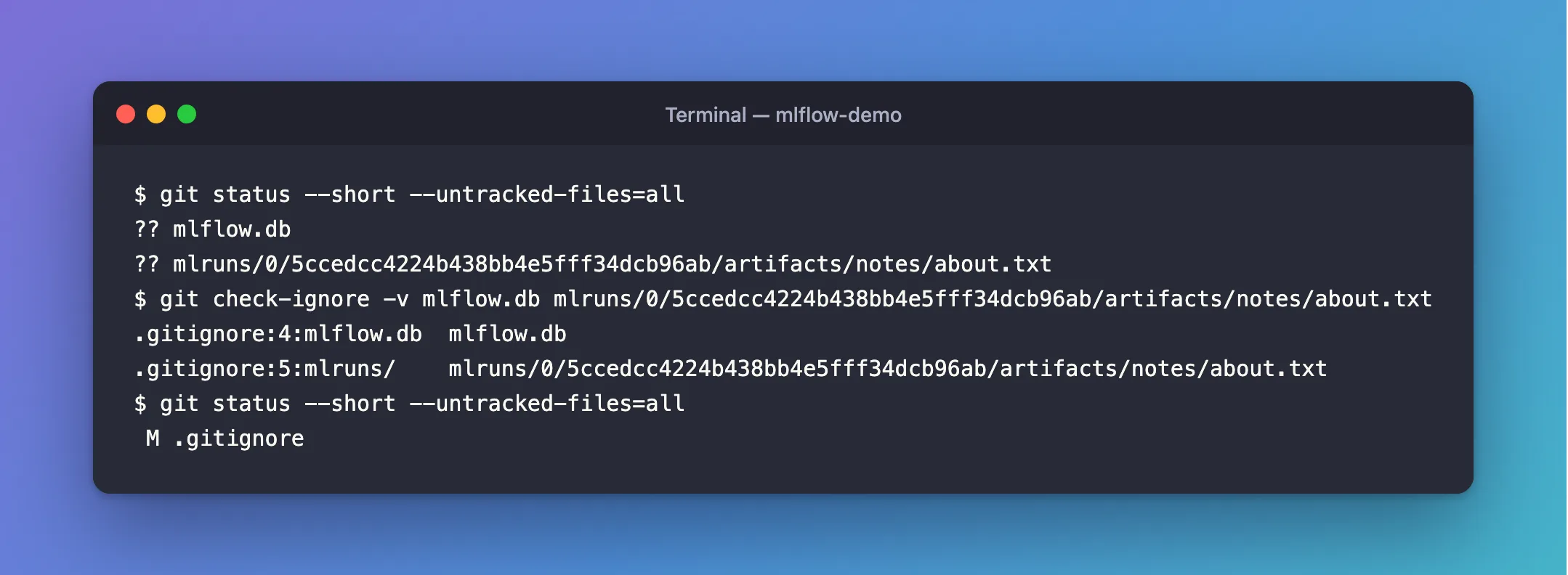
The MLflow files are gone from the list. The only change is .gitignore itself, marked M for modified.
Step 4: Commit the .gitignore
git add .gitignore
git commit -m "Keep MLflow files out of Git"
Then check which commit last changed .gitignore:
git log --oneline -1 -- .gitignore
08ee202 Keep MLflow files out of Git
--oneline prints each commit's short ID and message, -1 only the newest, and -- .gitignore only commits that changed that file. From now on, every clone of the repository ignores MLflow's files too, because .gitignore travels with the code.
Common Mistakes
| Mistake | What happens | Do this instead |
|---|---|---|
Adding the lines after mlflow.db was already committed | Git keeps tracking it; .gitignore doesn't affect tracked files | Stop tracking it with git rm --cached mlflow.db, then commit |
Ignoring *.db | Every database file in the project is ignored, including ones you meant to commit | Name mlflow.db exactly |
Committing mlflow.db to share runs with a teammate | Each run changes the database, so commits and merges fill up with it | Share runs through a tracking server instead |
Troubleshooting
| Symptom | Likely cause | Fix |
|---|---|---|
mlflow.db still shows in git status | It was committed before the line was added | git rm --cached mlflow.db, then commit |
git check-ignore -v prints nothing for a path | No line matches it, often because of a typo | Check the spelling in .gitignore |
A new mlflow.db keeps appearing in the project | Your code runs without a tracking URI | Set it: How to Set the MLflow Tracking URI in Python |
FAQ
What does git rm --cached do to my file?
It removes the file from Git's index, so Git stops tracking it, and leaves the file on disk. Git's documentation: "To stop tracking a file that is currently tracked, use git rm --cached to remove the file from the index."
Should my tracking server's folder be in Git?
No. Keep the server in a folder outside your projects, as How to Start an MLflow Tracking Server on Your Computer does, and keep its mlflow.db and mlartifacts out of every repository.
Where do MLflow's files go when I use a server?
Into the server's folder, not your project's: How to See Where MLflow Stores Runs and Artifacts.
Conclusion
A script with no tracking URI created mlflow.db and mlruns/ inside the project, and Git listed both as untracked. Three lines in .gitignore, mlflow.db, mlruns/ and mlartifacts/, fixed it: git check-ignore -v showed the matching lines, and git status was left with only the .gitignore change to commit.
Additional Resources
- gitignore — the pattern rules, and why tracked files aren't affected.
- git check-ignore — finding the line that ignores a path.
- git status —
--untracked-filesand the short format.
