How to Join a pandas Series to a DataFrame by Index

When a table's columns and one more column live apart, such as the inputs of a model and the value it should predict, DataFrame.join puts them back together. It matches rows by their labels, not their position, so the right value lands on the right row even when the two are in a different order. This guide joins a price column to a table of houses, with real output from pandas 3.1.1.
Syntax
<table>.join(<series>)
<table>.join(<series>, how="<left|inner|outer|right>")
| Part | What it means |
|---|---|
<table> | The DataFrame to add the column to. Its row labels, the index, decide which rows the result has |
<series> | The column to add. pandas: "If a Series is passed, its name attribute must be set, and that will be used as the column name" |
| Matching | By row label: index on index. A row of <table> gets the value with the same label in <series> |
how= | Which labels to keep. The default, "left", keeps every row of <table>: "use calling frame's index" |
join returns a new DataFrame and leaves both inputs as they were.
Step 1: Join a Price Column
The example has the rooms and size of three houses, labelled 10, 11 and 12, and their prices in a Series listed in the opposite order. A second Series has prices for only two of the houses. Create join.py:
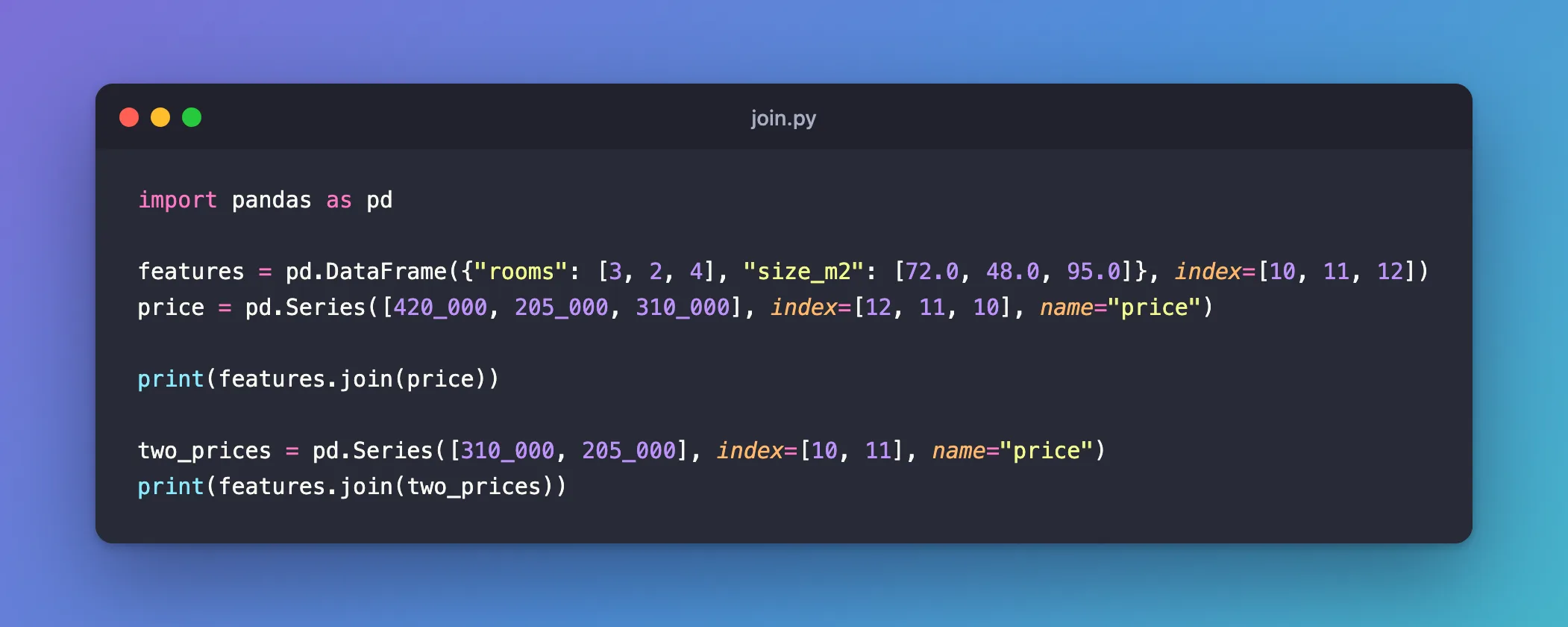
import pandas as pd

features = pd.DataFrame({"rooms": [3, 2, 4], "size_m2": [72.0, 48.0, 95.0]}, index=[10, 11, 12])
price = pd.Series([420_000, 205_000, 310_000], index=[12, 11, 10], name="price")

print(features.join(price))

two_prices = pd.Series([310_000, 205_000], index=[10, 11], name="price")
print(features.join(two_prices))
| Line | What it does |
|---|---|
features = pd.DataFrame(..., index=[10, 11, 12]) | A table of three houses, labelled 10, 11 and 12 |
price = pd.Series(..., index=[12, 11, 10], name="price") | Their prices, in reverse order. House 12 costs 420,000 and house 10 costs 310,000 |
features.join(price) | Adds a price column, matching each price to its house by label |
two_prices | Prices for houses 10 and 11 only |
Step 2: Run It
uv run python join.py
    rooms  size_m2   price
10      3     72.0  310000
11      2     48.0  205000
12      4     95.0  420000
    rooms  size_m2     price
10      3     72.0  310000.0
11      2     48.0  205000.0
12      4     95.0       NaN
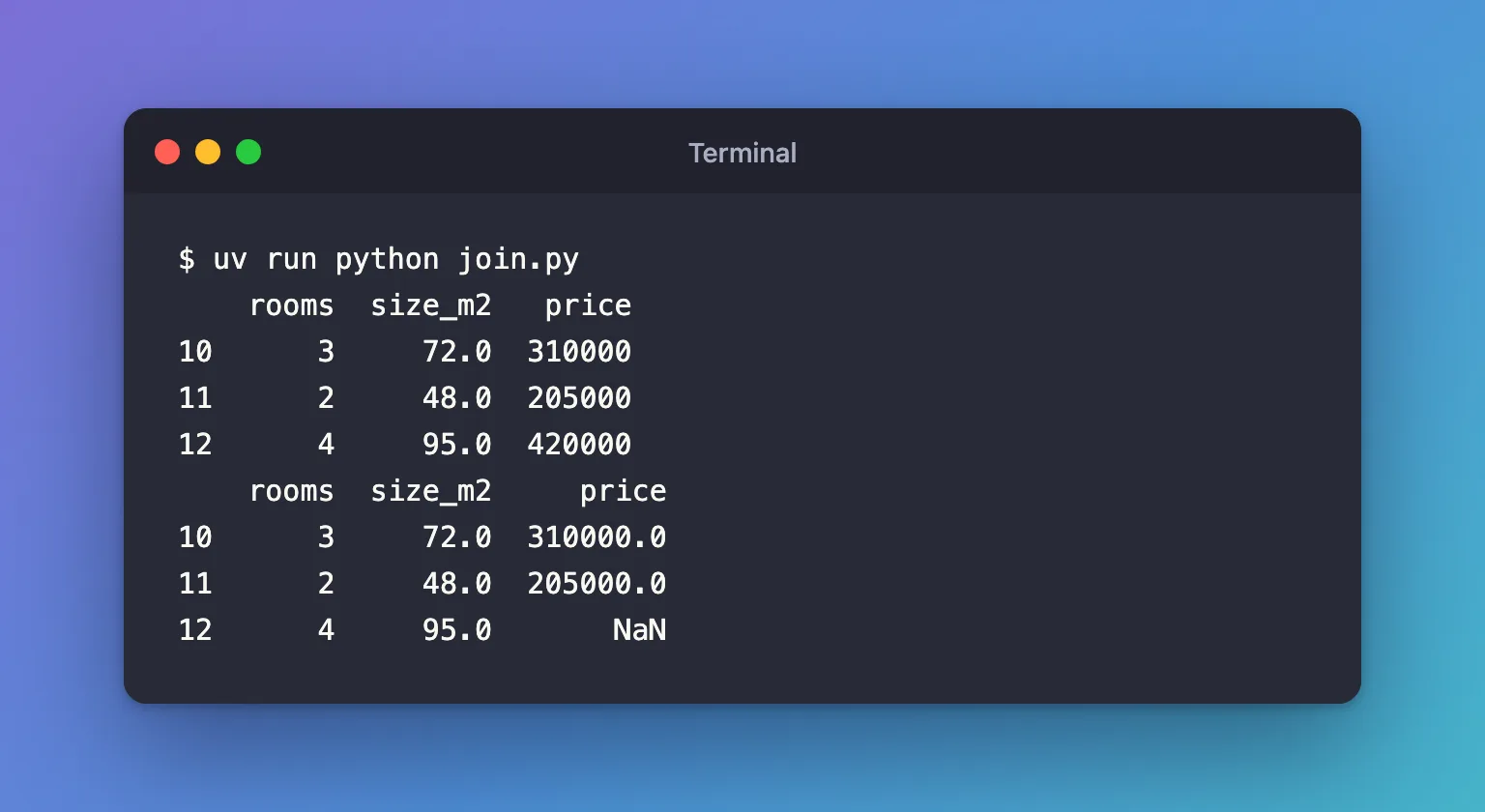
- The first table has the right price on every row: 310,000 for house 10 and 420,000 for house 12, although the Series listed them the other way round.
joinmatched the labels. - The column's name,
price, came from the Series' name. - In the second table, house 12 has no price in
two_prices, so it getsNaN, pandas' marker for a missing value. All rows stay, becausehow="left"keeps every row offeatures. - The prices turned into decimals (
310000.0) in the second table. A whole-number column can't holdNaN, so pandas switched the column tofloat64.
Common Mistakes
| Mistake | What happens | Do this instead |
|---|---|---|
| Joining a Series without a name | ValueError: Other Series must have a name | Pass name= when you create it, or series.rename("price") |
| Joining a column whose name the table already has | ValueError: columns overlap but no suffix specified: Index(['rooms'], dtype='str') | Rename one of them first |
| Building the Series from a plain list, so its labels are 0, 1, 2 | Every row gets NaN, because no label matches 10, 11 or 12 | Give the Series the table's labels: index=features.index |
| Expecting rows to match by position | Values follow labels, so a reordered Series still lines up | Rely on the labels, as above |
Troubleshooting
| Symptom | Likely cause | Fix |
|---|---|---|
| A whole-number column turned into decimals | Some rows had no match and got NaN | Check which labels are missing, or use how="inner" to keep only matched rows |
| Fewer rows than expected | how="inner" keeps only labels found in both | Use the default how="left" |
FAQ
Is join the same as pd.concat with axis=1?
For this case they give the same columns: both line rows up by label. join reads as "add these columns to this table" and defaults to keeping the table's rows; pd.concat([features, price], axis=1) defaults to keeping every label from both.
Can I join several Series at once?
Yes, pass a list: features.join([price, other_series]). Every Series in it needs a name.
Can I join on a column instead of the index?
Yes, with on="<column>": the values in that column of the table are matched against the other object's index.
Conclusion
features.join(price) added a price column to a table of houses, matching each value by row label, so the reversed order of the Series didn't matter. A house missing from the Series got NaN, which turned the column into decimals. Give the Series a name, and the labels of the table it joins.
Additional Resources
- pandas.DataFrame.join — the method's reference, including
howandon. - Merge, join, concatenate and compare — pandas' guide to combining tables.
