How to Hash Several Strings into One ID with SHA-256 in C#

Need one ID made from several strings, such as a user and a document? Hash them with SHA-256, but not by gluing them together: "user1" + "23" and "user12" + "3" are the same text, so they get the same hash. Write each part as its length, a colon and the text first, and every combination gets its own ID.
A hash turns any text into a fixed-length value. That makes it a good ID when the inputs are long, can contain any character, or have to become a file name or a database key. SHA-256, built into .NET, always gives 32 bytes, 64 hexadecimal characters, and as Microsoft's reference says for hash algorithms, it is computationally infeasible to find two distinct inputs that hash to the same value. The weak spot is the step before: turning several strings into one text.
Syntax
using System.Security.Cryptography;
using System.Text;

string <text> = $"{<part1>.Length}:{<part1>}{<part2>.Length}:{<part2>}";
string <id> = Convert.ToHexStringLower(SHA256.HashData(Encoding.UTF8.GetBytes(<text>)));
| Part | What it is |
|---|---|
<part1>, <part2> | The strings that together identify something. Add more the same way, always in the same order |
<part>.Length and : | Each part's length, then a colon, before the part itself. The lengths tell exactly where each part ends |
Encoding.UTF8.GetBytes(<text>) | The text as bytes. UTF-8 gives the same bytes on every machine |
SHA256.HashData(...) | Computes the hash: The SHA-256 algorithm always produces a 256-bit hash, or 32 bytes |
Convert.ToHexStringLower(...) | The 32 bytes as 64 lowercase hexadecimal characters, 0 to 9 and a to f |
<id> | The result, the same for the same parts every time |
SHA256.HashData and Convert.ToHexStringLower are static methods, with nothing to create or dispose.
The Example
An app keeps one file per user and document, named after an ID made from both. The console app hashes four (user, document) pairs three ways: joined as they are, joined with a dash, and length-prefixed, and prints the first 16 of each hash's 64 characters, enough to see which are equal.
Prerequisites
- The .NET 10 SDK.
dotnet --versionprints a version that starts with10.0.
Step 1: Create a Console App
dotnet new console -n DocumentIds
cd DocumentIds
The template "Console App" was created successfully.

Processing post-creation actions...
Restoring /Users/you/source/DocumentIds/DocumentIds.csproj:
Restore succeeded.
No packages: SHA-256 is part of .NET. Open the folder in VS Code, or DocumentIds.csproj in Visual Studio.
Step 2: Write the Hashing Code
Replace everything in Program.cs. First the two helpers. LengthPrefixed writes each part as its length, a colon and the text:
// Writes each part as its length, a colon and the text: "user1" and "23" become "5:user12:23".
static string LengthPrefixed(params string[] parts)
{
    StringBuilder text = new();
    foreach (string part in parts)
    {
        text.Append(part.Length).Append(':').Append(part);
    }

    return text.ToString();
}
Sha256Hex hashes a text into its 64-character ID:
// The SHA-256 hash of the text's UTF-8 bytes, as 64 lowercase hex characters.
static string Sha256Hex(string text) =>
    Convert.ToHexStringLower(SHA256.HashData(Encoding.UTF8.GetBytes(text)));
Then the pairs, and the three ways to combine them:
// Four (user, document) pairs. Joined as they are, the first two give the same text,
// and joined with a dash, the last two do.
(string User, string Document)[] pairs =
[
    ("user1", "23"),
    ("user12", "3"),
    ("ann-lee", "plan"),
    ("ann", "lee-plan"),
];

foreach ((string user, string document) in pairs)
{
    Console.WriteLine($"{user} + {document}");
    Show("joined", user + document);
    Show("joined with '-'", $"{user}-{document}");
    Show("length-prefixed", LengthPrefixed(user, document));
}
Show prints each text with the start of its hash:
// Prints the text and the first 16 of its 64 hash characters, enough to compare them.
static void Show(string label, string text) =>
    Console.WriteLine($"  {label}: \"{text}\" -> {Sha256Hex(text)[..16]}…");
Step 3: Run It
Run dotnet run in VS Code's terminal, or press Ctrl+F5 in Visual Studio:
$ dotnet run
user1 + 23
  joined: "user123" -> e606e38b0d8c19b2…
  joined with '-': "user1-23" -> bf9a764d3d5e6a6c…
  length-prefixed: "5:user12:23" -> bd0b5d5bf76f9bcf…
user12 + 3
  joined: "user123" -> e606e38b0d8c19b2…
  joined with '-': "user12-3" -> 486f84b865d97197…
  length-prefixed: "6:user121:3" -> d82556d2931e405d…
ann-lee + plan
  joined: "ann-leeplan" -> 277d0fc8813fbe65…
  joined with '-': "ann-lee-plan" -> d001d724afc14c37…
  length-prefixed: "7:ann-lee4:plan" -> 14edd2a10a2e7274…
ann + lee-plan
  joined: "annlee-plan" -> e3d32a7cd06222e4…
  joined with '-': "ann-lee-plan" -> d001d724afc14c37…
  length-prefixed: "3:ann8:lee-plan" -> af628244bbc44ec8…
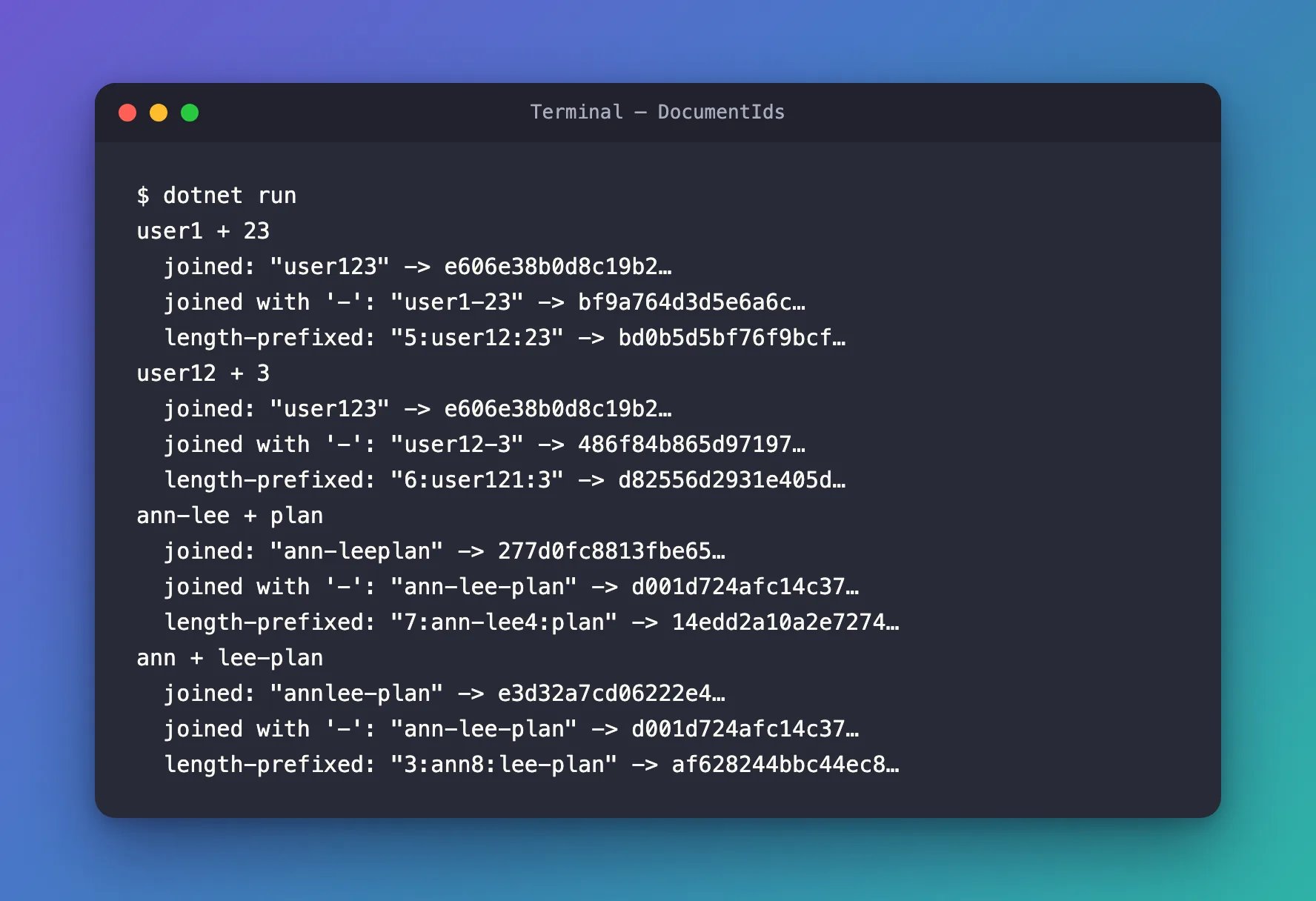
Read it by method:
- Joined:
user1+23anduser12+3both becomeuser123, so they get the same hash,e606e38b…. Two different users would share one file. - Joined with a dash: that pair is now different, but
ann-lee+planandann+lee-planboth becomeann-lee-plan, hashd001d724…. A separator only works while no value contains it, and IDs often do. - Length-prefixed: all four are different.
5:user12:23can only be read one way: five characters,user1, then two,23.
SHA-256 didn't fail in either collision: it got the same text twice. The length prefix makes sure different parts never make the same text.
The Complete File
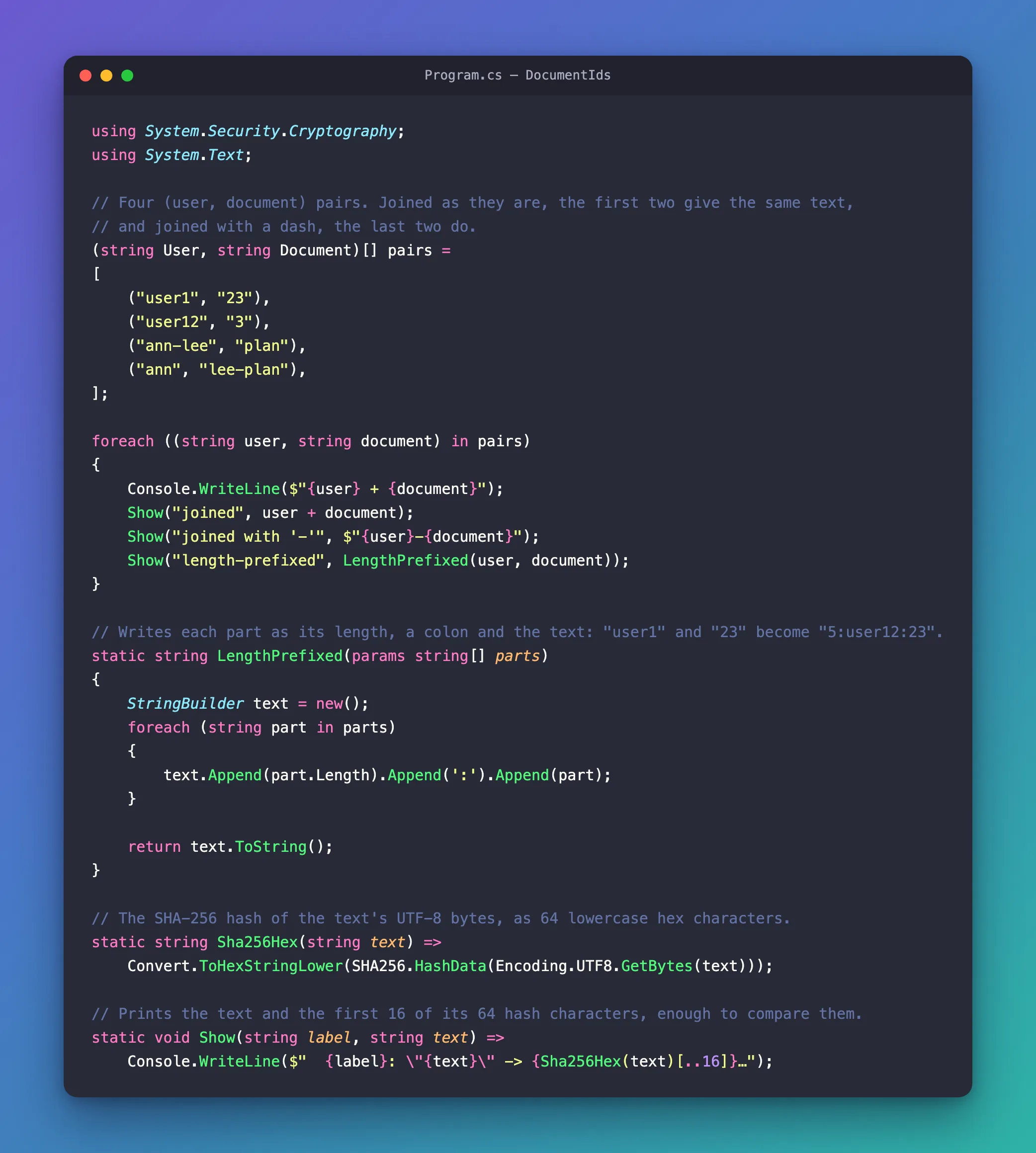
using System.Security.Cryptography;
using System.Text;

// Four (user, document) pairs. Joined as they are, the first two give the same text,
// and joined with a dash, the last two do.
(string User, string Document)[] pairs =
[
    ("user1", "23"),
    ("user12", "3"),
    ("ann-lee", "plan"),
    ("ann", "lee-plan"),
];

foreach ((string user, string document) in pairs)
{
    Console.WriteLine($"{user} + {document}");
    Show("joined", user + document);
    Show("joined with '-'", $"{user}-{document}");
    Show("length-prefixed", LengthPrefixed(user, document));
}

// Writes each part as its length, a colon and the text: "user1" and "23" become "5:user12:23".
static string LengthPrefixed(params string[] parts)
{
    StringBuilder text = new();
    foreach (string part in parts)
    {
        text.Append(part.Length).Append(':').Append(part);
    }

    return text.ToString();
}

// The SHA-256 hash of the text's UTF-8 bytes, as 64 lowercase hex characters.
static string Sha256Hex(string text) =>
    Convert.ToHexStringLower(SHA256.HashData(Encoding.UTF8.GetBytes(text)));

// Prints the text and the first 16 of its 64 hash characters, enough to compare them.
static void Show(string label, string text) =>
    Console.WriteLine($"  {label}: \"{text}\" -> {Sha256Hex(text)[..16]}…");
When the Parts Have No Order
Sometimes the parts are a set of named values, such as a dictionary of tags, and the same set can arrive in any order. Sort them by name before writing them, with an ordinal comparison so the order doesn't depend on the machine's culture, and write each name and value with its length. The same set then always makes the same text, and the same ID.
Common Mistakes
| Mistake | What happens | Do this instead |
|---|---|---|
| Joining the parts as they are | Different parts that run together, such as user1 + 23 and user12 + 3, get the same ID | Write each part as its length, a colon and the text |
| Joining with a separator | A value that contains the separator collides with another | Use the length prefix, which works whatever the values contain |
| Changing the order or the format later | Every ID changes, and existing data can't be found | Treat the format as permanent, like a database key |
Hashing with UTF-16 (Encoding.Unicode) in one app and UTF-8 in another | The same text gives other bytes, and another ID | Use Encoding.UTF8 everywhere |
| Trying to read the parts back from the ID | A hash only goes one way | Store the parts beside the ID if you need them |
FAQ
Why not use the joined text itself as the ID?
You can, when the parts are short and safe. A hash always has the same length and only uses 0–9 and a–f, so it's safe as a file name or a database ID whatever the parts contain, including /, .. or very long values.
Why lowercase?
Either works, as long as you always use the same. Convert.ToHexString gives uppercase, Convert.ToHexStringLower lowercase; mixing them gives two IDs for the same parts.
Conclusion
To make one ID from several strings in C#, write each part as its length, a colon and the text, in a fixed order, then hash the UTF-8 bytes with SHA256.HashData and turn the 32 bytes into 64 characters with Convert.ToHexStringLower. The length prefix is what keeps user1 + 23 and user12 + 3, or ann-lee + plan and ann + lee-plan, from sharing an ID.
Additional Resources
- SHA256.HashData — the one-call hash method.
- Convert.ToHexStringLower — bytes to lowercase hex.
- Ensuring data integrity with hash codes — hashing a string with SHA-256 in .NET.
