How to Handle Errors in Power Apps with IfError

When a formula fails in a canvas app, say a connector call that finds nothing, Power Apps shows a red error banner and the control shows nothing. IfError catches the error and gives you a value to use instead, so the app carries on calmly. Here's how it works, with a real error from the Office 365 Users connector.
Syntax
IfError( Value, Replacement )
IfError( Value1, Replacement1, Value2, Replacement2, ..., DefaultResult )
If Value is an error, IfError returns Replacement; otherwise it returns Value. With several pairs, it checks each in turn and stops at the first error (IfError reference).
Prerequisites
- Formula-level error management on. Microsoft notes that IfError won't work correctly if an app has disabled it under Settings → Updates → Retired. In the example app, Disable formula-level error management is Off, so error management is on.
- Something that can fail. The example's
MyManagernamed formula callsOffice365Users.ManagerV2, which returns an error for the signed-in admin, who has no manager. See How to Get a User's Manager in Power Apps.
Step 1: Catch an Error Where You Use It
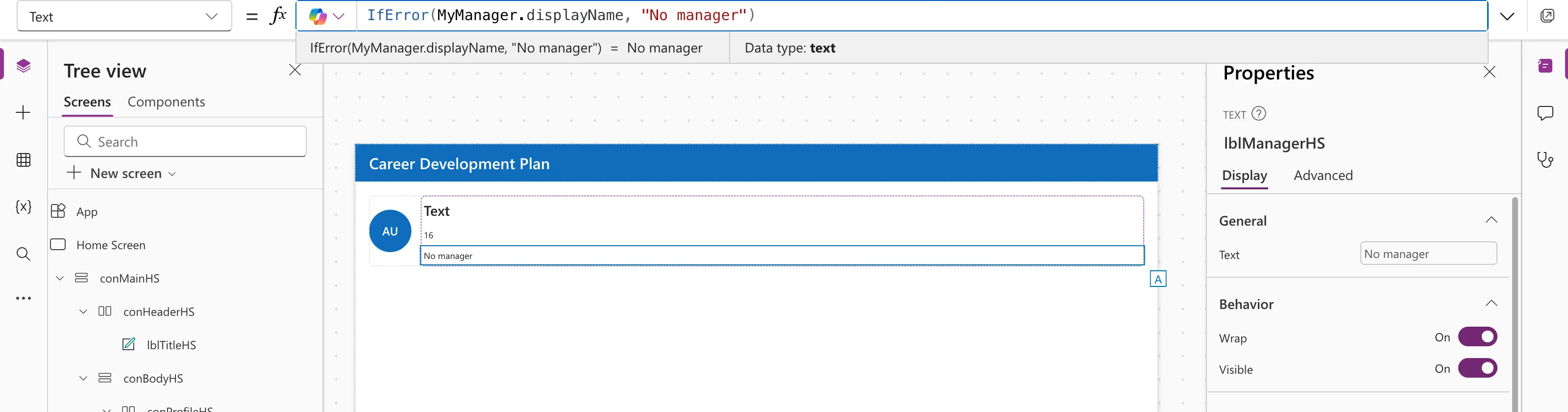
Without IfError, the label showed nothing and a banner said Office365Users.ManagerV2 failed: … Resource 'manager' does not exist …. With it:
IfError(MyManager.displayName, "No manager")
Step 2: Catch It Once, at the Source
If several controls use the value, catch the error where it's created instead. The example wraps the connector call in its named formula and returns Blank() for "no manager":
MyManager = IfError(
    Office365Users.ManagerV2(
        MyProfile.id,
        {'$select': "id,displayName,mail,jobTitle"}
    ),
    Blank()
);
Now MyManager.displayName is simply blank, and the error banner is gone:
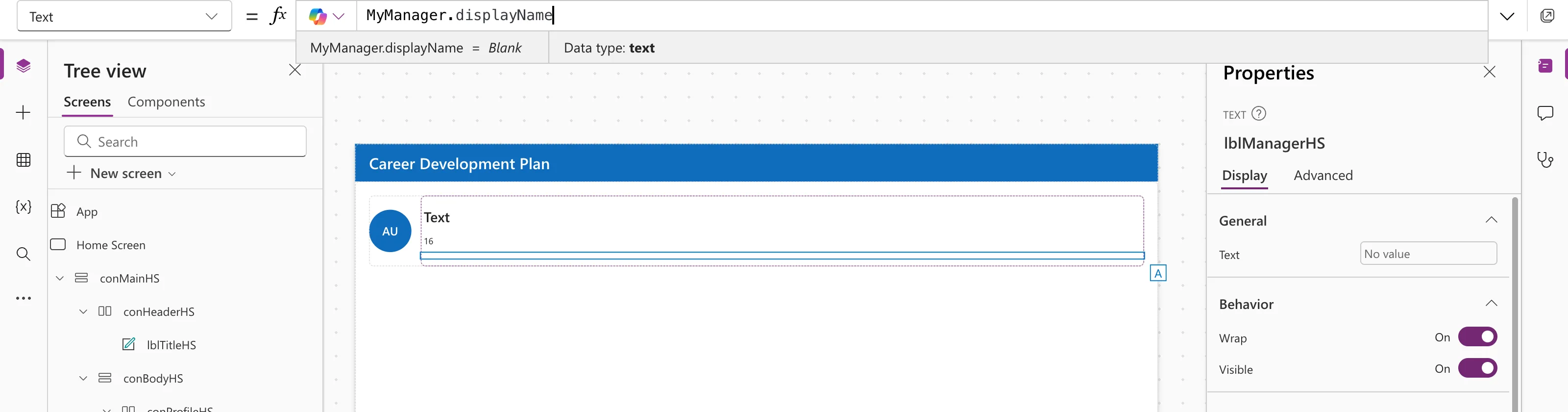
Each control then decides what to show for a blank; see How to Use the If Function in Power Apps.
Types Must Match
IfError returns either the value or the replacement, so they must be the same type. Microsoft's example: IfError( 1/x, "#DIV/0!" ) doesn't work, because the text replacement is converted to a number. Convert the first argument instead:
IfError( Text( 1/x ), "#DIV/0!" )
What Went Wrong? FirstError
Inside the replacement, FirstError describes the error: Kind, Message, Source and more. For example, to log or show the message:
IfError( Patch( ... ), Notify( FirstError.Message, NotificationType.Error ) )
Part 6 of the Career Development Plan series uses this pattern when saving a response, with FirstError.Kind to explain a conflict.
Common Mistakes
| Mistake | What happens | Do this instead |
|---|---|---|
| A replacement of a different type | Another error | Make both the same type |
Catching every error with Blank() | Real failures look like "no data" | Show a message that covers both, or check FirstError.Kind |
| Wrapping each use separately | Repeated code | Catch once in a named formula |
Troubleshooting
| Symptom | Likely cause | Fix |
|---|---|---|
| The banner still shows | The error isn't inside the IfError | Wrap the part that fails |
| IfError seems to do nothing | Formula-level error management disabled | Check Settings → Updates → Retired |
| Still an error, with IfError in place | The replacement can't be converted to the value's type | Make the types match, for example with Text |
FAQ
IfError or IsError?
IfError replaces an error with a value. IsError only tells you, true or false, whether something is an error.
Does IfError stop actions after an error?
Yes, in behavior formulas: the reference shows IfError(Patch(DS1, …), Notify(…), Patch(DS2, …), Notify(…)) stopping after the first failure.
Can I use it in App.Formulas?
Yes, as long as the replacement is a value, not an action. The example's MyManager does exactly that.
Conclusion
IfError(value, replacement) swaps an error for something useful. Catch errors once, where the value is created, keep the types the same, and use FirstError when you need to know what failed.
Additional Resources
- Error, IfError, IsError, IsBlankOrError functions: syntax, type rules and FirstError.
- App object: OnError: handling errors app-wide.
